Skills
Skills extend the capabilities of Wanxiaozhi in a conversation. Install skills to give the applications that you build with Wanxiaozhi additional capabilities, such as image generation, video generation, payment integration, maps, email, and voice. Wanxiaozhi provides a skill marketplace that covers Wanxiaozhi official skills and community or third-party skills, and you can also create your own skills.This topic describes how to browse and install skills, create a skill, view skill details, use skills in a conversation, and configure skill models, and introduces the Wanxiaozhi official skills.
Browse and install skills
In the Wanxiaozhi workspace, open the skill marketplace.
Use the following filter and display options to find the skill that you need:
Option
Description
Skill scope
View all skills, or view only the skills that you installed
Category filter
Filter skills by purpose
Sort order
Sort skills by release date or by popularity
Layout switch
Adjust the display density of the skill cards
Each skill card shows the skill name, description, version number (such as v0.1.0), and date.
On the target skill card, use the available action to use a Wanxiaozhi official skill or install a community or third-party skill. After the skill is installed, use the installed-skills scope filter to view it.
Create a skill
In the upper-right corner of the skill marketplace, use the control for creating a skill to open the upload dialog box.
Prepare a skill package that meets the following requirements:
Item
Requirement
File format
.zipor.skillFile size
The file size cannot exceed 10 MB.
SKILL.mdRequired. You can place it in the root directory of the skill package or in a subfolder.
Optional directories
You can include directories such as
scripts/,examples/, andresources/Drag the skill package to the upload area, or click to select a file to upload. The skill is then created.
View skill details
In the skill marketplace, click the target skill to view the details of the skill.
View the skill information:
The skill name and category tags appear at the top of the page.
The skill introduction section shows the content of the skill description file (
SKILL.md), including the core capabilities, component structure, and usage principles.
Use the available action to use the skill.
Use skills in a conversation
Method 1: Select a skill directly
Find the
 icon below the conversation area, select the skill that you need, and describe your requirement.
Method 2: Use the
/commandIn the AI conversation input box of the application editor, enter
/to open the skill selection panel.In the panel, select the target skill, describe your requirement, and send the message.
Wanxiaozhi uses the skill to complete the task, such as generating images or videos, integrating the payment feature, or enabling map, email, and voice capabilities.
Wanxiaozhi official skills
AMAP
Embed AMAP in your pages. The skill supports map features such as location, markers, and route display.
Alibaba Cloud video
Embed Alibaba Cloud video playback in your pages. The skill supports online video playback, cover display, and playback controls.
Alipay payment
Alipay payment is a payment skill provided by Wanxiaozhi. It supports QR code payment and website payment and applies to PC websites.
Through the authorization configuration, you can integrate the payment collection capability of your Alipay app into the website that you created with Wanxiaozhi.
Key conceptsWhen you configure the Alipay payment skill, the following key concepts apply:
Concept | Description |
Wanxiaozhi application | The unique identifier of a website in Wanxiaozhi. Each website that you create with Wanxiaozhi is an independent application. |
Alipay merchant ID | The merchant identifier on the Alipay merchant platform. One Alipay merchant can create multiple apps. |
Alipay app ID | The unique identifier of an app on the Alipay merchant platform. A merchant can create multiple apps, and each app has an independent payment collection capability. |
PrerequisitesBefore you start the configuration, make sure that the following conditions are met:
You have completed merchant onboarding on the Alipay merchant platform and activated the corresponding payment products to receive payments.
You have created a website in Wanxiaozhi.
You can then manage product authorization on the Alipay platform.
Configure Alipay paymentAlipay payment uses an authorization mechanism to grant the payment collection capability of your Alipay app to Wanxiaozhi as the service provider. After the authorization is complete, Wanxiaozhi handles the payment transactions of the website on your behalf.
Invoke the Alipay payment skill.
Log on to the Wanxiaozhi console, select the target application in the application list, and click Enter Application.
In the conversation input box, press
/to open the skill panel, select the Alipay payment skill, describe your requirement, and send the message.The system integrates the Alipay payment feature. The integration takes some time.
Complete the authorization configuration.
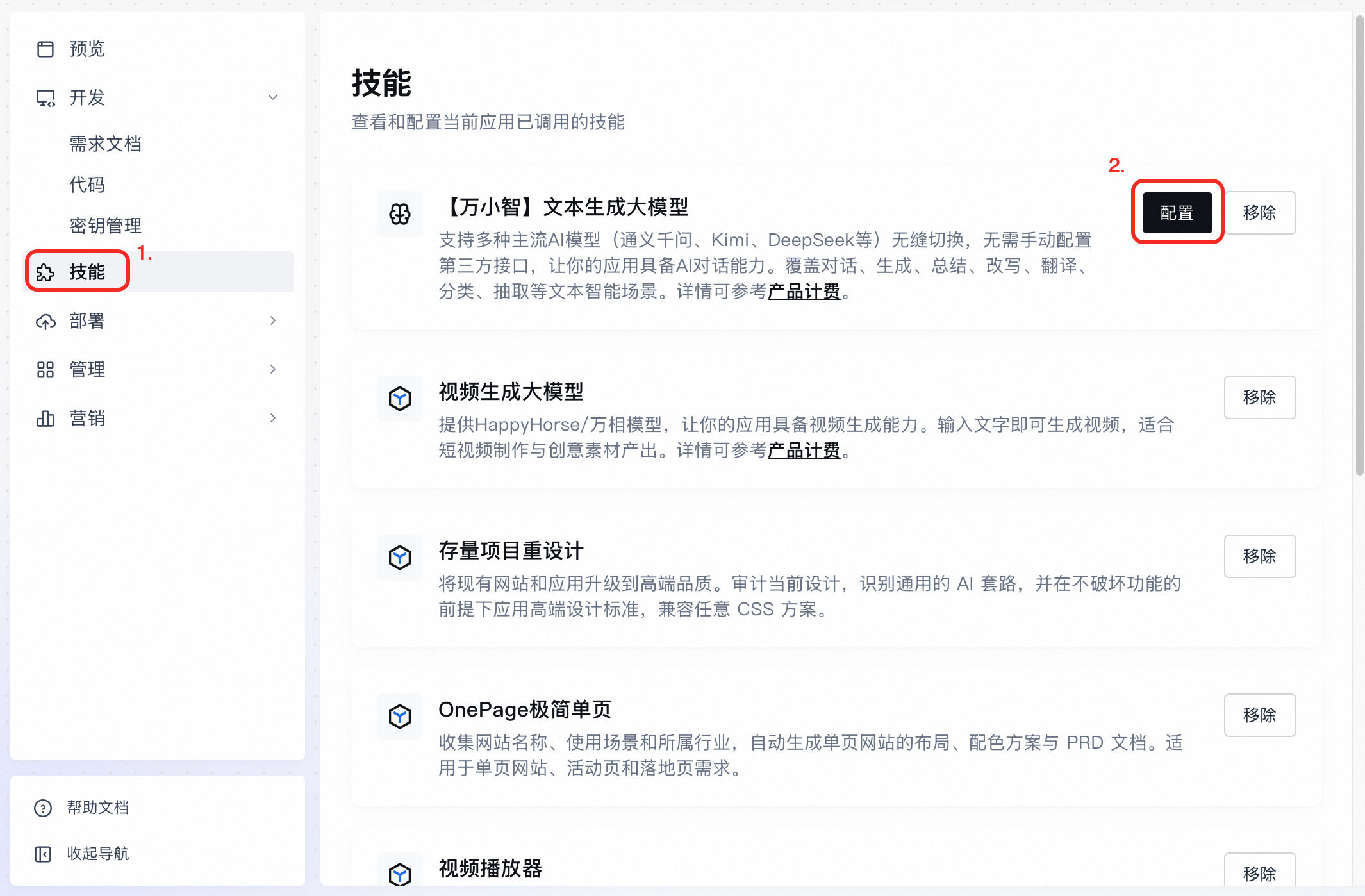
From the left-side navigation pane of the editor, open the skill configuration page, where you can view and configure the skills that the current application has invoked.
Find the Alipay payment skill, click Configure, and then click Authorize Now in the dialog box.
The page redirects to the Alipay authorization page. Scan the QR code to complete the authorization as prompted.
After the authorization succeeds, Alipay payment is configured.
Reuse the authorization for multiple websitesAlipay payment allows multiple Wanxiaozhi websites to reuse the same authorized merchant and app. When you configure a new website, select a merchant ID and an app ID that have already been authorized. No repeated authorization is required.
Limits
Authorization uniqueness — One Alipay app can be authorized to only one service provider. A second authorization of the same app invalidates the original authorization code, and the websites configured with that authorization code can no longer collect payments.
Deauthorization — Wanxiaozhi does not support deactivating the Alipay authorization. To deactivate it, go to the Alipay merchant platform. For more information, see product authorization management.
Impact of removing the skill — After you remove the Alipay payment skill from Wanxiaozhi, the corresponding authorization code is cleared and the website can no longer collect payments through Alipay. To restore payment collection, configure the skill again and complete the authorization.
Text generation LLM
Switch between supported AI models such as Qwen, Kimi, and DeepSeek without manually configuring third-party interfaces. The skill enables AI conversation capabilities for your application and covers text-based scenarios such as dialogue, generation, summarization, rewriting, translation, classification, and extraction.
Available models: kimi-k2.5, glm-5, MiniMax-M2.5, qwen3.6-plus, deepseek-v3.2, and qwen3-vl-plus. For details about Inspiration Credits deductions, see Billing.
Image generation LLM
Use the Qwen and Wanxiang models to give your application image generation capabilities. Enter a text description to generate an image, or use an existing image as a reference for a new creation.
Available models: qwen-image-2.0 and wan2.7-image. For details about Inspiration Credits deductions, see Billing.
Video generation LLM
Use the HappyHorse and Wanxiang models to give your application video generation capabilities. Enter text to generate a video.
Available models: happy-horse-t2v (1080p/720p) and wan2.7-t2v (1080p/720p). For details about Inspiration Credits deductions, see Billing.
Image text extraction
Use the Qwen OCR model to give your application text extraction capabilities. The skill identifies the text in images.
Available model: qwen-vl-ocr. For details about Inspiration Credits deductions, see Billing.
Configure skill models
The Text generation LLM, Image generation LLM, and Video generation LLM skills support custom models. You can specify a model in the conversation or select one manually in the configuration.
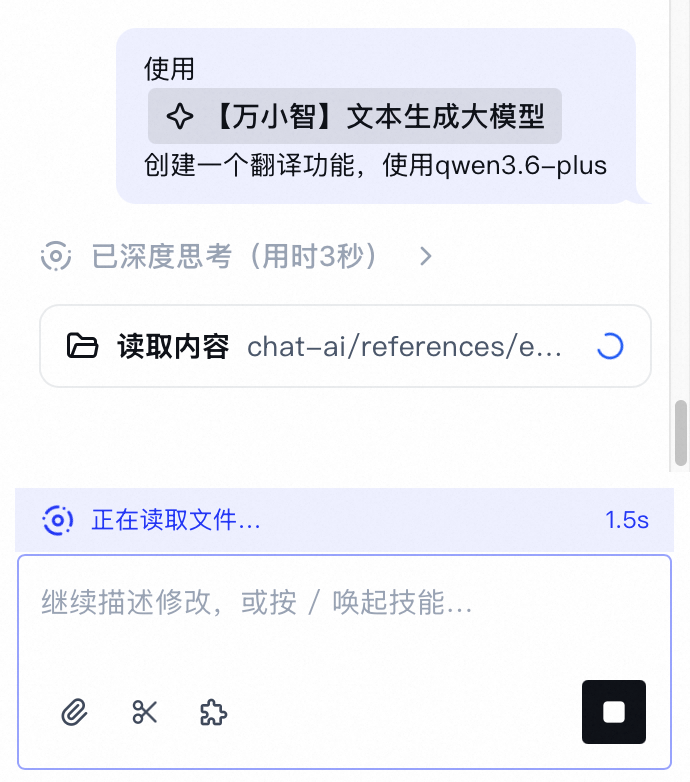
Specify a model in the conversation: Invoke a skill in the conversation and specify the model that you need.
 Note
If you do not specify a model when you invoke a skill, the model preset for that skill is automatically matched. You can change it manually in the configuration later.
If the specified model is outside the supported range, Wanxiaozhi triggers Secret management to guide you through manually configuring a third-party model interface.
Select a model in the configuration: In the left-side navigation pane, click Skills, and then click Configure for the skill whose model you want to customize.