How to sync emails from one Alibaba Mail account to another
Overview
This topic describes how to sync emails from one Alibaba Mail account (Account A) to another account (Account B).
Details
1. To sync only the emails in your inbox, use the Other Mailbox feature in Account B to add Account A and receive its emails. For more information, see How to receive emails from other mailboxes in the Alibaba Mail web client.
2. To sync emails from all folders, such as Inbox, Sent Items, Deleted Items, and Spam, to Account B, use a third-party client such as Outlook 2016. This operation cannot be performed directly on the mail server.
Setting up a mailbox and transferring emails in Outlook 2016 are client-side operations. If data issues occur because of incorrect operations, they can be resolved only on the client, not on the mail server. Use this method with caution.
3. Log on to Outlook 2016 and add Account A and Account B. For more information, see Configure Alibaba Mail in Outlook 2016.
4. Right-click a mail folder in Account A, such as Inbox, Sent Items, Deleted Items, or Spam, and select Copy Folder. 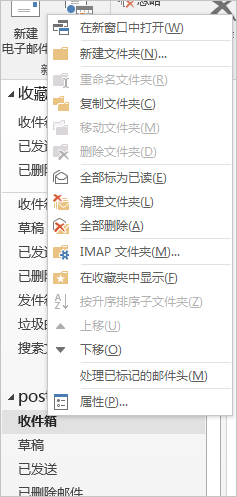
5. Find and select the destination mail folder in Account B and click OK to move the folder from Account A. 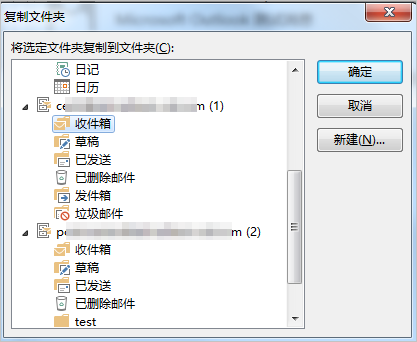
Applies to
Alibaba Mail