Getting Started
This topic describes how to integrate the audio and video call service into a WeChat mini program. The WX-SDK enables audio and video calls between WeChat mini programs, other mobile clients, and web clients.
Integration procedure
Upgrade the SDK to the latest version, 1.1.1.
To use a WebSocket connection, you must add the WebSocket domain name to the whitelist in the WeChat console. WeChat mini programs support only the wss protocol.
The SDK uses the socketTask method for WebSocket connections. For usage details, refer to the mini program demo. For more information about SocketTask, see the WeChat Mini Program Developer Documentation.
You must debug audio and video calls on a physical device. WeChat DevTools cannot be used for this purpose.
The live-pusher component can push video without audio permissions. To obtain the audio and video stream, you must enable camera permissions.
Click here to download the
mrtc-wx-sdk.Save the SDK JS files,
rArtvcRoom.jsandmtc.js, in your local project.In your project's
room.jsfile, import the JS file:import ArtvcRoom from './utils/ArtvcRoom.js';.Instantiate the SDK:
this.artvcChat = new ArtvcRoom(this);. If other pages need to use the instance, store it as a global variable so it can be accessed from them.Set the configuration for the WebSocket connection. Pass the configuration to the Connect interface and call it. For more information, see the Connect interface in the API reference.
The format is as follows:
let config = {
  "uid":"wx_163575803****",
  "biz_name":"demo",
  "appId":"default",
  "workspaceId":"default",
  "server_url":"wss://mrtc.mpaas.cn-hangzhou.aliyuncs.com/ws",
  "network_check_timeout":10
}
Before you enter a channel, register the callback functions that are provided by the SDK. These functions include OnError, OnCreateRoom, OnJoinRoom, OnGetSign, OnLeaveRoom, OnConnect, and OnGetFeedIds. For a specific implementation, see the mini program demo. For more information, see Callback interfaces.
The following code provides an example:
app.globalData.artvcChat.OnCreateRoom = function(data) {
console.log(`This is the message received in onCreateRoom on the room page. data = ${JSON.stringify(data)}`);
        app.globalData.roomId = data.roomId;
        app.globalData.rtoken = data.rtoken;
        wx.navigateTo({
            url:'../pushAndlive/pushAndlive'
        })
}
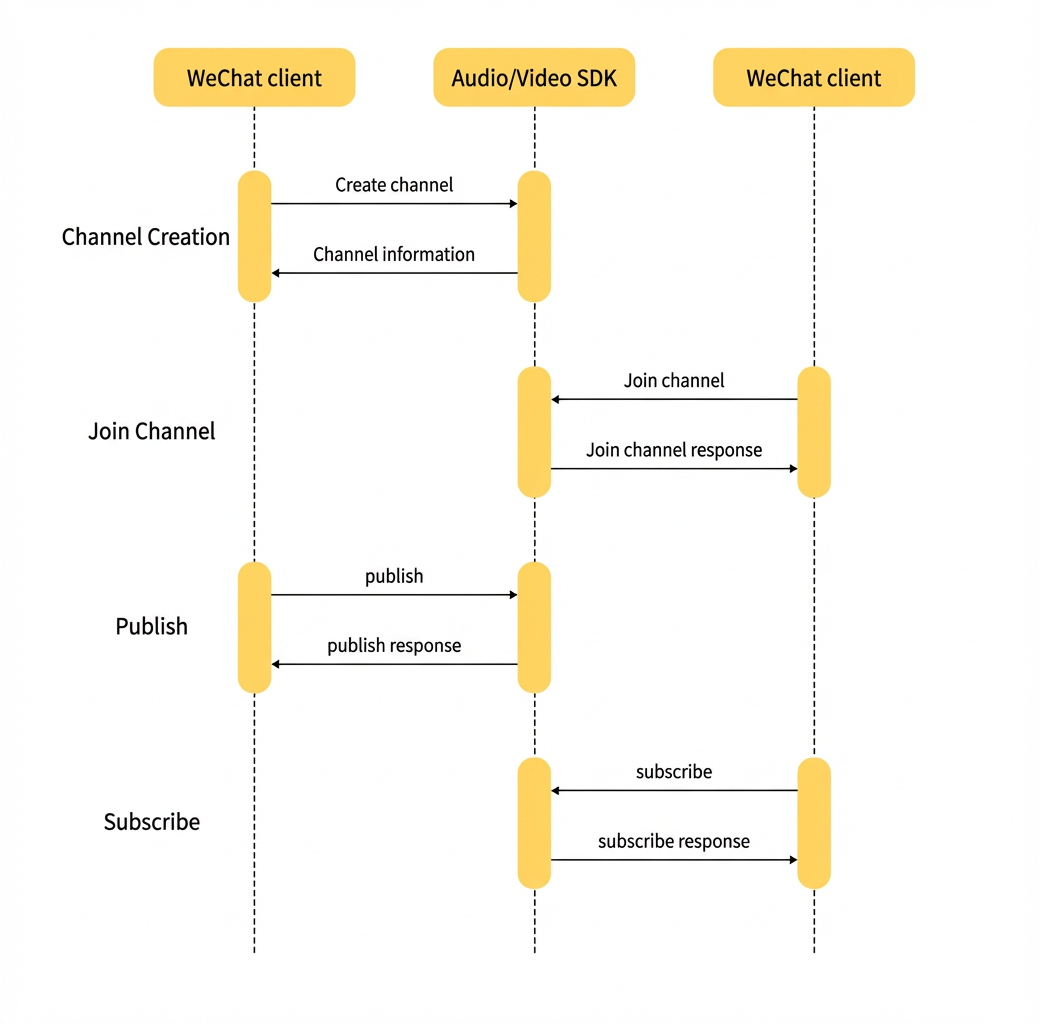
Call createRoom to create a video call channel, or call JoinRoom to join an existing channel.
After you enter the channel, register the callback functions for in-channel operations. These callbacks receive notifications about events that occur after you join the channel, such as publishing, subscribing, leaving the channel, other users joining, and sending messages. The eight callback functions are OnPublish, OnSubscribe, OnGetSign, OnLeaveRoom, OnParticipantLeaveRoom, OnClientJoin, OnSendTxtMessageSucc, and ArtvcChat.OnGetTxtMessage.
Call the Publish interface to publish the video stream. Assign the RTMP stream ingest URL that is returned by the OnPublish callback to the live-pusher component.
When you join a channel, the OnGetFeedIds callback provides information about existing users. You can use this information to subscribe to their published streams. If a new user joins, the OnClientJoin callback provides their information, which you can use to subscribe to the new user's stream.
Retain event reporting logic
The SDK uses the reportClientEvent interface to report mini program events, such as enabling the camera or microphone. To implement this, copy the code sections that call reportClientEvent from the demo to your mini program. In the OnConnect callback interface, add the following code:
wx.onAppShow(app.globalData.artvcChat.reportClientEvent.bind(app.globalData.artvcChat,301));
wx.onAppHide(app.globalData.artvcChat.reportClientEvent.bind(app.globalData.artvcChat,302));
// Enable headphone playback:
app.globalData.artvcChat.reportClientEvent(329);
// Enable speaker:
app.globalData.artvcChat.reportClientEvent(330);
// Disable camera:
app.globalData.artvcChat.reportClientEvent(321);
// Disable microphone:
app.globalData.artvcChat.reportClientEvent(323);
// Enable microphone:
app.globalData.artvcChat.reportClientEvent(324);
// Listener for stream ingest status changes
  statechangePublish(e) {
    app.globalData.artvcChat.statechangePublish(e);
  }
API protocol
The entire API is encapsulated in the ArtvcRoom class. The interfaces are divided into the following two types:
Calling interfaces: Interfaces that you call from your application.
Feedback callback for the main calling interface
Return notifications from the service.
Usage flow