Before you connect to a host in an ApsaraDB MyBase for MySQL dedicated cluster, you must create a host account. The process covers three steps: enabling the bastion host, associating the cluster host with it, and creating the account.
Prerequisites
Before you begin, ensure that you have:
The Grant OS Permissions parameter set to Enabled when the dedicated cluster was created. For more information, see Create an ApsaraDB MyBase for MySQL dedicated cluster.
A bastion host created. For more information, see Create a bastion host.
Step 1: Enable the bastion host
Log on to the Bastionhost console.
Find the bastion host and click Run on the right side. For more information, see Enable a bastion host.

Step 2: Associate the host with the bastion host
Log on to the ApsaraDB for MyBase console.
In the upper-left corner, select a region.
Find the dedicated cluster and click Details in the Actions column.
In the left-side navigation pane, click Bastion Hosts. Find the bastion host and click Associate with Bastion Host in the Actions column.

Click Import Host. In the dialog box, select the host and click Import.
Step 3: Create a host account
Find the host and click Add an account in the Host Account column.
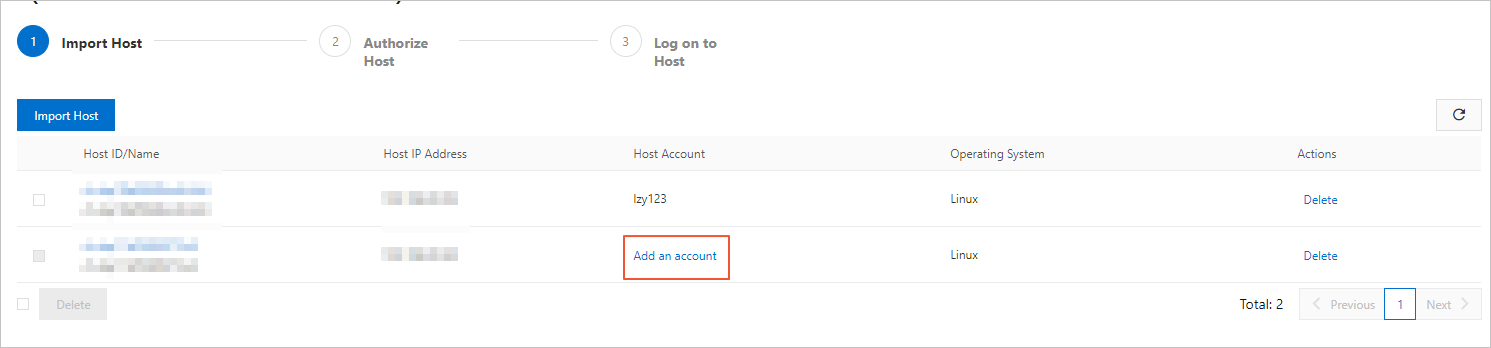
In the Create Host Account dialog box, configure the following parameters.
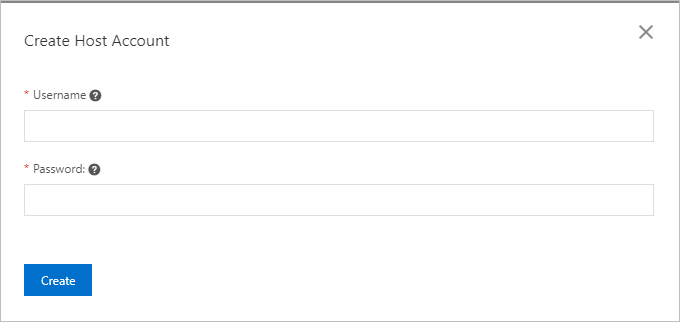
Parameter Requirements Username - Starts with a lowercase letter and ends with a letter or digit. - Contains lowercase letters, digits, and underscores ( _). - 2–16 characters in length. - Cannot beroot,admin, or a username reserved by the system.Password - Contains at least three of the following character types: uppercase letters, lowercase letters, digits, and special characters. - 6–32 characters in length. - Allowed special characters: ! @ # $ % ^ & * ( ) _ + - =Click Create.
NoteAfter creation, manage the host account — including modifying or deleting it — in the Bastionhost console. For more information, see Configure account information for a host.
What's next
Connect to the host using the account you just created. For more information, see Log on to a host by using a bastion host in Linux.