Service registry
In addition to editing functions in function nodes, you can use the service registry to write functions for the entire bot.
Functions written in the service registry can be reused across multiple conversation flows in the bot. You can call these functions using service invocation nodes.
You can debug registered services online.
Note: After you create a service, you must set its status to Published. Otherwise, the service is not visible in the service invocation node.
Create a service
The Return parameters option determines whether to retrieve the service's response after the function call.
For synchronous calls, a response is generated and returned after the service call completes or times out. For asynchronous calls, the caller must access the API to retrieve the service result or timeout information.
The Service timeout setting specifies the duration before a service call times out. If a timeout occurs, the system returns a timeout message.
Service settings and feature configuration
Configure the parameters as required by the service. The HTTP protocol is supported with GET and POST methods.
Use cases:
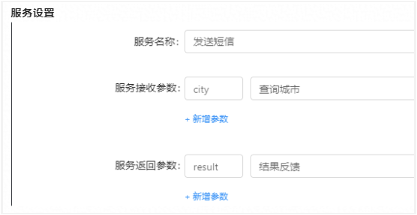
Parameter descriptions
Service name: A custom name for the service based on its function.
Service request parameters: The parameters that the service requires. For example, to check the weather, a city must be specified.
Service response parameters: The parameters that are returned by the service. In a service node, you can assign these parameters to global variables.
Service interface: The third-party API that the service calls.
Request type: GET
Request URL: http://127.0.0.1/smsapi
Request parameters: The input parameters that are required by the third-party API. You can reference the service request parameters using the `${variable}` format, such as `${city}`.
API response parameters: The result that is returned by the service API, such as `${serviceOutput}`. You can assign this result to the service response parameters.
Name: A custom name for the node.
Select service: Select a service from the service registry.
Service request parameters: These parameters correspond to the request parameters of the service in the registry. Assign values that are obtained from the conversation flow.
Service response parameters: The parameters that are returned from the service call. You can assign these to global variables.
Set mock data: This feature enables mock testing.