API usage guide
To use the BaaS REST service, first enable access permissions. Use the AK signature key pair and Access-ID to obtain an access token. This token is required to call the BaaS REST API.
The base request URL for the BaaS REST API is: https://rest.baas.alipay.com.
Enable access permissions
You must enable access permissions to use the BaaS REST service. After you enable permissions, you will receive the following:
AK signature key pair
AK ID
For more information about how to enable the BaaS REST service and obtain an AK signature key pair and an Access-ID, see Obtain a REST identity.
Obtain an access token
When you use the BaaS REST service, you must first authenticate your identity with a digital signature to obtain an access token. This token is then used for access authorization in subsequent requests.
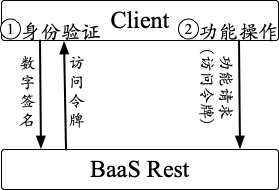
To authenticate your identity, sign the request with your AK private key. BaaS REST verifies the signature using the corresponding public key. The service uses the Sha256WithRSA digest algorithm and the RSA signature algorithm. The content to be signed includes the Access-ID and a timestamp. For added security, the validity of the signature is checked during authentication. The access token that you receive is also valid for a limited time.
For more information, see Get token API.