Grant permissions to RAM users
You can control access to the Cloud Build service using an Alibaba Cloud account or a Resource Access Management (RAM) user. To allow a RAM user to use Cloud Build features, the associated Alibaba Cloud account must grant the necessary access policies to that RAM user.
Prerequisites
You have an Alibaba Cloud account. For more information, see Account Management.
You have activated the EMAS service. For more information, see Quick Start.
The Alibaba Cloud Management Console home page is open.
Procedure
Create entity
You can control access using a user, user group, or RAM role. You can configure the principal based on your requirements.
Log on to the RAM console and do one of the following:
Create a RAM user. For more information, see Create a RAM user.
Create a user group. For more information, see Create a user group.
Create a RAM role. For more information, see RAM role overview.
Create User List Read Permission
Log on to the Resource Access Management (RAM) console, choose Permission Management > Policies, and then click Create Policy.
On the Create Policy page, click the Script Editor tab.
Clear the default script, copy and paste the example script into the editor, and then click OK.
{
    "Statement": [
        {
            "Action": "ram:ListUsers",
            "Effect": "Allow",
            "Resource": "*"
        }
    ],
    "Version": "1"
}
In the dialog box that appears, enter a name for the policy and save the custom policy.
Return to the Policies page, where you can search for or view the custom policy that you created.
Grant permissions
On the Resource Access Management page, choose Permission Management > Authorization. The Authorization page opens.
On the Authorization page, click Add Authorization to open the Add Permission right-side panel.
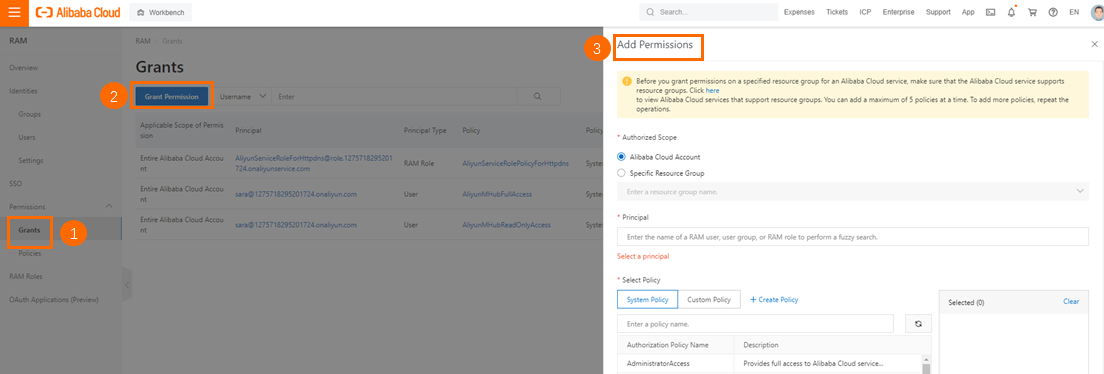
In the Add Permission right-side pane, perform the following operations:
The configuration is as follows:
Option
Description
Authorization Scope
Select All Alibaba Cloud Account Resources.
Principal
Enter a keyword to search for and select the user, user group, or RAM role that you created.
Select Permissions
Select the System Policy or Custom Policy option.
Enter keywords to search for the system policies for Remote Log Access and Multiexperience Development Platform (EMAS). These include the following:
AliyunMHubFullAccess: Permissions to manage Multiexperience Development Platform EMAS.
AliyunMHubReadOnlyAccess: Read-only permissions for Multiexperience Development Platform EMAS.
AliyunEmasDevOpsFullAccess: Permissions to manage Cloud Build.
AliyunEmasDevOpsReadOnlyAccess: Grants read-only access to Cloud Build.
Custom policies include the read-only permission for the user list that you added.
As needed, select the system policies for Multiexperience Development Platform EMAS and Remote Log Access, and add them to the Selected list on the right.
ImportantSelect at least one system policy for Multiexperience Development Platform (EMAS).
Select at least one system policy for Cloud Build.
Click OK to save the settings.
Related content
RAM is a general-purpose Alibaba Cloud service. For more information, see Resource Access Management.