Grant system policies to a RAM user
This topic describes how to grant EMAS system policies to a RAM user. If a RAM user does not have the required permissions for EMAS, they cannot view or use EMAS products after logging on to the Alibaba Cloud console.
Prerequisites
You have created a RAM user. For more information, see Create a RAM user.
Log on to the RAM console by using your main account or as a RAM administrator.
Procedure
You must first grant basic permissions for EMAS. If you need to use a specific EMAS service, you must also grant permissions for it.
In the left-side navigation pane of the RAM console, choose Authorization > Grants.
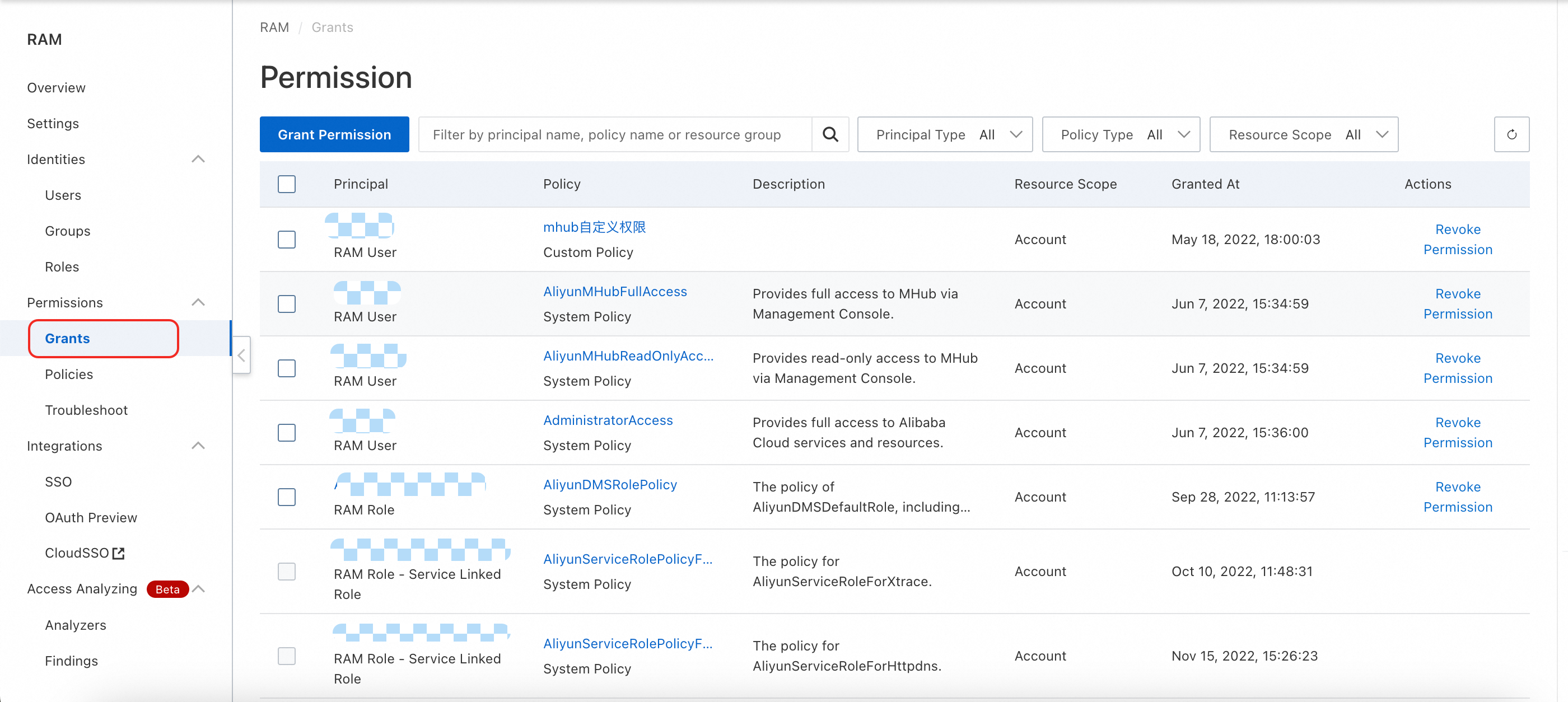
Click Grant Permission. The Grant Permission panel opens on the right.
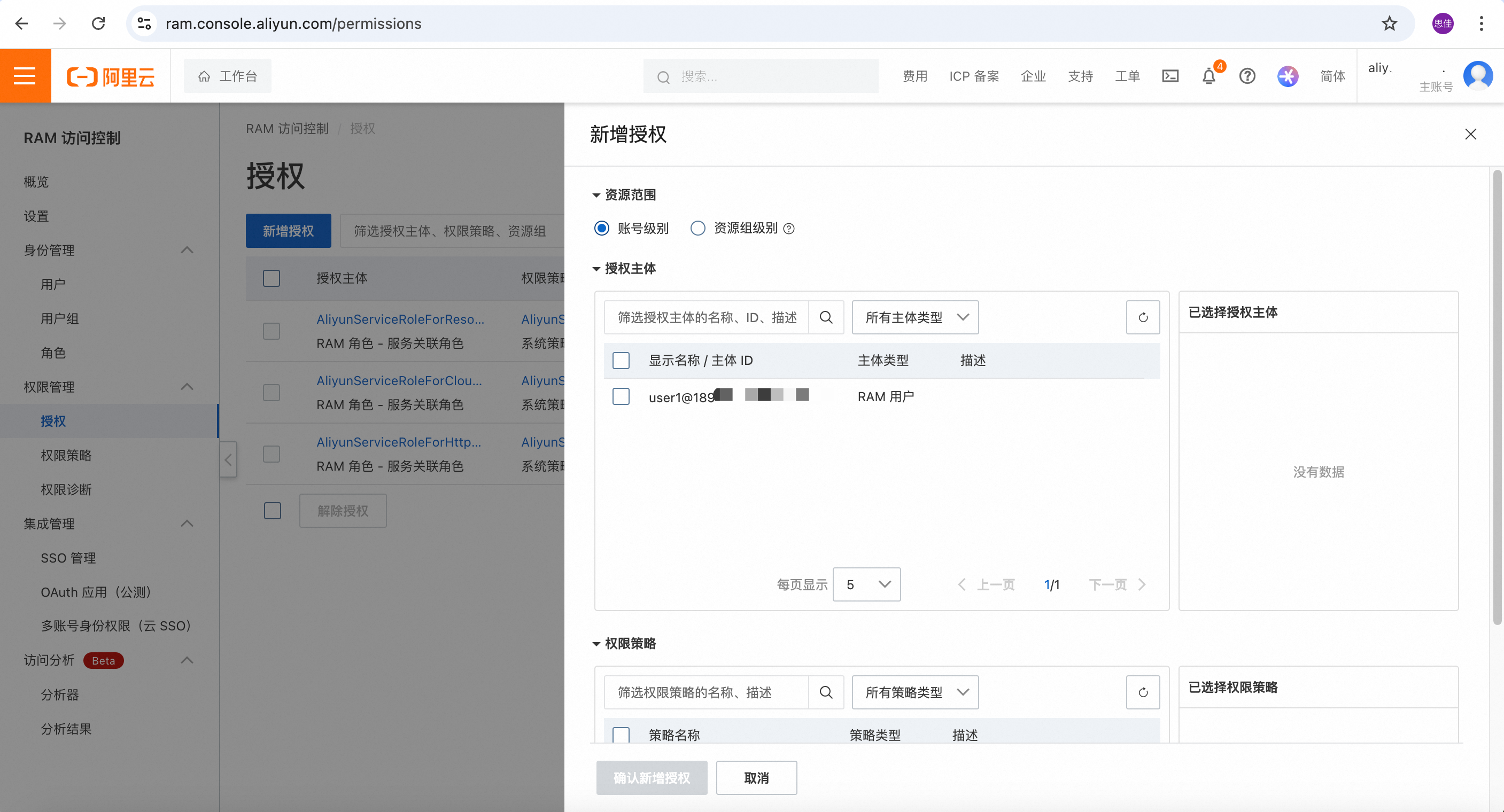
In the panel on the right, configure the authorization settings. The following table describes the parameters.
You must grant basic permissions for EMAS by attaching either the AliyunMHubFullAccess or AliyunMHubReadOnlyAccess policy. These policies allow the RAM user to perform basic operations in EMAS, such as creating and deleting projects (read/write permissions) and viewing projects (read-only permissions).
If you need to use a specific service, such as Mobile Push or HTTPDNS, you must grant permissions for that service separately.
Parameter | Description |
Authorization scope | Select Account level.
|
Principal | Enter keywords to search for and select the RAM user. Note The RAM user must be created in advance. For more information, see Create a RAM user. |
Permission policy | 1. Select the System policy option. 2. Enter the keyword AliyunMHubFullAccess: Grants permissions to manage EMAS. AliyunMHubReadOnlyAccess: Grants read-only permissions for EMAS. 3. Select the required policies and add them to the Selected list on the right. |
To use a specific EMAS service, you must also add the corresponding permission policies as described in the following table.
Resource type | Policy name | Description |
Mobile Push | AliyunMPushFullAccess | Grants permissions to manage Mobile Push. |
AliyunMPushReadOnlyAccess | Grants read-only permissions for Mobile Push. | |
HTTPDNS | AliyunHTTPDNSFullAccess | Grants permissions to manage HTTPDNS. |
AliyunHTTPDNSReadOnlyAccess | Grants read-only permissions for HTTPDNS. | |
Mobile Hotfix | AliyunHotfixFullAccess | Grants permissions to manage Mobile Hotfix. |
AliyunHotfixReadOnlyAccess | Grants read-only permissions for Mobile Hotfix. | |
Mobile Feedback | AliyunFeedbackFullAccess | Grants permissions to manage Mobile Feedback. |
AliyunFeedbackReadOnlyAccess | Grants read-only permissions for Mobile Feedback. | |
cloud build and cloud release | AliyunEmasDevOpsFullAccess | Grants permissions to manage cloud build and cloud release. |
AliyunEmasDevOpsReadOnlyAccess | Grants read-only permissions for cloud build and cloud release. | |
crash analysis, performance analysis, and remote logs | AliyunEMASAppMonitorFullAccess | Grants permissions to manage crash analysis, performance analysis, and remote logs. |
AliyunEMASAppMonitorReadOnlyAccess | Grants read-only permissions for crash analysis, performance analysis, and remote logs. | |
EMAS Serverless | AliyunMPServerlessFullAccess | Grants permissions to manage EMAS Serverless. |
AliyunMPServerlessReadOnlyAccess | Grants read-only permissions for EMAS Serverless. |
Click OK to complete the authorization.
Related documents
To control permissions with a custom policy, see Grant custom policies to RAM users.
To understand the operations and resources covered by Mhub RAM system permission policies, see Mhub RAM authentication operations and resources.