Chaoxin template creation and guidelines
You can create templates for text messages, digital messages, and card messages. After a template is approved, you can use it as the message content when creating a sending task. Before you create an SMS template, you must apply for an SMS signature and carefully read the template rules.
Create an SMS template
1. Create a card message template
Go to Workspace > User Marketing > Reach Marketing > Lingyang SuperSMS > SMS Template > Card Message.
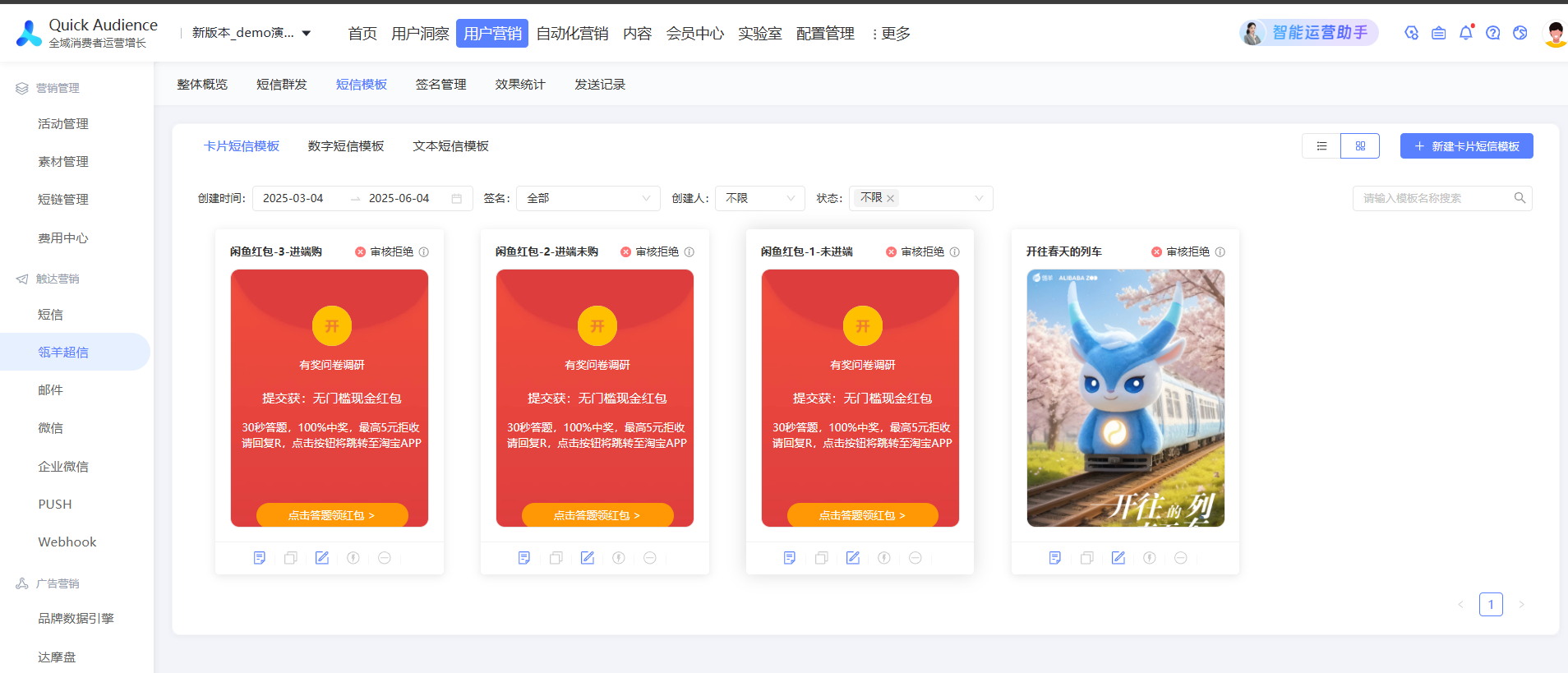
In the upper-right corner, click Create Card Message Template.
On the template creation page, configure the basic information for the template.
Parameter
Description
Message type
Card messages are not classified as promotional or notification messages. This setting is only used for Fatigue Control.
Promotional message: Subject to fatigue control rules. Sending stops after the limit is reached within a specific period.
Notification: Not subject to fatigue control rules.
Template name
Enter a name for the template.
Scenarios
Enter the business scenario for the message.
Select signature
Select an approved SMS signature, or create a new one.
Automatic renewal review
Disabled by default.
Disabled: The template is not automatically submitted for renewal review.
Enabled: The template is automatically submitted for renewal review before it expires, according to system rules. This continues until the switch is disabled or the review fails.
Note: The automatic renewal review feature is not enabled by default. To use this feature, contact after-sales support to request activation.
Template purpose
Select the template purpose: Production or Test.
Template type
Select a template type. Different template types support different content configurations.
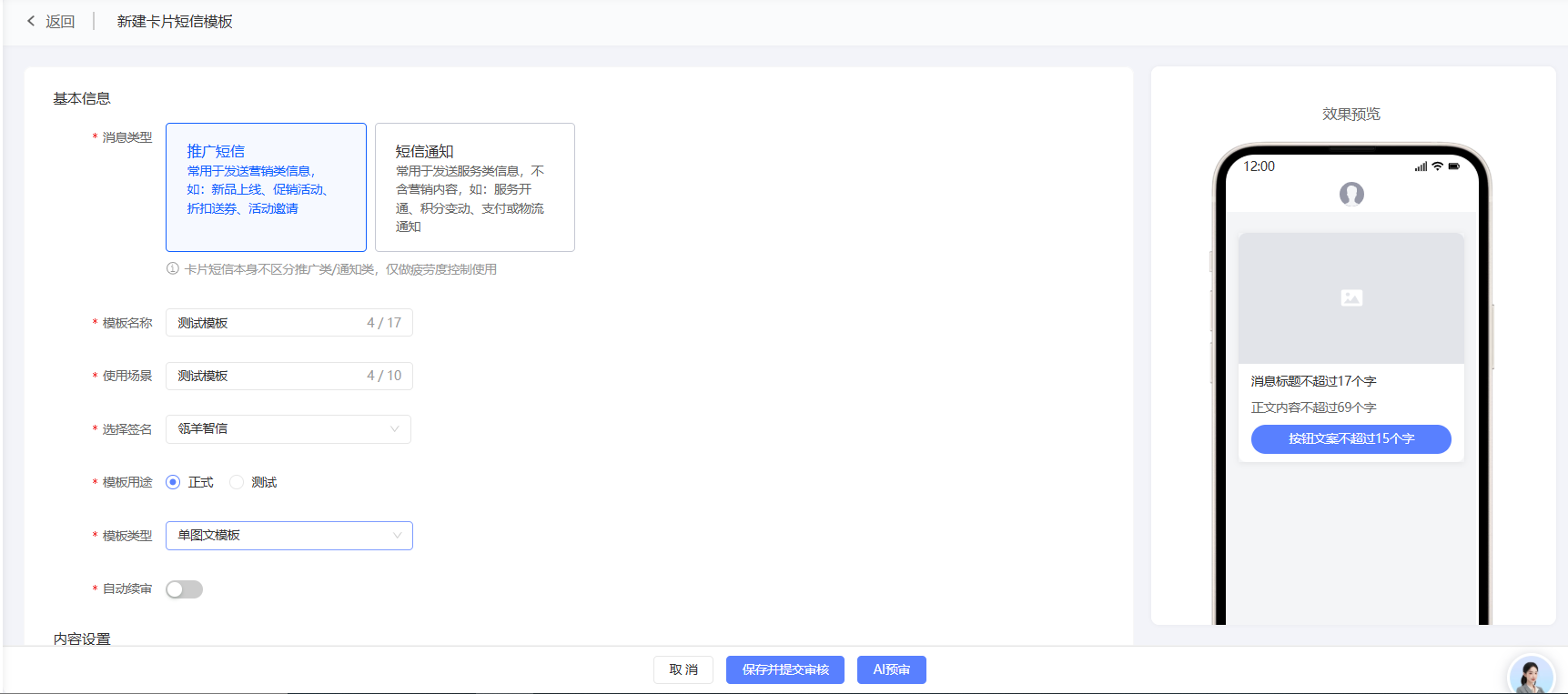
Configure the template content based on the selected template type. The required content varies slightly depending on the template type. The following example shows the configuration for a single image-text template:
Parameter
Description
Image
Select an image from Material Management or upload a new one. The image must be in JPG, JPEG, or PNG format and no larger than 100 KB. A 16:9 aspect ratio and a size of 1248 × 702 pixels are recommended. Images with other aspect ratios or sizes will be stretched or scaled to fit.
You also need to set a click event for the image. For more information, see the instructions below.
Message title
Enter a message title.
You can insert one variable. The variable references a user tag value, so the content sent to different users will vary based on their tag values.
To configure a variable, click the
 icon where you want to insert it, enter a variable name, and click Insert.
Body content
Enter the template content.
You can insert up to three variables.
The content can be up to 69 characters long, with a maximum of 23 characters per line and up to 3 lines. A line break counts as one character.
Button name
Enter a name for the button.
You also need to set a click event for the button. For more information, see the instructions in the next step.
Set the click event for the image and button. Four types of redirects are supported:
Redirect to H5 page: Enter the H5 page URL. Only HTTPS URLs are supported. Short parameters are allowed. Enter an access name. This name is used in the prompt 'Redirecting to XXX (access name)'. Note: If the event type is 'Redirect to H5 page', the URL cannot trigger an app download or launch. To enable app downloads or launches, use the 'Redirect to browser' event.
Redirect to app: Enter the deep link address. Short parameters are allowed. Enter an access name and package name. You can also enter a fallback link. If the app is not installed, the user is redirected to this link. The fallback link can be a Quick App deep link or an HTTPS H5 URL. If you do not set a fallback link, the user is redirected to the app download page.
Redirect to browser: Enter the web page URL. Only HTTPS URLs are supported. Short parameters are allowed. Enter an access name. This name is used in the prompt 'Redirecting to XXX (access name)'.
Open the dialer: Enter the phone number to dial.
2. Create a digital message template
Go to Workspace > User Marketing > Reach Marketing > Lingyang SuperSMS > SMS Template > Digital Message.
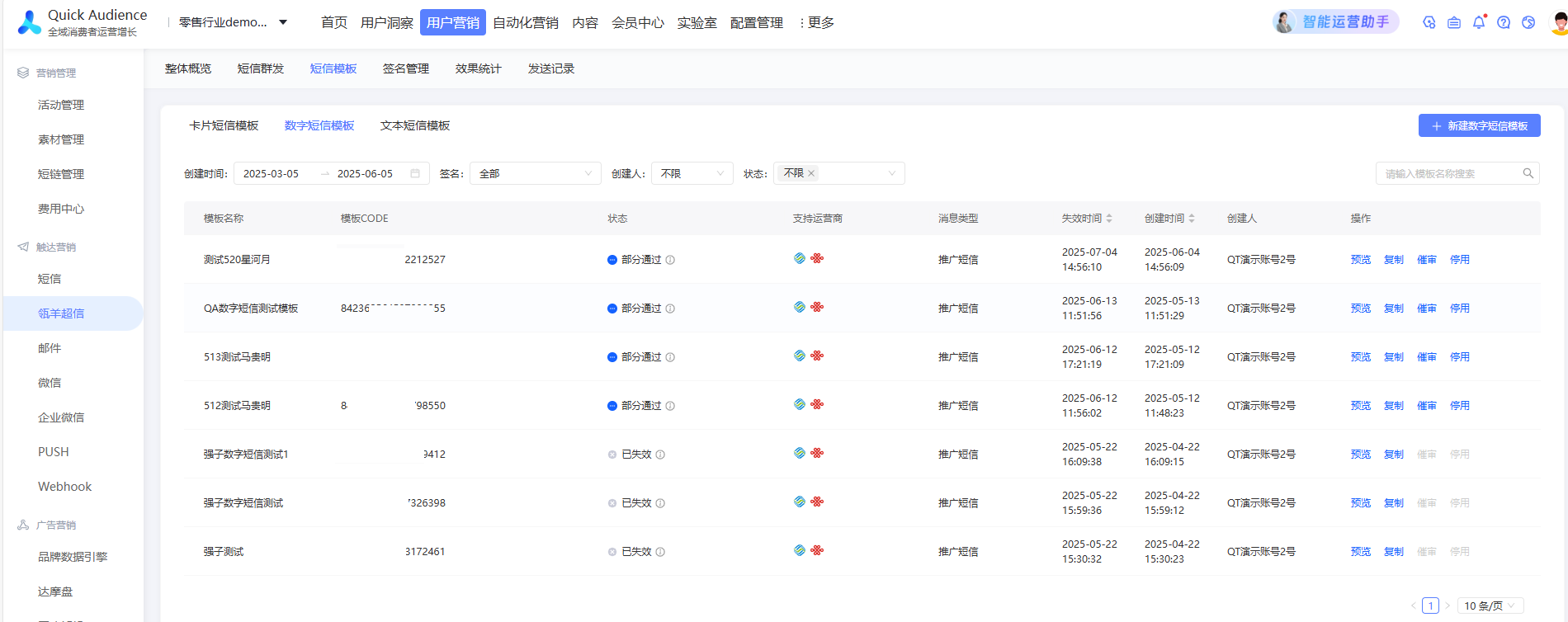
In the upper-right corner, click Create Digital SMS Template.
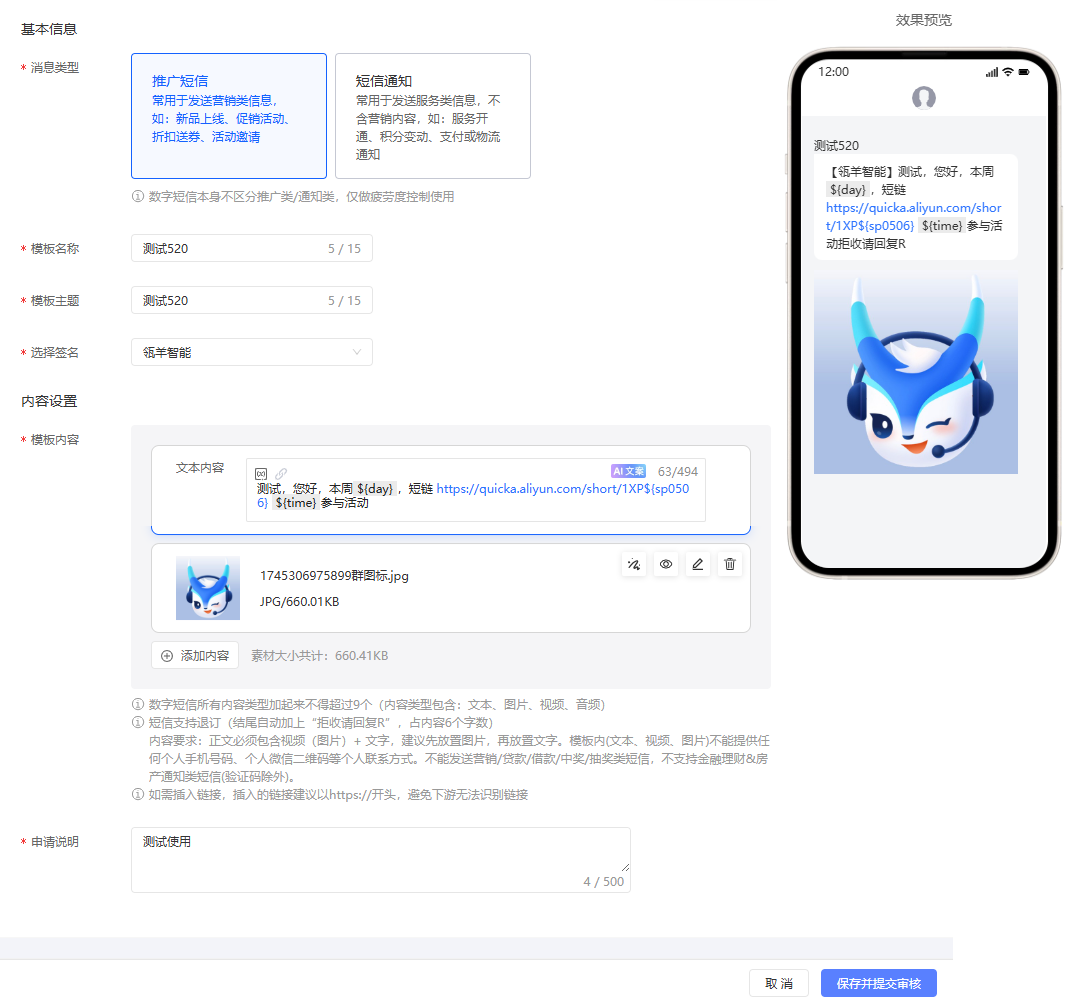
On the template creation page, configure the basic information for the template. After you finish, click Save and Submit for Review. The template will be reviewed by phone manufacturers that support its style and events. You can view the review results in the template list.
Parameter
Description
Message type
Digital messages are not classified as promotional or notification messages. This setting is only used for Fatigue Control.
Promotional message: Subject to fatigue control rules. Sending stops after the limit is reached within a specific period.
Notification: Not subject to fatigue control rules.
Template name
Enter a name for the template.
Template subject
Enter a subject for the template. The subject is sent to the user with the message.
Select signature
Select an approved SMS signature, or create a new one.
Automatic renewal review
Disabled by default.
Off: Disables automatic submission for renewal review.
Enabled: The template is automatically submitted for renewal review before it expires, according to system rules. This continues until the switch is disabled or the review fails.
Note: The automatic renewal review feature is not enabled by default. To use this feature, contact after-sales support to request activation.
Template content
Enter the content for the digital message.
A preview of the message content appears on the right side of the page. Check the preview.
Click '+Add Content' to add text, images, audio, or video. When you move the mouse over a content item, buttons to reorder, preview, edit, or delete appear.
You can insert variables. Variables reference user tag values, so the content sent to different users will vary based on their tag values. To insert a variable, click the
 icon where you want it, enter a variable name, and click Insert. You can insert up to three variables.
You can insert short links and short links with short parameters.
Application description
Provide a description for the reviewers. We recommend explaining the business scenario for the message.

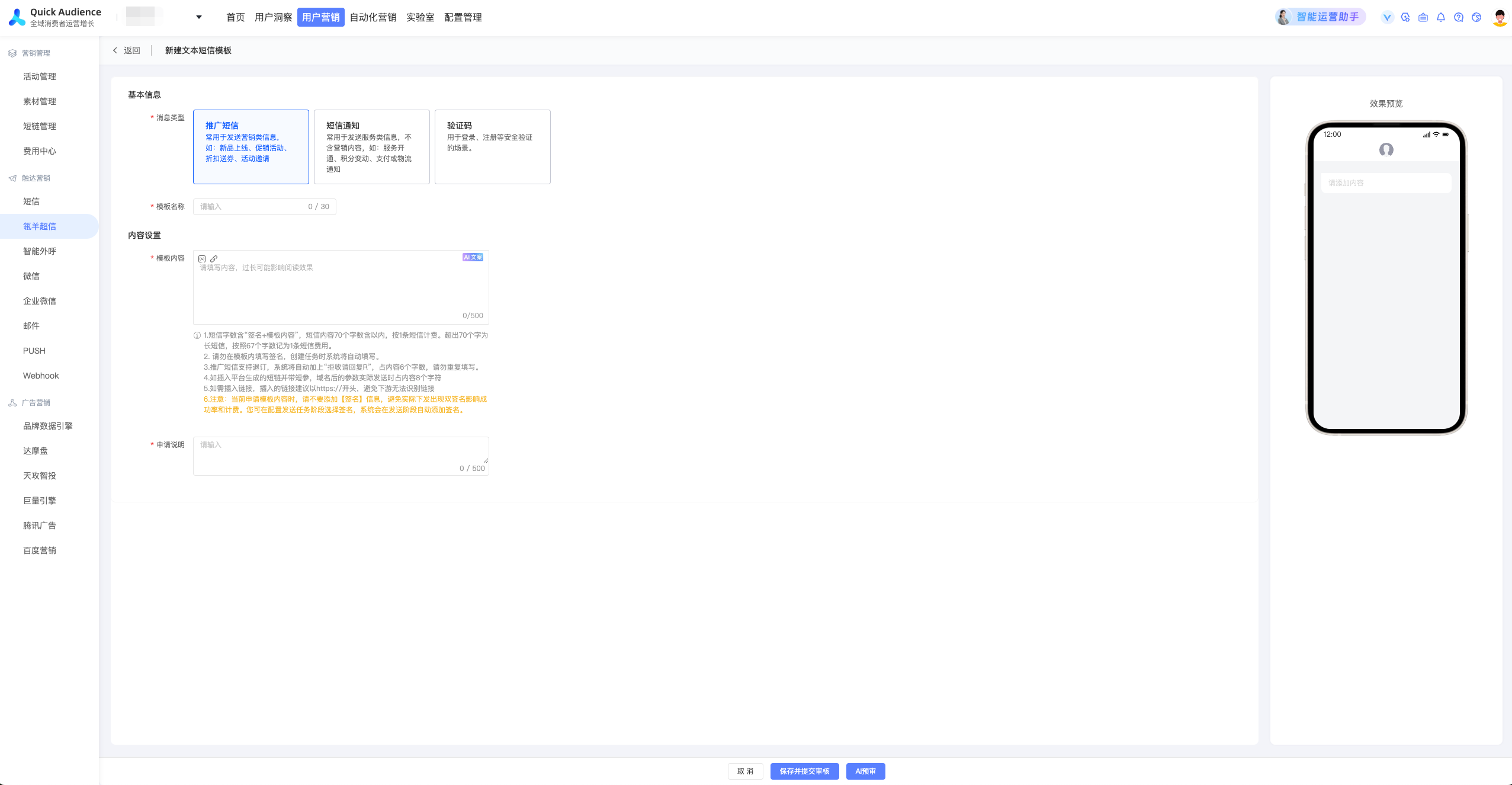
3. Create a text message template
Go to Workspace > User Marketing > Reach Marketing > Lingyang SuperSMS > SMS Template > Text Message.
In the upper-right corner, click Create Text Message Template.
On the template creation page, configure the basic information for the template. After you finish, click Save and Submit for Review. The template will be reviewed by phone manufacturers that support its style and events. You can view the review results in the template list.
Parameter
Description
Message type
Select a message type. This is used for Fatigue Control.
Promotional message: Typically used to send marketing information to users, such as new product launches, promotions, discount coupons, and event invitations. Subject to fatigue control rules. Sending stops after the limit is reached within a specific period.
Notification: Typically used to send service-related information to users, such as service activation, point balance changes, payment notifications, and logistics updates. It does not contain marketing content. Not subject to fatigue control rules.
Template name
Enter a name for the template.
Template content
Enter the content for the text message template.
Application description
Provide a description for the reviewers. We recommend explaining the business scenario for the message.
Manage SMS templates
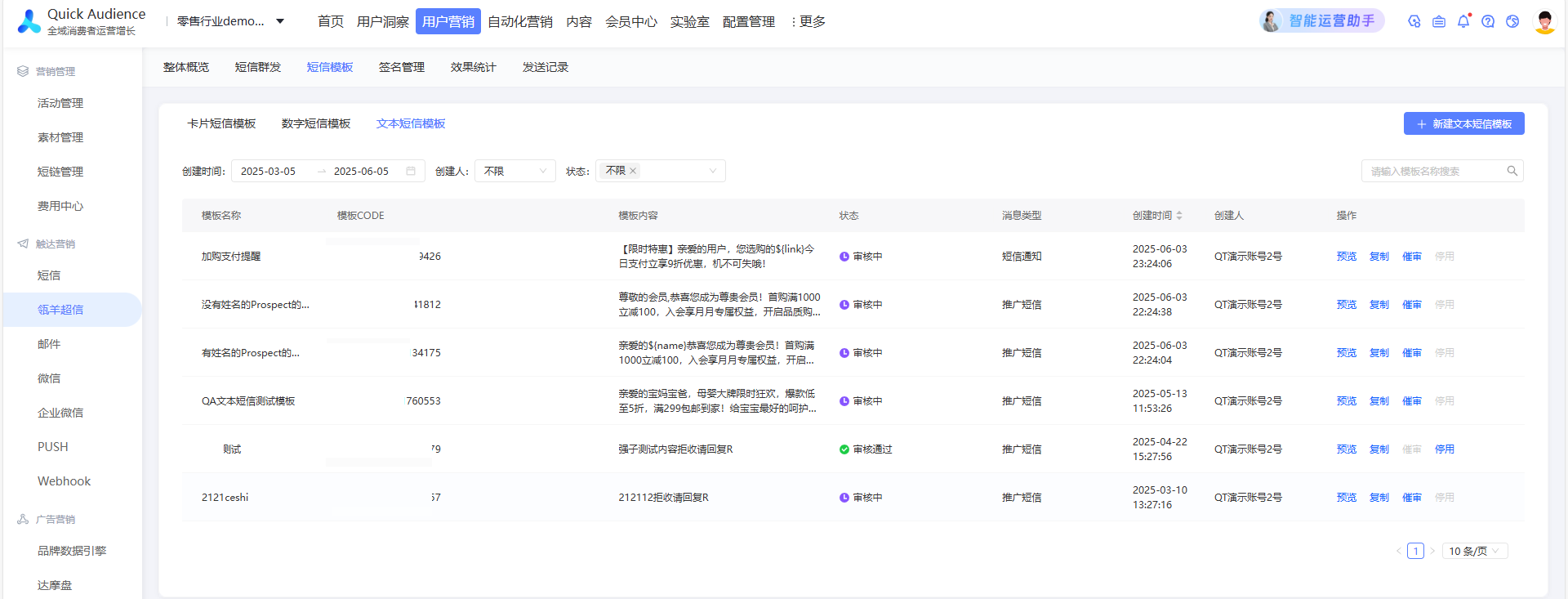
The list displays the card message templates that you have created, including the following information: template type, status, supported manufacturers, automatic renewal review setting, next renewal review time, renewal review status, message type, and expiration time. Possible statuses are Under Review, Partially Approved, Approved, and Rejected. Possible renewal review statuses are Automatic Renewal Review Not Set, Pending Renewal Submission, Under Review, Partially Approved, Approved, and Rejected.
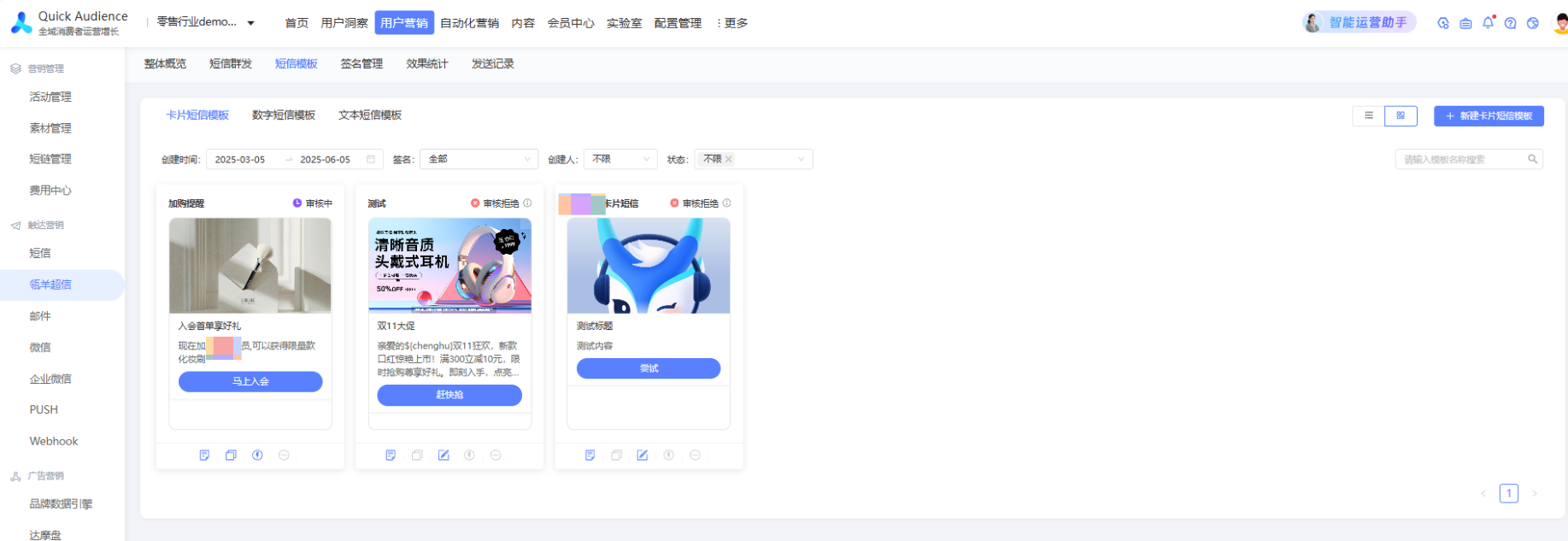
You can perform the following operations:
Preview: You can preview a template in any status.
Copy: You can copy a template in any status.
Expedite Review: Expedite the review of a template that is currently under review.
Disable: You can disable a template that is Approved or Partially Approved. A disabled template cannot be used in SMS tasks. Do not delete templates that are being used by card message tasks that are pending or in progress.
A status of Partially Passed indicates that some vendors have passed the review, while others are still under review or have been rejected.
Hover over the Partially Approved or Rejected status text to see the review status and rejection reason from each manufacturer.
Templates that are Approved or Partially Approved can be used when you create card message tasks. When a card message is sent, manufacturers that have approved the template can parse and render the message correctly.
Digital message templates are valid for 30 days from their creation date. Card message templates are valid for 90 days from their creation date.
Automatic renewal review: Only approved templates can be automatically reviewed for renewal. The automatic renewal switch is disabled if the review fails or the template expires.
Next renewal review time: For digital message templates, the renewal review is submitted on the 21st day after creation, and the template status is updated on the 26th day. For card message templates, the renewal review is submitted on the 81st day after creation, and the template status is updated on the 86th day. Note: The renewal submission time may change based on carrier requirements. The actual renewal time takes precedence.
SMS template rules
1. Digital message template rules
1.1 Format rules
The message content cannot be text-only, video-only, image-only, or audio-only. The template size must be greater than 660 KB.
The total size of images, audio, video, and text must be less than 1900 KB.
Images must be in PNG, GIF, or JPG format. Videos must be in MP4 or AVI format with H.264 encoding. Audio must be in MP3 format.
The message content (text, video, images) cannot contain any personal contact information, such as personal mobile phone numbers or WeChat QR codes. Videos cannot contain any logos, such as those from Aijianji, VUE, or Tencent Video.
To avoid confusion with the signature, do not use square brackets `【】` anywhere in the message content. Do not use sensitive words, such as words related to pornography, violence, or cash incentives.
You can add links. The allowed format is a combination of an official website link and a variable, such as `https://www.aliyun.com/${url}`. Note that specific URLs are subject to review and can be used only after they are approved.
You can add text variables, such as `${name}`.
Variables are limited to 1 to 20 characters. A message can contain a maximum of three text variables.
When you apply for an SMS template, an unsubscribe method is added by default, so you do not need to add it again. The unsubscribe action applies to the signature. After a user unsubscribes, they will no longer receive messages that use that signature.
1.2 Content rules
Digital message templates must clearly state the actual content of the message.
Industry
Description
Real estate
Supported by China Mobile and China Unicom. Not currently supported by China Telecom.
Pharmaceuticals
Supported by China Mobile and China Unicom. Not currently supported by China Telecom.
(Excludes special drugs, such as aphrodisiacs.)
Games
China Mobile and China Unicom support messages for games from major developers (such as Legend and Xianxia genres).
(To register game content, you must provide the publication number, business license, and signature authorization letter.)
Exhibitions and conferences
Messages about competitor industries (such as telecommunications) are not supported. Messages about lectures (such as healthcare lectures) are not supported.
Live streaming
Supported by China Mobile and China Unicom. Not currently supported by China Telecom.
Finance
Supported by China Mobile. Not currently supported by China Unicom and China Telecom.
(You must provide a business license and proof of authorized cooperation with a financial institution.)
E-commerce
Messages about sensitive products such as alcohol, milk powder, and health supplements are not supported.
Sending unsolicited information is not supported. This mainly refers to commercial information that invites users to register or become members.
Messages related to the following content are prohibited: social networking, education and training, micro-businesses, type-II e-commerce, medical aesthetics, pornography, gambling, drugs, party and government affairs, legal rights protection, crowdfunding, charitable fundraising, religion, superstition, stocks, study abroad and immigration, job interviews and recruitment, betting, loans, debt collection, credit card limit increases, investment and financial management, lotteries, prize draws, one-dollar prize draws, one-dollar flash sales, one-dollar cloud purchases, counterfeit goods, tobacco and alcohol, dating, violence, intimidation, fur, cash rebates, invoice issuance, information prohibited by carriers, agent registration, certificate services, invitations to join groups, QQ, or WeChat, selling personal information, carrier services, traffic marketing, violations of advertising laws, funerals, brushing, task-based rewards, empty package websites, soliciting positive reviews, store transfers, user acquisition, crowdsourcing, POS machines, and point redemption.
If the message contains a link, the linked website must be relevant to the signature and the message content. The content of the linked website must not be illegal.
2. Card message template rules
2.1. Format rules
Information item | Description |
Template purpose | When using a test template, set the template purpose to 'Test'. The template name, text content, and body must include the word 'test'. |
Title | A subject is required and does not support line breaks. Carousel templates support line breaks with a maximum of 11 lines.
|
Video | Upload a clear video and video thumbnail.
|
Link |
|
Variable | You can add text variables, such as `${name}`. Variables are limited to 1 to 20 characters. A message can contain a maximum of three text variables. |
Event type |
|
Parameter | Parameter names can only contain English letters and numbers, must start with a letter, and cannot exceed 10 characters. Example: `name123` |
2.2. Content rules
Messages related to the following content are prohibited: social networking, education and training, micro-businesses, type-II e-commerce, medical aesthetics, healthcare, medicine, hospitals, weapons, controlled knives, dangerous goods, pornography, gambling, drugs, party and government affairs, legal rights protection, crowdfunding, charitable fundraising, religion, superstition, stocks, study abroad and immigration, job interviews and recruitment, betting, loans, debt collection, credit card limit increases, investment and financial management, lotteries, prize draws, one-dollar prize draws, one-dollar flash sales, one-dollar cloud purchases, counterfeit goods, tobacco and alcohol, dating, violence, intimidation, fur, cash rebates, illegal cash-out, game plug-ins, invoice issuance, information prohibited by carriers, agent registration, certificate services, invitations to join groups, QQ, or WeChat, selling personal information, carrier services, traffic marketing, violations of advertising laws, funerals, brushing, task-based rewards, empty package websites, soliciting positive reviews, store transfers, user acquisition, crowdsourcing, POS machines, and point redemption.
3. Text message template rules
SMS template rules may be adjusted in real time based on requirements from the Ministry of Industry and Information Technology (MIIT) and carriers. The actual review results take precedence. SMS templates must clearly state the actual content and reflect the actual sending scenario of the message.
1. Do not send the following content:
Sending illegal or non-compliant content is prohibited.
Promotional messages do not support content from three special industries: finance, games, and social networking.
Messages cannot contain certain types of contact information (such as non-corporate official accounts, QQ numbers, QQ groups, WeChat groups, Douyin, or invitations to join groups).
Do not send text messages containing content related to illegal activities such as pornography, gambling, drugs, political topics, violence, threats, smuggling, selling personal information, contraband, counterfeit goods, or door-to-door debt collection. This prohibition also covers betting (such as sports betting, score betting, and lotteries) and regulated products or services such as tobacco, alcohol, adult products, fur products, chess and card games, cosmetic surgery, medical aesthetics, and funeral services. Financial content is restricted, including stocks, private equity, crude oil futures, virtual currencies, loans, debt collection reminders, credit card limit increases, investment and financial management, crowdfunding, and charitable fundraising. Messages about religion or superstition (such as fortune-telling, divination, and feng shui) are also forbidden. Promotional content is broadly prohibited. This includes promotions for games, dating services, exhibitions, conferences, recruitment, real estate, bidding, franchises, and financial services (such as for banks, insurance, and loans). It also covers marketing tactics such as brushing, completing tasks for rewards, requests for positive reviews, prize notifications, raffles, cash back, rebates, point collection or redemption, special offers (such as one-yuan prize grabs, flash sales, or zero-yuan purchases), Class II e-commerce, Taobao passcodes, and empty package websites. Other forbidden promotional content includes app downloads, promotional links, invitations to join groups or add contacts (such as on QQ, WeChat, or to customer service), new user acquisition, and user recall campaigns. Agent-based and third-party services are also prohibited, including academic ghostwriting, seal carving, company registration, bookkeeping, issuing invoices, obtaining certificates, handling annual inspections, trademark registration, legal rights protection, mediation, data ranking, customer acquisition, SEO keyword search services, and agent-based promotions (such as for intellectual property and patents). Finally, do not send messages about studying abroad, immigration, vocational training, decoration (including building materials and furniture), POS machines, in-home massages, part-time jobs, digital collectibles, device rentals, questionnaires, replies to confirm receipt of goods, or carrier-related content (such as value-added services, service centers, and promotions from providers like China Mobile, China Unicom, China Telecom, or China Broadcasting Network, or content related to King Cards, 4G, or 5G).
2. Rules for sending marketing content to members
Include a member salutation in the template to confirm the member relationship or to target a specific group of people.
Sending marketing content to non-members is not supported. Sending unsolicited information is not supported.
Examples include commercial information that invites users to register or become members, and marketing content that does not confirm a member relationship, such as 'grand opening promotions', 'business introductions', or 'company introductions'.
Content for member holiday or birthday greetings and promotional activity notifications must be submitted as promotional messages.
If the template content involves third-party rights, you must select the corresponding third-party qualifications and signature during the application process.