Use the audio and video plugin in uniapp
This topic describes how to import the Alipay audio and video plugin into a uniapp project created with the Hbuilder development tool.
Prerequisites
Before using the audio and video plugin in uniapp, complete the required settings and enable the service as described in the Alipay Audio and Video Plugin integration guide.
Procedure
1. Import the plugin in uniapp
In the project's manifest.json file, find the configuration for the Alipay mini program and declare the plugin in the corresponding field. For more information about the configuration, see the plugin's development document.
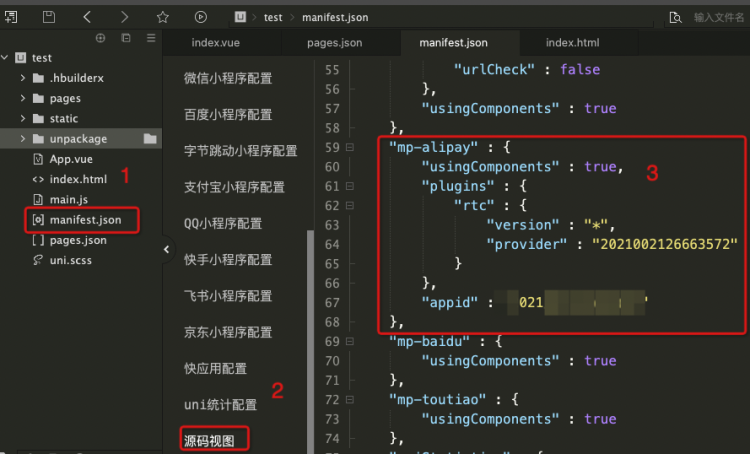
The following code provides an example.
"mp-alipay" : {
      "usingComponents" : true,
      "plugins" : {
          "rtc" : {
              "version" : "*",
              "provider" : "2021002126663572"
          }
      },
      "appid" : "xxxxxxx"
  },
2. Use the plugin on a page
To use a component from the plugin on a page, configure usingComponents for the target platform. The configuration must be under the style node for that page in the pages.json file. The following code provides an example:
{
    "path": "pages/index/index",
    "style": {
      "navigationBarTitleText": "Audio and Video Plugin Test",
      "mp-alipay": {
        "usingComponents": {
          "rtcTag": "plugin://rtc/flex"
        }
      }
    }
  }
The value consists of three segments. plugin is the protocol. rtc is the name of the plugin that you specified during import. rtcTag is the name of the component that the plugin exposes.
The following code is used on the page.
<template>
	<view class="content">
		<!-- Use the audio and video plugin -->
		<rtcTag
		  config="{}"
		  currentUserId="{}"
		  onPlayerChange="handlePlayerChange"
		  onUserChange="handleUserChange"
		  onHangup="handleHangup"
		  onError="handleError"
		/>
	</view>
</template>
To attach a callback, bind the callback method during the onLoad lifecycle event. The following code provides an example:
export default {
  data() {
    return {
      title: 'Audio and Video Plugin Test'
    }
  },
  onLoad() {
    this.$scope.handleHangup = this.handleHangup.bind(this);
  },
  methods: {
   handleHangup(){

   }
  }
}
3. Import and trigger the plugin in JS
// Import in JS
const { rtc } = requirePlugin('rtc');
export default {
  data() {
    return {
      title: 'Audio and Video Plugin Test'
    }
  },
  onLoad() {
    // this.startRtc();
  },
  methods: {
    startRtc(){
      // Trigger the method
      rtc.start({}).then(roomInfo => {
        console.log('roomInfo:',roomInfo);
        // const { roomId, token } = roomInfo;
        // Obtain the created roomId and token here. Use them for other users to join later.
      })
    }
  }
}
Demo
Click demo to download the uniapp demo project.