Troubleshooting basic MySQL issues
Overview
This topic describes how to troubleshoot basic issues with MySQL on an Alibaba Cloud Elastic Compute Service (ECS) instance.
Detailed information
Note:
If you perform risky operations, such as modifying instances or data, ensure that your instance has disaster recovery and fault tolerance capabilities to protect your data.
Before you modify the configuration or data of an instance, such as an ECS or ApsaraDB RDS instance, create a snapshot or enable features such as RDS log backup.
If you have submitted security information, such as logon credentials, on the Alibaba Cloud platform, change them promptly.
Refer to the following solutions as needed.
Cannot start
For more information, see Troubleshoot common startup failures or exceptions for the MySQL service on Linux instances.
Cannot connect
When a client fails to connect to MySQL, it may return one of the following errors. You can analyze the specific error message to diagnose the problem.
ERROR 1045 (28000): Access denied for user 'testcon'@'10.24.236.231' (using password: YES).ERROR 2005 (HY000): Unknown MySQL server host 'rm-XXXXXXXXXXXX.mysql.rds.aliyuncs.com' (110).ERROR 1449 (HY000): The user specified as a definer ('testcon'@'10.24.236.231') does not exist.ERROR 2003 (HY000): Can't connect to MySQL server on 'test.mysql.rds.aliyuncs.com' (110).ERROR 1135 (HY000): Can't create a new thread (errno 11); if you are not out of available memory, you can consult the manual for a possible OS-dependent bug.ERROR 1130 (HY000): Host '192.168.1.3' is not allowed to connect to this MySQL server.ERROR 1045 (HY000): #28000ip not in whitelist.ERROR 5 (HY000): Out of memory (Needed 260400 bytes).ERROR 1129 (HY000): Host '10.24.236.231' is blocked because of many connection errors; unblock with 'mysqladmin flush-hosts'.ERROR 1226 (42000): User 'testcon' has exceeded the 'max_user_connections' resource (current value: 2).ERROR 1040 (HY000): Too many connections.ERROR 1862 (HY000): Your password has expired. To log in you must change it using a client that supports expired passwords.The MYSQL server is running with the -rds-deny-access option so it cannot execute this statement.Failed For Connect Mysql Server with high priv, please try again later or check the health of db #RDS00Connect Failed For Mysql Server No Response.ERROR 1045 (28000): Access denied for user 'testcon'@'10.24.236.231' (using password: NO).Client does not support authentication protocol requestedby server; consider upgrading MySQL client.
Disk space issues
Causes
High usage by binary log files.
High usage by data files.
High usage by temporary files.
High usage by system files.
You can check the instance's disk space usage with the du -h command.
Solutions
ECS instances support disk space scale-out. Upgrading disk space is an effective way to resolve these issues. The following sections describe how to resolve disk space issues without upgrading.
Clean up binary log files
Binary log files record instance transaction information and are usually enabled. If many Data Manipulation Language (DML) operations generate a large volume of binary logs in a short time, your disk space can fill up. Disk space can also fill up if binary logs are not cleaned up for a long time and become stacked. You can use the following solutions to clean up binary logs:
Automatically clean up binary logs. Use the
expire_logs_days=30parameter to configure the retention period for automatic cleanup.Manually clean up binary logs. Before you manually delete files, check which binary log file the primary and replica databases are currently using.
Primary database:
show master status;Replica database:
show slave status\GPURGE MASTER LOGS TO 'binlog.xxx';
Clean up data files
If data files use too much space, you can reduce space usage by cleaning up data. For example, you can use drop table and truncate table to remove data that you no longer need.
Querying data capacity from information_schema.tables
The `information_schema.tables` view provides partial statistics for tables based on sampling. Because of this, the table and database sizes returned by queries on this view will differ from the actual data file size. The returned value is usually smaller than the actual space used by the data file.
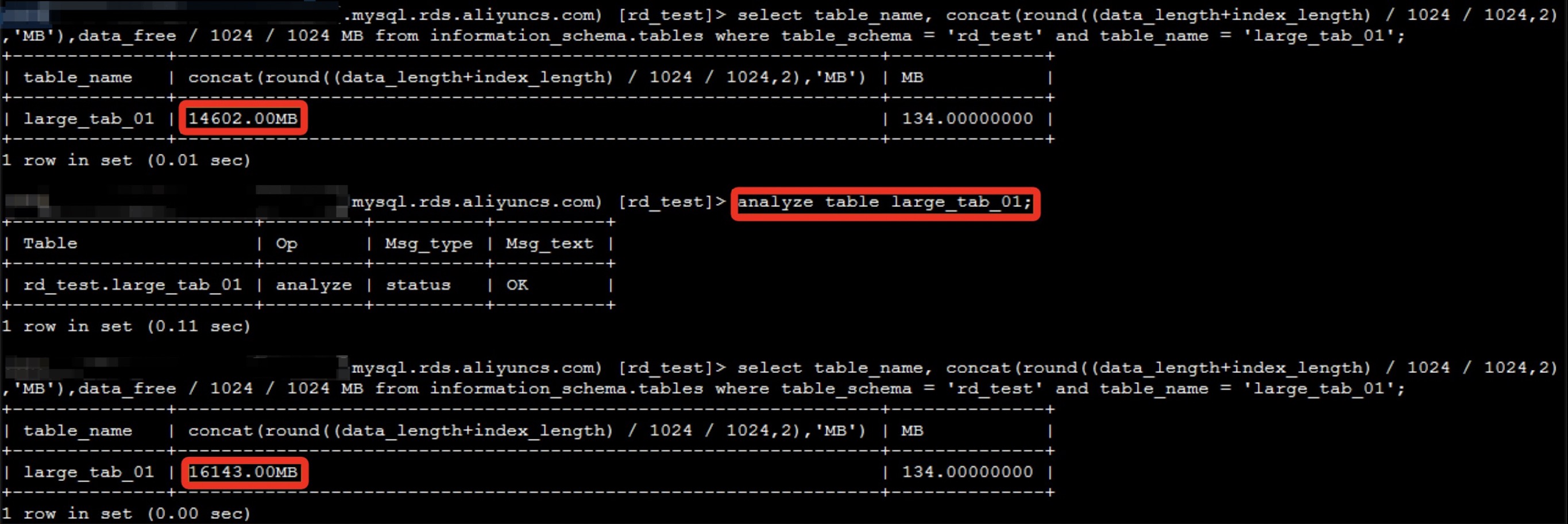
The following figure shows the difference in the reported table size before and after collecting table statistics.
Note: Even if you run the
analyze tablecommand to re-collect statistics, the returned value is usually smaller than the actual space used by the data file. For example, the value 16143 MB in this case is smaller than the actual space that the data file uses. Data files can become fragmented after frequent DML operations. To calculate a value closer to the actual space used by the data file, you can use the following method:select sum(data_length + index_length + data_free) / 1024 / 1024 from information_schema.tables;Note: Because `information_schema.tables` provides statistics based on sampling, this calculation is accurate only when the statistics closely match the actual data.
delete: Deletes data.
The `delete` operation does not immediately reclaim the disk space used by the deleted data. This is like draining a swimming pool. The pool is empty, but its footprint remains the same. In addition, the
deleteoperation generates binary log files, which can worsen disk space usage. After you delete data with thedeleteoperation, you can runoptimize table table_name;to reclaim the space.Deleting backups
Clean up backups regularly.
Release temporary files
Temporary files are released automatically when a query finishes or a session ends. If temporary files fill up the disk space and lock the instance, you can release the space by stopping the session.
Handle system files
System files include the ibdata1 system tablespace file and the ib_logfile0 and ib_logfile1 log files.
ibdata1 file:
The InnoDB engine supports Multi-Version Concurrency Control (MVCC). It stores the undo information required for queries in the `ibdata1` system file. If a long-running query is performed on an InnoDB table while the table's data changes significantly, a large amount of undo information is generated. This increases the size of the `ibdata1` file. Due to limitations in MySQL's internal mechanism, the `ibdata1` file cannot be shrunk. If this occurs and you do not want to upgrade the disk space, the best solution is to start a new instance. Then, use Data Transmission Service (DTS) to migrate the data to the new instance.
ib_logfile log files:
The `ib_logfile0` and `ib_logfile1` files store transaction log information for InnoDB engine tables. Their size is fixed and cannot be changed. A larger file size can improve instance performance in scenarios with high concurrent transactions because it reduces the frequency of log file switches.