Pass-through/Edit script
If a device cannot send data to the cloud in JSON format, it must transmit the data in binary format using pass-through mode. The cloud then runs a parsing script to convert this data into the standard ICA JSON format.
Prerequisites
You have created a product and set its Data format to Pass-through/Custom. Otherwise, the options described in this topic will not be available on the Product > Device Debugging page.Pass-through parsing script
The parsing script is developed in JavaScript. The data protocol for devices and scripts can be either standard or custom.
- For devices developed with the standard protocol, you can directly use the script that is automatically generated by the cloud.
- If you use a custom protocol, you must develop the JavaScript (JS) script yourself.
The script must support the following two methods for communication with the cloud.
- protocolToRawData (converts ICA protocol data to binary data)
- rawDataToProtocol (converts binary data to ICA protocol data)
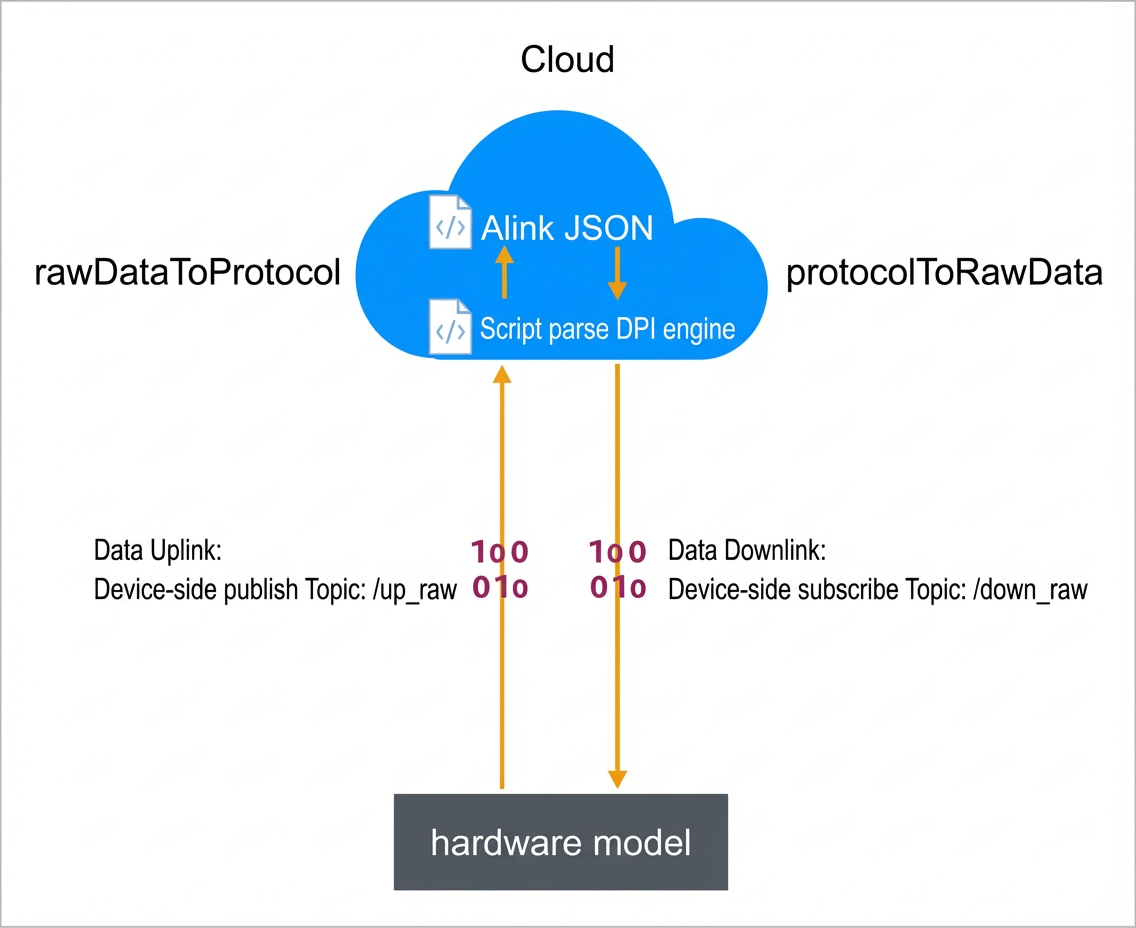
Procedure
- Go to the Product > Device Debugging page.
- In the Data Parsing section, click Edit Script.
- Edit the script and debug it with simulated data.
Script definition
The script supports only JavaScript syntax that complies with ECMAScript 5.1.
The data upload process is as follows.
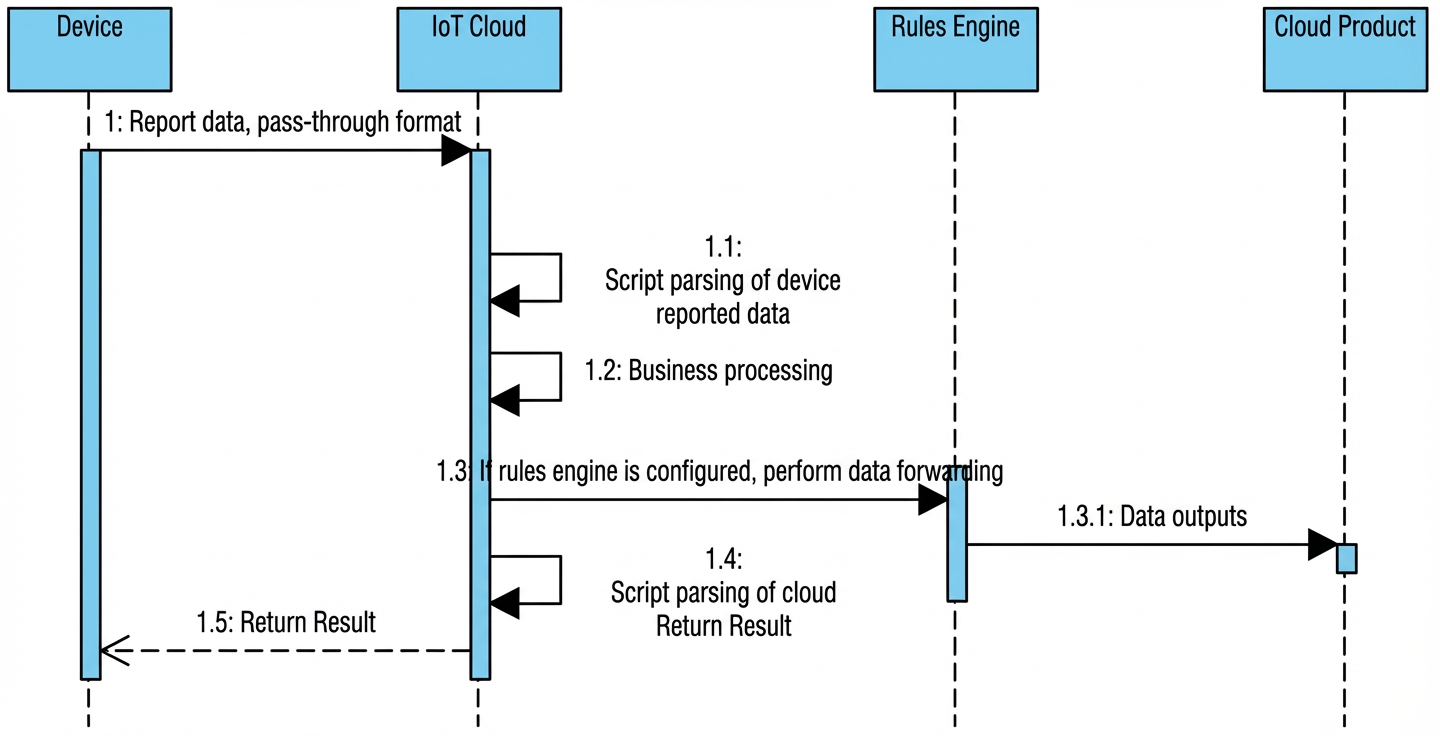
- The device reports data in pass-through mode.
- The cloud uses the script to parse the data from the device and convert it into the standard data format of the IoT Platform.
- The converted data is used for business logic processing.
- The script parses the result that is returned from the cloud.
- The converted result is pushed to the device.
Write a script
- Product definition
As an example, assume a test product has three properties: prop_float, prop_int16, and prop_bool.
- Script example
var COMMAND_REPORT = 0x00; // Report properties
var COMMAND_SET = 0x01; // Set properties
var COMMAND_REPORT_REPLY = 0x02; // Response to reported data
var COMMAND_SET_REPLY = 0x03; // Response from the device to a property setting request
var COMMAD_UNKOWN = 0xff;    // Unknown command
var ALINK_PROP_REPORT_METHOD = 'thing.event.property.post'; // Standard ALink JSON topic for devices to upload property data to the cloud
var ALINK_PROP_SET_METHOD = 'thing.service.property.set'; // Standard ALink JSON topic for the cloud to send property control commands to a device
var ALINK_PROP_SET_REPLY_METHOD = 'thing.service.property.set'; // Standard ALink JSON topic for a device to report the result of a property setting to the cloud
/*
Sample data:
Data reported by the device
Input parameter ->
    0x000000000100320100000000
Output result ->
    {"method":"thing.event.property.post","id":"1","params":{"prop_float":0,"prop_int16":50,"prop_bool":1},"version":"1.0"}

Response to a property setting request
Input parameter ->
    0x0300223344c8
Output result ->
    {"code":"200","data":{},"id":"2241348","version":"1.0"}
*/
function rawDataToProtocol(bytes) {
    var uint8Array = new Uint8Array(bytes.length);
    for (var i = 0; i < bytes.length; i++) {
        uint8Array[i] = bytes[i] & 0xff;
    }
    var dataView = new DataView(uint8Array.buffer, 0);
    var jsonMap = new Object();
    var fHead = uint8Array[0]; // command
    if (fHead == COMMAND_REPORT) {
        jsonMap['method'] = ALINK_PROP_REPORT_METHOD; // ALink JSON format - Topic for reporting properties
        jsonMap['version'] = '1.0'; // ALink JSON format - Fixed field for the protocol version number
        jsonMap['id'] = '' + dataView.getInt32(1); // ALink JSON format - ID of the request
        var params = {};
        params['prop_int16'] = dataView.getInt16(5); // Corresponds to the prop_int16 property of the product
        params['prop_bool'] = uint8Array[7]; // Corresponds to the prop_bool property of the product
        params['prop_float'] = dataView.getFloat32(8); // Corresponds to the prop_float property of the product
        jsonMap['params'] = params; // ALink JSON format - Standard params field
    } else if(fHead == COMMAND_SET_REPLY) {
        jsonMap['version'] = '1.0'; // ALink JSON format - Fixed field for the protocol version number
        jsonMap['id'] = '' + dataView.getInt32(1); // ALink JSON format - ID of the request
        jsonMap['code'] = ''+ dataView.getUint8(5);
        jsonMap['data'] = {};
    }

    return jsonMap;
}
/*
Sample data:
Set properties
Input parameter ->
    {"method":"thing.service.property.set","id":"12345","version":"1.0","params":{"prop_float":123.452, "prop_int16":333, "prop_bool":1}}
Output result ->
    0x0100003039014d0142f6e76d

Response to data reported by the device
Input data ->
    {"method":"thing.event.property.post","id":"12345","version":"1.0","code":200,"data":{}}
Output result ->
    0x0200003039c8
*/
function protocolToRawData(json) {
    var method = json['method'];
    var id = json['id'];
    var version = json['version'];
    var payloadArray = [];
    if (method == ALINK_PROP_SET_METHOD) // Set properties
    {
        var params = json['params'];
        var prop_float = params['prop_float'];
        var prop_int16 = params['prop_int16'];
        var prop_bool = params['prop_bool'];
        // Concatenate rawData based on the custom protocol format
        payloadArray = payloadArray.concat(buffer_uint8(COMMAND_SET)); // command field
        payloadArray = payloadArray.concat(buffer_int32(parseInt(id))); // ALink JSON format 'id'
        payloadArray = payloadArray.concat(buffer_int16(prop_int16)); // Value of the 'prop_int16' property
        payloadArray = payloadArray.concat(buffer_uint8(prop_bool)); // Value of the 'prop_bool' property
        payloadArray = payloadArray.concat(buffer_float32(prop_float)); // Value of the 'prop_float' property
    } else if (method ==  ALINK_PROP_REPORT_METHOD) { // Response to data reported by the device
        var code = json['code'];
        payloadArray = payloadArray.concat(buffer_uint8(COMMAND_REPORT_REPLY)); // command field
        payloadArray = payloadArray.concat(buffer_int32(parseInt(id))); // ALink JSON format 'id'
        payloadArray = payloadArray.concat(buffer_uint8(code));
    } else { // Unknown command. Some commands are not processed.
        var code = json['code'];
        payloadArray = payloadArray.concat(buffer_uint8(COMMAD_UNKOWN)); // command field
        payloadArray = payloadArray.concat(buffer_int32(parseInt(id))); // ALink JSON format 'id'
        payloadArray = payloadArray.concat(buffer_uint8(code));
    }
    return payloadArray;
}
// The following are helper functions
function buffer_uint8(value) {
    var uint8Array = new Uint8Array(1);
    var dv = new DataView(uint8Array.buffer, 0);
    dv.setUint8(0, value);
    return [].slice.call(uint8Array);
}
function buffer_int16(value) {
    var uint8Array = new Uint8Array(2);
    var dv = new DataView(uint8Array.buffer, 0);
    dv.setInt16(0, value);
    return [].slice.call(uint8Array);
}
function buffer_int32(value) {
    var uint8Array = new Uint8Array(4);
    var dv = new DataView(uint8Array.buffer, 0);
    dv.setInt32(0, value);
    return [].slice.call(uint8Array);
}
function buffer_float32(value) {
    var uint8Array = new Uint8Array(4);
    var dv = new DataView(uint8Array.buffer, 0);
    dv.setFloat32(0, value);
    return [].slice.call(uint8Array);
}
Debug with simulated data in the console
- Simulate data reported by a device
Set the simulation type to **Device Reported Data** and enter the test data. The simulated input data in the console must be in hexadecimal format.
0x00002233441232013fa00000Click Run to view the output of the reported data.
{ "method": "thing.event.property.post", "id": "2241348", "params": { "prop_float": 1.25, "prop_int16": 4658, "prop_bool": 1 }, "version": "1.0" } - Simulate a response to data reported by the device
Set the simulation type to **Data Received by Device** and enter the test data.
{
  "id": "12345",
  "version": "1.0",
  "code": 200,
  "method": "thing.event.property.post",
  "data": {}
}
Click **Run** to view the output of the received data. The output is the result of the script conversion in hexadecimal format.
0x0100003039014d0142f6e76d - Simulate a device response to a property setting request
Simulate the device returning the result of a property setting. Enter the test data.
0x0300223344c8Click **Run** to view the data reported by the device.
{
  "code": "200",
  "data": {},
  "id": "2241348",
  "version": "1.0"
}
Local debug script
This method is for local testing only. To test in the console, see Debug with simulated data in the console. To simplify script development and debugging, you can run the script in your local environment. The following example shows how to do this.
// Place the implementations of rawDataToProtocol and protocolToRawData here

// Test Demo
function Test()
{
    //0x001232013fa00000
    var rawdata_report_prop = new Buffer([
        0x00, // Fixed command header. 0 indicates property reporting.
        0x00, 0x22, 0x33, 0x44, // Corresponds to the id field, which marks the sequence number of the request.
        0x12, 0x32, // Two-byte int16, corresponding to the prop_int16 property.
        0x01, // One-byte bool, corresponding to the prop_bool property.
        0x3f, 0xa0, 0x00, 0x00 // Four-byte float, corresponding to the prop_float property.
    ]);

    rawDataToProtocol(rawdata_report_prop);

    var setString = new String('{"method":"thing.service.property.set","id":"12345","version":"1.0","params":{"prop_float":123.452, "prop_int16":333, "prop_bool":1}}');
    protocolToRawData(JSON.parse(setString));
}

Test();
Simple data pass-through protocol
To save you from developing scripts and to reduce the computational load on the Microcontroller Unit (MCU), we have created a simple data protocol. The core data transmission uses the Type-Length-Value (TLV) format.
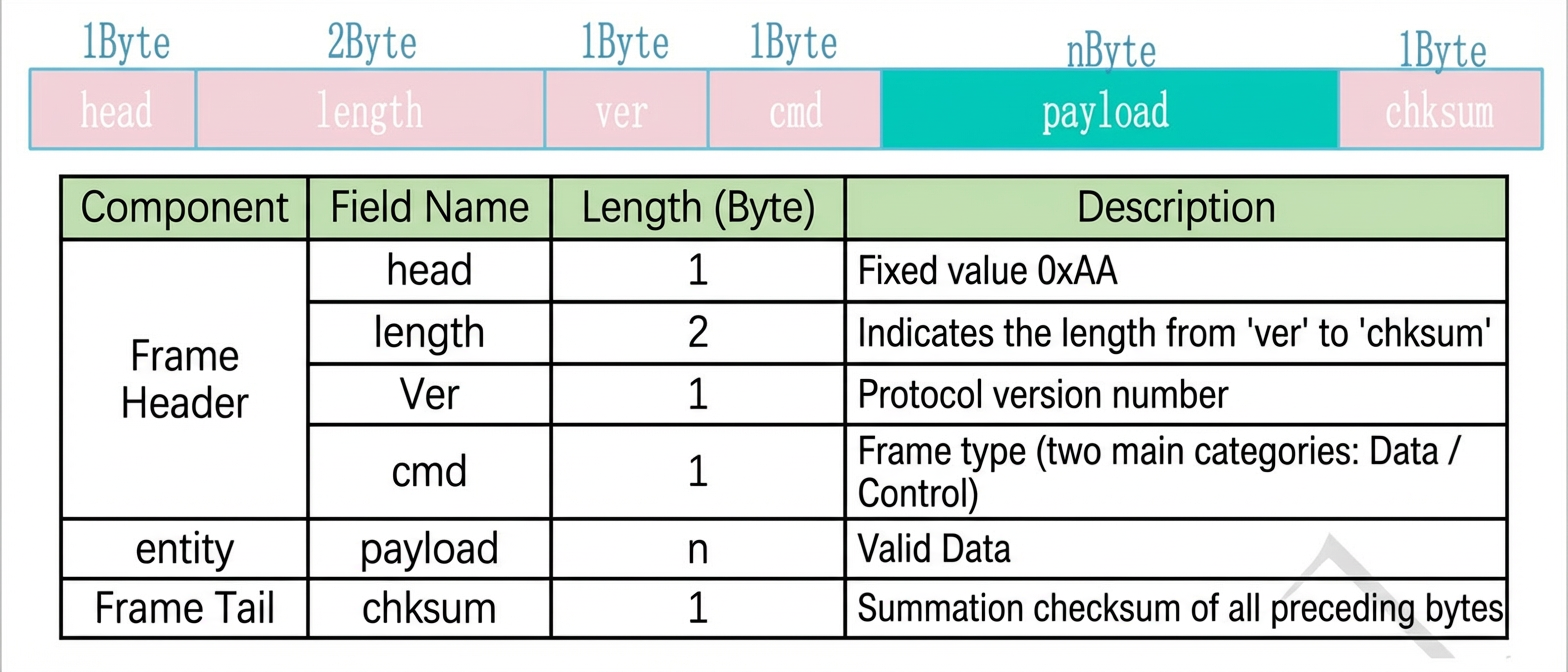
- Data is transmitted in big-endian byte order (high byte first).
- To ensure reliable transmission, implement acknowledgement, timeout, and retransmission mechanisms.
- Protocol frame type definition
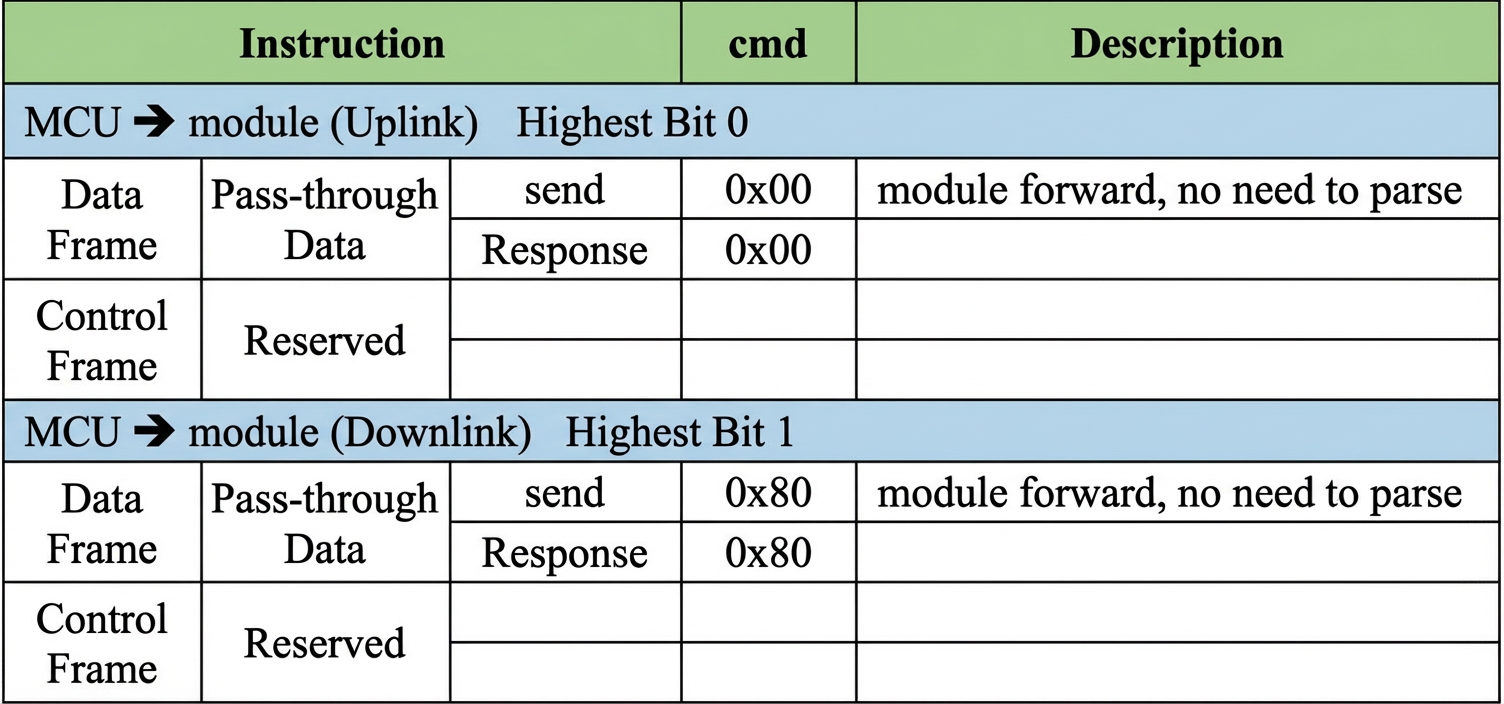
- Payload format definition

- method: The operation method. The following table describes the definitions.

- id: A frame identifier that distinguishes requests. The response frame must have the same id as the request frame.
- data: The data domain. The specific format is determined by the method.
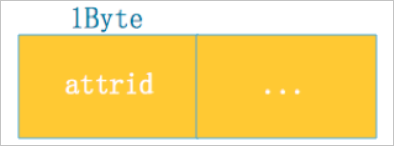
- Data domain format for the Get method
attrid is the numbered ID of the property that the cloud reads.
- Data domain format for the Set/Report method
The protocol uses numbers to represent types and properties. The len field is optional and is required only for array and text types to indicate the length.
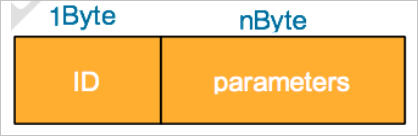
- Data domain format for the Service/Event method
Services and events are identified by number for transmission. ID is the number of the service or event. parameters are the parameters for the service or event.
- Data domain format for the Ack methoderrcode indicates the error code.
- Data domain format for the Get method
- method: The operation method. The following table describes the definitions.
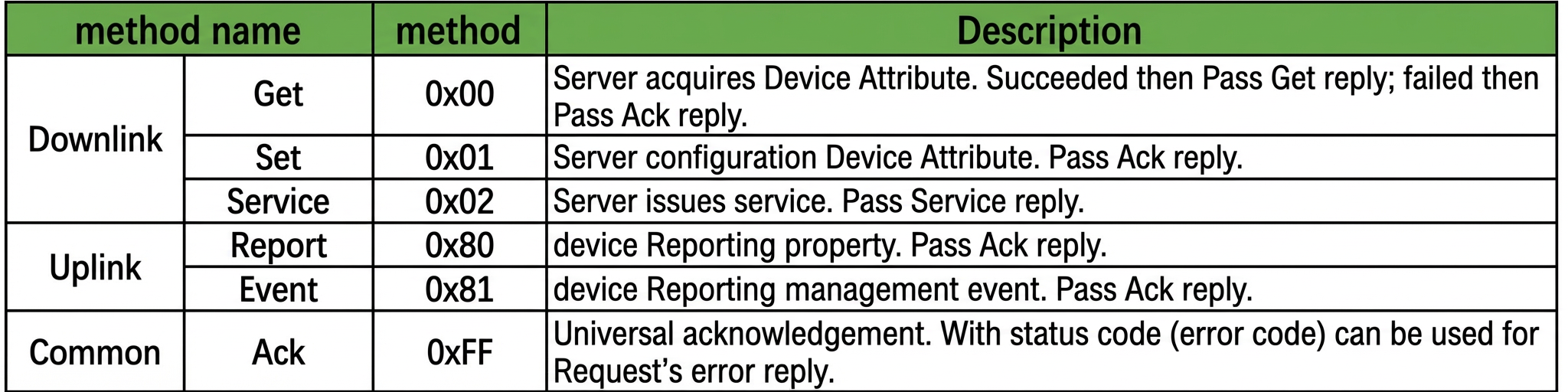

MCU SDK
For the standard binary protocol, we provide an MCU SDK that encapsulates the protocol. Based on your product's feature definitions, we also generate the corresponding code and logic for reporting and processing data in the MCU SDK. When you use the MCU SDK for development, you do not need to implement the communication protocol or define product features. You can directly call the provided API operations and add your business logic.
For example, when the cloud sends a request to turn off a light, which corresponds to the Switch property identifier, you must implement the Switch handling within a specific API. The MCU SDK handles the reply to the cloud by default. When your program detects a change in the local light's on/off state, it calls the API to modify the Switch property. The MCU SDK then reports the change to the cloud. This lets you focus on developing the device's business features.
The MCU SDK can generate development projects for the following chip models. You can develop your applications directly based on these projects. If you choose other platforms, we provide an SDK and a simple demo that you can compile and run in Linux.
- STM8S207
The development Integrated Development Environment (IDE) is IAR for STM8 (EWSTM8).
- STM32L053R8
The development IDE is Keil MDK5.
- Other platforms
Only a simple example is provided. You can compile and run it in Linux.
The core code for the MCU SDK is in the sdk-core directory. The directory structure, which includes the inc header file directory and the src source code directory, is shown in the following figure.
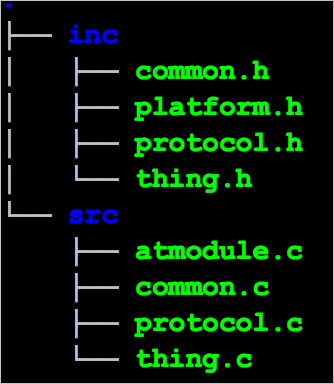
The header files are described as follows.
- common.h
The common header file for the software development kit (SDK). It includes type definitions, global object definitions for the SDK, and public API operations. We recommend that you review this file.
- platform.h
Defines the functions that you need to implement or handle. We recommend that you review this file.
- protocol.h
Defines the interfaces used for the communication protocol with the cloud. You can ignore this file.
- thing.h
Contains definitions related to product features, such as properties, services, and events. We recommend that you review this file.
The source files are described as follows.
- common.c
Implements the common code for the SDK.
- protocol.c
Defines and implements the communication protocol with the cloud.
- thing.c
Implements the interfaces related to product features.
Parts of the code in thing.h and thing.c are automatically generated based on the product's Thing Specification Language (TSL).
API reference
The following interfaces are available for you to call.- Public interfaces
- SDK initializer function:
void boneSdkInit(void) - SDK runtime function, which is called in a while loop:
void boneSdkRun(void) - Receives byte data from the serial port. This function is called in the serial port interrupt service routine:
Int32_t boneRcvFromUart(Uint8_t *data, Uint16_t length); - System runtime calculation, which is called by a 1 ms timer. You can leave this unimplemented for now:
void boneSystimeInc(void);
- SDK initializer function:
- Product feature interfaces
/ Property value range definition /
#define  ATTR_XXX

/ Set and get property values. AttrName represents the property name. The actual interface name corresponds to the property identifier. AttrVal represents the property value. ValueType represents the property type. /
void boneSet_AttrName(AttrVal);
ValueType boneGet_AttrName(void);

/ Report an event. EventName represents the event name. The actual interface name corresponds to the event identifier. Params represents the output parameters of the event. /
void boneEvntPost_EventName(Params);
Note The interfaces and parameters defined above are only a template. The specific APIs depend on the product features that you define. The following APIs are automatically generated for the sample product.- Property value range definition
#define RANG_PROPINT8_R_MIN -100 #define RANG_PROPINT8_R_MAX 100 - Set and retrieve property values
void boneSet_PropInt8_r(Int8_t data); Int8_t boneGet_PropInt8_r(void); void boneSet_PropUint8_r(Uint8_t data); Uint8_t boneGet_PropUint8_r(void); - Report an event
void boneEvntPost_EventInfo(eo_EventInfo_t *arg);

void boneEvntPost_EventAlarm(void);
- Property value range definition
- Interfaces for you to implement
/ Send protocol data over the serial port / Int32_t boneUartSend(Uint8_t *buffer, Uint16_t length); /* Lock-related interfaces. Can be left empty if no OS is used. */ void *boneMutexCreate(void); void boneMutexDestroy(void *mutex); void boneMutexLock(void *mutex); void boneMutexUnlock(void *mutex); - Interfaces where you need to add handler methods
/* Property change handler function */
void bonePropChangeHandler(Int32_t index);

/* Service handler function. Can be ignored if there are no services. ServiceName in the interface name represents the service name. The actual interface name corresponds to the service identifier. */
static Int32_t boneServCall_ServiceName(Uint32_t id, Uint8_t *data, Uint16_t length)
The following is an example.
static Int32_t boneServCall_SrvAsync1(Uint32_t id, Uint8_t *data, Uint16_t length);

static Int32_t boneServCall_SrvAsync2(Uint32_t id)