Authentication
Authentication basis
API ID and API Secret
Note: Because the data is sensitive, the API ID and API Secret are visible only to the root account at the following location:
Management Console > Collect Information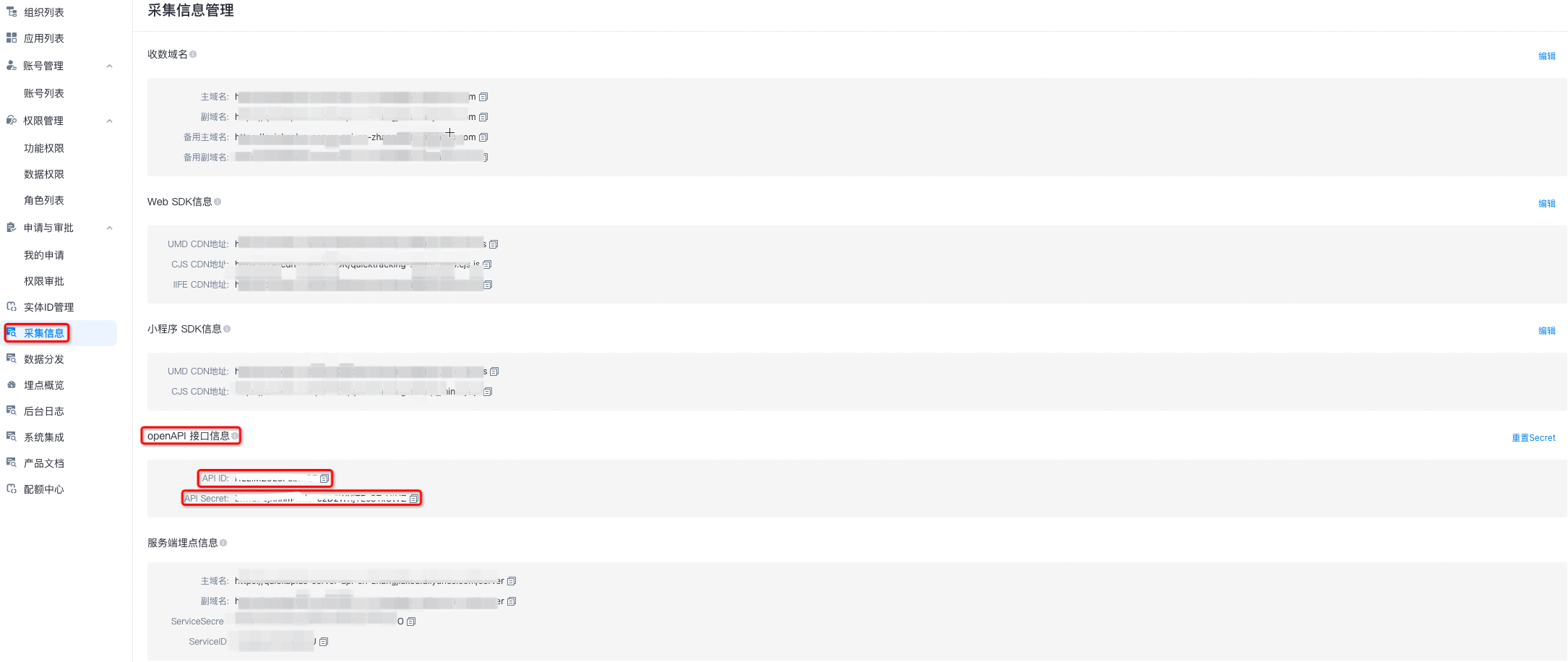
URL parameters
http://{yourDomain}/api/{service}?api_id=abcdef&api_sign=abcdef&api_ts=123456
|
Parameter name |
Description |
Notes |
|
api_id |
The API ID. |
Visible to the root account in the Quick Tracking console. |
|
api_sign |
The signature. |
For details, see the Authentication signature section. |
|
api_ts |
The timestamp. |
In milliseconds. |
|
http://{yourDomain} |
The domain name of the management console. |
Displayed in the browser address bar after you log on to Quick Tracking. |
Body parameters
Example using the following dimension table:
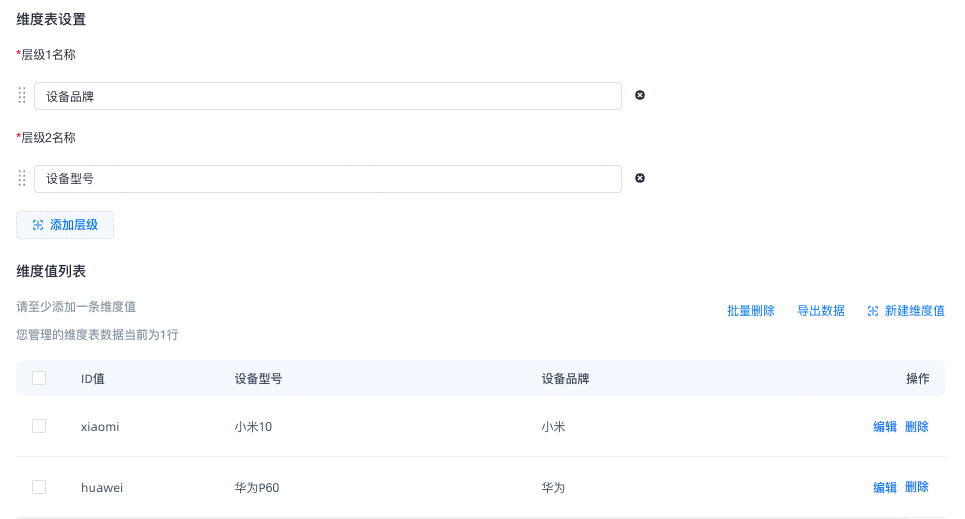
{
 "dimId": "24932301303965",
 "dimensionValueParamList": [
 {
 "idValue": "huawei",
 "level1": "Huawei",
 "level2": "Huawei P60"
 },
 {
 "idValue": "xiaomi",
 "level1": "Xiaomi",
 "level2": "Xiaomi 10"
 }
 ]
}|
Field |
Description |
Required |
Notes |
|
dimId |
The dimension table ID. |
Required |
|
|
dimensionValueParamList |
The dimension values to add or modify. |
Required |
|
|
idValue |
The ID value. |
Required |
|
|
level1 |
Level 1. |
Required |
At least one level is required. |
|
level2~n |
Level 2 to n. |
Optional |
Note:
-
If the uploaded idValue already exists in the dimension table, the existing value is overwritten. Otherwise, a new dimension value is appended.
-
Obtain the dimId as follows:
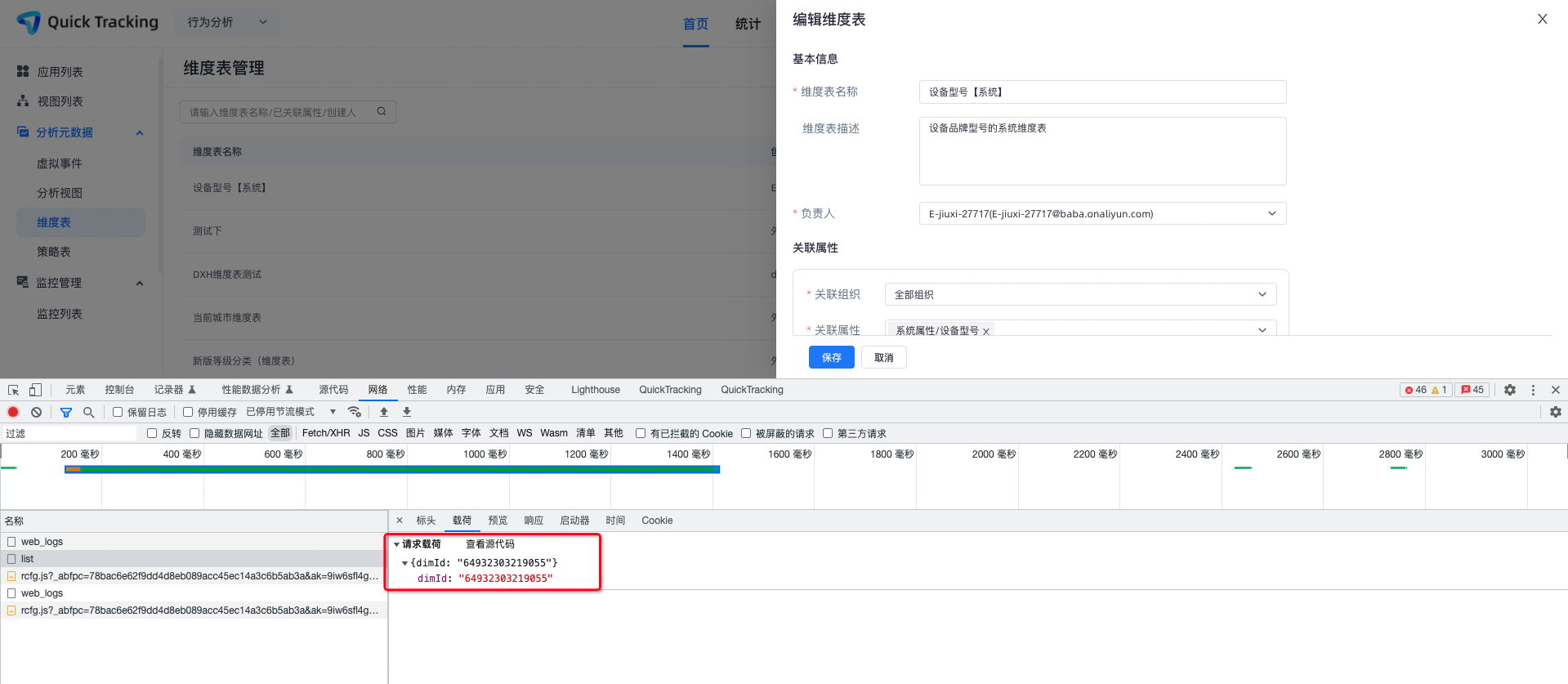
Authentication signature
Method name + Parameters sorted by key in lexicographical order
/**
 * Viewable by the root account in the Quick Tracking console.
 */
String secret = "abcdef";

/**
 * The name of the service to request.
 */
String service = "general.dimensionValue.addOrModify";

/**
 * 1. Get the URL parameters, such as apiId=abcdef&sign=abcdef&ts=123456.
 * 2. Sort the parameters by key and remove the sign parameter. The result is apiId=abcdef&ts=123456.
 */
String queryString = sort("api_id=abcdef&api_ts=123456");

/**
 * The body content for the POST request.
 */
String bodyString = "{
 {
 "dimId": "24932301303965",
 "dimensionValueParamList": [
 {
 "idValue": "A001",
 "level1": "1"
 },
 {
 "idValue": "A002",
 "level1": "2"
 }
 ]
}";

String source = service
 + "\n"
 + queryString
 + "\n"
 + bodyString;
Encrypt the source string with the API Secret
String sign = new HmacUtils(HmacAlgorithms.HMAC_SHA_1, secret).hmacHex(source);
sign = 1cfc10a297397e91f1e50e1f41ac24b8c45fd53d
<dependency>
 <groupId>com.squareup.okhttp3</groupId>
 <artifactId>okhttp</artifactId>
 <version>3.3.0</version>
</dependency>package com.alibaba.umeng.base.product.advanced.controller;

import com.alibaba.fastjson.JSONObject;
import okhttp3.*;
import org.apache.commons.codec.digest.HmacAlgorithms;
import org.apache.commons.codec.digest.HmacUtils;
import org.slf4j.Logger;
import org.slf4j.LoggerFactory;

import java.io.IOException;

/**
* @author mingpeng.spc
* @date 2022/01/07
*/
public class OpenApiControllerTest {

 private static final MediaType APPLICATION_JSON = MediaType.parse("application/json; charset=utf-8");

 private final static Logger LOGGER = LoggerFactory.getLogger(OpenApiControllerTest.class);

 public static void main(String[] args) {

 String url = "http://pre.aplus.emas-poc.com/api/";
 String service = "general.dimensionValue.addOrModify";

 String apiId = "avWYU24hvdl62V8p";
 String apiSecret = "xezIgkcrtZ2yLQA4LYgBuyUo6Re2hCu8";

 /**
 * Construct the URL parameters.
 */
 String query = new StringBuilder()
 .append("api_id=").append(apiId)
 .append("&")
 .append("api_ts=").append(System.currentTimeMillis())
 .toString();

 /**
 * Construct the body parameters.
 */
 JSONObject body = new JSONObject();
 body.put("dimId", "24932301303965");
 body.put("dimensionValueList", "xxx");


 String bodyString = body.toJSONString();

 /**
 * service
 * query
 * body
 */
 StringBuilder valueToDigest = new StringBuilder()
 .append(service)
 .append("\n")
 .append(query)
 .append("\n")
 .append(bodyString);

 String sign = new HmacUtils(HmacAlgorithms.HMAC_SHA_1, apiSecret).hmacHex(valueToDigest.toString());

 try {
 Response response = post(url + service + "?" + query + "&api_sign=" + sign, bodyString);
 System.out.println(response.body().string());
} catch (Exception e) {
 LOGGER.info("invoke post error", e);
}
}

/**
* HTTP Post
* @param url The URL.
* @param body The request body.
* @return
*/
private static Response post(String url, String body) throws IOException {

 LOGGER.info("http post start, url = {}, body = {}", url, body);

 RequestBody requestBody = RequestBody.create(APPLICATION_JSON, body);
 Request request = new Request.Builder()
 .url(url)
 .post(requestBody)
 .build();
 Response response = new OkHttpClient().newCall(request).execute();

 LOGGER.info("http post success");

 return response;
}
}
Python example
import hashlib
import hmac
import json
import time
import urllib.parse
import logging
import requests

# Configure logging.
logging.basicConfig(level=logging.INFO)
logger = logging.getLogger(__name__)

# Configure parameters.
url_base = "https://{yourDomain}/api/"
service = "general.dimensionValue.addOrModify"

api_id = "xxx" # View in the console: Collect Information > Management Console
api_secret = "xxxx" # View in the console: Collect Information > Management Console

# 1. Construct and sort the query parameters.
api_ts = str(int(time.time() * 1000))  # Millisecond timestamp.

query_params = {
    "api_id": api_id,
    "api_ts": api_ts
}

# Sort the parameters by key in lexicographic order and concatenate them into a query string.
query_string = "&".join([f"{k}={v}" for k, v in sorted(query_params.items())])

# 2. Construct the request body.
body_data = {
    "dimId":"23462505162178",
    "dimensionValueParamList":[
        {
            "idValue":"140001",
            "level1":"Direct Sales",
            "level2":"Guangdong Province",
            "level3":"Guangzhou City"
        },
        {
            "idValue": "140002",
            "level1": "Direct Sales",
            "level2": "Jiangsu Province",
            "level3": "Nanjing City"
        }
    ]
}
body_string = json.dumps(body_data, separators=(',', ':'), ensure_ascii=False)  # Compressed format with no spaces.

# 3. Construct the string to be signed (sign source).
sign_source = f"{service}\n{query_string}\n{body_string}"

# 4. Sign the string using HMAC-SHA1.
sign = hmac.new(
    key=api_secret.encode('utf-8'),
    msg=sign_source.encode('utf-8'),
    digestmod=hashlib.sha1
).hexdigest()

# 5. Construct the final URL with the signature.
final_url = f"{url_base}{service}?{query_string}&api_sign={sign}"

# 6. Send the POST request.
headers = {
    "Content-Type": "application/json; charset=utf-8"
}

logger.info(f"HTTP POST start, url = {final_url}, body = {body_string}")

try:
    response = requests.post(final_url, data=body_string.encode('utf-8'), headers=headers)
    response.raise_for_status()  # Check for HTTP errors.
    print("Response:", response.text)
except Exception as e:
    logger.error("Invoke post error", exc_info=True)
Request parameter construction
{
 "dimId": "24932301303965",
 "dimensionValueParamList": [
 {
 "idValue": "A001",
 "level1": "1"
 },
 {
 "idValue": "A002",
 "level1": "2"
 }
 ]
}|
Field |
Description |
Required |
Notes |
|
dimId |
The dimension table ID. |
Required |
|
|
dimensionValueParamList |
The dimension values to add or modify. |
Required |
|
|
idValue |
The ID value. |
Required |
|
|
level1 |
Level 1. |
Required |
At least one level is required. |
|
level2~n |
Level 2 to n. |
Optional |
Response
{
 "code": 200,
 "msg": "SUCCESS",
 "sCode": 200,
 "sMsg": "SUCCESS",
 "traceId": "1ec5e2df16769551646401019d120f",
 "success": true
}