1 Event sending before page jump
Description
When a user clicks a button that triggers an immediate page redirect, the click event may not be sent before the page navigates away. To help ensure data delivery in this scenario, delay the page redirect. The following WeChat mini program code shows an example:
// Click the link.
function targetLinkCLK(url) {
  // Delay page redirection and reserve the amount of time for the SDK to send the page.
  setTimeOut(function(){
    wx.navigateTo({
      url: `/pages/goods/details/index`,
    });
  }, 500);
  const { aplus } =Mini Program Platform Environment Variables // Such as WeChat wx, Alipay my, Byte tt, Baidu Swan, etc.
  aplus.record('track_navigate_clk', 'CLK', {
    param1: xxxx,
    param2: xxxx
  });
}
2 Application startup redirects to another page
Description
If a mini program redirects to a different page on startup based on business logic, the page code and title of the application startup event may not match the pageConfig mapping. To avoid this inconsistency, delay the redirectTo API call. The following WeChat mini program code shows an example:
App({
    onLaunch(){
    setTimeout(()=>{
      wx.redirectTo({
        url: 'test?id=1'
      });
    }, 500);
  },
    onShow(){},
    onHide(){}
})
3 How to track WeChat mini program plug-ins
Scenario Description
WeChat mini program developers can package reusable pages and components into mini program plug-ins, then integrate these plug-ins into the main package to build the complete application.
3.1 Integration and configuration of the host applet QuickTracking applet SDK
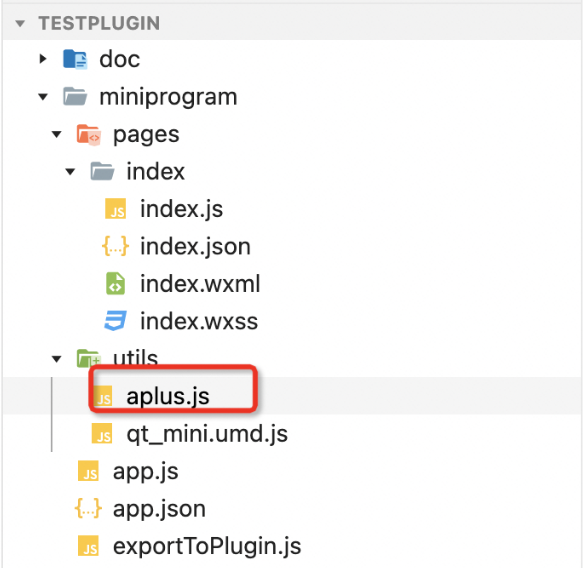
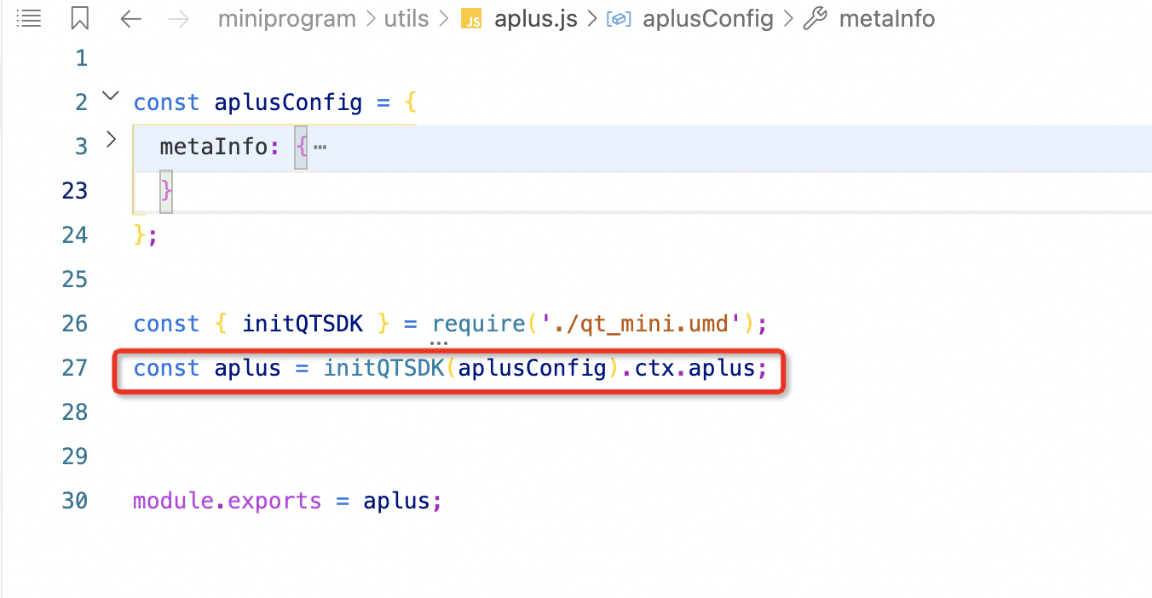
3.2 Export SDK environment variables for plug-in calls
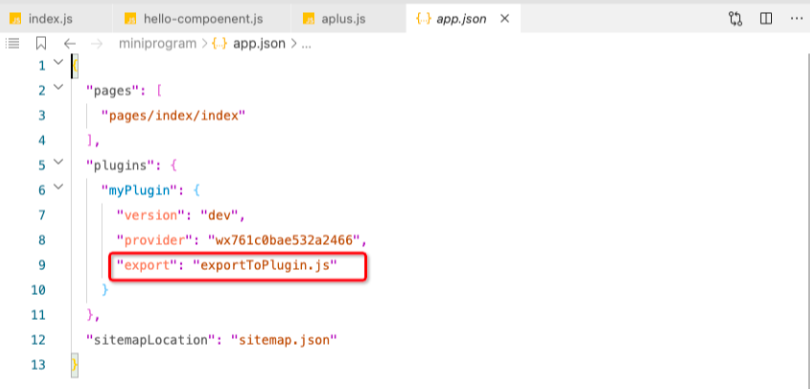
Create an exportToPlugin.js file with the following logic:
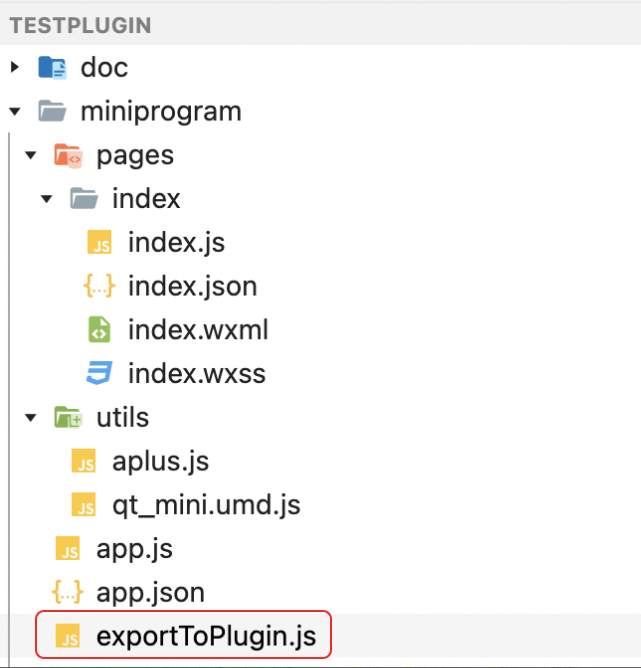
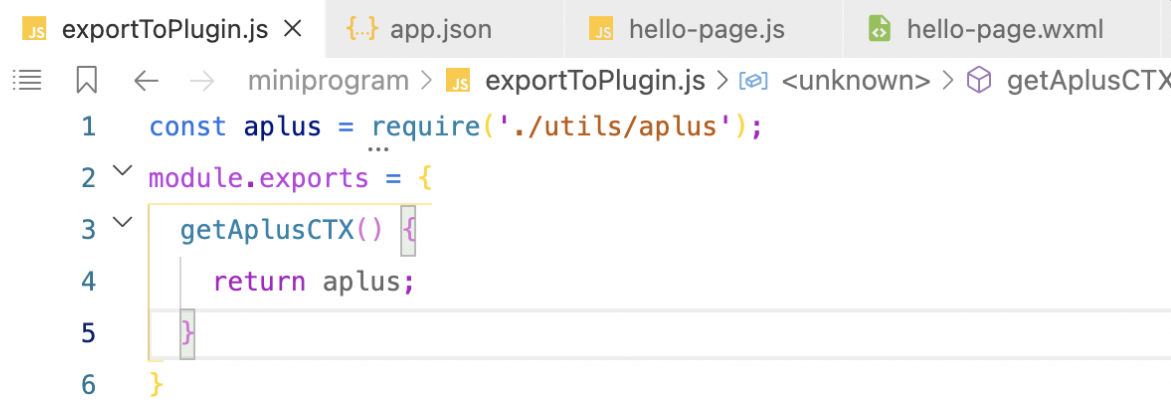
Then export the JS file to the plug-in in app.json.
Example of a page view event:
const aplus = require('../utils/aplus.js');
Page({
  data: {},
  onLoad() {
    console.log('This is a plugin page!', aplus);
  },
  onShow() {
    aplus.sendPV({is_auto: false}, {page_name: 'plugin_page'});
  },
})
Click event example:
const aplus = require('../utils/aplus.js');
Page({
  data: {},
  testCLK() {
    aplus.record('test_plugin_clk', 'CLK', {a: 1, b:2})
  }
})
Note that the following limits apply to the SDK in mini program plug-ins:
1. Automatic PVs are not supported.
2. Automatic tracking such as automatic click and exposure are not supported.
3. Visual tracking points are not supported.
4. The SDK cannot resolve the page address within a plug-in. You must specify page_name in the event attribute for page view events; otherwise, statistical correlation calculations will fail.
4 Meaning of mini program scenarios
Quick Tracking collects the official scene values from each platform. The following links provide the scene value mapping documentation:
Baidu scenario value: https://smartprogram.baidu.com/docs/data/scene/
WeChat scenario value: https://developers.weixin.qq.com/minigame/dev/reference/scene-list.html
Byte Scene Value: https://microapp.bytedance.com/docs/zh-CN/mini-game/develop/framework/scene-value/
Alipay scenario value: https://opendocs.alipay.com/mini/framework/scene
QQ scene value: https://q.qq.com/wiki/develop/game/frame/scene/
5 Mini Program Sharing Recurring Definition
In the QuickTracking console, recurring metrics are defined based on scenario values. The following list describes the sharing-related scenario values by platform.
-
WeChat: "small program message card in single chat session", "small program message card in group chat session", "App sharing message card", "small program message card with shareTicket", "chat record, open small program", "# topic page open small program", "open single page mode in circle of friends"
-
Alipay: "Small program message card (share) in a single person chat session"
-
Bytes: "WeChat Dialogue", "WeChat Friends Circle", "QQ Dialogue", "Qzone", "DingTalk", "System Sharing", "Copy Link", "Password Sharing", "Shared Micro Headlines"
-
Baidu: "Share", "Share the original intermediate page", "Share the web-based intermediate page ", " Baidu Friends Chat Page Recurring Portal"
6 1.X Upgrade 2.X Operation Document
Replace SDK
2. Contact your account manager to obtain the download URL for the 2.X SDK.
Open the URL, right-click the page, save the SDK file locally, and then add the new SDK file to your project.
SDK introduction:
The data collection domain field is renamed from aplus-rhost-v to trackDomain.
const aplus=require ('./utils/aplus_mini')(aplusConfig); Replace with:
// After the initQTSDK function is executed, the SDK is mounted under the context of the mini program, such as WeChat wx, byte tt, and Alipay my.
// The aplus and aplus_queue environment variables
import { initQTSDK } from './utils/qt_mini.umd.js';
initQTSDK(aplusConfig);
SDK 2.x provides two API calling methods:
-
Call the API directly by using the aplus environment variable
-
Send API commands to the aplus_queue of the SDK
Note: You can choose either method, or mix both in the same project.
1. Call an API operation by using the aplus environment variable
Direct API calls use a more concise syntax:
const { aplus } =Mini Program Platform Environment Variables // Such as WeChat wx, Alipay my, Byte tt, Baidu Swan, etc.
aplus.${APIName}($arguments) // The arguments are the input parameters
of the specified API.
The APIName includes:
-
setMetaInfo: overwrites the existing default settings of the SDK
-
appendMetaInfo: the default configuration of the append SDK
-
getMetaInfo: obtains the current configuration of the SDK.
-
record: used to send event logs
-
sendPV: used to send page logs
arguments are the input parameters for each API call
2. Send API commands to the aplus_queue queue
You can also send commands to the SDK through its command queue aplus_queue. The command format is as follows:
const { aplus_queue } =Mini program platform environment variables; // such as WeChat wx, Alipay my, byte tt, and Baidu Swan.
aplus_queue.push({
  action: "$APIName",
  arguments: [$arguments], // The arguments are the input parameters of the specified API.
});-
The action parameter specifies the API name as a string. Available values are as follows:
-
aplus.setMetaInfo: Overwrites the existing default settings of the SDK
-
aplus.appendMetaInfo: the default configuration of the append SDK
-
aplus.getMetaInfo: obtains the current configuration of the SDK.
-
aplus.record: used to send event logs
-
aplus.sendPV: used to send page logs
-
-
The arguments parameter is an array of input values for the API specified in the action. The element order must match the order defined by the API.
7. Other framework support capabilities
The WeChat mini program framework behaves inconsistently across platforms. In some PC environments, the pre-built page exit and application exit events may be lost.
8. About hooks
The SDK hooks the system onAppHide event. To ensure that the pre-built events page exit, page usage duration, application exit, and application usage duration are collected correctly, avoid performing time-consuming operations in the wx.onAppHide event handler.