Purchase guide
Alibaba Cloud Blockchain as a Service (BaaS) supports three blockchain frameworks: Ant Blockchain, Hyperledger Fabric, and Quorum (an enterprise-focused version of Ethereum). This guide explains the available editions and their use cases, then walks you through the purchase process for each framework.
Before you begin
Before choosing a framework or edition, understand the key building blocks:
-
Consortium: A group of organizations that share a blockchain network. You create a consortium first, then add blockchain instances to it.
-
Organization: An individual participant in a consortium. Each organization runs its own peer nodes.
-
Channel: A private communication channel within a consortium that restricts data visibility to specific organizations.
-
Node: A server that stores the ledger and processes transactions.
Choose a framework
| Framework | Best for |
|---|---|
| Ant Blockchain | Enterprises that need a high-throughput, managed blockchain with a simplified setup process |
| Hyperledger Fabric | Enterprises that need fine-grained access control, multi-organization consortia, or interoperability with external systems |
| Quorum | Enterprises migrating from or integrating with Ethereum-based smart contracts |
Purchase process - Ant Blockchain
Step 1: File a declaration of use
A declaration of use is required before every new instance purchase — whether you are a first-time buyer or are adding a new instance to an existing account.
-
Log on to the console. In the left-side navigation pane, choose AntChain > Contract Chain to open the My Consortium page.
-
In the upper-right corner of the page, click Declaration of Use in the yellow area. Select the intended use in the pop-up window and click Submit Declaration.
If you select Others, enter a description of no more than 30 characters in the text box.
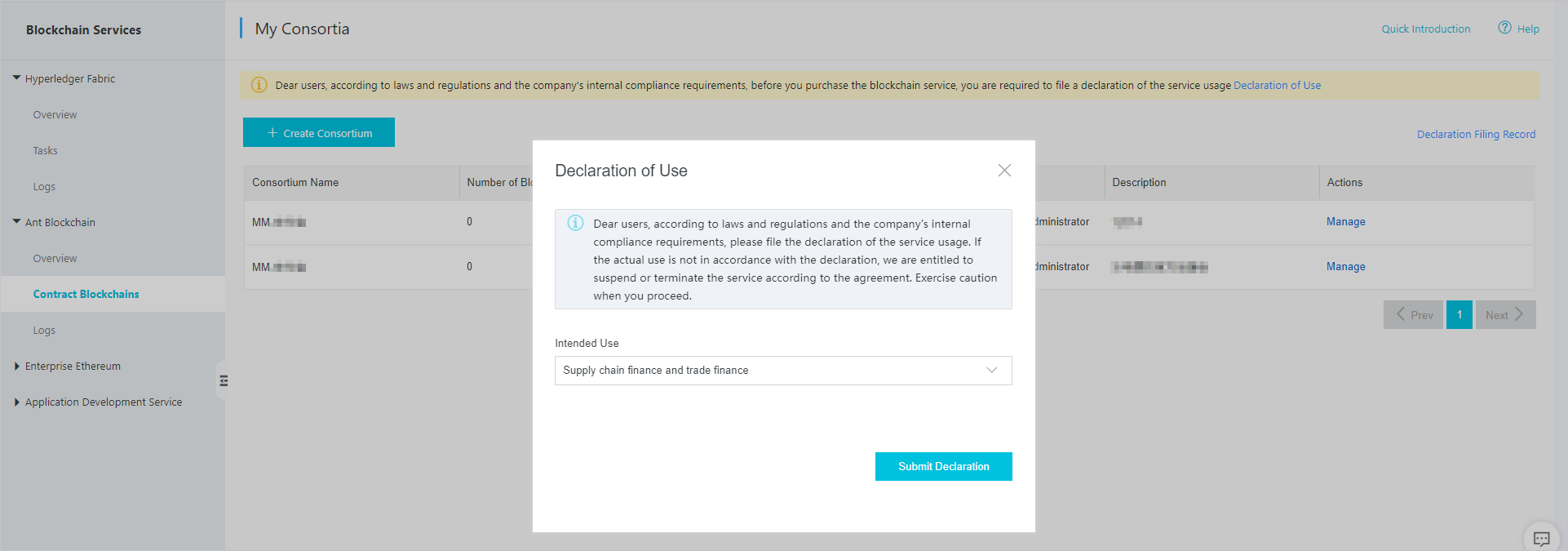
-
Follow the on-screen instructions to complete the declaration.
The Description of Your Intended Use field accepts up to 300 characters.
-
Check the review status.
-
Click Declaration Filing Record in the upper-right corner of the My Consortium page.
-
In the window that appears, view the declaration status:
-
Approved: The declaration is approved. Proceed to purchase.
-
To be reviewed: The review is in progress. The review typically takes 1–2 days. A notification banner also appears at the top of the My Consortium page:

-
Rejected: Click Re-Submit Declaration in the red banner at the top of the My Consortium page to resubmit.

-
-
Step 2: Create a consortium
Skip this step if you are adding a blockchain to an existing consortium.
-
In the console, choose AntChain > Contract Chain.
-
Click Create Consortium. Enter a name and description, then click Submit.
Step 3: Purchase a blockchain instance
-
In the consortium list, click Manage to open the chain management page.
-
Click Create Blockchain to go to the purchase page. The Consortium field is pre-populated with all consortia in your account.
-
Configure the following parameters:
Parameter Description Region Select the region closest to your applications to minimize network latency. Consortium Select an existing consortium or create one. Blockchain Name Enter a name of 1–100 characters using digits, letters, and hyphens (-). You can modify the name at any time on the console chain management page. Duration Select a subscription period. Instances are subscription-based. -
Click Buy Now and complete the payment.
After payment, the instance appears in the console. Instance creation takes 10–30 minutes because each instance uses exclusive dedicated resources. For pricing details, see Specifications and billing methods.
Upgrade from Professional Edition to Enterprise Edition
-
Log on to the console. In the navigation pane on the left, click Ant Blockchain > Contract Chain to go to the My Consortiums page.
-
On the consortium list page, find the consortium that you want to manage and click Manage in the Actions column to go to the consortium chain list page.
-
In the Chains in Consortium list, find the Professional Edition chain to upgrade. In the Actions column, click More > Upgrade.
You are redirected to the product purchase page, where you can complete the upgrade configuration.
-
Change the current plan to Enterprise Edition. Then, follow the on-screen instructions to complete the upgrade.
Purchase process - Hyperledger Fabric
Purchase options
Purchase from either the product page or the console:
-
Product page: Go to the Alibaba Cloud BaaS product page and click Buy Now.
-
Console: Log on to the Alibaba Cloud BaaS console. On the Hyperledger Fabric page, click Create Consortium or Create Organization, then click Purchase consortium/organization resources.
Configure instance parameters
On the purchase page, configure the following:
| Parameter | Description |
|---|---|
| Region | Select the region closest to your business applications. |
| Instance parameters | Select an edition based on your requirements. See Purchase reference - Hyperledger Fabric for a feature comparison. |
| Duration | Select a subscription period. Instances are subscription-based. |
If you have previously created a Fabric V1.4 or V2.2 instance, you can continue creating instances of those versions or create a new instance of Fabric V2.5. Mixed networking between different versions is not supported.
New accounts can only create Fabric V2.5 instances by default. To create a V1.4 or V2.2 instance, submit a ticket.
Click Buy Now and complete the payment. For pricing details, see Specifications and billing methods.
Purchase reference - Ant Blockchain
Ant Blockchain instances are available in Enterprise Edition only.
| Edition |
Chain Property |
Price |
Benefits |
Resource Configuration |
Purchase Recommendation |
| Professional Edition |
Dedicated consortium chain |
Paid (For more information, see Specifications and pricing) |
|
|
This edition meets basic blockchain management and development needs but has some functional limitations. It is suitable for general business systems of small enterprises that do not have high requirements for the number of participants or transaction processing capacity. We recommend this edition for users with small- to medium-sized businesses or those in the initial phase of their business. You can upgrade to the Enterprise Edition in the console later. For more information, see Upgrade from Professional Edition to Enterprise Edition below. |
| Enterprise Edition |
Dedicated consortium chain |
Paid (For more information, see Specifications and pricing) |
|
|
This edition provides complete blockchain management and development features, along with value-added capabilities. It is suitable for important business systems of medium-sized or large enterprises that have high requirements for the number of participants or transaction processing capacity. |
| Instance type | Nodes | Free storage per node | Use case |
|---|---|---|---|
| Enterprise Edition | 4 | 6 TB | Medium-to-large enterprises with many business participants or high transaction throughput requirements |
Purchase reference - Hyperledger Fabric
Choose an edition
Select the edition that matches your network type and scale:
| Edition | Network type | Use case |
|---|---|---|
| Basic Edition | Production network (multiple parties) | Developers and small-to-medium enterprises running basic production workloads on Alibaba Cloud |
| Enterprise Edition | Production network (multiple parties) | Medium-to-large enterprises requiring interoperability, external Certificate Authority (CA), China-approved cryptographic algorithms, or high transaction throughput (up to 2,000 TPS) |
| Enterprise Security Edition |
Builds on the Enterprise Edition using Alibaba Cloud ECS Bare Metal Instances (Shenlong) to provide built-in Intel Software Guard Extensions (SGX) chip-level encryption and security protection for BaaS. This edition supports the Chinese cryptographic algorithm, external CAs, and interconnection with external Fabric nodes. It can be integrated with other Alibaba Cloud services on a large scale. |
Suitable for the core business of government, banking, finance, and large enterprises with extremely high security protection requirements. This edition is also suitable for systems with special requirements, such as the Chinese cryptographic algorithm, commercial CAs, cross-cloud interconnection, and on-chain/off-chain collaboration. |
Consortium instance features
| Feature |
Basic Edition |
Enterprise Edition |
Enterprise Security Edition |
| Organization limit in a consortium |
5 |
10 |
Unlimited |
| Channel limit |
5 |
10 |
Unlimited |
| Organization limit in a channel |
5 |
10 |
Unlimited |
| Chinese cryptographic algorithm |
Not supported |
Supported (Before purchasing, please submit a ticket) |
Supported (Before purchasing, please submit a ticket) |
| SGX chip-level encryption |
Not supported |
Not supported |
Supported |
| Basic DDoS protection |
Supported |
Supported (For advanced protection, please submit a ticket) |
Supported (For advanced protection, please submit a ticket) |
Organization instance features
| Feature |
Basic Edition |
Enterprise Edition |
Enterprise Security Edition |
| Channel join limit |
5 |
10 |
Unlimited |
| Interoperability |
Not supported |
Support |
Support |
| Limit on triggers of each type for Alibaba Cloud service integration |
1 |
3 |
10 |
| HA CA service |
Not supported |
Support |
Support |
| External CA |
Not supported |
Supported (Before purchasing, please submit a ticket) |
Supported (Before purchasing, please submit a ticket) |
| Chinese cryptographic algorithm |
Not supported |
Supported (Before purchasing, please submit a ticket) |
Supported (Before purchasing, please submit a ticket) |
| Underlying performance optimization |
Not supported |
Support |
Support |
| SGX chip-level encryption |
Not supported |
Not supported |
Supported |
| REST API |
Supported |
Support |
Support |
| Basic DDoS protection |
Support |
Supported (For advanced protection, please submit a ticket) |
Supported (For advanced protection, please submit a ticket) |
| Peak performance (TPS) |
Up to 300 TPS |
Up to 2,000 TPS |
Up to 2,300 TPS |
Underlying resources
| Instance Type |
Specifications |
Server Specification |
Number of Servers |
Free Storage Space |
| Consortium |
Basic Edition |
4-core 8 GB |
3 |
100 GB |
| Enterprise Edition |
16-core 32 GB |
3 |
500 GB |
|
| Enterprise Security Edition |
X-Dragon SGX 8-core 32 GB |
3 |
1000 GB |
|
| Organization |
Basic Edition |
4-core 8 GB |
3 |
100 GB |
| Enterprise Edition |
16-core 32 GB |
3 |
500 GB |
|
| Enterprise Security Edition |
ECS Bare Metal Instance SGX 8-core 32 GB |
3 |
1000 GB |