Getting Started
The Starter Edition deploys a pre-configured Hyperledger Fabric network owned by a single account. It includes one consortium and two organizations joined to a shared default channel, so you can start testing smart contracts without manual network setup.
The Starter Edition is for testing only and does not support adding more organizations. To build a production network with multiple members, use the Basic Edition or Enterprise Edition. For more information, see Operation process.
Getting Started
This topic describes how to create a Fabric blockchain. Before you begin, make sure that you have an Alibaba Cloud account or a RAM user. Then, follow these steps:
What gets created
When the Starter Edition provisions, it creates the following Hyperledger Fabric components in your account:
| Component | Count | Description |
|---|---|---|
| Consortium | 1 | The governance boundary for your blockchain network |
| Organizations | 2 | Participant organizations that transact on the network |
| Channel | 1 (default) | A private communication subnet where both organizations transact |
Both organizations are automatically joined to the default channel. Your only remaining task is to deploy a chaincode to that channel.
Prerequisites
Before you begin, make sure you have:
An Alibaba Cloud account or RAM user with BaaS permissions
A region selected for your blockchain resources
Deploy a blockchain network
Log in to Alibaba Cloud.
Alibaba Cloud account: https://account.alibabacloud.com/login/login.htm
Go to the Alibaba Cloud BaaS console.
Create an organization.
On the Hyperledger Fabric > Overview page, click Create Organization. On the purchase page, set the following parameters:
Parameter
Description
Region and Zone
The region where your blockchain infrastructure is located. Select the same region as your business application system.
Blockchain Type
The type of blockchain. Currently, only Hyperledger Fabric is available.
Resource Type
Select Organization.
Series
Basic Edition, Enterprise Edition, and Enterprise Security Edition are available. Select one as needed. For more information about these editions and a comparison, see Product editions.
Organization Name
Enter a name that is related to your business for easy identification.
Organization Domain Name
The unique identifier of the organization in the blockchain network. Enter a prefix for the organization's domain name.
Storage Fee
You do not need to select a capacity during purchase. You are billed hourly based on actual data usage. For more information, see Specifications and pricing.
Subscription Duration
Select the service duration. Select auto-renewal to prevent service interruptions when the subscription expires.
Click OK.
It takes 15 to 40 minutes to create the organization. After the process is complete, the status of the organization changes to Running.
In the My Organizations section, click the name of an organization to view its details.
The organization details page includes the Joined Consortiums, Joined Channels, Peer Nodes, Users, and Chaincodes tabs.
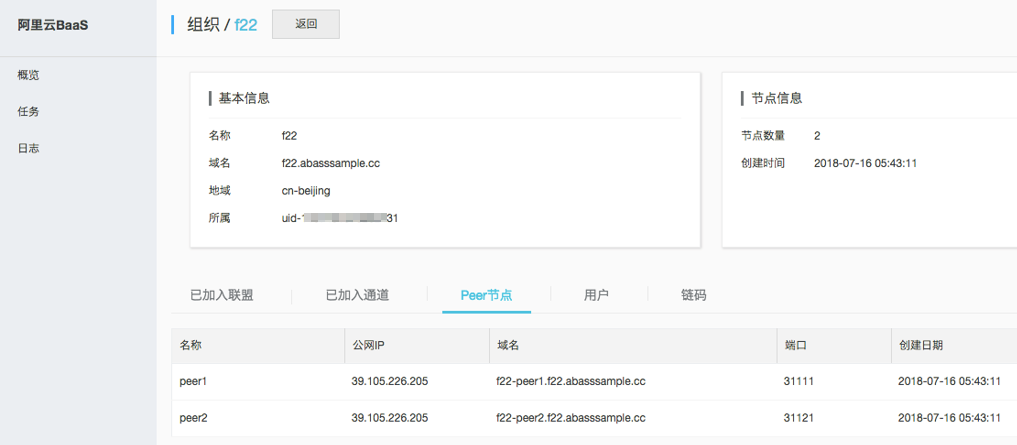
You have now created a basic blockchain network. To learn how to manage the blockchain and develop applications based on it, see the User Guide and the Developer Guide.
Create a consortium.
On the Hyperledger Fabric > Overview page, click Create Consortium. On the purchase page, set the following parameters.
Parameter
Description
Region and Zone
The region where your blockchain infrastructure is located. Select the same region as your business application system.
Blockchain Type
The type of blockchain to create. Currently, only Hyperledger Fabric is available.
Resource Type
Select Consortium.
Series
Basic Edition, Enterprise Edition, and Enterprise Security Edition are available. Select one as needed. For more information about these editions and a comparison, see Product editions.
Consortium Name
Enter a name that is related to your business for easy identification.
Consortium Domain Name
The unique identifier of the consortium in the blockchain network. Enter a domain name for the consortium.
Storage Fee
You do not need to select a capacity during purchase. You are billed hourly based on actual data usage. For more information, see Specifications and pricing.
Subscription Duration
Select the service duration. Select auto-renewal to prevent service interruptions when the subscription expires.
Click OK. It takes 15 to 40 minutes to create the consortium. After the process is complete, the status of the consortium changes to Running.
In the My Consortiums section, click the name of a consortium to view its details.
The consortium details page includes the Participating Organizations, Channels, Chaincodes, and Orderer Nodes tabs, as shown in the following figure.
By default, BaaS automatically creates three Orderer nodes for each consortium.
Your blockchain network is ready. Both organizations can now transact on the default channel.
Troubleshooting
Consortium or organizations not appearing on the Overview page
Provisioning typically takes a few minutes. Refresh the page and wait. If resources do not appear after several minutes, check that your account has the required BaaS permissions and that the purchase completed successfully in your order history.
Purchase page does not load or shows an error
Make sure you are logged in with an account or RAM user that has BaaS purchase permissions.
What's next
Deploy chaincode to your channel to start executing transactions: