Create an Oracle Data Subscription channel
Subscribe to incremental data changes from a self-managed Oracle database in real time to enable cache updates, asynchronous decoupling, and ETL-based synchronization.
Prerequisites
-
The self-managed Oracle database must be version 9i, 10g, or 11g. Real Application Clusters (RAC) instances are not supported.
-
Supplemental logging is enabled for the self-managed Oracle database, including both
supplemental_log_data_pkandsupplemental_log_data_ui. For more information, see Supplemental Logging. -
The self-managed Oracle database must run in ARCHIVELOG mode with a suitable retention period configured for archived logs. Archived logs must be accessible. For more information, see ARCHIVELOG.
Usage notes
- Online DDL changes by tools such as gh-ost or pt-online-schema-change are not tracked. The client may fail to write consumed data to the destination table due to schema mismatches.
- If the source database is used in another task such as data migration, data outside your subscription scope may be tracked. Filter unwanted data in your client application.
Preparations
Log on to the source Oracle database and create a database account with DBA privileges for Data Subscription.
If you need to track data changes from an Oracle database but the database administrator (DBA) permission cannot be granted to the database account, you can enable archive logging and supplemental logging, and grant fine-grained permissions to the account.
Enable archive logging and supplemental logging.
Type
Procedure
Archive logging
Execute the following statements to enable archive logging:
shutdown immediate;
startup mount;
alter database archivelog;
alter database open;
archive log list;
Supplemental logging
Enable supplemental logging at the database or table level:
NoteYou can enable database-level supplemental logging to ensure the stability of DTS tasks. You can enable table-level supplemental logging to reduce the disk usage of the source Oracle database.
Enable database-level supplemental logging
Enable minimal supplemental logging:
alter database add supplemental log data;Enable primary key and unique key supplemental logging at the database level:
alter database add supplemental log data (primary key,unique index) columns;
Enable table-level supplemental logging
Enable minimal supplemental logging:
alter database add supplemental log data;Enable table-level supplemental logging by using one of the following methods:
Enable primary key supplemental logging at the table level:
alter table table_name add supplemental log data (primary key) columns;Enable table-level supplemental logging for all columns:
alter table tb_name add supplemental log data (all) columns ;
Grant fine-grained permissions to an Oracle database account.
Oracle Versions 9i to 11g
# Create a database account, for example, rdsdt_dtsacct, and grant permissions to the account.
create user rdsdt_dtsacct IDENTIFIED BY rdsdt_dtsacct;
grant create session to rdsdt_dtsacct;
grant connect to rdsdt_dtsacct;
grant resource to rdsdt_dtsacct;
grant execute on sys.dbms_logmnr to rdsdt_dtsacct;
grant select on V_$LOGMNR_LOGS to rdsdt_dtsacct;
grant select on all_objects to rdsdt_dtsacct;
grant select on all_tab_cols to rdsdt_dtsacct;
grant select on dba_registry to rdsdt_dtsacct;
grant select any table to rdsdt_dtsacct;
grant select any transaction to rdsdt_dtsacct;
-- v$log privileges
grant select on v_$log to rdsdt_dtsacct;
-- v$logfile privileges
grant select on v_$logfile to rdsdt_dtsacct;
-- v$archived_log privileges
grant select on v_$archived_log to rdsdt_dtsacct;
-- v$parameter privileges
grant select on v_$parameter to rdsdt_dtsacct;
-- v$database privileges
grant select on v_$database to rdsdt_dtsacct;
-- v$active_instances privileges
grant select on v_$active_instances to rdsdt_dtsacct;
-- v$instance privileges
grant select on v_$instance to rdsdt_dtsacct;
-- v$logmnr_contents privileges
grant select on v_$logmnr_contents to rdsdt_dtsacct;
-- system tables
grant select on sys.USER$ to rdsdt_dtsacct;
grant select on SYS.OBJ$ to rdsdt_dtsacct;
grant select on SYS.COL$ to rdsdt_dtsacct;
grant select on SYS.IND$ to rdsdt_dtsacct;
grant select on SYS.ICOL$ to rdsdt_dtsacct;
grant select on SYS.CDEF$ to rdsdt_dtsacct;
grant select on SYS.CCOL$ to rdsdt_dtsacct;
grant select on SYS.TABPART$ to rdsdt_dtsacct;
grant select on SYS.TABSUBPART$ to rdsdt_dtsacct;
grant select on SYS.TABCOMPART$ to rdsdt_dtsacct;
Procedure
-
Purchase a Data Subscription channel. Purchase process.
NoteOn the buy page, set Subscription Instance Type to Oracle and select the source instance region.
-
Log on to the DTS console.
-
In the navigation pane on the left, click Change Tracking.
-
At the top of the Data Subscription page, select the region of the subscription channel.
-
Find the purchased Data Subscription channel and click Configure Subscription Channel.
-
Configure the source database and network type.
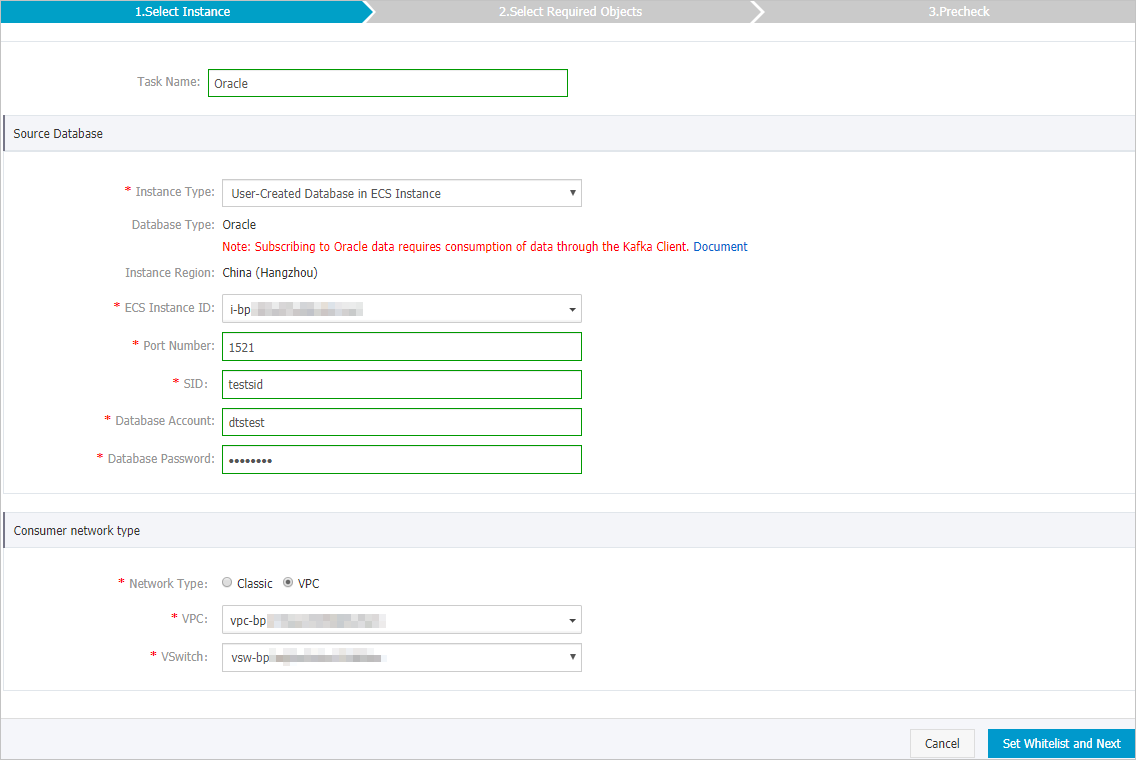
Category
Parameter
Description
N/A
Subscription name
DTS generates a name automatically. We recommend that you use a descriptive name for easier identification. The name does not need to be unique.
Source database information
Instance type
Select the source instance type. This example uses User-Created Database with Public IP.
NoteIf your self-managed database is of a different instance type, you may need to complete additional preparations. For more information, see Preparations for data migration.
Database type
Auto-filled as Oracle. Cannot be changed.
Instance region
The Source Instance Region selected during purchase. Cannot be changed.
ECS instance ID
Select the ECS instance that hosts your self-managed Oracle database.
Port
The service port of the self-managed Oracle database.
SID
The SID of the self-managed Oracle database.
Database account
The database account of the self-managed Oracle database created in the Preparations section.
NoteRefer to Preparations for account creation and configuration details.
Database password
Enter the password of the database account.
Consumption network type
N/A
The network type for the Data Subscription channel.
Note-
Select the same network type as the ECS instance where your subscription client is deployed. For example, if the ECS instance is in a VPC, select VPC as the network type and specify the Proprietary Network and vSwitch.
-
Private network connections minimize latency.
-
Classic Network
If you set the network type to Classic Network, no other configuration is needed. What is a classic network?.
-
Proprietary Network
If you set the network type to Proprietary Network, you must also select a Proprietary Network and a vSwitch. What is a VPC?.
-
-
Click Authorize Whitelist and Proceed to Next Step.
DTS adds its server CIDR blocks to the source database configuration. For Alibaba Cloud instances such as ApsaraDB RDS for MySQL or ApsaraDB for MongoDB, CIDR blocks are added to the instance whitelist. For self-managed databases on ECS, DTS adds CIDR blocks to security group rules, but you must also add them to the database whitelist. CIDR blocks of DTS servers.
Warning Adding public CIDR blocks poses security risks. Use strong passwords, restrict open ports, authenticate internal APIs, review network access regularly, and use private connections through Express Connect, VPN Gateway, or Smart Access Gateway. -
Configure the data types and subscription objects.
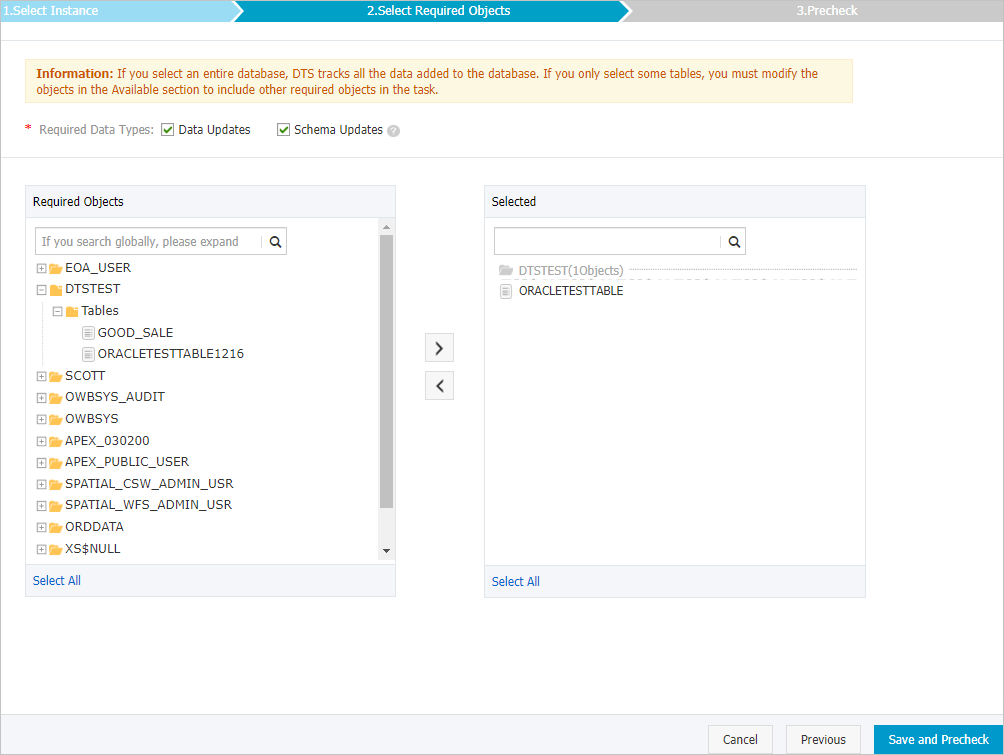
Parameter Description Required data types - Data Update
Subscribes to data changes (INSERT, DELETE, and UPDATE operations) for the selected objects.
- Schema Update
Subscribes to schema changes (CREATE, DROP, and ALTER operations) for all objects in the instance. Filter for required data in your client application.
Note- Selecting an entire database also tracks changes to objects added later.
- Selecting a specific table tracks only that table. To track new tables, add them to the subscription objects. Modify the objects for change tracking.
Required objects In the Required Objects box, select objects to track and click
Note You can select objects at the database or table level. - Data Update
-
In the lower-right corner of the page, click Save and Precheck.
Note-
DTS runs a precheck before the subscription task starts. The task starts only after the precheck passes.
-
If the precheck fails, click the
 icon next to the failed item for details. Fix the issues and rerun the precheck.
-
-
After Precheck Passed appears in the Precheck dialog box, close the Precheck dialog box.
The Data Subscription channel starts initialization, which typically takes about one minute. After initialization is complete, create consumer groups and start consuming subscription data.