What is Elastic Container Instance?
Elastic Container Instance (ECI) is a serverless container service that runs containers on Alibaba Cloud without requiring you to provision or manage servers. Bring a Docker image, submit it, and pay only for what your containers consume — no Elastic Compute Service (ECS) instances to purchase, no capacity to plan.
Prerequisites
Before you read this topic, you should understand the following concepts:
Overview
ECI combines container and serverless technologies. You bring Docker images; ECI handles the underlying infrastructure. No need to invest time in operating and maintaining ECS instances — focus on developing your business instead.
You can connect ECI to your existing systems through API operations, and deploy containerized applications from the ECI console or via API. You can also use Virtual Kubelet to connect ECI to Kubernetes and use ECI's elastic capacity to handle burst traffic.
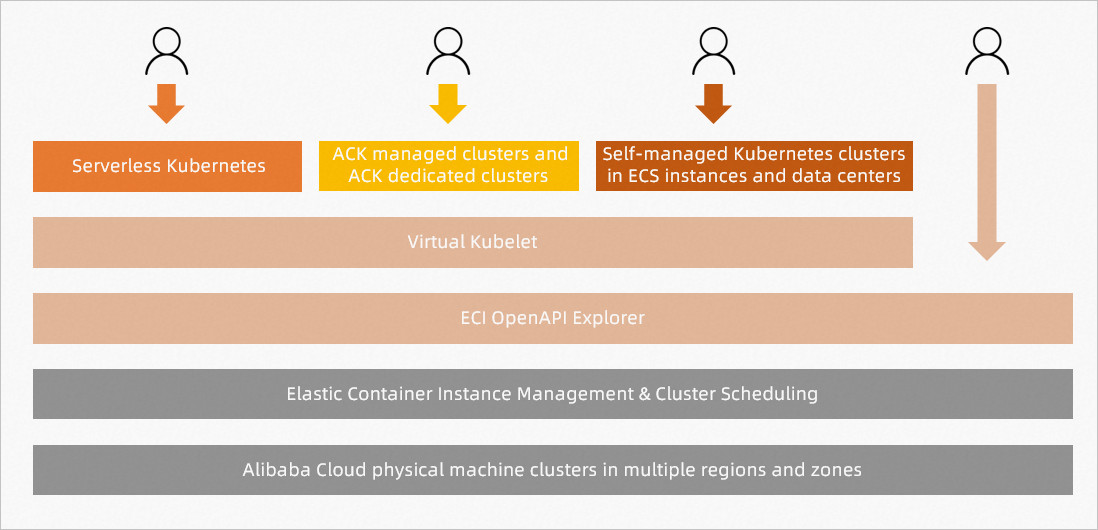
ECI supports four integration methods. The first two are recommended for most use cases.
(Recommended) ACK Serverless clusters — Fully managed, O&M-free clusters where underlying pods are handled entirely by ECI.
(Recommended) ACK clusters — Connect ECI to ACK clusters so your ACK clusters obtain elastic capabilities for cluster deployment.
Self-managed Kubernetes via Virtual Kubelet — Connect ECI to a Kubernetes cluster running on ECS instances or in your own data center. Provides on-demand compute for clusters you manage.
API operations — Call ECI APIs directly to create and release container instances anytime at low costs. Elastic container instances deliver high performance to handle concurrent workloads and allow you to offload the burdens of planning resource capacities.
You must monitor the status of pods and containers that run on ECI and the status of business deployed in containers. For example, monitor the CPU utilization and disk usage of your pods and containers, and track the health of the business running inside them.
Service architecture
Elastic Container Instance features multiple security optimizations to ensure isolation by design. Each container runs inside an Alibaba Cloud CIPU-based sandbox, which provides VM-class security and isolation with lower overhead and faster startup than traditional VMs.
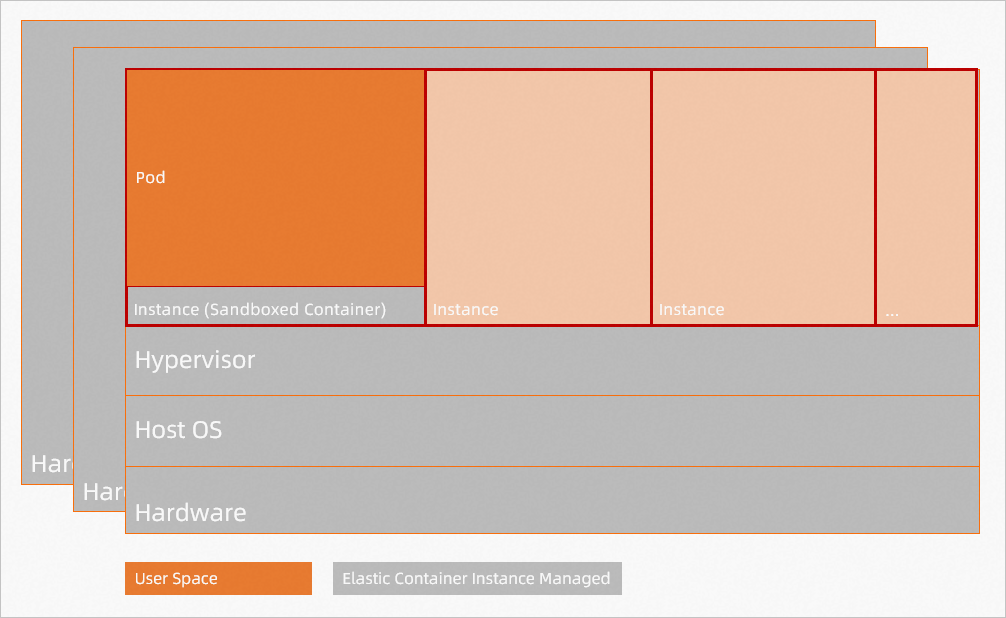
ECI and Kubernetes work together in a layered model: ECI schedules and manages underlying pods, while Kubernetes acts as a Platform as a Service (PaaS) layer on top to manage workloads. The following figure shows the full Alibaba Cloud container service portfolio and where ECI fits.
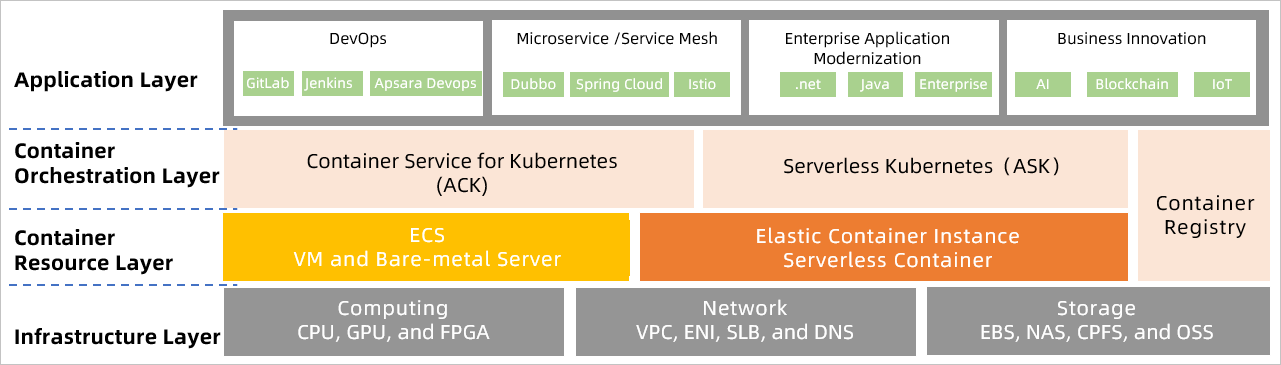
We recommend using ACK to experience the container running capabilities that ECI provides.
Billing
ECI charges for the resources your workloads consume. The following table summarizes what is billed and links to detailed pricing pages.
Resource | What you pay for | Details |
Elastic container instances (computing resources) | Billed by vCPU and memory specs, or by ECS instance type — whichever model you choose when creating the instance | |
Image caches (auto-created by the system) | Free | |
Image caches (manually created) | Temporary resources and snapshots | |
Image caches (usage) | Cloud disk or temporary storage space, based on cache type and size | |
Data caches (creation) | Temporary resources and snapshots | |
Data caches (usage) | The container instance plus the attached disk | |
Temporary storage space | Increased capacity only, if you expand beyond the default |
For a complete breakdown, see Billing overview.
Contact us
If you encounter problems when using ECI, join the DingTalk serverless containers group (group ID: 30390760) for help.