Purchase a savings plan
To use a savings plan for cost optimization, first evaluate your business needs. You can purchase a plan based on recommendations from Alibaba Cloud or by performing a manual calculation. This topic explains how to evaluate your needs and purchase a suitable savings plan.
Overall process for purchasing a savings plan
Before purchasing a savings plan, perform a pre-purchase assessment. Alibaba Cloud offers two types of recommendations based on your resource purchase history and provides methods and examples for manual calculation. Use this information to assess your options and proceed to the savings plan purchase page to configure and place your order.
To upgrade your savings plan, see Upgrade your current savings plan.
On the purchase page, adjusting options other than the hourly commitment and duration does not affect your total payment. It only affects the amount of resources your savings plan can offset per hour. We strongly recommend using a recommended plan or performing a manual assessment before you proceed to the purchase page.

Purchase a savings plan based on recommendations
Recommended plan based on historical usage
If you have existing pay-as-you-go ECS or ECI resources and want to optimize costs: Go to the Savings Plan Purchase Scheme Calculation page to view recommended configurations.
On the Savings Plan Purchase Scheme Calculation page, enter the savings plan type, duration, and payment option, and then click Calculate. The system automatically calculates an optimization suggestion, including a recommended hourly commitment and your expected savings.
If the recommendation meets your needs, click Buy Now.
Recommended purchase plan based on resource requirements
If you have never purchased pay-as-you-go ECS or ECI resources from Alibaba Cloud: You can use the Savings Plan Calculator to select your desired ECS configurations and calculate a recommended purchase plan.
On the Savings Plan Calculator page, enter your desired instance configurations and click Add to List.
After you add all instance configurations, click the Savings Plan Calculator button in the upper-right corner of the page to view the recommended plan.
If the recommendation meets your needs, click Buy Now.
Manually purchase a savings plan
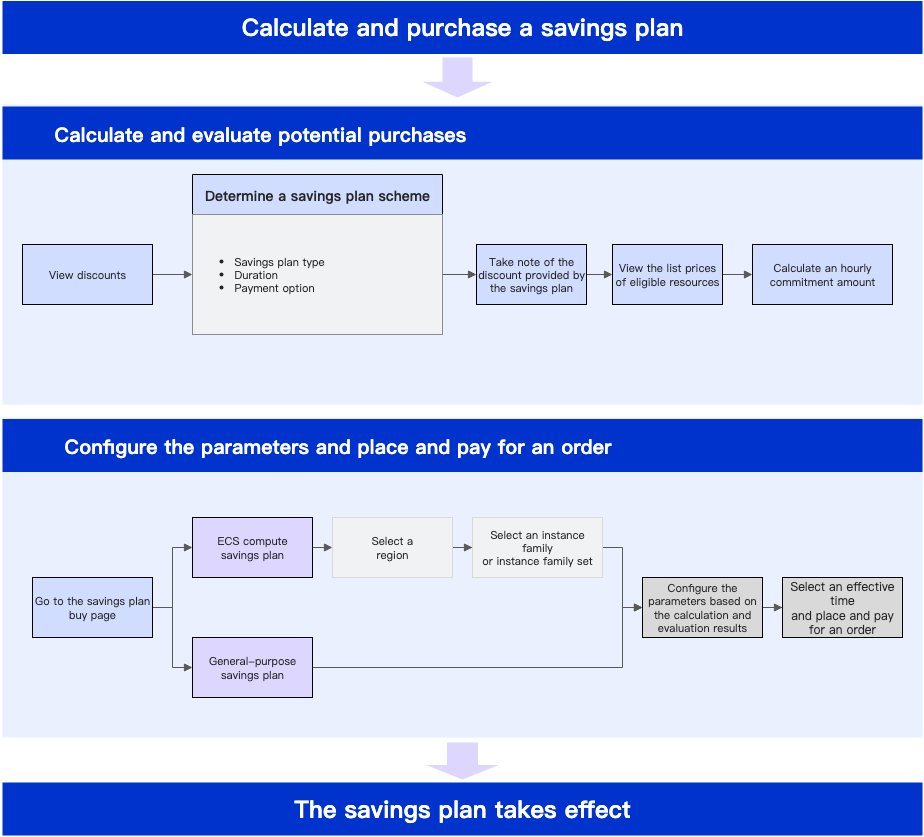
If the recommended optimization does not meet your needs or if you have a limited spending history, you can manually calculate a suitable hourly commitment and then proceed to the savings plan purchase page to purchase a plan. The following figure shows the workflow for manual calculation and purchase.
Go to the Discount Details page to check discounts based on different filters. Determine a purchase plan that includes the savings plan type, duration, and payment option, and record the corresponding discount.
Calculate the required hourly commitment based on the discount, your purchase information, and the list prices of the target eligible resources.
After you complete the assessment, go to the savings plan purchase page, configure the purchase items based on your assessment plan, and enter the calculated hourly commitment.
Select an activation time for the savings plan and place your order. The savings plan takes effect at the time that you specify and automatically offsets the costs of your pay-as-you-go resources.
When you purchase an ECS compute savings plan, if an instance type family package includes your required instances, we recommend that you select the instance type family package. The discount is the same whether you select a single instance type or an instance type family package, but the package provides greater flexibility.
Look up discounts for eligible resources
Different eligible resources of a savings plan have different discounts. The discount for a single eligible resource is also affected by multiple factors. When you select a savings plan type, you can also go to the Discount Details page to query the corresponding discounts. For information about the eligible resources of a savings plan, see Eligible resources and offset rules for savings plans.
The discount for an eligible resource depends on the following factors:
Duration: The longer the duration, the greater the discount. The available durations, from the one that provides the greatest discount to the one that provides the least, are 5 years, 3 years, and 1 year.
Payment option: The higher the upfront payment, the greater the discount. The available payment options, from the one that provides the greatest discount to the one that provides the least, are All Upfront, Partial Upfront, and No Upfront.
Savings plan type
The instance family of the instance that is covered by the savings plan.
The region of the instance that is covered by the savings plan.
A higher discount for an eligible resource allows you to offset more usage for the same hourly commitment.
Choose a savings plan type
You can choose an ECS compute savings plan or a general-purpose savings plan to offset the costs of your ECS or ECI instances. Before you make a purchase, select a savings plan type that suits your business needs based on the comparison in the following table.
If your business serves users in multiple regions and requires region flexibility, or if your business uses various ECS instance families, we recommend that you purchase a general-purpose savings plan.
If your resource usage is stable over a long period and you want to receive the largest possible discount, use the offset rules to your advantage based on your business needs. For example, if your business is stable with limited foreseeable changes, we recommend that you purchase a 3-year or 5-year All Upfront ECS compute savings plan.
Item | ECS compute savings plan | General-purpose savings plan | ||
Use cases | Workloads with stable resource usage, such as system upgrades or cluster deployments. Instances might be released and re-created, but the overall usage remains relatively stable. | Workloads with stable resource usage, such as system upgrades or cluster deployments. Instances might be released and re-created, but the overall usage remains relatively stable. | ||
Region flexibility | Not supported. | Supported. | ||
Flexibility for eligible resources | Offsets the pay-as-you-go costs of ECS and ECI instances that are created with specified instance types, and the costs of capacity reservations that take effect immediately. Note For information about the specific eligible resources, see Eligible resources and offset rules for savings plans. | In addition to the eligible resources supported by ECS compute savings plans, general-purpose savings plans also offset the costs of data disks, burstable performance for cloud disks, and the vCPU and memory of ECI instances that are created in basic mode. | ||
Instance type flexibility | Allows flexible switching between instance types within the same instance family or instance family set. | Allows flexible switching between ECS instance types. | ||
Choose a payment option
Alibaba Cloud savings plans offer three payment options: All Upfront, Partial Upfront, and No Upfront. Select a payment option based on your business needs. The three options are:
All Upfront: You pay the full amount at the time of purchase. No other fees are charged during the term.
Partial Upfront: You pay a portion of the fee (approximately 50%) at the time of purchase. The remaining amount is billed on an hourly basis during the term.
No Upfront: You are not required to make an upfront payment. You are charged for your hourly commitment during the term. Eligibility for the No Upfront payment option depends on your ECS usage. To use this option, contact your business manager to enable it.
Select a duration
When you purchase an ECS compute or general-purpose savings plan, you can select a duration of 1 Year, 3 Years, or 5 Years.
Calculate the hourly commitment
The hourly commitment is the maximum amount of pay-as-you-go bills that your savings plan can offset each hour. Within this limit, your pay-as-you-go bills are first discounted, and then the resulting cost is offset by your commitment. After you select a savings plan type, you must calculate a suitable hourly commitment to maximize your cost savings. When you purchase a savings plan, you must place an order based on the calculated hourly commitment. Alibaba Cloud provides examples of how to manually calculate the hourly commitment. You can refer to these examples to perform calculations based on your business needs.
Select activation date and place order
If you are a RAM user, you must be granted the required permissions to purchase a savings plan. For more information, see Manage permissions for a RAM user.
After manually calculating the hourly commitment, go to the savings plan purchase page to purchase the plan with your selected configurations. The system automatically calculates the total fee based on your specified duration and hourly commitment.
When you place the order, Alibaba Cloud allows you to select Immediately After Payment or Custom Time.
Activate Immediately After Payment: The plan activates at the top of the hour (HH:00:00) when you complete the payment and immediately begins offsetting costs.
Activate at a Specified Time: You can schedule the plan to activate up to one year in advance, specified to the hour. The plan becomes effective at the top of the selected hour (HH:00:00).