How to resolve the "bash: cd: /tmp: Permission denied" error on a Linux instance
This topic explains how to resolve the "bash: cd: /tmp: Permission denied" error when you access the /tmp directory on a Linux ECS instance.
Symptom
Accessing the /tmp directory on a Linux ECS instance returns the following error:
bash: cd: /tmp: Permission deniedCause
This error occurs because the /tmp directory on the ECS instance has incorrect permissions.
Solution
Connect to the ECS instance as the root user.
For more information, see Connection methods.
Run the following command to check the permissions of the
/tmpdirectory:NoteBy default, the
/tmpdirectory hasdrwxrwxrwtpermissions.ls -l /The output shows that the
/tmpdirectory permissions aredr--r--r--, which must be modified.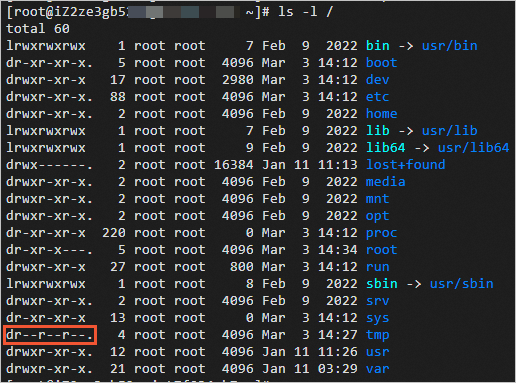
Run the following command to set the correct permissions for the
/tmpdirectory:chmod 1777 /tmpVerify that you can now access the
/tmpdirectory.