Access Alibaba Cloud KMS with Enclave remote attestation
This topic uses a minimal Enclave application implemented in Go as an example to demonstrate the implementation and verification process from image building, PCR measurement recording, RAM access policy configuration, to ciphertext decryption.
Scenario and core mechanisms
Alibaba Cloud Enclave provides a trusted execution environment that is isolated from the parent instance within an ECS instance, and is used to protect application code and sensitive data in use. An Enclave image typically contains the code and data required to run the application, but should not contain static plaintext sensitive data. In this scenario, you can host encryption keys in Alibaba Cloud KMS and use the Enclave remote attestation mechanism to allow KMS to control access to APIs such as Decrypt based on the Enclave identity. This ensures that sensitive data is decrypted only within the expected Enclave.
This solution achieves the goal through the following three mechanisms:
Identity measurement: When an Enclave image is built, the image file, kernel and boot loader, and application are measured into PCR8, PCR9, and PCR11, respectively. These values are determined during the build.
Authorization control: Expected PCR values are used as conditions in a RAM access policy to restrict permissions for APIs such as
kms:Decrypt. This allows only requests initiated by an Enclave that runs the expected application to pass authorization.Response protection: When an Enclave calls a KMS API, it must include a remote attestation report that contains its PCR values and an ephemeral public key. After KMS validates the report and the PCR conditions, it encrypts the sensitive data response with the ephemeral public key before returning it. This ensures that only the Enclave that initiated the request can decrypt the response.
An Enclave has no external network connectivity and can communicate with its parent instance only through vsock. An application in the Enclave can use
kmstool-enclave-clito initiate KMS calls protected by remote attestation and access the KMS service through a vsock proxy on the parent instance.
Communication flow
The following figure shows the remote attestation-based decryption communication flow among the parent instance, Enclave, and KMS.
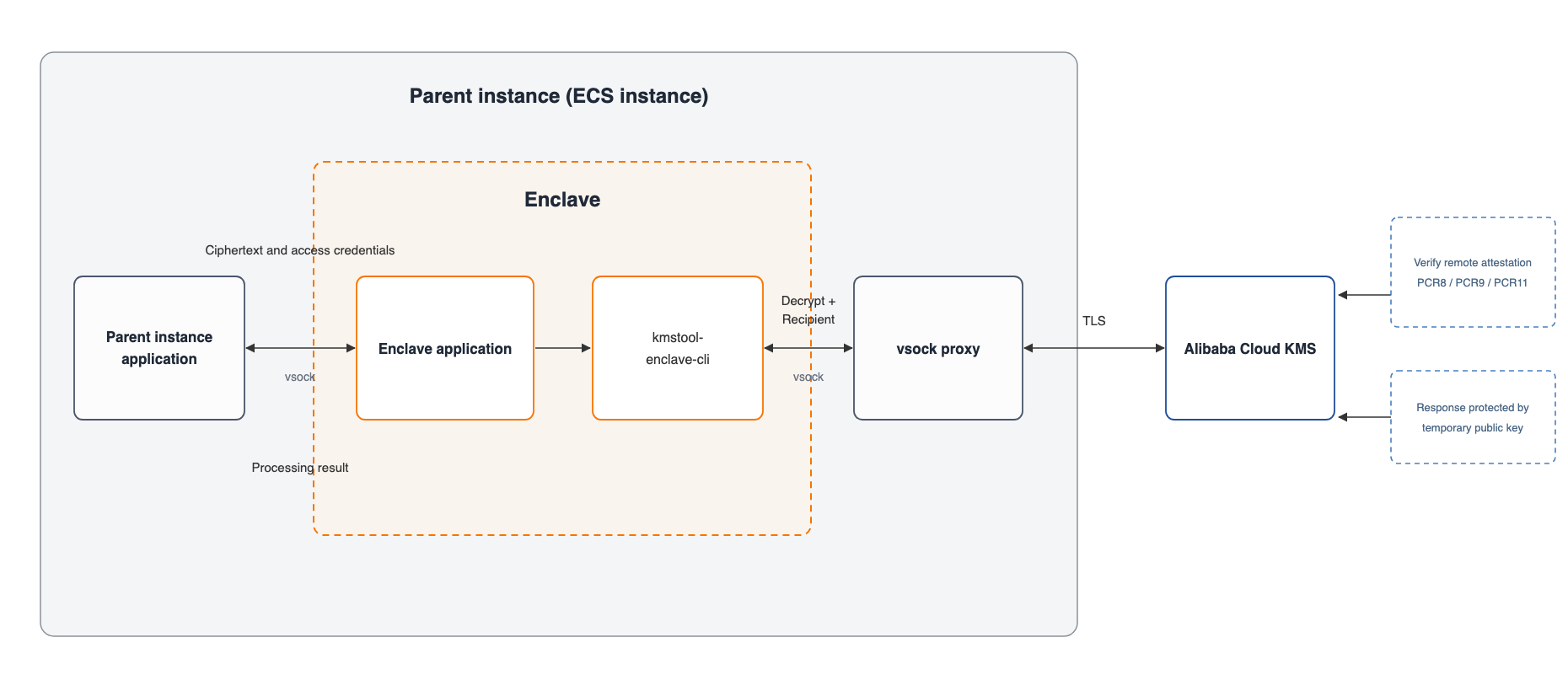
The parent instance passes the credentials required to access KMS and the ciphertext to decrypt into the Enclave through a vsock channel.
The Enclave application calls
kmstool-enclave-clito generate an ephemeral key pair, and uses the ephemeral public key as user data to generate a remote attestation report signed by the Enclave root of trust. When the KMSDecryptAPI is called, the Recipient parameter in the request carries the ephemeral public key and remote attestation report, and the request is sent to the KMS service through the vsock proxy on the parent instance.KMS verifies the remote attestation and compares the PCR measurements in it with the expected values in the RAM permission policy. Only when the PCR values match will KMS decrypt the ciphertext and encrypt the decryption result using the temporary public key in the remote attestation report. If the remote attestation report is invalid or the PCR values do not match, KMS will reject the decryption request.
kmstool-enclave-cliuses the ephemeral private key in the Enclave to decrypt the result, and passes the decrypted plaintext to the Enclave application for processing. This ensures that sensitive plaintext data appears only in the Enclave application at runtime.
Integration responsibilities
By role, the applications on both sides assume the following responsibilities:
Component | Responsibility |
Enclave application |
|
Parent instance application |
|
Example: Decrypt KMS ciphertext in an Enclave
This example uses Go to encrypt the string Hello World as KMS ciphertext, then builds a minimal Enclave application, and calls the KMS Decrypt API in the application based on Enclave remote attestation to decrypt the ciphertext. For the Enclave environment build method and application communication mechanism, see Build an Enclave confidential computing environment and Implement network connectivity in Alibaba Cloud Enclave over vsock.
Prerequisites
An ECS instance and Enclave environment have been prepared as described in Build an Enclave confidential computing environment.
A KMS instance and symmetric key have been created, and the dedicated gateway endpoint and CA certificate of the KMS instance have been obtained. For instructions, see Purchase and enable a KMS instance and Manage keys.
Credentials for calling KMS APIs have been created (AccessKey ID/AccessKey secret of a RAM user or STSToken of a RAM role).
The ECS instance, KMS instance, and KMS key must be in the same region.
Step 1: Prepare and build the Enclave image
Perform the following operations in the same working directory on the parent instance. Building the Enclave image requires the following four files: enclave-server.go, kmstool-enclave-cli, ca.pem, and Dockerfile.
Set environment variables and prepare credentials:
export REGION_ID="cn-hangzhou"

 # KMS Dedicated gateway endpoint of the KMS instance. Obtain it from the instance details page in the KMS console.
export KMS_ENDPOINT="kst-xxxx.cryptoservice.kms.aliyuncs.com"

 # Symmetric key ID. Obtain it from the Key Management page in the KMS console.
export KMS_KEY_ID="key-xxxx"

 # Credentials for calling KMS APIs: AccessKey of a RAM user, or replace with a RAM role's STSToken
export ALIBABA_CLOUD_ACCESS_KEY_ID="<access-key-id>"
export ALIBABA_CLOUD_ACCESS_KEY_SECRET="<access-key-secret>"
Prepare the CA certificate
ca.pemfor the KMS dedicated gateway endpoint. Upload thePrivateKmsCA_kst-xxxx.pemfile downloaded from the KMS console to the working directory of the parent instance, and rename it toca.pemduring the upload:# Run this command on the local machine. Replace the local certificate path, <parent-instance-IP>, and <working directory> with actual values scp "/path/to/PrivateKmsCA_kst-xxxx.pem" root@<parent-instance-IP>:<working directory>/ca.pemInstall
curland download the latest open-sourcekmstool-enclave-clicommand-line tool:yum install -y curl curl -fL https://github.com/aliyun/acs-apsara-enclave/releases/latest/download/kmstool-enclave-cli -o kmstool-enclave-cli chmod +x kmstool-enclave-cliCreate
enclave-server.goin the working directory. This program provides the/decryptHTTP endpoint through vsock port 5000 in the Enclave and callskmstool-enclave-cli decrypt:package main import ( "bufio" "encoding/base64" "encoding/json" "fmt" "net/http" "os" "os/exec" "strings" "golang.org/x/sys/unix" ) type request struct { Endpoint string `json:"endpoint"` AccessKeyID string `json:"accessKeyId"` AccessKeySecret string `json:"accessKeySecret"` Ciphertext string `json:"ciphertext"` } type response struct { Plaintext string `json:"plaintext,omitempty"` Error string `json:"error,omitempty"` } func decrypt(input request) response { output, err := exec.Command( "/app/kmstool-enclave-cli", "decrypt", "--endpoint", input.Endpoint, "--access-key-id", input.AccessKeyID, "--access-key-secret", input.AccessKeySecret, "--ciphertext", input.Ciphertext, "--ca-cert", "/app/ca.pem", "--proxy-port", "8000", ).CombinedOutput() if err != nil { return response{Error: strings.TrimSpace(string(output))} } encoded := strings.TrimSpace(strings.TrimPrefix(string(output), "PLAINTEXT:")) plaintext, err := base64.StdEncoding.DecodeString(encoded) if err != nil { return response{Error: err.Error()} } return response{Plaintext: string(plaintext)} } func writeResponse(connection *os.File, status string, output response) { body, _ := json.Marshal(output) fmt.Fprintf(connection, "HTTP/1.1 %s\r\nContent-Type: application/json\r\nContent-Length: %d\r\nConnection: close\r\n\r\n%s", status, len(body), body) } func handle(fd int) { connection := os.NewFile(uintptr(fd), "vsock") defer connection.Close() httpRequest, err := http.ReadRequest(bufio.NewReader(connection)) if err != nil { return } defer httpRequest.Body.Close() if httpRequest.Method != http.MethodPost || httpRequest.URL.Path != "/decrypt" { writeResponse(connection, "404 Not Found", response{Error: "not found"}) return } var input request if err := json.NewDecoder(httpRequest.Body).Decode(&input); err != nil { writeResponse(connection, "400 Bad Request", response{Error: err.Error()}) return } output := decrypt(input) status := "200 OK" if output.Error != "" { status = "502 Bad Gateway" } writeResponse(connection, status, output) } func main() { fd, err := unix.Socket(unix.AF_VSOCK, unix.SOCK_STREAM, 0) if err != nil { panic(err) } if err := unix.Bind(fd, &unix.SockaddrVM{CID: unix.VMADDR_CID_ANY, Port: 5000}); err != nil { panic(err) } if err := unix.Listen(fd, 16); err != nil { panic(err) } for { connection, _, err := unix.Accept(fd) if err == nil { go handle(connection) } } }Create
Dockerfilein the working directory. The final image contains only the statically compiled Enclave service,kmstool-enclave-cli, and the CA certificate of the KMS instance:FROM golang:1.24-alpine AS builder WORKDIR /src COPY enclave-server.go . RUN go mod init enclave-server \ && SYS_VERSION="v0.21.0" \ && go get golang.org/x/sys@${SYS_VERSION} \ && CGO_ENABLED=0 GOOS=linux GOARCH=amd64 go build -trimpath -o /out/enclave-server . FROM scratch WORKDIR /app COPY kmstool-enclave-cli /app/kmstool-enclave-cli COPY --from=builder /out/enclave-server /app/enclave-server COPY ca.pem /app/ca.pem CMD ["/app/enclave-server"]Build the Enclave image and record PCR8, PCR9, and PCR11:
docker build -t enclave-kms-hello-world:latest .

enclave-cli build-enclave \
  --docker-uri enclave-kms-hello-world:latest \
  --output-file enclave-kms-hello-world.eif | tee enclave-build.log

grep -E '"PCR(8|9|11)"' enclave-build.log
Step 2: Configure the KMS access policy and prepare example ciphertext
Install
jqand Alibaba Cloud CLI on the parent instance:yum install -y jq curl -fL https://aliyuncli.alicdn.com/aliyun-cli-linux-latest-amd64.tgz -o aliyun-cli-linux-latest.tgz tar -xzf aliyun-cli-linux-latest.tgz mv aliyun /usr/local/bin/Create the following custom policy in the RAM console, replace the placeholders in it with actual values, and grant the policy to the corresponding RAM user or role.
ImportantThis RAM user or role must not obtain the
kms:Decryptpermission without PCR conditions through another user group or access policy. If such unconditional authorization exists, the PCR conditions cannot restrict this permission.{ "Version": "1", "Statement": [ { "Effect": "Allow", "Action": "kms:Encrypt", "Resource": "acs:kms:<region-id>:<account-id>:key/<key-id>" }, { "Effect": "Allow", "Action": "kms:Decrypt", "Resource": "acs:kms:<region-id>:<account-id>:key/<key-id>", "Condition": { "StringEquals": { "kms:RecipientAttestation:PCR8": "<pcr8>", "kms:RecipientAttestation:PCR9": "<pcr9>", "kms:RecipientAttestation:PCR11": "<pcr11>" } } } ] }Call KMS
Encrypton the parent instance to encryptHello World, and save the returnedCiphertextBlobin theCIPHERTEXTvariable:PLAINTEXT="$(printf '%s' 'Hello World' | base64 | tr -d '\n')" CIPHERTEXT="$( SSL_CERT_FILE="${PWD}/ca.pem" aliyun --mode AK \ --region "${REGION_ID}" \ --endpoint "${KMS_ENDPOINT}" \ --secure \ --access-key-id "${ALIBABA_CLOUD_ACCESS_KEY_ID}" \ --access-key-secret "${ALIBABA_CLOUD_ACCESS_KEY_SECRET}" \ kms Encrypt \ --KeyId "${KMS_KEY_ID}" \ --Plaintext "${PLAINTEXT}" | jq -r '.CiphertextBlob' )"You could run
echo "${CIPHERTEXT}"to echo the variable. A non-empty output indicates a successful encryption call.
Step 3: Start the runtime environment
Perform the following operations on the parent instance and keep the processes running after they are started.
Start the vsock proxy to forward requests that the Enclave sends to the vsock port to KMS:
socat-vsock vsock-listen:8000,fork,reuseaddr tcp-connect:"${KMS_ENDPOINT}":443 &Start the Enclave application:
enclave-cli run-enclave \
  --cpu-count 2 \
  --memory 1024 \
  --enclave-cid 16 \
  --eif-path enclave-kms-hello-world.eif
Forward local port 8443 to CID 16 and vsock port 5000 of the Enclave:
socat-vsock tcp-listen:8443,bind=127.0.0.1,fork,reuseaddr vsock-connect:16:5000 &This command only forwards data between TCP and vsock. It does not parse HTTP requests or call KMS.
Step 4: Verify decryption
Use curl on the parent instance to submit the ciphertext generated in Step 2 to the /decrypt endpoint in the Enclave. The application in the Enclave accesses KMS based on the remote attestation report to decrypt the data:
curl -sS http://127.0.0.1:8443/decrypt -H 'Content-Type: application/json' \
--data @- <<EOF
{
    "endpoint": "${KMS_ENDPOINT}",
    "accessKeyId": "${ALIBABA_CLOUD_ACCESS_KEY_ID}",
    "accessKeySecret": "${ALIBABA_CLOUD_ACCESS_KEY_SECRET}",
    "ciphertext": "${CIPHERTEXT}"
}
EOF
Expected output:
{"plaintext":"Hello World"}When the PCR values in the remote attestation do not match the access policy, KMS rejects the Decrypt request. This example returns the decrypted plaintext to the parent instance only to show the decryption result. In production, use the plaintext within the Enclave and return only the business processing result to the parent instance.
Other examples
In addition to the preceding basic example, you can use the Enclave KMS capability to implement a scenario in which only the expected Enclave application dynamically obtains a signing private key at runtime. Combined with Enclave isolation, this makes the signing private key usable but not visible. For the complete example, see Alibaba Cloud Enclave KMS Application Example.
References
KMS policy condition keys: The values and matching rules of remote attestation condition keys such as
kms:RecipientAttestation:PCR8, PCR9, and PCR11.Alibaba Cloud Enclave SDK: Use this when you integrate KMS call logic in Enclave and parent instance applications.