Local disks
Local disks reside on the physical machines that host the associated Elastic Compute Service (ECS) instances of the disks, and provide ECS instances access to local storage. Local disks are physically attached to physical machines and deliver cost-effectiveness, high random IOPS, high throughput, and low latency. Local disks are suitable for scenarios that require high-performance storage, such as cache systems that involve a large number of accesses. This topic describes the categories and performance specifications of local disks.
The durability of data stored on a local disk is determined by the reliability of the associated physical machine. The risk of a single point of failure (SPOF) exists. A SPOF in a physical machine may affect multiple running instances. Data stored on local disks may be lost when a hardware failure occurs on their associated physical machine. We recommend that you store only temporary data on local disks.
You can improve the disaster recovery and backup capabilities of your local disk data with the following methods, however it is difficult to completely eliminate the risk of data loss.
-
Use Cloud Backup to back up and restore data and implement disaster recovery. Cloud Backup is a unified platform that is developed by Alibaba Cloud for backup and disaster recovery. It supports file and file directory level backups and restoration for ECS instances.
-
Back up data from a local disk to Object Storage Service (OSS). Alibaba Cloud offers multiple backup methods for data in OSS.
-
Back up data from a local disk to a cloud disk, which implements cross-zone or cross-region disaster recovery of disks based on async replication capabilities.
For more information, see Back up files on a local disk.
Limits
-
Local disks can be used once they have been initialized.
After you purchase an ECS instance that has local disks attached, log on to the instance to initialize the local disks. For more information, see Initialize data disk.
-
Local disks do not support the following operations:
-
Create a separate local disk.
-
Use a snapshot to create a local disk.
-
Attach a local disk.
-
Detach and release a local disk.
-
Resize a local disk.
ImportantDo not resize local disks. If you resize local disks, the partition table and file system structure on the disks may be corrupted, which affects business continuity.
-
Re-initialize a local disk.
-
Create a snapshot for a local disk.
-
Use a snapshot to roll back a local disk.
-
Local disk categories
This topic provides information about local disks that are purchased together with ECS instances. For information about the performance of instance families that are equipped with local SSDs and big data instance families, see Instance family overview.
Local disks are suitable for scenarios that require high storage I/O performance, mass storage, and high cost efficiency. Alibaba Cloud provides two categories of local disks. The following table describes the categories.
|
Category |
Supported instance family |
Scenario |
|
Local non-volatile memory express (NVMe) SSD |
The following instance families use local NVMe SSDs:
|
Instance families equipped with local NVMe SSDs are suitable for the following scenarios:
|
|
Local SATA HDD |
The d3s, d2c, d2s, d1ne, and d1 big data instance families use local SATA HDDs. |
Local SATA HDDs are the preferred storage media for industries such as Internet and finance that have high requirements for big data computing, storage, and analytics. These disks are suited for mass storage and offline computing scenarios and can meet the high requirements of distributed computing services such as Hadoop in terms of storage performance, storage capacity, and internal network bandwidth. |
Performance of local disks
For information about the performance of local disks, see Block storage performance.
Billing
Fees for local disks are included in the fees for the instances to which the disks are attached. For more information, see Subscription and Pay-as-you-go.
Alibaba Cloud provides the extended suspension-free benefit. When a pay-as-you-go resource is overdue, you can continue to use cloud services for a certain amount or duration. Normal fees apply during the extended period. For more information, see Extended Suspension-Free Benefit.
Disk initialization sequence
When you use an image to create an instance that has local disks attached, disks on the created instance are initialized based on the following rules:
-
Rule 1: If the image does not contain data disk snapshots, the local disks are initialized prior to the cloud disks that are created together with the instance.
-
Rule 2: If the image contains data disk snapshots, the data disks created from the snapshots are initialized in the order of data disk device names that are recorded in the image. The other disks on the instance are initialized based on Rule 1.
The following section provides an example on how disks are initialized based on Rule 2. In this example, an instance created from a Linux image that contains two data disk snapshots is used.
-
If the data disk device names recorded in the image are /dev/xvdb and /dev/xvdc, Alibaba Cloud first allocates /dev/xvdb and /dev/xvdc as device names to the data disks created from the image. The system disk is initialized first. Then, the data disks are initialized in the following sequence: data disk 1 created from the image, data disk 2 created from the image, local disk 1, local disk 2, cloud disk 1, cloud disk 2, and so on. The following figure shows the sequence in which the disks are initialized.
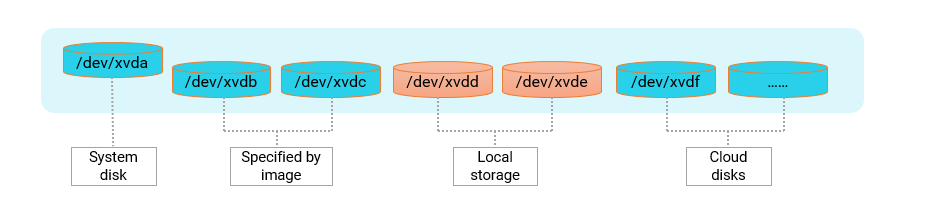
-
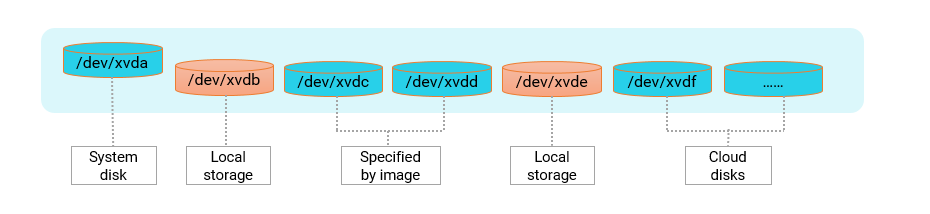
If the data disk device names recorded in the image are /dev/xvdc and /dev/xvdd, Alibaba Cloud first allocates /dev/xvdc and /dev/xvdd as device names to the data disks created from the image. Then, Alibaba Cloud allocates other available device names in alphabetic order to the local disks first and then to other disks. The system disk is initialized first. Then, the data disks are initialized in the following sequence: local disk 1, data disk 1 created from the image, data disk 2 created from the image, local disk 2, cloud disk 1, cloud disk 2, and so on. The following figure shows the sequence in which the disks are initialized.
Lifecycle
A local disk shares the same lifecycle as the instance to which it is attached. For more information, see Instance lifecycle.
Impacts of instance operations on data stored on local disks
The following table describes the impacts of instance operations on data stored on local disks.
|
Instance operation |
Retain local disk data |
Retain local disk |
|
Restart from operating system/Restart from console/Force restart |
Yes |
Yes |
|
Shut down from operating system/Stop from console/Force stop |
Yes |
Yes |
|
Automatic instance recovery. For more information about other recovery methods, see Modify maintenance attributes |
No |
Yes |
|
No |
No |
|
|
After a subscription instance expires and is stopped, but before it is revoked due to expiration |
Yes |
Yes |
|
After an overdue payment occurs for an account, but before the pay-as-you-go instance is revoked |
Yes |
Yes |
|
After a subscription instance expires, is stopped, and is then revoked |
No |
Yes |
|
After an overdue payment occurs for an account and the pay-as-you-go instance is revoked |
No |
Yes |
|
After an instance is released due to expiration or an overdue payment |
No |
No |
|
Manually renew an expired subscription instance |
Yes |
Yes |
|
Add funds to an account with an overdue payment and restart the pay-as-you-go instance |
Yes |
Yes |
|
Manually renew a subscription instance that has expired and is in the revoking state |
No |
Yes |
|
Add funds to an account with an overdue payment and restart a pay-as-you-go instance that is in the revoking state |
No |
Yes |
References
-
You can test the bandwidth, IOPS, and latency of local disks to verify the benchmark performance data provided by Alibaba Cloud and the Quality of Service (QoS) of local disks. For more information, see the Local disk performance test commands section of the "Test the performance of block storage devices" topic.
-
For information about retired local SSDs, see Retired disks - Local SSD disks.
-
For information about how to handle system events of instances that are equipped with local disks, see Maintenance and system events for local disk instances.