Cloud Assistant overview
Cloud Assistant runs Shell, PowerShell, and Bat commands across ECS instances without bastion hosts, at no extra cost.
Features
-
Batch operations: Run commands on multiple instances simultaneously. Execution is isolated per instance — a failure on one does not affect others.
-
File upload: Send configuration files, scripts, or other assets to instances.
-
Public commands: Pre-built scripts and plugins for common tasks such as security audits, OS patching, and application installation.
-
Parameterized commands: Define custom or built-in parameters to create reusable command templates. A single template serves multiple scenarios by injecting different values at runtime.
-
Security and control: Cloud Assistant never initiates actions on its own — you retain full control over every operation.
Use cases
-
Software deployment: Push application code, configuration updates, or hotfixes to a fleet of instances in a single operation.
-
Security patching: Roll out OS patches or security updates across all instances without logging in individually.
-
Software lifecycle management: Manage software development lifecycles across instances.
-
Instance configuration: Modify hostnames or reset user credentials in batch.
-
Process monitoring: Poll process status or service health across instances and collect results centrally.
-
Package management: Fetch and install updates from OSS or YUM repositories.
Common operations
The following table maps common tasks to their documentation and API references.
|
Task |
Documentation |
API |
|
Install the agent |
||
|
Use the SDK |
-- |
|
|
Create a command |
||
|
Run a command |
||
|
Check results |
||
|
Modify a command |
-- |
|
|
Clone a command |
-- |
|
|
Stop a command |
||
|
Delete a command |
Cloud Assistant Agent is pre-installed on ECS instances created from public images after December 1, 2017.
Instance requirements
-
Instances must be in the Running state.
-
Cloud Assistant Agent must be installed. The agent is pre-installed on instances created from public images after December 1, 2017. For custom images or Alibaba Cloud Marketplace images, verify compatibility and install Cloud Assistant Agent manually if needed.
Supported operating systems
Linux
-
Alibaba Cloud Linux
-
CentOS 6, 7, 8, and later
-
CoreOS
-
Debian 8, 9, 10, and later
-
OpenSUSE
-
Red Hat 5, 6, 7, and later
NoteRed Hat requires manual RPM installation. See Install Cloud Assistant Agent.
-
SUSE Linux Enterprise Server 11, 12, 15, and later
-
Ubuntu 12, 14, 16, 18, and later
-
FreeBSD 11, 12, 13, 14, and later
Windows
-
Windows Server 2012, 2016, 2019, and later
Payload and parameter limits
All sizes refer to the Base64-encoded payload.
|
Operation |
Max size |
|
Create command |
18 KB |
|
Run immediately (save command) |
18 KB |
|
Run immediately (do not save) |
24 KB |
|
Upload file |
32 KB |
Each command supports up to 20 custom parameters.
Feature compatibility matrix
Some features require a minimum Cloud Assistant Agent version.
|
Feature |
Min version (Linux) |
Min version (Windows) |
|
Agent heartbeat reporting |
1.0.2.458 |
1.0.0.149 |
|
File distribution |
1.0.2.569 |
1.0.0.149 |
|
Run as specific user |
2.2.0.106 |
2.1.0.50 |
|
Run on next boot |
2.2.0.46 |
2.1.0.50 |
|
Run on every boot |
2.2.0.46 |
2.1.0.50 |
|
Session Manager support |
2.2.3.196 |
2.1.3.196 |
|
Scheduled tasks (Rate/At expressions) |
2.2.3.282 |
2.1.3.282 |
|
Scheduled tasks (Cron with year/timezone) |
2.2.3.282 |
2.1.3.282 |
|
Built-in environment parameters |
2.2.3.309 |
2.1.3.309 |
|
Instance names as parameter |
2.2.3.344 |
2.1.3.344 |
|
Stop or restart via exit code |
2.2.3.317 |
2.1.3.317 |
|
Container execution (by name) |
2.2.3.344 |
2.1.3.344 |
|
Container execution (by ID) |
2.2.3.344 |
2.1.3.344 |
Billing
Cloud Assistant itself is free. You are billed only for the ECS resources (compute, network, storage) consumed during task execution. See Billing overview.
Resource overhead
Cloud Assistant Agent has minimal impact on instance performance.
|
Resource |
Linux |
Windows |
|
CPU |
< 1% average utilization |
< 1% average utilization |
|
Physical memory |
~20 MB |
~30 MB |
|
Disk I/O |
Negligible (peaks only during upgrades or script saving) |
Negligible (peaks only during upgrades or script saving) |
|
Network I/O |
Minimal (heartbeat traffic) |
Minimal (heartbeat traffic) |
Command execution status
Cloud Assistant tracks execution at two levels: instance level (per-instance status) and invocation level (aggregated status across all targeted instances in a batch).
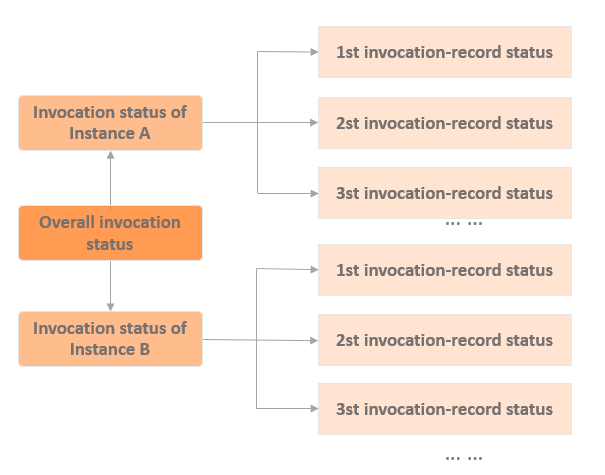
Instance-level status
These statuses correspond to the InvocationStatus field under InvokeInstance in DescribeInvocations, or the InvocationStatus field in DescribeInvocationResults.
|
Status code |
Description |
|
|
The system is verifying or sending the command. |
|
|
Invalid command type or parameter. |
|
|
Failed to send. The instance must be |
|
|
The command is executing on the instance. |
|
|
Finished with exit code 0. For scheduled tasks, the last execution finished with exit code 0 and the schedule has ended. |
|
|
Finished with a non-zero exit code. For scheduled tasks, a non-zero exit code on the last execution aborts the task. |
|
|
An exception occurred. |
|
|
Exceeded the specified timeout period. |
|
|
Cancelled before execution started. |
|
|
A stop request was sent; execution is being stopped. |
|
|
Manually stopped. |
|
|
Terminated during runtime. |
|
|
Waiting for the next scheduled execution window. |
Invocation-level status
For batch commands, Cloud Assistant aggregates instance statuses into a single invocation status returned in the InvocationStatus field of DescribeInvocations.
|
Status code |
Aggregation rule |
|
|
At least one instance is |
|
|
At least one instance is |
|
|
At least one instance is |
|
|
All instances finished. At least one reported |
|
|
All instances finished, but none succeeded. An instance is considered failed if it reported |
|
|
At least one instance is |
|
|
All instances report |
|
|
All instances finished with mixed results — some succeeded and some failed or stopped. |
Permissions (RAM)
The Alibaba Cloud account has full Cloud Assistant access by default. For production use, create a RAM user and grant only required permissions. See Grant permissions to a RAM user to use Cloud Assistant.
Agent architecture and directory structure
Linux
Cloud Assistant Agent is installed at /usr/local/share/aliyun-assist/.
-
/usr/local/share/aliyun-assist/-
2.x.x.xxx/— Version-specific directory (for example,2.2.4.965/).-
aliyun-service— Core agent binary. -
assist_daemon— Daemon (watchdog) that monitorsaliyun-serviceand restarts it if it crashes. -
acs-plugin-manager— Plugin management utility. -
aliyun_assist_update— Auto-update utility. -
aliyun_installer— Deprecated. Superseded byacs-plugin-manager. -
config/-
GlobalSignRootCA.crt— Root certificate for HTTPS communication. -
hash_file— Cryptographic hashes for integrity verification.
-
-
init/-
install,uninstall,clean— Installation, uninstallation, and cleanup scripts. -
version— Current agent version.
-
-
log/-
aliyun_assist_main.log— Active log file (current day). -
aliyun_assist_main.log.YYYYMMDD— Archived logs (rotated daily).
-
-
plugin/-
ACS-ECS-SysInfoGatherer— Pre-installed system information collection plugin.
-
-
-
cache/-
state_configs.json— Cached configuration for CloudOps Orchestration Service (OOS) inventory collection.
-
-
config/-
task_sign_certs/— Public keys for task digital signature verification.
-
-
hybrid/-
hardwareHash— Hardware fingerprint for managed instance registration.
-
-
plugin/-
installed_plugins.db— Database of installed plugins.
-
-
work/-
script/— Staging directory for execution scripts.NoteStarting from version 2.x.3.704, Cloud Assistant no longer saves execution scripts to disk by default. Enable the script-saving feature manually to view executed files in this directory.
-
-
region-id— Region ID of the instance.
-
Windows
Cloud Assistant Agent is installed at C:\ProgramData\aliyun\assist\.
-
C:\ProgramData\aliyun\assist\-
2.x.x.xxx/— Version-specific directory (for example,2.1.4.965).-
aliyun_assist_service.exe— Core agent binary. -
acs-plugin-manager.exe— Plugin management utility. -
aliyun_assist_update.exe— Auto-update utility. -
aliyun_installer.exe— Installer program. -
install.bat,install.exe— Installation scripts. -
PatchGo.dll— Runtime patch for Windows Server 2008 to mitigate Go clock drift. -
version.ini— Agent version configuration. -
config/-
GlobalSignRootCA.crt— Root certificate for HTTPS communication. -
hash_file— Cryptographic hashes for integrity verification.
-
-
log/-
aliyun_assist_main.log— Active log file (current day). -
aliyun_assist_main.log.YYYYMMDD— Archived logs (rotated daily).
-
-
plugin/-
ACS-ECS-SysInfoGatherer— System information collection plugin. -
SessionManager— Password-free session management plugin. -
installed_plugins.db— Database of installed plugins.
-
-
-
cache/-
state_configs.json— Cached configuration for OOS inventory collection.
-
-
config/-
task_sign_certs/— Public keys for task signature verification.
-
-
hybrid/— Managed instance registration data. -
plugin/-
installed_plugins.db— Plugin database.
-
-
work/-
script/— Staging directory for execution scripts.NoteStarting from version 2.x.3.704, Cloud Assistant no longer saves execution scripts to disk by default. Enable the script-saving feature manually to view executed files in this directory.
-
-
config.ini— Global configuration, including the current agent version. -
region-id— Region ID of the instance. -
version— Current agent version.
-
Terms
|
Term |
Description |
|
Cloud Assistant |
The service. Available in all Alibaba Cloud regions. |
|
Cloud Assistant Agent |
The client binary on each instance. Process name: |
|
AssistDaemon |
A watchdog that monitors and restarts the agent if it crashes. Linux only. Service name: |
|
Working directory |
The path where scripts are temporarily staged (if script saving is enabled). Linux: |
|
Command |
The operation payload sent to an instance. Types: Shell, PowerShell, and Bat. |
|
Custom parameter |
A variable defined with |
|
One-time execution |
A single execution event on one or more instances (also called an invocation). |
|
Scheduled execution |
A command configured to run periodically wit |