Stop and uninstall Cloud Assistant Agent
Stopping or uninstalling Cloud Assistant Agent disables remote logon, OOS command execution, and Diagnostics.
Stop Cloud Assistant Agent
If you are connected via Session Manager or Workbench, stopping the agent terminates your session. Connect using another method first, such as Workbench terminal connection, third-party client tool (SSH), or VNC.
Linux
-
Connect to a Linux instance by using a username and password.
-
Stop the daemon process.
The daemon process monitors Cloud Assistant Agent and restarts it automatically. Stop the daemon first. Newer versions of Cloud Assistant do not install the daemon component. If the following path does not exist on the instance, skip this step.
if [ -e /usr/local/share/assist-daemon/assist_daemon ]; then sudo /usr/local/share/assist-daemon/assist_daemon --stop fi -
Identify the init system.
The stop command differs by init system. Identify which one your instance uses.
-
systemd: Alibaba Cloud Linux, CentOS 7+, Red Hat Enterprise Linux (RHEL) 7+, Fedora 15+, Ubuntu 15.04+, Debian 8+, and others. -
Upstart: Ubuntu 6.10-14.10, RHEL 6, CentOS 6, and others. -
SysVinit: RHEL 5, CentOS 5, Debian 6, and others.
-
-
Stop Cloud Assistant Agent.
systemd
sudo systemctl stop aliyun.service

# Verify that the service has stopped. The service is stopped if the output contains "inactive (dead)".
sudo systemctl status aliyun.service
Upstart
sudo /sbin/initctl stop aliyun-service

# Verify that the service has stopped. The service is stopped if the output is empty.
ps aux | grep -v grep | grep "aliyun-service"
SysVinit
sudo /etc/init.d/aliyun-service stop

# Verify that the service has stopped. The service is stopped if the output is empty.
ps aux | grep -v grep | grep "aliyun-service"
Windows
Method 1: Use the Windows Services console
-
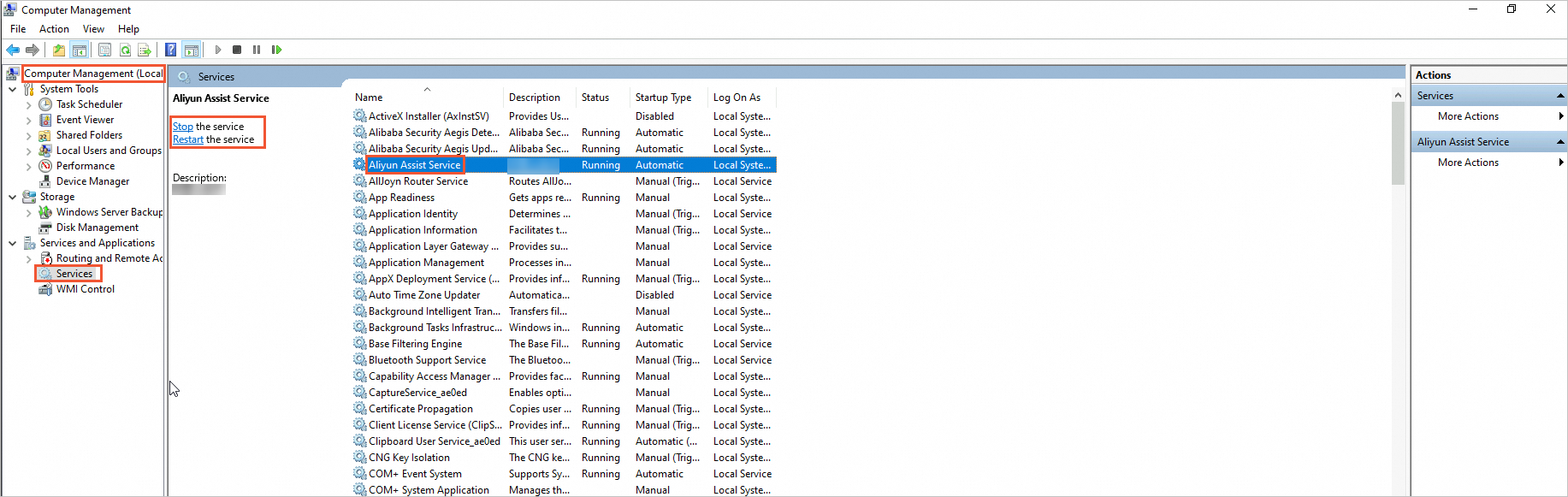
Click the Start icon and select Windows Administrative Tools > Computer Management.
-
In the left pane, go to Computer Management (Local) > Services and Applications > Services.
-
Find Aliyun Assist Service and click Stop the service.
Method 2: Use Windows PowerShell
-
Click the Start icon, find Windows PowerShell, right-click it, and select Run as administrator.
-
Stop Cloud Assistant Agent.
Stop-Service -Name "AliyunService" -
Verify that the agent has stopped.
The agent is stopped if
StatusisStopped.Get-Service -Name "AliyunService"
Uninstall Cloud Assistant Agent
If you are connected via Session Manager or Workbench, stopping the agent terminates your session. Connect using another method first, such as Workbench terminal connection, SSH, or VNC.
Linux
-
Delete the daemon process.
Newer versions of Cloud Assistant do not install the daemon component. If the /usr/local/share/assist-daemon path does not exist on the instance, skip this step. The assist_daemon file bundled with older installation packages resides in the version directory under /usr/local/share/aliyun-assist and is removed in the "Clean up residual files and service configs" step.
if [ -e /usr/local/share/assist-daemon/assist_daemon ]; then sudo /usr/local/share/assist-daemon/assist_daemon --delete fi -
Uninstall the package.
-
RPM: For Alibaba Cloud Linux, CentOS, RHEL, Fedora, Rocky Linux, openSUSE, and others. -
DEB: For Debian, Ubuntu, and others.RPM
sudo rpm -qa | grep aliyun_assist | xargs sudo rpm -eDEB
sudo apt-get purge -y aliyun-assist
-
-
Clean up residual files and service configs.
sudo rm -rf /usr/local/share/aliyun-assist sudo rm -rf /usr/local/share/assist-daemon sudo rm -f /etc/systemd/system/aliyun.service sudo rm -f /etc/init.d/aliyun-service -
Verify that the agent is uninstalled.
The agent is uninstalled if the output is empty.
ps aux | grep -v grep | grep "aliyun-service"
Windows
Method 1: Use the Windows desktop interface
-
In File Explorer, go to the View tab, select Hidden items, and delete the C:\ProgramData\aliyun\assist directory.

Method 2: Use Windows PowerShell
-
Click the Start icon, find Windows PowerShell, right-click it, and select Run as administrator.
-
Stop Cloud Assistant Agent.
Stop-Service -Name "AliyunService" -Force -
Delete the installation directory and registry.
# Delete the installation directory Remove-Item -Path "C:\ProgramData\aliyun\assist" -Recurse -Force # Delete the registry entry Remove-Item -Path "HKLM:\SYSTEM\CurrentControlSet\Services\AliyunService" -Recurse -Force -
Verify that the agent is uninstalled.
The agent is uninstalled if the output is empty or shows
Cannot find any service with service name 'AliyunService'.Get-Service -Name "AliyunService"
FAQ
How do I restart Cloud Assistant Agent after stopping it?
Linux
-
Connect to a Linux instance by using a username and password.
-
Start the daemon process.
Newer versions of Cloud Assistant do not install the daemon component. If the following path does not exist on the instance, skip this step.
if [ -e /usr/local/share/assist-daemon/assist_daemon ]; then sudo /usr/local/share/assist-daemon/assist_daemon --start fi -
Start Cloud Assistant Agent.
systemd
sudo systemctl start aliyun.service

# Verify that the service has started. The service is running if the output contains "active (running)".
sudo systemctl status aliyun.service
Upstart
sudo /sbin/initctl start aliyun-service

# Verify that the service has started. The service is running if the output is not empty.
ps aux | grep -v grep | grep "aliyun-service"
SysVinit
sudo /etc/init.d/aliyun-service start

# Verify that the service has started. The service is running if the output is not empty.
ps aux | grep -v grep | grep "aliyun-service"
Windows
Method 1: Use the Windows Services UI
-
Click the Start icon and select Windows Administrative Tools > Computer Management.
-
In the left pane, go to Computer Management (Local) > Services and Applications > Services.
-
Find Aliyun Assist Service and click Start the service.
Method 2: Use Windows PowerShell
-
Click the Start icon, find Windows PowerShell, right-click it, and select Run as administrator.
-
Start Cloud Assistant Agent.
Start-Service -Name "AliyunService" -
Verify that the agent has started.
The agent is running if
StatusisRunning.Get-Service -Name "AliyunService"