View and modify CPU topologies
Call API operations to view and modify ECS instance CPU topologies for optimized performance in scenarios such as virtualization, multi-threaded programming, and HPC.
Background
Only specific Alibaba Cloud instance families support two CPU topology types: Hyper-Threading (HT) continuous (ContinuousCoreToHTMapping) and HT discrete (DiscreteCoreToHTMapping).
-
HT continuous CPU topology: Logical cores are continuously assigned to physical cores, reducing inter-thread communication and contention. Suitable for tasks that require low memory access latency and near-physical-core computing power, such as scientific computing, data analysis, and HPC.
-
HT discrete CPU topology: Logical cores are discretely distributed across physical cores, reducing resource contention in multi-threaded environments and providing better performance isolation. Suitable for tasks assigned to separate threads or tasks that require high single-thread performance.
The following figures use an x86 instance with eight vCPUs as an example.
The two CPU topology types are illustrated below.
HT continuous CPU topology
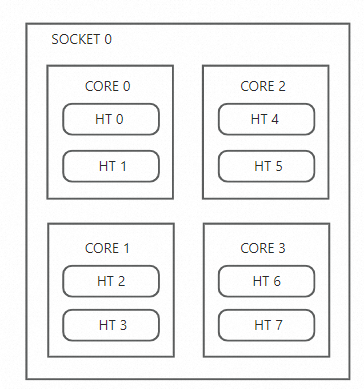
Relationships between logical cores and physical cores:
-
HT 0andHT 1belong toCORE 0. -
HT 2andHT 3belong toCORE 1. -
HT 4andHT 5belong toCORE 2. -
HT 6andHT 7belong toCORE 3.
HT discrete CPU topology
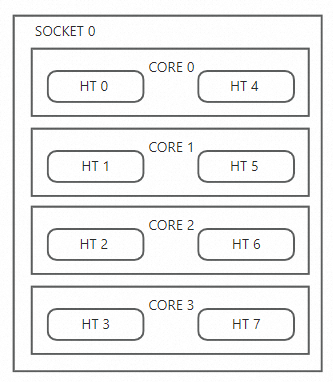
Relationships between logical cores and physical cores:
-
HT 0andHT 4belong toCORE 0. -
HT 1andHT 5belong toCORE 1. -
HT 2andHT 6belong toCORE 2. -
HT 3andHT 7belong toCORE 3.
Limitations
CPU topology modification is supported only for the following instance families:
-
ecs.g9i, ecs.c9i, and ecs.r9i
-
ecs.hfg9i, ecs.hfc9i, and ecs.hfr9i
-
ecs.g8i, ecs.c8i, and ecs.r8i
-
ecs.g7, ecs.c7, and ecs.r7
-
ecs.g7a, ecs.c7a, and ecs.r7a
-
ecs.hfg8i, ecs.hfc8i, and ecs.hfr8i
-
ecs.hfg7, ecs.hfc7, and ecs.hfr7
-
ecs.g6, ecs.c6, and ecs.r6
-
ecs.g6e, ecs.c6e, and ecs.r6e
See Instance family.
View CPU topologies
Call the DescribeInstances operation with the AdditionalAttributes parameter and check the TopologyType response parameter for the CPU topology type. See DescribeInstances.
Valid values of TopologyType:
-
ContinuousCoreToHTMapping: HT continuous CPU topology. -
DiscreteCoreToHTMapping: HT discrete CPU topology. -
Empty: The CPU topology cannot be modified.
Modify CPU topologies
Before you modify a CPU topology, perform benchmark tests and performance evaluation to determine the most suitable mode.
Set the CpuOptions.TopologyType parameter to modify the CPU topology of an instance.
-
Modify CPU topologies during instance creation
Call the RunInstances operation and set the
CpuOptions.TopologyTypeparameter. See RunInstances. -
Modify the CPU topology of an existing instance
NoteThe instance must be in the Stopped state.
Call the ModifyInstanceAttribute operation and set the
CpuOptions.TopologyTypeparameter. See ModifyInstanceAttribute.
Valid values of CpuOptions.TopologyType:
-
ContinuousCoreToHTMapping: HT continuous CPU topology -
DiscreteCoreToHTMapping: HT discrete CPU topology