Cache API
Cache data on points of presence (POPs) so that subsequent requests return data faster. You can configure the time to live (TTL) and cache size to control caching behavior.
Working mechanism
The built-in Cache API of EdgeRoutine caches processed results or origin server data on Dynamic Content Delivery Network (DCDN) POPs. Other requests that access the same POPs can reuse the cached data, which reduces repetitive calculations and network requests. The following figure shows the relationship between EdgeRoutine and DCDN cache.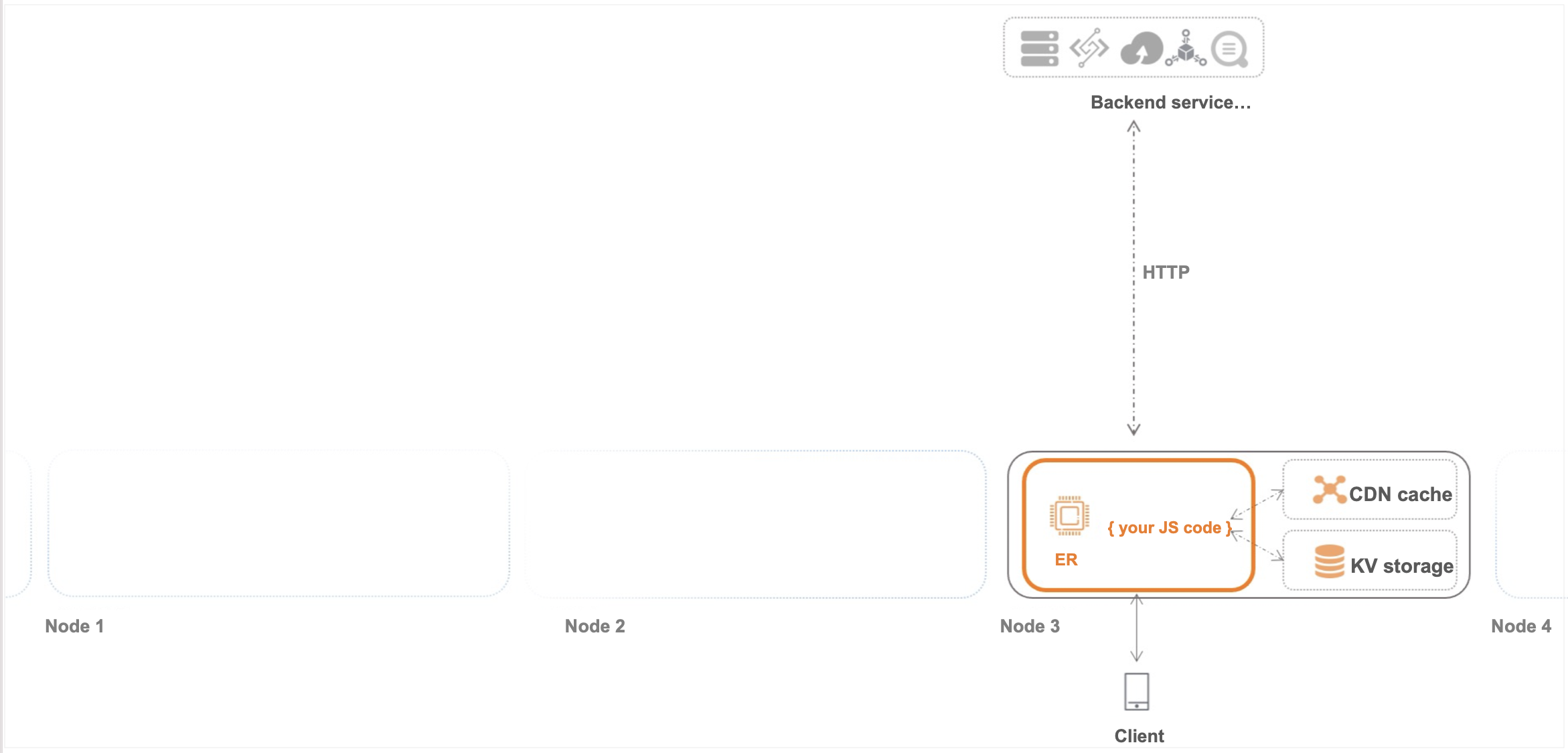
API standards
The Cache API follows the standard Cache API as closely as possible. However, because EdgeRoutine reuses the DCDN cache engine, the semantics are not identical.
API definition
cache.put(request/string, response)
-
Adds a Response object to Cache.
-
If the PUT method is successful, the returned Promise resolves to undefined.
-
If the cache engine fails, the Promise is rejected with an error.
-
If the cache engine quota is exhausted, the Promise is rejected with an error.
-
-
The cache key is set to the URL of the Request object, or you can use a string to specify the URL. Only HTTP URLs are supported due to DCDN cache engine limitations.
-
This is an asynchronous function. You can use await to wait until the Response object is added to the cache.,awaitFor usage, seeawaitsyntax
-
Configure the Cache-Control header on the Response object to define the cache TTL. The Cache-Control header must conform to Cache standards.
cache.get(request/string)
-
Returns the cached Response object that matches the input request or string. If no match exists, the Promise resolves to undefined.
-
This is an asynchronous function. You can use await to wait until the Response object is returned.
-
The GET method may not return an object that was added by a preceding PUT call. A cached object may be evicted by the least recently used (LRU) algorithm.
cache.delete(request/string)
-
Deletes a Response object whose key is the input request.
-
On success, the Promise resolves to true.
-
On failure, the Promise resolves to false.
-
-
This is an asynchronous function. You can use await to wait until the deletion completes.
Limits
-
Cache API calls are subrequests that share the EdgeRoutine subrequest quota. By default, the total number of cache.put, cache.get, cache.delete, and fetch subrequests cannot exceed 32 per request context. This quota may change when EdgeRoutine is put into commercial use.
-
cache.put, cache.get, and cache.delete are subject to concurrency control. If concurrent requests target the same URL, one request may return a pending state. Retry the request later if this occurs.
NoteIf a cache.put, cache.get, or cache.delete request is rejected and the Promise resolves to true, the rejection is caused by concurrency control.
Cache refresh
The Cache API does not support active cache refresh. You must specify an appropriate TTL when you add an item to the cache with the cache.put() method.