Configure origin SNI
If your origin server uses a single IP address to host multiple domain names and the origin protocol is HTTPS, you must configure origin SNI. This allows the origin server to identify the requested domain, return the correct SSL certificate, and ensure successful origin fetches.
Background information
Server Name Indication (SNI) is an extension to the SSL/TLS protocol. It allows a server to host multiple SSL certificates on a single IP address. This addresses the challenge of an HTTPS server hosting multiple domains without knowing which one the client is requesting. After you enable SNI, when a DCDN point of presence (POP) initiates a TLS handshake with the origin server, the origin server uses the SNI information carried in the TLS handshake to identify the requested domain name and returns the correct SSL certificate to the POP.
-
Your origin server must be able to parse the SNI information contained in TLS handshake requests.
-
If you have configured multiple origin servers for an accelerated domain name, the origin SNI setting applies to all of them. If you want to configure different SNI values for different origin servers, you can fill out the form.
The following figure shows how origin SNI works.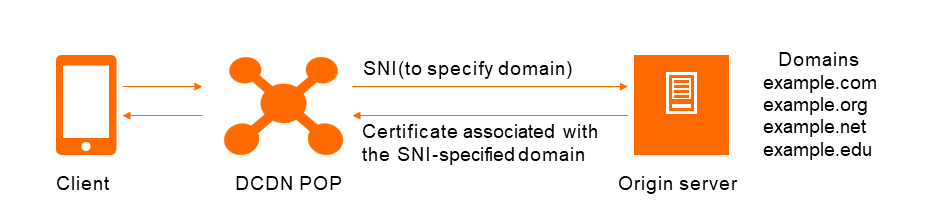
The origin SNI workflow is as follows:
-
When a DCDN point of presence (POP) accesses the origin server over HTTPS, it must specify the target domain, such as example.com, in the SNI field.
-
The origin server receives the request and returns the SSL certificate for the domain specified in the SNI. In this case, this is the certificate for example.com.
-
The DCDN point of presence (POP) receives the certificate and establishes a secure connection with the server.
We recommend that you set the origin Host header and origin SNI to the same domain name (typically the origin server domain name or the accelerated domain name). If the origin Host header (the HTTP Host header) and origin SNI (the domain name specified during the TLS handshake) do not match (for example, the origin Host header is set to the origin server domain name but SNI is set to the accelerated domain name), the SSL handshake may fail or the origin server may return an error. Configure them separately in the console, and make sure they match the origin server certificate and virtual host configuration.
Procedure
-
Log on to the DCDN console.
-
In the left-side navigation pane, click Domain Names.
-
On the Domain Names page, find the target domain name and click Configure.
-
In the left-side navigation tree of the domain name, click Origin Fetch.
-
On the Origin Fetch tab, find Default Origin SNI.
-
Turn on the Default Origin SNI switch and enter the domain name for origin SNI, such as
example.com.NoteThe origin SNI value must be an exact-match domain name. Wildcard domain names are not supported.
-
Click OK.