Specify static file URIs
You can configure URIs of static files that you want to cache. This way, the specified static files can be directly served from POPs, instead of following the acceleration rule for dynamic resources.
Background information
The following rules apply to accelerating dynamic and static resources:
-
Enabled
If you need to accelerate both static and dynamic resources, enable the Dynamic Acceleration switch. You can then configure acceleration rules for static file types based on your business requirements. After you complete the configuration, resources are accelerated according to your specified rules. You can customize the file types for edge cache, the URIs of static files to be cached, and the resource directories for static acceleration.
-
Disabled
If you do not need to accelerate dynamic resources, disable the Dynamic Acceleration switch. After you disable dynamic acceleration, dynamic resources are no longer accelerated. Instead, they are processed based on the static edge cache logic. In this case, the default static file acceleration rules take effect, and any manually added static file acceleration rules become invalid.
By enabling dynamic acceleration and configuring static file types, you can accelerate dynamic and static content separately. This allows static assets to be cached on points of presence (POPs) for faster access, while dynamic pages use an optimized route to fetch the latest content from the origin server.
For example, the following describes a typical configuration for a WordPress site:
-
Enable the Dynamic Acceleration switch. This ensures that dynamic pages, such as those generated by PHP, use intelligent routing to retrieve the most up-to-date content from the origin server.
-
In the Static File Types settings, add the filename extensions for common static assets on your site, such as
jpg,png,gif,css,js,ico,svg,mp4,woff. DCDN caches these static resources on points of presence (POPs), reducing the load on your origin server and improving access speed. -
When you configure cache expiration, set a long cache duration, such as 30 days, for rarely updated assets, such as images and videos. For frequently updated assets, such as CSS and JS files, set a shorter cache duration, such as 1 day. For dynamic files like PHP, we recommend setting the cache duration to 0s to prevent them from being cached.
Procedure
-
Log on to the DCDN console.
-
In the left-side navigation pane, click Domain Names.
On the Domain Names page, find the target domain name and click Configure.
-
In the left-side navigation tree of the domain name, click Acceleration Rules.
-
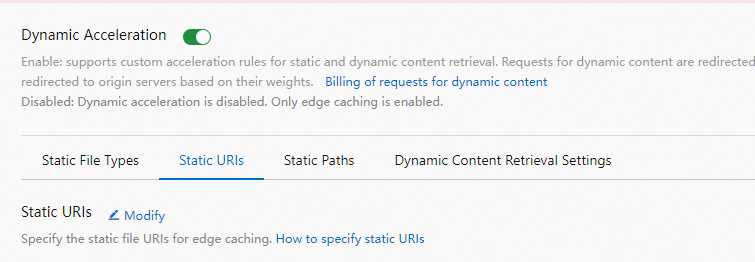
Turn on Dynamic Acceleration.
-
On the Static URIs tab, click Modify.
-
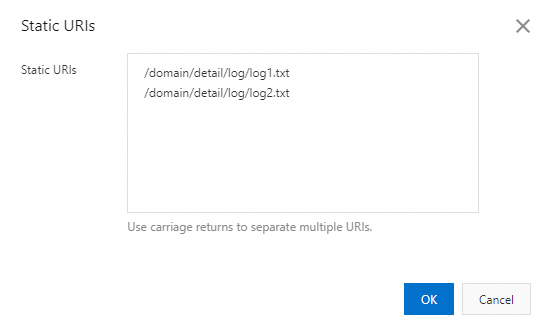
In the Static URIs dialog box, specify static URIs based on your business requirements.
-
Click OK.