API Security Settings
API security settings let you manage Session ID, Schema Validation Settings, and Token Configuration for Edge Security Accelerator (ESA) API Security from a single place. Session identifiers are used mainly by the API management feature. Token configuration is used when you configure API rules.
Add a session identifier
Session identifiers identify individual sessions of an API. ESA collects and analyzes the traffic of the tagged APIs and generates rate limiting suggestions for them.
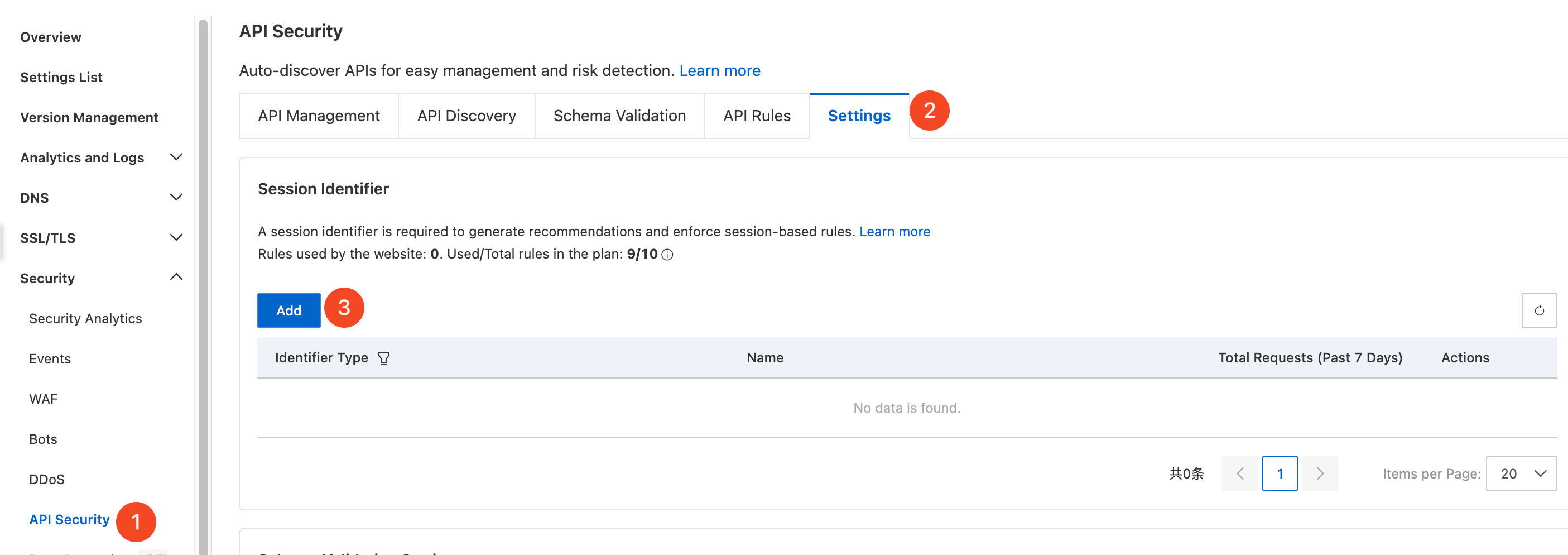
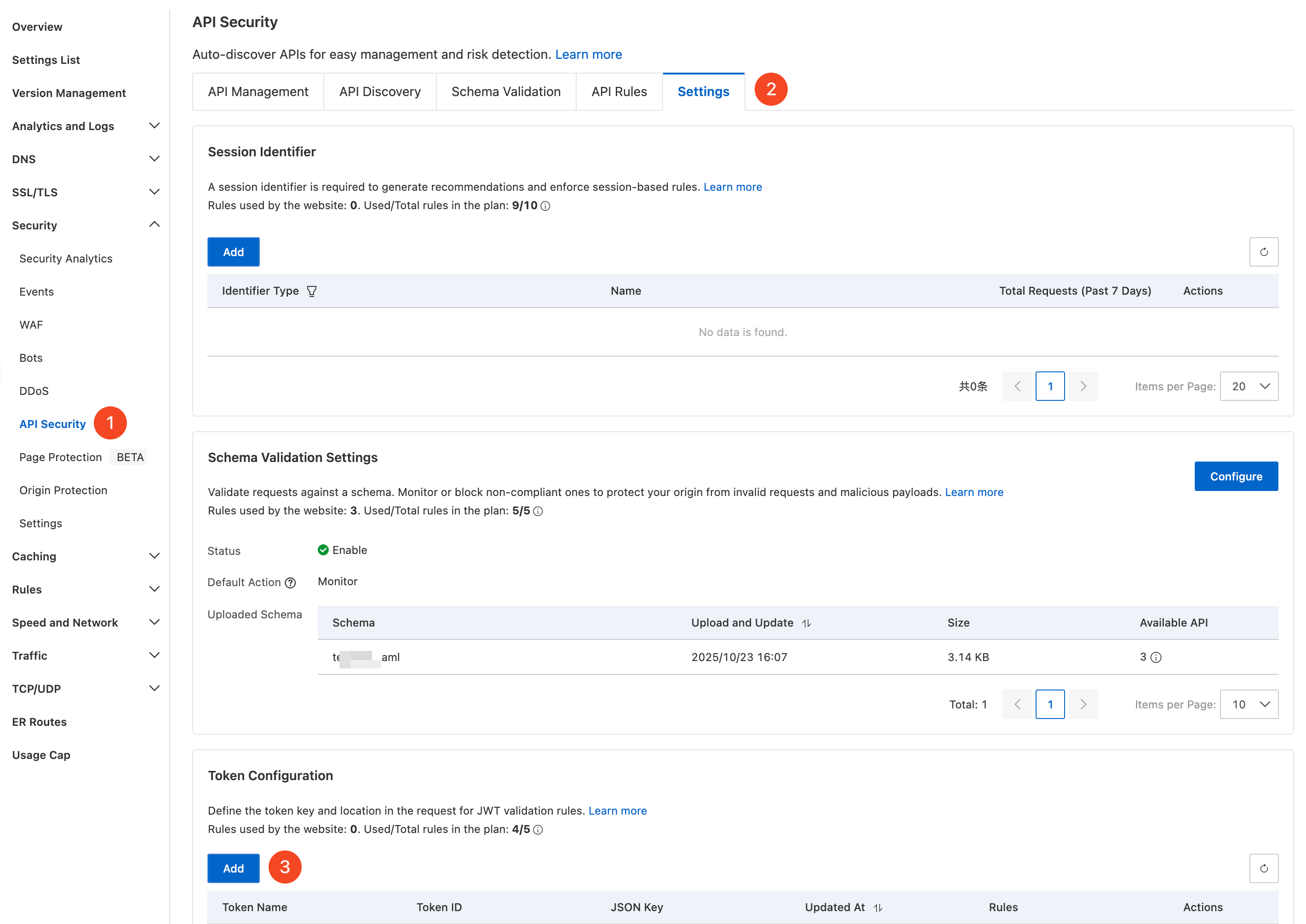
In the ESA console, select Websites, and in the Website column, click the target site.
In the left navigation pane, choose Security > API Security.
On the API Security page, click the Settings tab, and then click Add in the Session ID section to start the configuration.
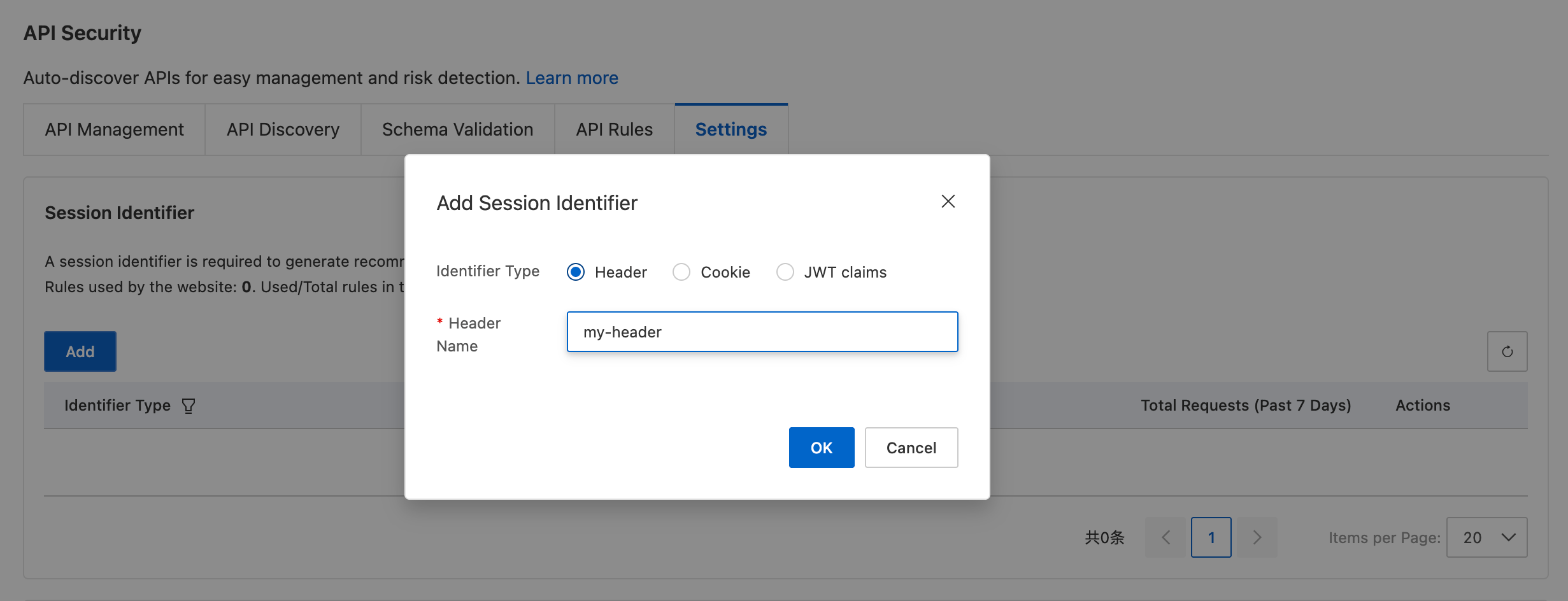
Select the identifier type that matches your business requirements, and then enter the corresponding custom header name. The following identifier types are available:
Header
Cookie
JWT claims, which must already exist or be created now
Configure schema validation
Upload an API schema such as an OpenAPI specification. ESA automatically matches it to your managed APIs, validates incoming requests against the schema, and applies the configured action to non-compliant requests. In the schema validation settings, you can turn the feature on or off, configure the default action, and upload a custom schema file.
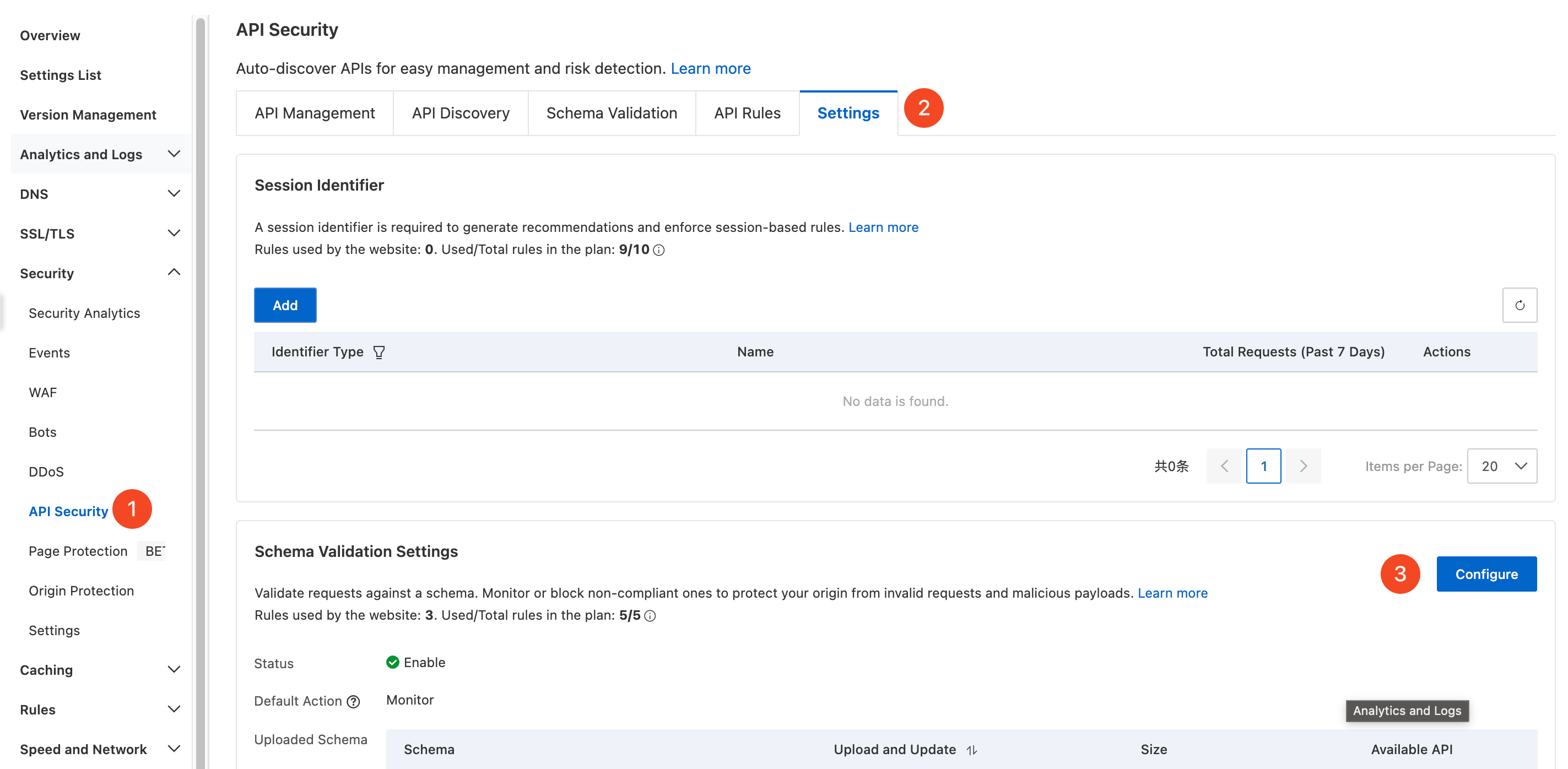
In the ESA console, select Websites, and in the Website column, click the target site.
In the left navigation pane, choose Security > API Security.
On the API Security page, click the Settings tab, and then click Configure in the Schema Validation Settings section to start the configuration.
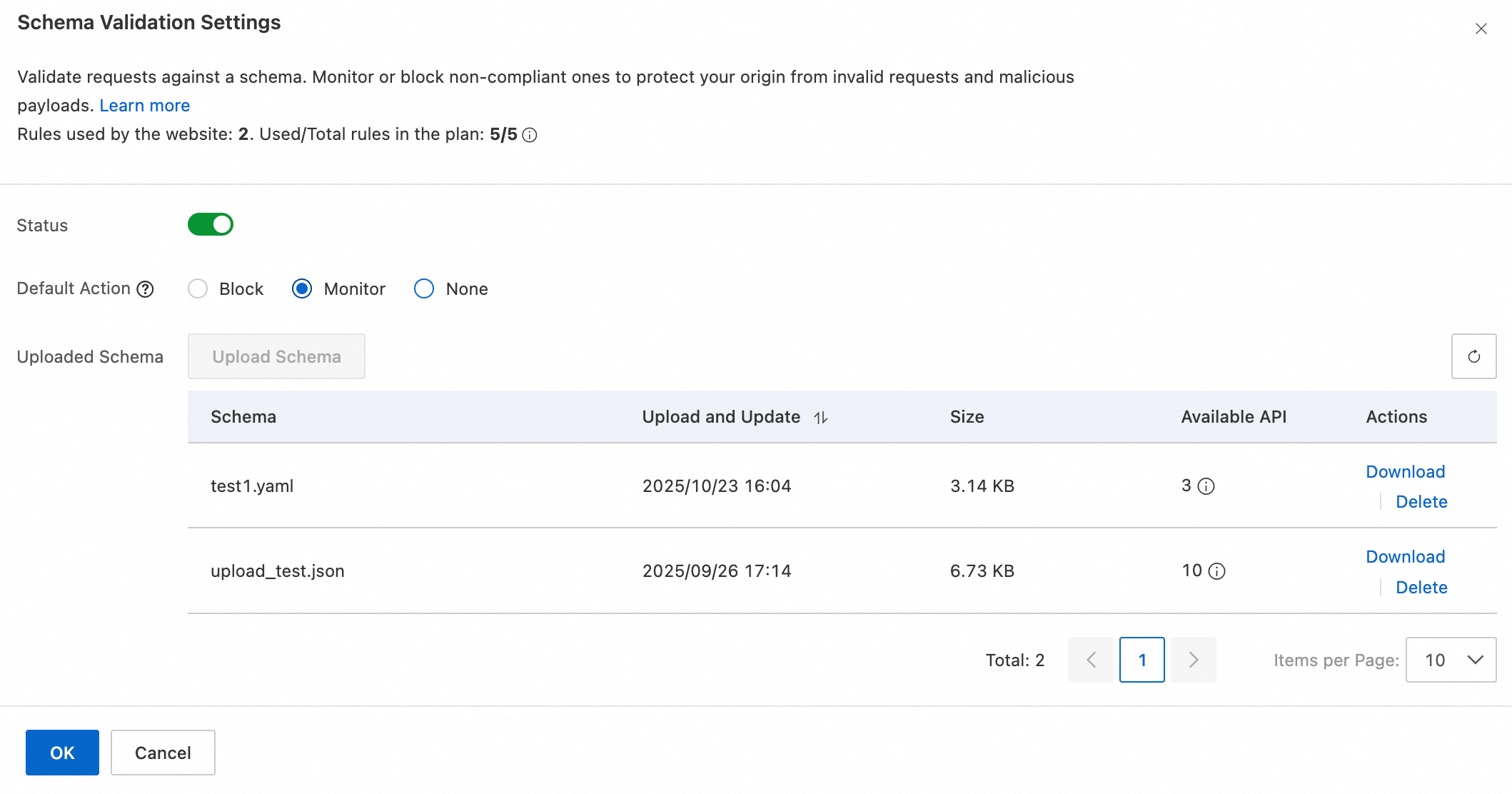
Complete the following settings based on your business requirements, and then click OK:
Status: Turn schema validation on or off.
Default Action: Select the default action to apply to requests that do not comply with the schema. The following actions are available:
Block: Blocks non-compliant requests and records a block log. To view the details, see Event analysis.
Monitor: Allows non-compliant requests and records a log. To view the details, see Event analysis.
None: Takes no action.
Uploaded Schema: Upload a custom schema file. ESA parses the file automatically and uses it as the API compliance validation rule.
Add a token
Add JSON Web Token (JWT) information in Token Configuration, and then reference it in API token compliance validationto authenticate visitors.
In the ESA console, select Websites, and in the Website column, click the target site.
In the left navigation pane, choose Security > API Security.
On the API Security page, click the Settings tab, and then click Add in the Token Configuration section to start the configuration.
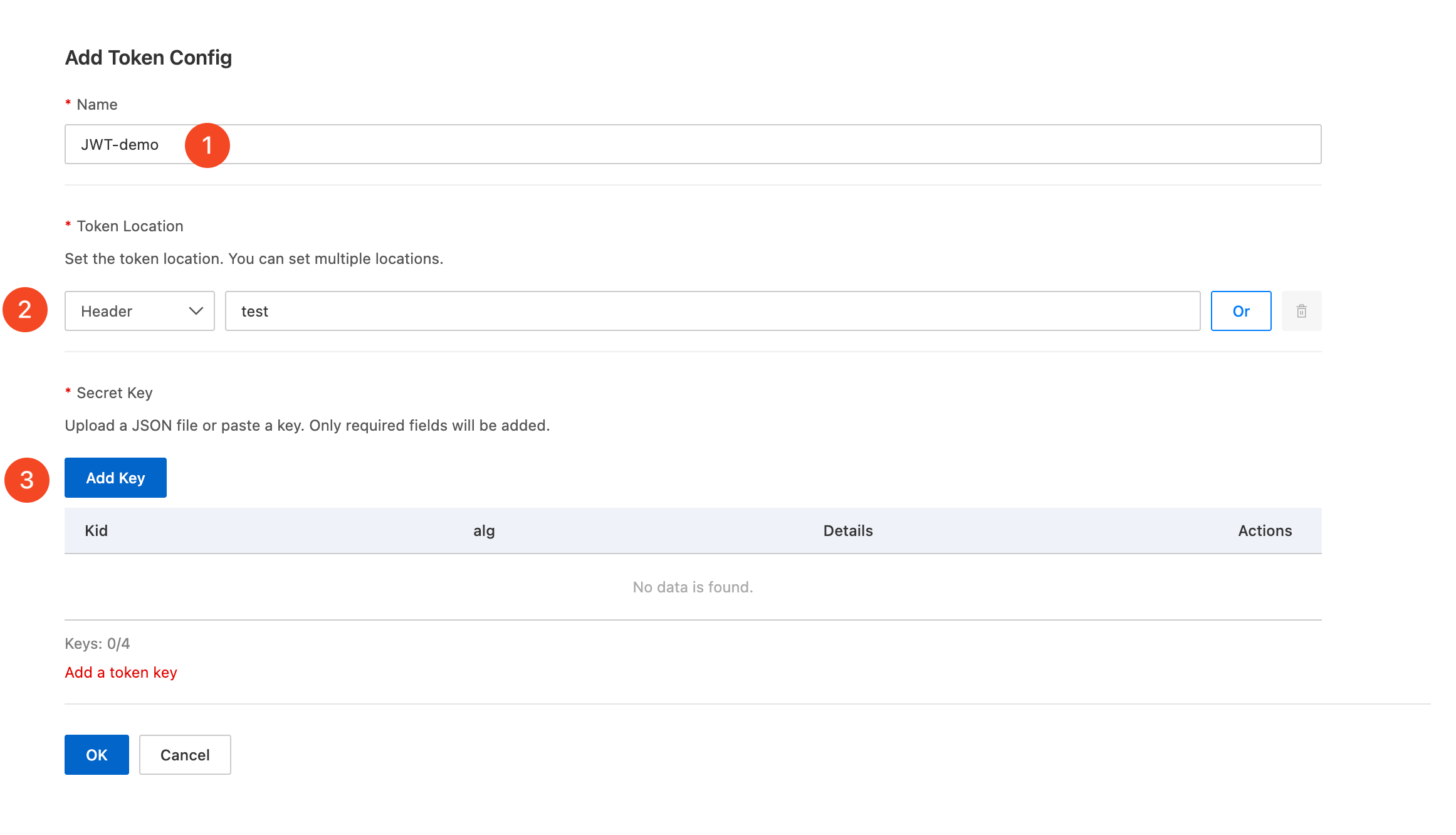
Specify the following token parameters based on your business requirements.
Name: Enter a custom token name, such as
JWT-Demo.Token Location: Select where the token is located in the request. You can select the Headeror Cookiefield, and then enter the corresponding key.
To accommodate JWTs that reside in different locations across your business, click Orto create a logical
ORcondition. You can evaluate up to four token locations at the same time.Secret Key: Add the token key by entering it manually or by uploading a JSON file. For key requirements, see JWK fields.
If you configure multiple keys, ESA selects a key based on the
kidfield for validation. Validation passes if any one of the keys validates the token successfully.
Schema file specifications
Type and size
Schema validation files must be in .yml, .yaml, or .json format. The maximum file size is 58 KB. If your schema file exceeds this limit, use the .json format and compress the file locally before uploading.
Schema content
Version
ESA schema validation supports only OpenAPI Specification (OAS) v3.0.x.
Fields
Required fields
openapi: The API version, such as3.0.0.info: Metadata about the API, such as"version": "1.0.0".paths: Must contain at least one API path, such as/api.servers: Information about the host. The following sub-fields are supported:url: Only absolute URLs are supported, such ashttps://api.example.com.variables: ESA does not support server variables. Variable placeholders are ignored during parsing.
Optional fields
schema: The data structure definition. The following types are supported:int32
uint32
int64
uint64
float
double
boolean
email
reference: Uses$refto reference a predefined object. External or relative references are not supported.requestBody: Defines the request body. Only data with acontent-typeofapplication/jsonis supported.
Example
The following is an example of a .json schema file.{
"openapi": "3.0.0",
"info": {
"title": "example",
"description": "example",
"version": "1.0"
},
"servers": [
{
"url": "https://example1.aliyun.com",
"description": "example1 url"
},
{
"url": "https://example2.aliyun.com",
"description": "example2 url"
}
],
"components": {
"schemas": {
"ParamsObject": {
"type": "object",
"properties": {
"id": {
"type": "integer"
},
"value": {
"type": "string"
}
},
"required": [
"id",
"value"
]
}
}
},
"paths": {
"/example/{param1}": {
"get": {
"operationId": "getexampleById",
"parameters": [
{
"name": "param1",
"in": "path",
"required": true,
"description": "id",
"schema": {
"type": "integer",
"format": "int32"
}
}
]
}
},
"/api1": {
"post": {
"operationId": "post_api1",
"summary": "post api1 request",
"parameters": [],
"requestBody": {
"required": true,
"content": {
"application/json": {
"schema": {
"$ref": "#/components/schemas/ParamsObject"
}
}
}
}
},
"get" :{
"operationId": "get_api1",
"summary": "get api1 request",
"parameters": [
{
"name": "id",
"in": "query",
"required": true,
"schema": {
"type": "integer",
"format": "int32"
}
},
{
"name": "name",
"in": "query",
"required": false,
"schema": {
"type": "string"
}
}
]
}
}
}
}Schema file specifications
Type and size
Schema validation files must be in .yml, .yaml, or .json format. The maximum file size is 58 KB. If your schema file exceeds this limit, use the .json format and compress the file locally before uploading.
Schema content
Version
ESA schema validation supports only OpenAPI Specification (OAS) v3.0.x.
Fields
Required fields
openapi: The API version, such as3.0.0.info: Metadata about the API, such as"version": "1.0.0".paths: Must contain at least one API path, such as/api.servers: Information about the host. The following sub-fields are supported:url: Only absolute URLs are supported, such ashttps://api.example.com.variables: ESA does not support server variables. Variable placeholders are ignored during parsing.
Optional fields
schema: The data structure definition. The following types are supported:int32
uint32
int64
uint64
float
double
boolean
email
reference: Uses$refto reference a predefined object. External or relative references are not supported.requestBody: Defines the request body. Only data with acontent-typeofapplication/jsonis supported.
Example
The following is an example of a .json schema file.{
"openapi": "3.0.0",
"info": {
"title": "example",
"description": "example",
"version": "1.0"
},
"servers": [
{
"url": "https://example1.aliyun.com",
"description": "example1 url"
},
{
"url": "https://example2.aliyun.com",
"description": "example2 url"
}
],
"components": {
"schemas": {
"ParamsObject": {
"type": "object",
"properties": {
"id": {
"type": "integer"
},
"value": {
"type": "string"
}
},
"required": [
"id",
"value"
]
}
}
},
"paths": {
"/example/{param1}": {
"get": {
"operationId": "getexampleById",
"parameters": [
{
"name": "param1",
"in": "path",
"required": true,
"description": "id",
"schema": {
"type": "integer",
"format": "int32"
}
}
]
}
},
"/api1": {
"post": {
"operationId": "post_api1",
"summary": "post api1 request",
"parameters": [],
"requestBody": {
"required": true,
"content": {
"application/json": {
"schema": {
"$ref": "#/components/schemas/ParamsObject"
}
}
}
}
},
"get" :{
"operationId": "get_api1",
"summary": "get api1 request",
"parameters": [
{
"name": "id",
"in": "query",
"required": true,
"schema": {
"type": "integer",
"format": "int32"
}
},
{
"name": "name",
"in": "query",
"required": false,
"schema": {
"type": "string"
}
}
]
}
}
}
}