Build and route Pages projects
Configure build settings in the esa.jsonc file and customize routing behavior for static assets in Pages projects.
Build Pages with esa.jsonc
Create an esa.jsonc file in the root directory of your GitHub project. This file lets you define and override default project settings.
Benefits
-
Infrastructure as code: Configuration is version-controlled with your code, making every change traceable.
-
Seamless team collaboration: All team members share one configuration file, ensuring consistency between local development and cloud deployment.
-
Convenient rollbacks: Roll back to any historical commit and reproduce its exact build environment.
Configuration priority
esa.jsonc settings take precedence over console settings:
-
If your project does not have an
esa.jsoncfile:-
You can adjust the build options on the project's details page. For more information, see Modify build settings in the console.
-
Console settings apply to the current and all subsequent deployments.
-
-
If an
esa.jsoncfile exists in your project:-
The system detects the file and uses it as the sole configuration source.
-
On the project details page, console settings managed by
esa.jsoncare ignored. -
To modify the configuration, edit the
esa.jsoncfile and push the changes to your GitHub repository.
-
Configuration example
Add an esa.jsonc file to your Pages repository on GitHub. Example:
{
  "name": "vite-react-template",
  "entry": "./src/index.js",
  "installCommand": "npm install",
  "buildCommand": "npm run build",
  "assets": {
    "directory": "./dist",
    "notFoundStrategy": "singlePageApplication"
  }
}|
Parameter |
Description |
|
name |
The target project for deployment. If the project exists, the deployment applies to it. Otherwise, ESA creates a new project with this name. |
|
entry |
Path to the Edge Function entry file, such as |
|
installCommand |
Custom installation command, such as |
|
buildCommand |
Custom build command, such as |
|
assets |
Static asset hosting runs front-end websites on ESA Functions and Pages. Each Pages project supports one asset directory. Options:
|
Route static assets
After you configure esa.jsonc, requested URLs are routed to files in the static asset directory as follows:
Default mode
When notFoundStrategy is not set in esa.jsonc:
{
  "name": "vite-react-template",
  "entry": "./src/index.js",
  "assets": {
    "directory": "./dist"
  }
}
ESA routes requests as follows:

-
When a request URL reaches an edge node, ESA checks for a matching static asset. If found, ESA serves the file directly. If not, proceed to step 2.
-
If an Edge Routine (ER) function script exists, ESA executes it. Otherwise, a
404 Not Foundresponse is returned.
Single-page application
For single-page applications, set notFoundStrategy to singlePageApplication in esa.jsonc. Example:
{
  "name": "vite-react-template",
  "entry": "./src/index.js",
  "assets": {
    "directory": "./dist",
    "notFoundStrategy": "singlePageApplication"
  }
}
ESA routes requests as follows:

-
When a request URL reaches an edge node, ESA checks for a matching static asset. If found, ESA serves the file directly. If not, proceed to step 2.
-
Check if the request is a navigation request (contains the
Sec-Fetch-Mode: navigateheader). If not, proceed to step 3. If so, route to/index.htmland proceed to step a:-
If
/index.htmlexists, respond with200 OKand return its content. Otherwise, proceed to step 3.
-
-
If an ER function script exists, ESA executes it. Otherwise, a
404 Not Foundresponse is returned.
Static site generation
For static site generation applications, set notFoundStrategy to 404Page in esa.jsonc. Example:
{
  "name": "vite-react-template",
  "entry": "./src/index.js",
  "assets": {
    "directory": "./dist",
    "notFoundStrategy": "404Page"
  }
}
ESA routes requests as follows:

-
When a request URL reaches an edge node, ESA checks for a matching static asset. If found, ESA serves the file directly. If not, proceed to step 2.
-
Check if the request is a navigation request (contains the
Sec-Fetch-Mode: navigateheader). If not, proceed to step 3. If so, route to/404.htmland proceed to step a:-
If
/404.htmlexists, respond with200 OKand return its content. Otherwise, proceed to step 3.
-
-
If an ER function script exists, ESA executes it. Otherwise, a
404 Not Foundresponse is returned.
Automatic trailing slashes
By default, Pages automatically appends a trailing slash to request URLs that correspond to HTML files.
When a request path does not end with a trailing slash, ESA evaluates whether the path resolves to an HTML file. If it does, ESA issues an HTTP 301 redirect to the trailing slash version of the URL:
-
If
{path}.htmlexists in the static asset directory, a request to/{path}redirects to/{path}/. For example, a request to/aboutredirects to/about/whenabout.htmlexists. -
If
{path}/index.htmlexists in the static asset directory, a request to/{path}redirects to/{path}/.
This behavior is enabled by default and requires no configuration.
Modify build settings in the console
-
Log in to the ESA console. In the left-side navigation pane, choose .
-
On the Functions and Pages page, click the target function or page.
-
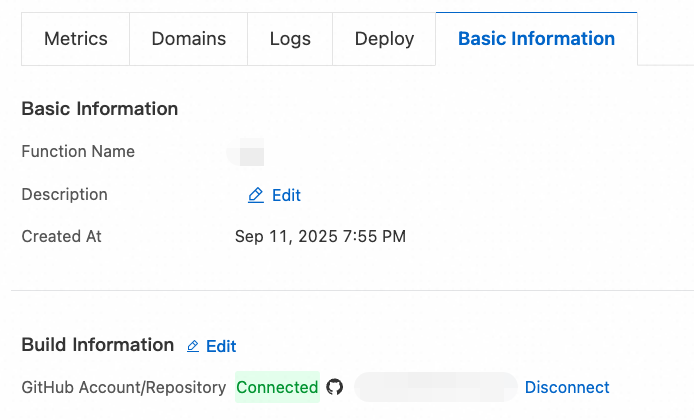
Select the Basic Information tab. In the Build Information section, click Edit.
-
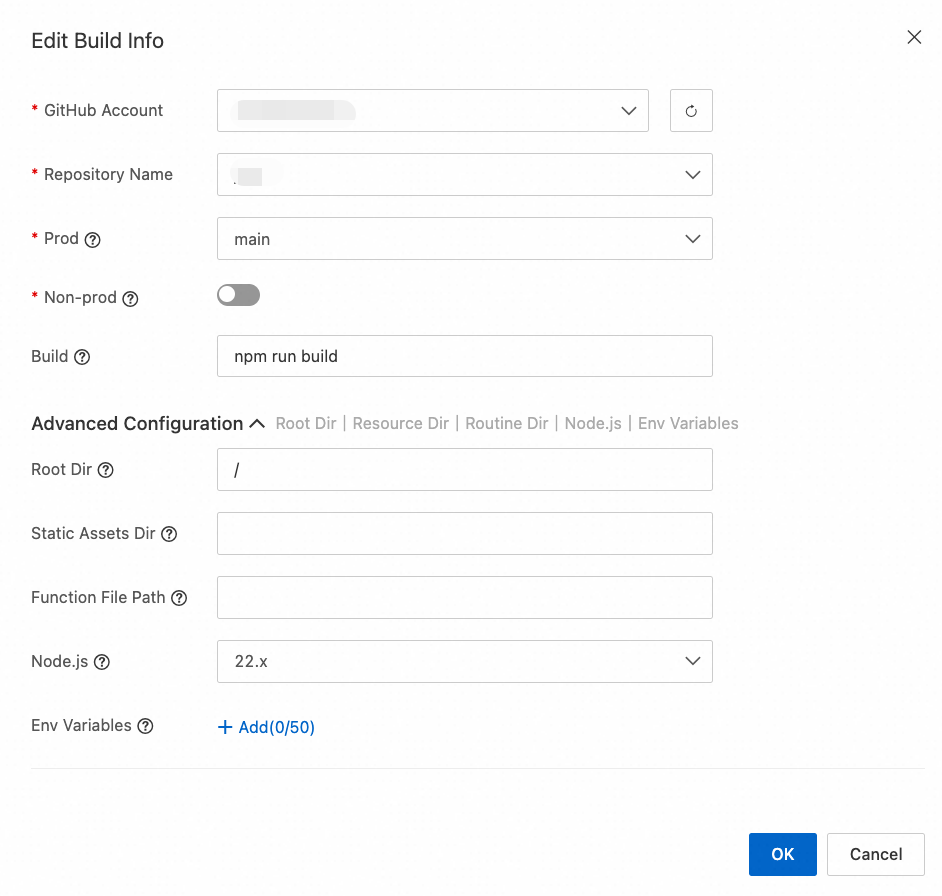
Update the Build Information settings as needed.
Parameter
Description
Root directory
The directory where the build command runs. Defaults to
/. For amonorepo, enter the subproject path, such as/frontendor/packages/web.Static asset directory
The build output directory for static assets, such as
./public,./dist, or./build. You can also set this in theassets.directoryfield of the esa.jsonc file, which takes precedence over the Build Information console setting.Function file path
Path to the function entry file, such as
./src/index.ts. You can also set this in theentryfield of the esa.jsonc file, which takes precedence over the Build Information console setting.Node.js version
The Node.js version for the build. Changes take effect on the next build. You can also set the major version in the
engines.nodefield ofpackage.json, which takes precedence over the Build Information console setting.Environment variables
Environment variables for the build process, accessible through
process.env.