Create a real-time log delivery task
Collect real-time logs from systems, applications, or devices and deliver them to a destination of your choice for security monitoring, troubleshooting, and performance optimization.
Before you begin
To deliver ESA real-time logs to Alibaba Cloud Simple Log Service (SLS), activate Simple Log Service first. SLS charges separate traffic and storage fees. For more information, see Billing overview.
To deliver ESA real-time logs to Alibaba Cloud Object Storage Service (OSS), activate Object Storage Service first. OSS charges separate traffic and storage fees. For more information, see Billing overview.
To deliver ESA real-time logs outside Alibaba Cloud, follow the third-party platform's requirements.
Logs typically reach the destination within 5 minutes.
Create a real-time log delivery task
The following flowchart shows the task creation process.

For non-Alibaba Cloud object storage destinations (AWS S3 or S3-compatible services), an ownership verification step confirms you own the destination bucket.
Only the first step (log category selection) differs between task types. The remaining steps are identical.
Select a log category
Edge Routine Log and Edge Container Log
In the ESA console, select Websites, and in the Website column, click the target site.
On the Real-time Logs page, click Create Delivery Task.

Following the prompts on the page, enter a task name, select a log category, and then click Next.

Access and Origin Log, Firewall Log, TCP/UDP Proxy Log, and DNS Logs
In the ESA console, select Websites, and in the Website column, click the target site.
In the left navigation pane, choose .
On the Delivery Tasks tab, click Create Delivery Task.
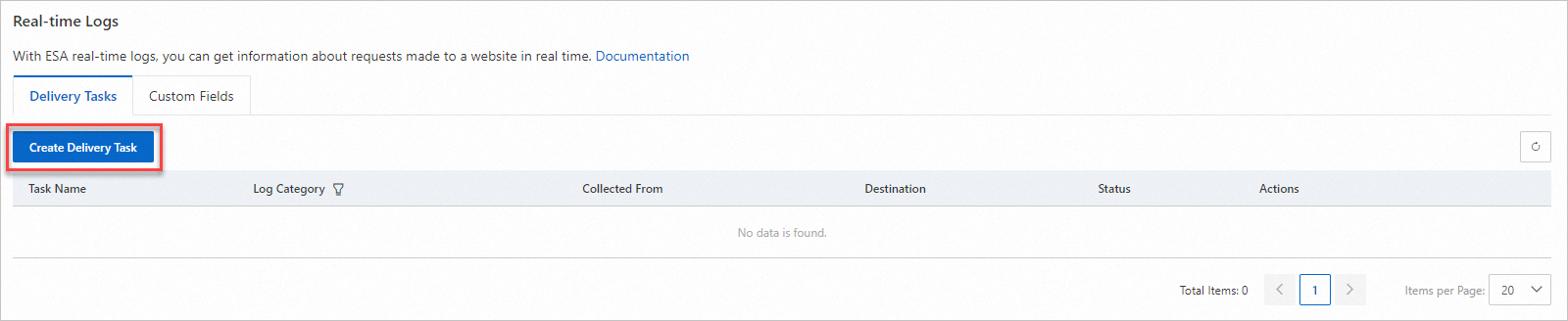
Following the prompts on the page, enter a task name, select a log category, and then click Next.
Select log fields
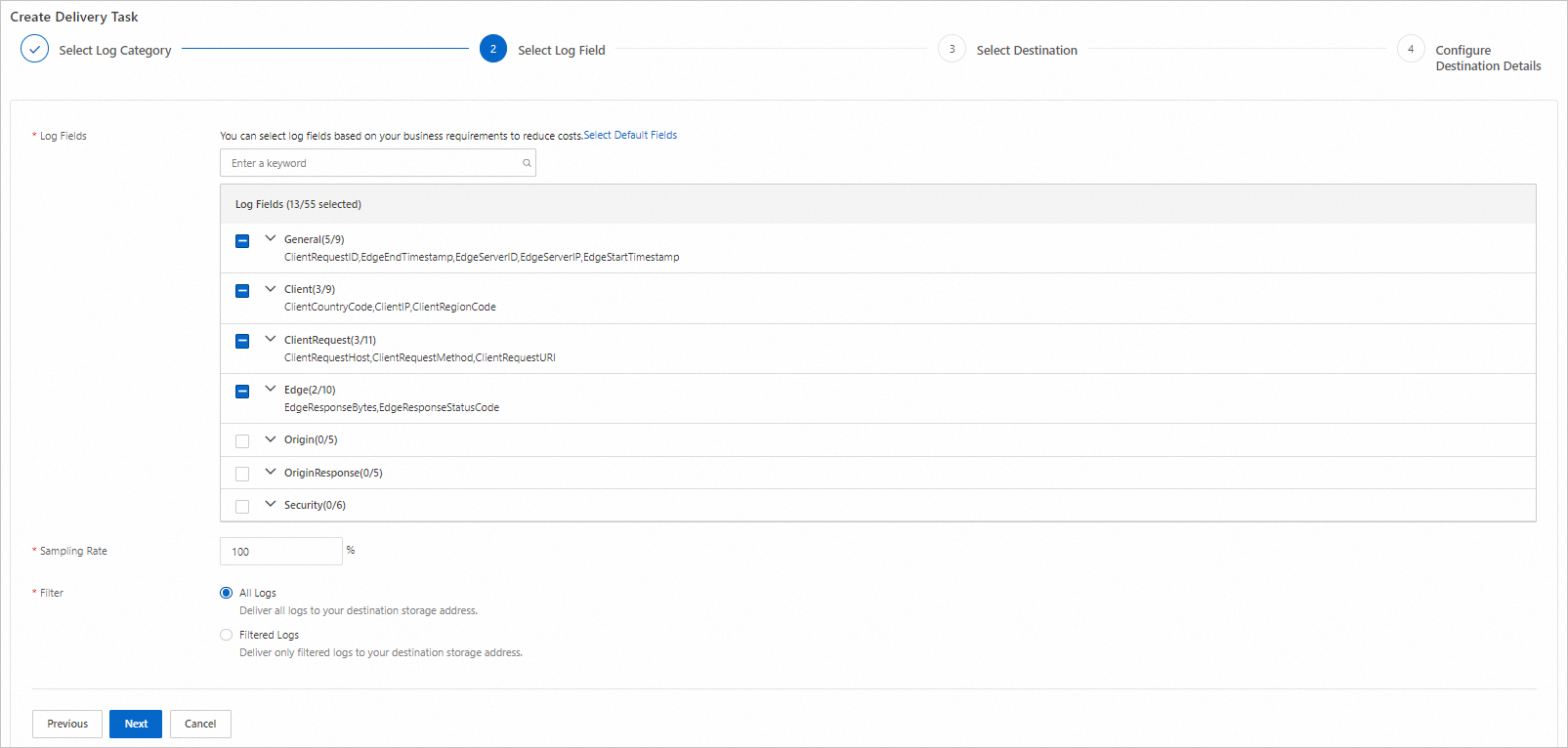
On the Select Log Field tab, configure these parameters and click Next.
Parameter | Description |
Log Fields | Select the fields to collect. For descriptions of all available fields, see . |
Sampling Rate | Reduce log volume and storage costs. ESA randomly samples logs at the specified percentage and delivers only sampled logs to the destination. |
Filter | Filter which logs to deliver. Up to 20 filter conditions supported. |
Select a destination
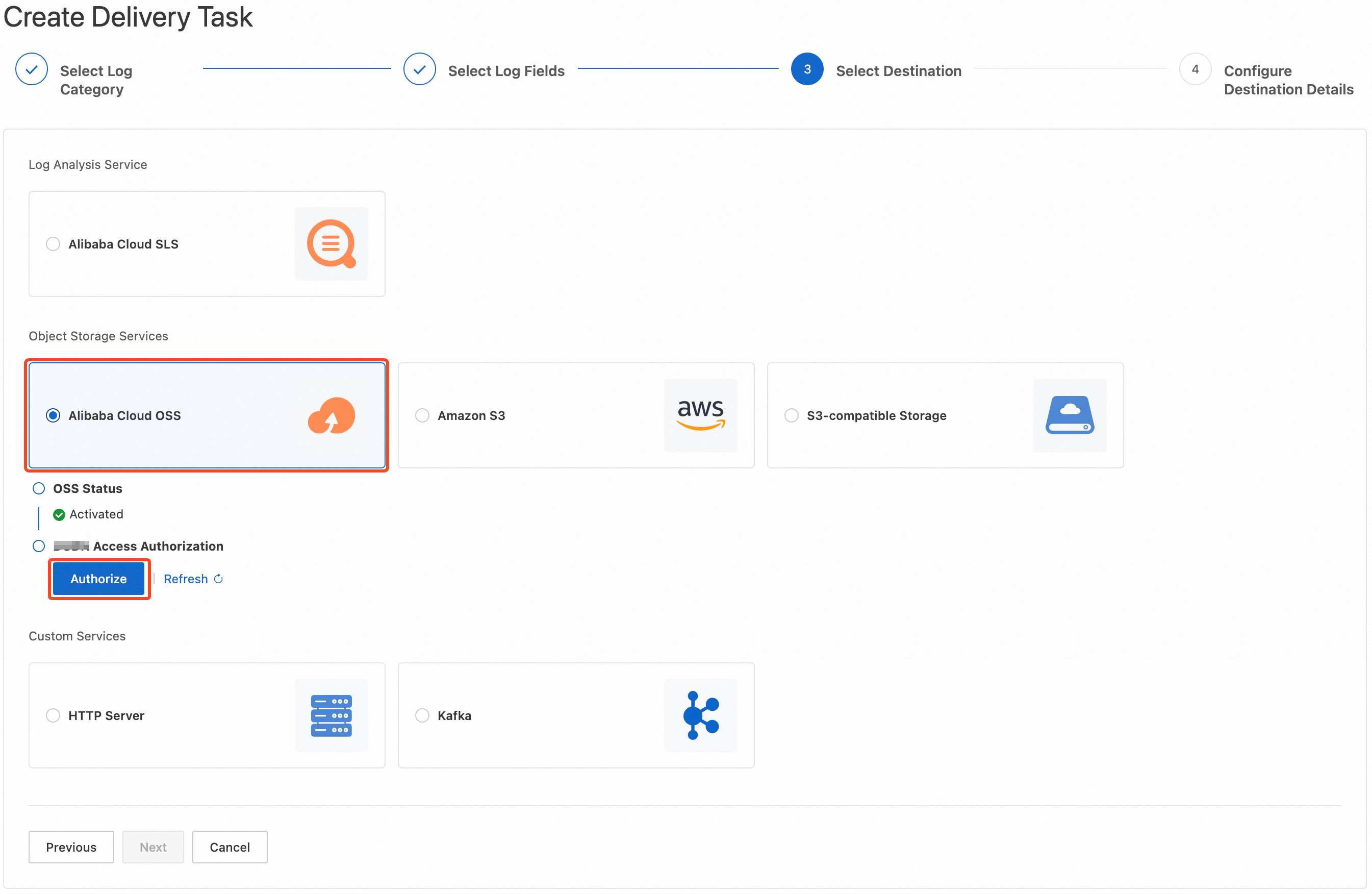
Select the log delivery destination and click Next.
Type | Destination |
Log analysis service | Alibaba Cloud Simple Log Service (SLS) |
Object storage service | Alibaba Cloud Object Storage Service (OSS) |
AWS S3 | |
Other S3-compatible storage services | |
Custom service | HTTP server |
Kafka |
Configure destination details
Deliver to Simple Log Service
Configure the SLS destination details and click OK.
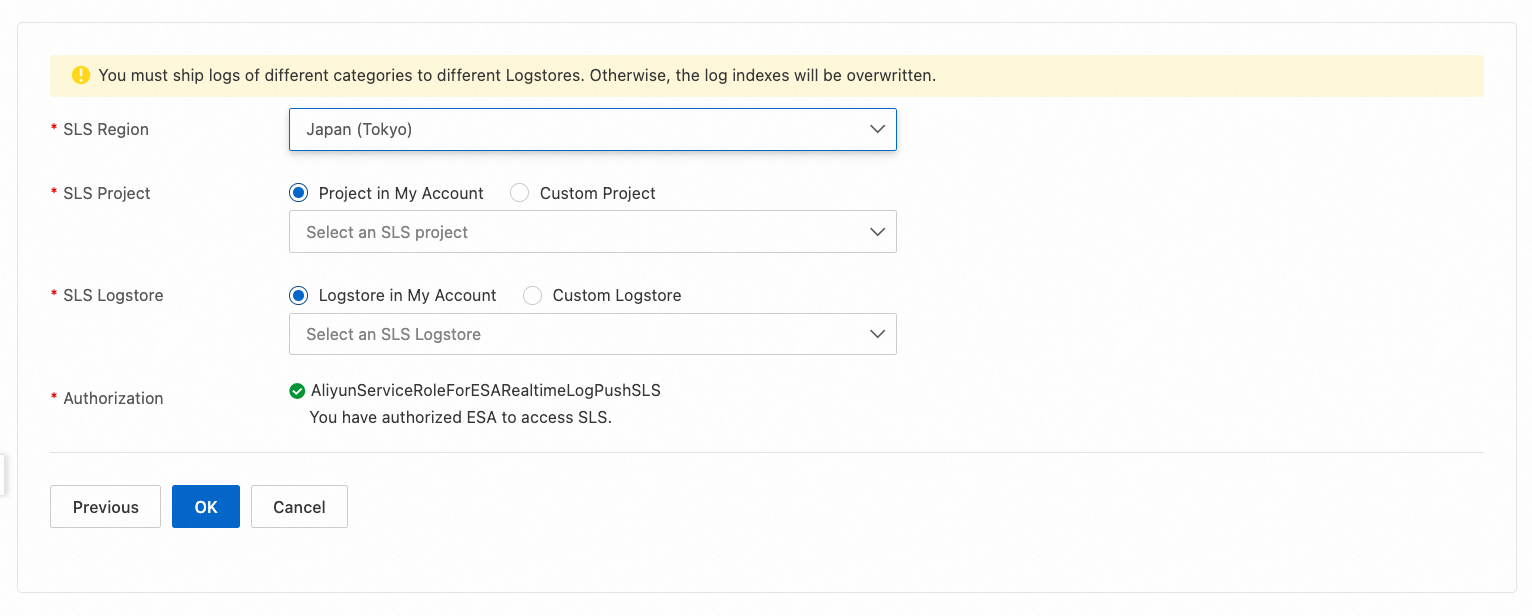
Parameter | Description |
SLS Region | Select the SLS region where logs are delivered. |
SLS Project | Select the SLS project that receives logs. |
SLS Logstore | Select the SLS Logstore that receives logs. If none exists under the target project, create one in the SLS console. |
Authorization | Authorize ESA to access SLS. The system automatically creates the AliyunServiceRoleForESARealtimeLogPushSLS service-linked role with required permissions so that ESA can access SLS resources. For more information about this role, see . |
Deliver to Object Storage Service
Configure the OSS destination details and click OK.
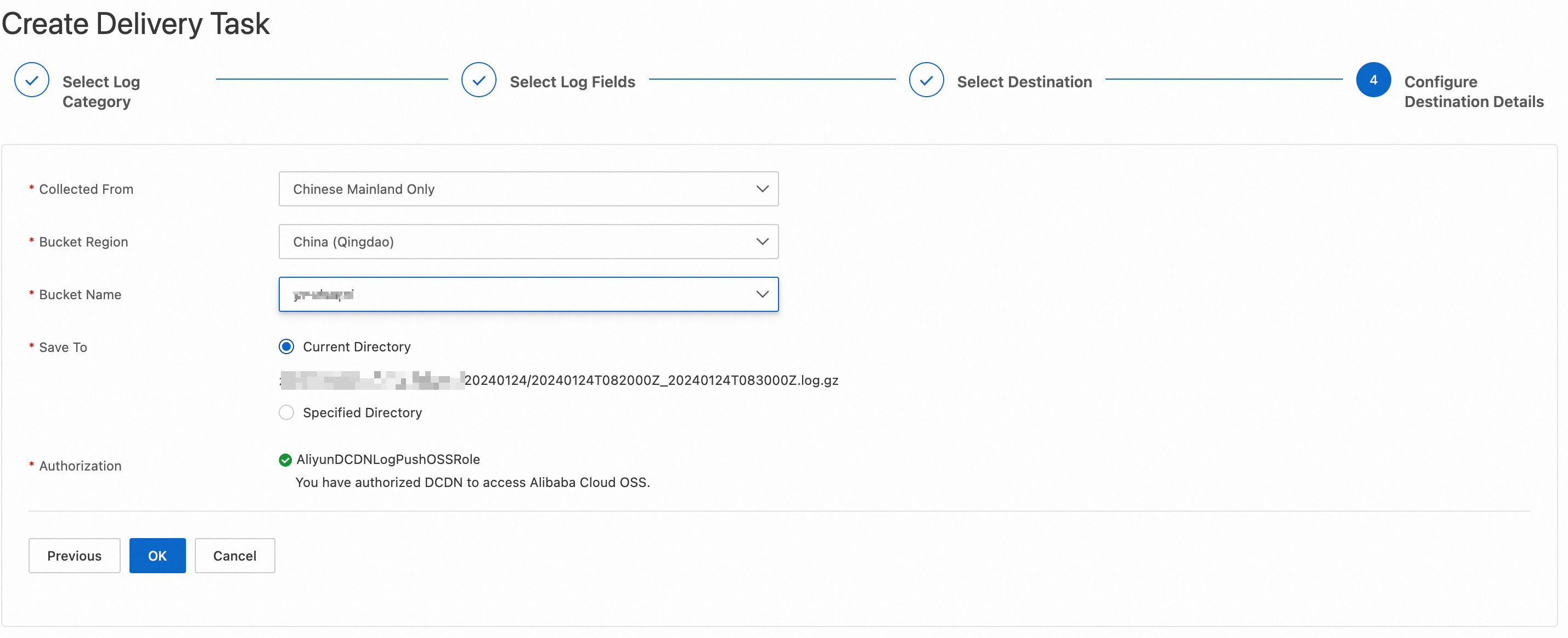
Parameter | Description |
Bucket Region | Select the bucket region. If you don't have a bucket, create one in the Bucket list in the OSS console. |
Bucket Name | Select an existing bucket from the current account. |
Save To | Save files to the bucket root or a specified path. |
Authorization | Authorize ESA to access OSS. The system automatically creates the AliyunESARealtimeLogPushOSSRole service-linked role with required permissions so that ESA can access OSS resources. |
Deliver to AWS S3
Configure the AWS S3 destination details and click Next. 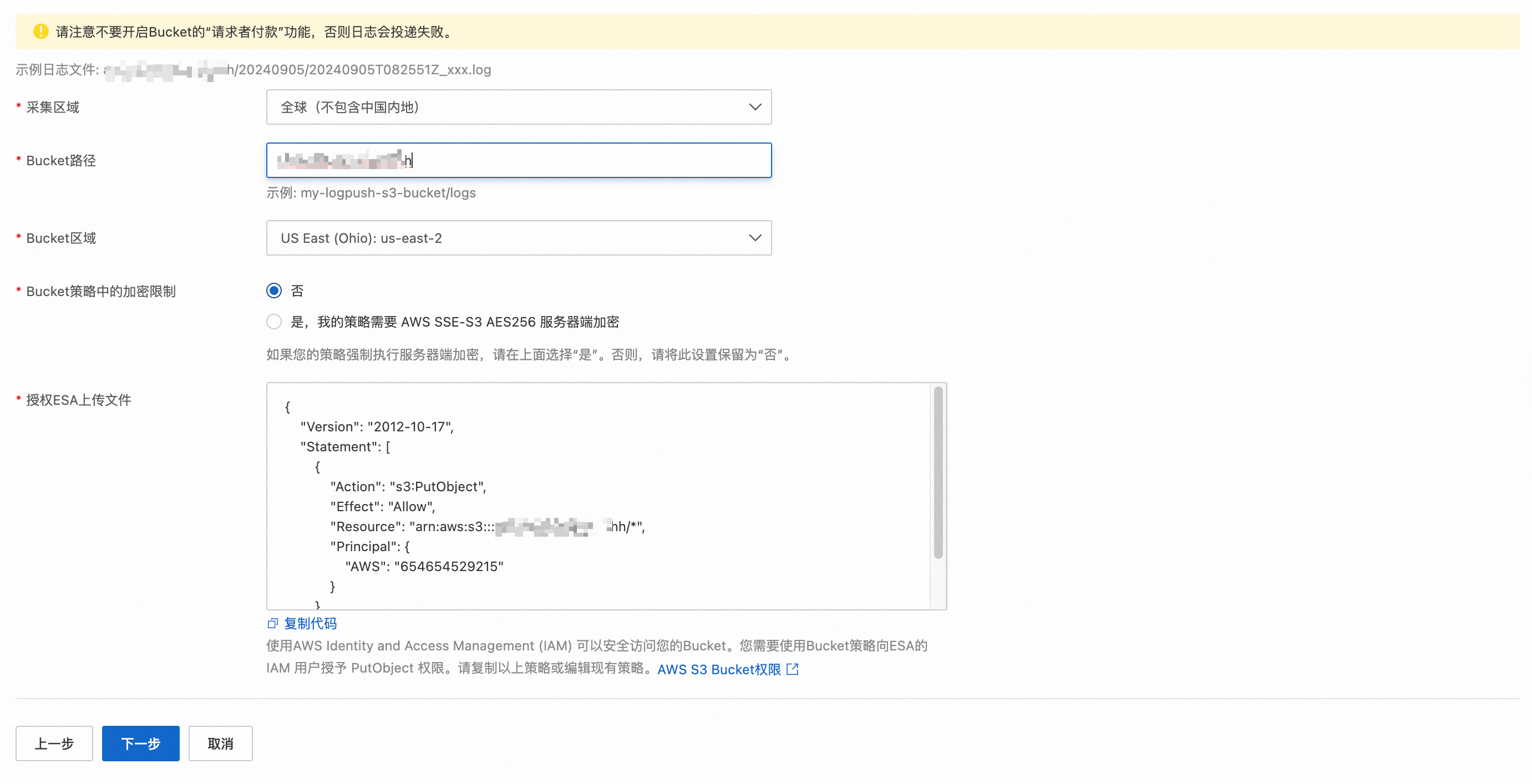
Do not enable Requester Pays on the destination bucket. Log delivery fails if enabled.
Parameter | Description |
Bucket Path | Enter your bucket path. |
Bucket Region | Select your bucket region. |
Encryption Required in Bucket Policy |
|
Authorize ESA to Upload Files | The console provides the required policy code to grant ESA log delivery access. Copy it to AWS S3 Buckets > the destination bucket > Permissions > Bucket policy to authorize ESA to deliver logs to your bucket. |
5. Verify the ownership
After you submit the AWS S3 destination details, the system writes a token file with the .txt extension to the log directory in your bucket.
Follow the path shown next to Prove Ownership to locate the .txt file in AWS S3, copy its full contents into Token, and then click OK.
Deliver to an S3-compatible storage service
Configure the S3-compatible storage destination details and click Next.
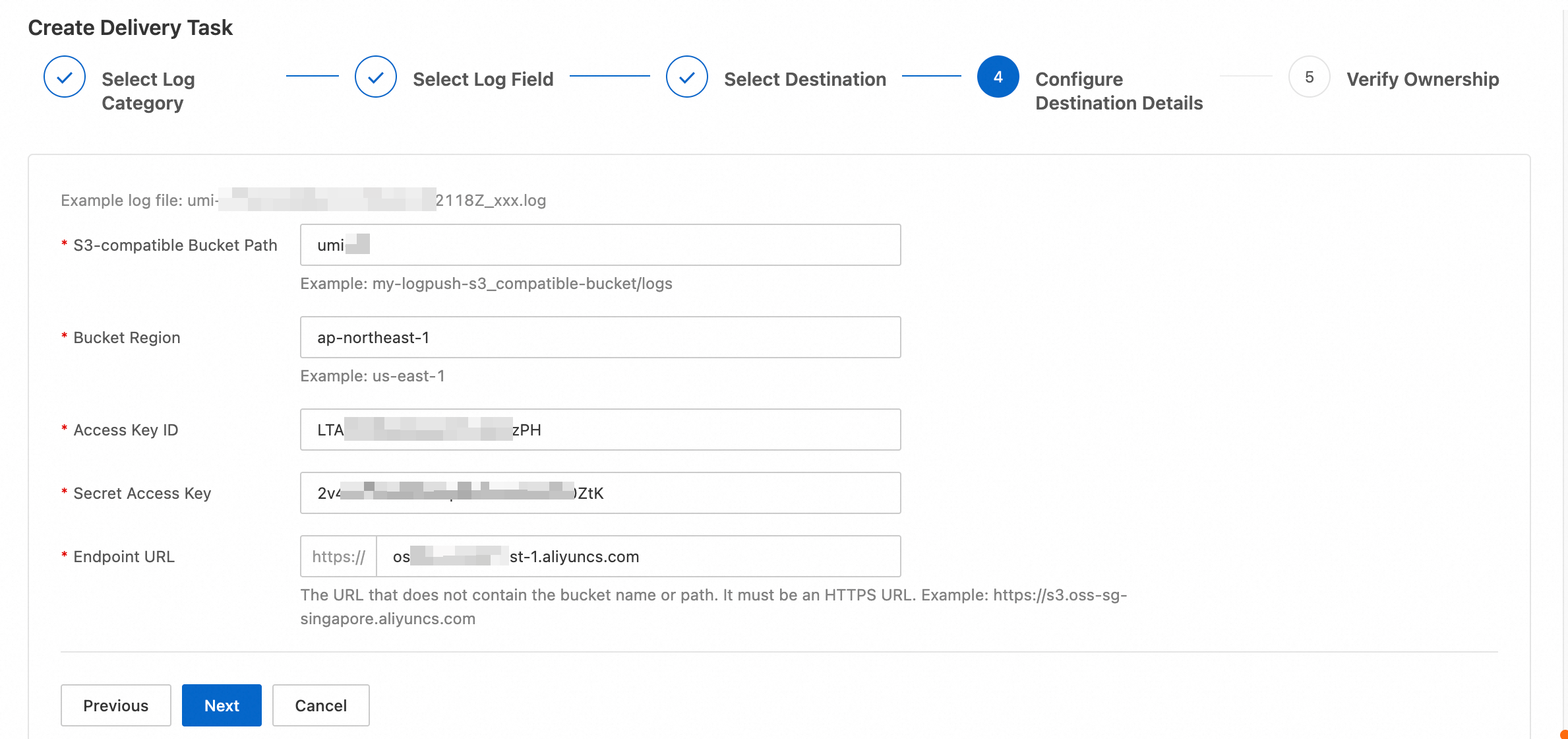
Parameter | Description |
S3-compatible Bucket Path | Enter your bucket path. The system automatically creates a date-based subdirectory to store log files. |
Bucket Region | Enter your bucket region. |
Access Key ID | Enter your AccessKey ID. |
Secret Access Key | Enter your AccessKey Secret. |
Endpoint URL | Enter the S3-compatible server URL. Do not include the bucket name or path. |
To deliver logs to an OSS bucket owned by a different account, use the S3-compatible format. Field mapping:
S3-compatible Bucket Path: Maps to the OSS bucket name and path.
Bucket Region: Maps to the OSS bucket region. Extract from the endpoint (format:
oss-{region}.aliyuncs.com). For example, if the endpoint isoss-cn-hangzhou.aliyuncs.com, the region iscn-hangzhou.Access Key ID / Secret Access Key: Enter the AccessKey pair of a RAM user in the destination account. The RAM user must have write permission on the bucket.
Endpoint URL: Enter the OSS endpoint, for example,
oss-cn-hangzhou.aliyuncs.com.
5. Verify the ownership
After submission, the system writes a .txt token file to the log directory in your bucket.
Follow the token file path shown next to Prove Ownership to locate the .txt file in your S3-compatible storage bucket, copy its full contents into Token, and then click OK. 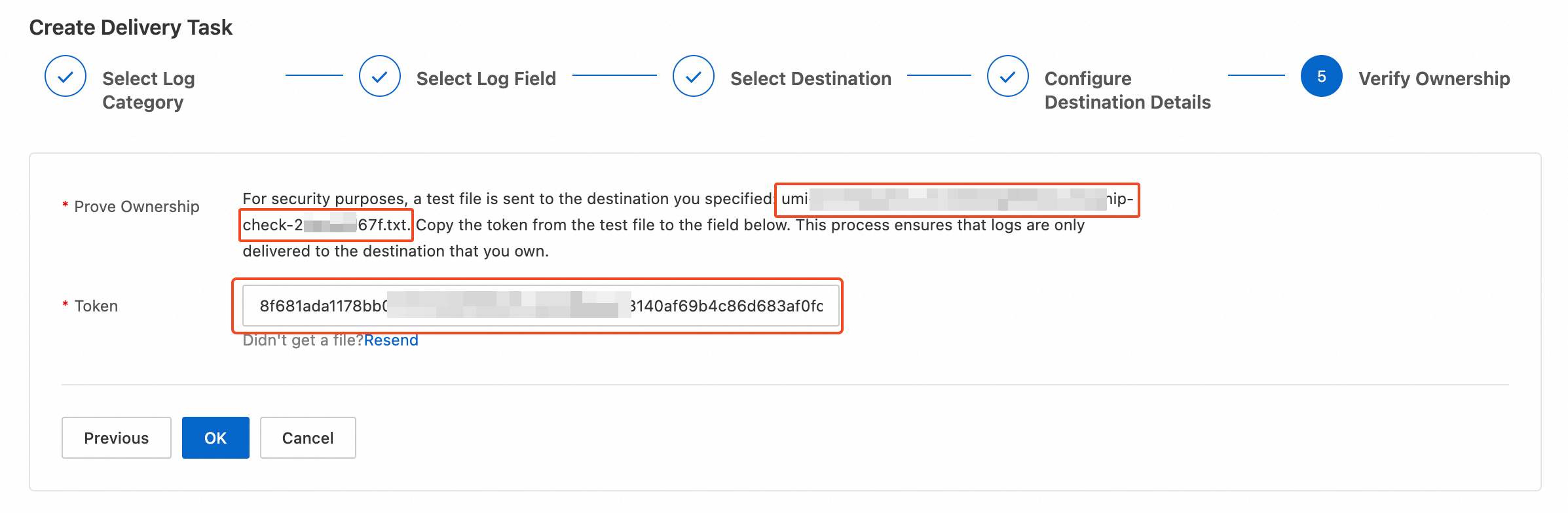
Deliver to an HTTP server
Configure the HTTP server destination details and click OK.
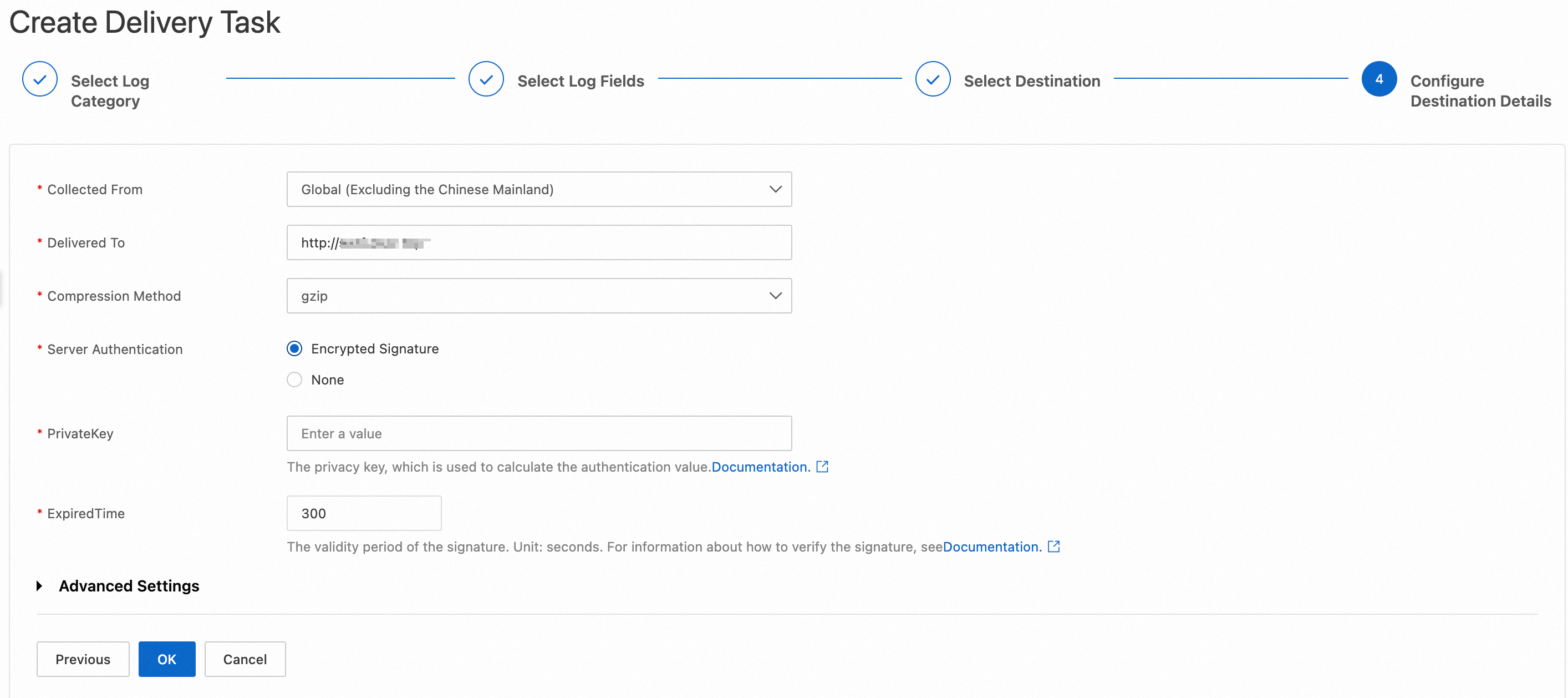
Parameter | Description |
Delivered To | Enter your HTTP server URL (must start with http:// or https://). |
Compression Method | Select a compression format:
|
Server Authentication | Specify whether your server requires an encrypted signature. If enabled, configure:
Authentication mechanism and code examples: see . |
PrivateKey | Private key for authentication. Must be 6–18 characters containing both letters and digits. |
ExpiredTime | Signature validity period, in seconds. |
Custom HTTP Request Header (optional) | Add up to 20 custom HTTP request headers. |
Custom URI Parameter (optional) | Add up to 20 custom URL parameters. |
Log Body Prefix (optional) | Custom prefix prepended to the log body. |
Log Body Suffix (optional) | Custom suffix appended to the log body. |
Deliver to Kafka
Configure the Kafka destination details and click OK.
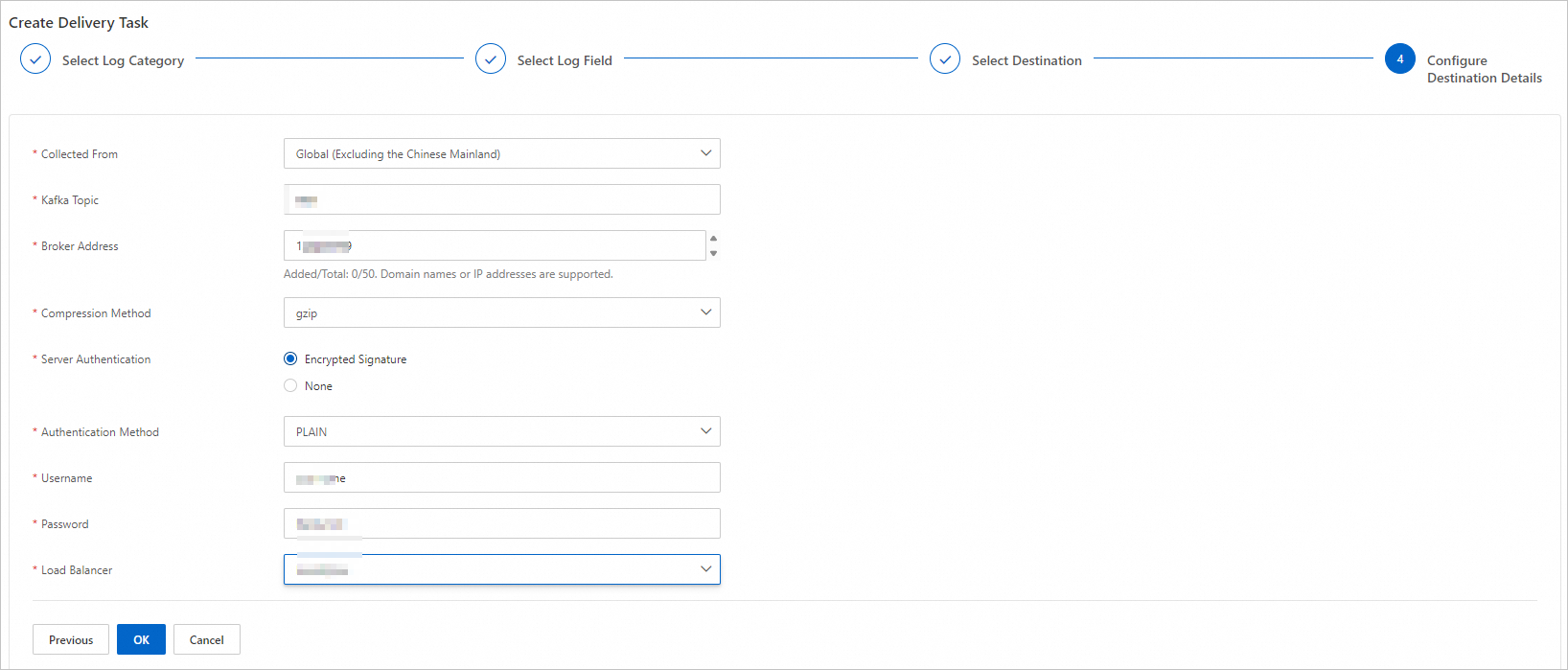
Parameter | Description |
Kafka Topic | Enter your Kafka topic. |
Broker Address | Enter your Kafka broker addresses. Supports domain names or IP addresses. Up to 50 entries. Press Enter to submit each. |
Compression Method | Select a compression format: gzip, snappy, lz4, zstd, or no. |
Server Authentication | Specify whether authentication is required. |
Authentication Method | Select an authentication method: PLAIN, SCRAM-SHA-256, or SCRAM-SHA-512. |
Username | Enter the Kafka username. Required only when Server Authentication is set to Encrypted Signature. |
Password | Enter the Kafka password. Required only when Server Authentication is set to Encrypted Signature. |
Load Balancer | Select the load-balancing method that Kafka uses to distribute messages. Valid values: LeastBytes, Hash, RoundRobin, CRC32Balancer, and Murmur2Balancer. |
To deliver logs to an OSS bucket owned by a different account, use the S3-compatible format. Field mapping:
S3-compatible Bucket Path: Maps to the OSS bucket name and path.
Bucket Region: Maps to the OSS bucket region. Extract from the endpoint (format:
oss-{region}.aliyuncs.com). For example, if the endpoint isoss-cn-hangzhou.aliyuncs.com, the region iscn-hangzhou.Access Key ID / Secret Access Key: Enter the AccessKey pair of a RAM user in the destination account. The RAM user must have write permission on the bucket.
Endpoint URL: Enter the OSS endpoint, for example,
oss-cn-hangzhou.aliyuncs.com.
Add custom fields
Add extra log fields for more detailed monitoring and analysis.
Only access and origin logs support custom fields. The collected field is named CustomFields.
In the ESA console, select Websites, and in the Website column, click the target site.
In the left navigation pane, choose .
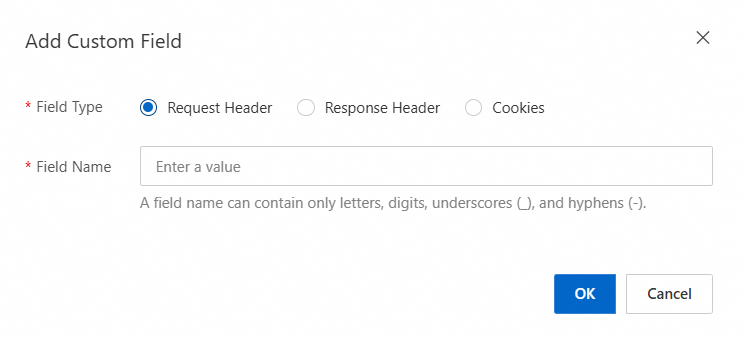
Select Custom Fields, and then click Add Custom Field.
In the dialog box that appears, set Field Type and Field Name, and then click OK.

Request Header: HTTP request metadata sent by the client that provides context for server-side processing.
Response Header: HTTP response metadata returned by the server that provides context for client-side processing.
Cookies: Small text files stored by the browser to maintain session state.