Handling bot false positives
Adjust ESA bot management policies to prevent legitimate traffic from being incorrectly blocked.
What causes false positives
A false positive occurs when bot management rules block legitimate traffic. This happens when client request characteristics — User-Agent, JA3 fingerprint, or request rate — match known malicious patterns, degrading user experience or causing business loss.
Create an allowlist rule
Create an allowlist rule to exempt known legitimate clients — such as corporate intranet IPs or trusted crawler User-Agents — from bot management checks.
Configuration example
An e-commerce platform allows third-party partners to scrape public product data through legitimate crawlers. After deploying bot protection rules, add the partner's server IP address (for example, 198.192.XXX.XXX) to an allowlist to avoid blocking their requests.
-
In the ESA console, select Site Management, and in the Actions column of the target site, click .
-
Select the Whitelist Rules tab, and then click Create Rule.
-
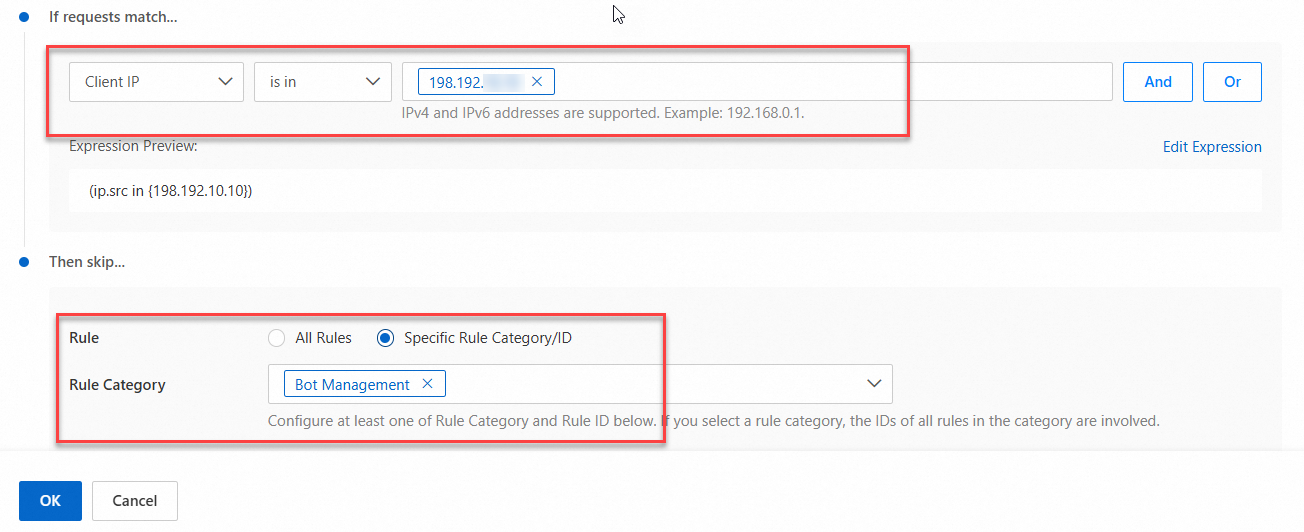
Enter a Rule Name. In the If requests match... section, set Client IP to Client IP, is in to is in, and is in to
198.192.XXX.XXX. -
In the Then skip... section, select Specific Rule Category/ID. Then, for Rule Category, select Bot Management.
-
Click OK.
Requests from the client IP
198.192.XXX.XXXwill now bypass the bot management rules.