Crop images
Crop images to remove unwanted areas or adjust aspect ratios. Specify cropping parameters in request URLs to crop images onEdge Security Accelerator (ESA) points of presence (POPs).
Parameters
image_process=crop or circle.
Supported parameters:
If any parameter is negative, the original image is returned unchanged.
|
Parameter |
Description |
Valid values |
|
w |
Width of the crop area. |
Default: 0. Maximum total pixels: 16,777,216. |
|
h |
Height of the crop area. |
|
|
x |
X coordinate of the crop area. Defaults to the upper-left corner of the image. |
|
|
y |
Y coordinate of the crop area. Defaults to the upper-left corner of the image. |
|
|
g |
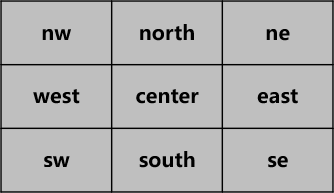
Crop position in a 3×3 grid. Each tile is identified by its upper-left corner. |
Grid positions are shown in the following figure. |
Tile positions in a 3×3 grid:
Examples
Supported cropping methods and examples:
|
Method |
Description |
Example |
|
Crop in a circle shape |
Specify a radius to crop the image into a circle. The radius cannot exceed half the shorter side of the image. |
|
|
Crop in a 3 by 3 grid |
Divide the image into a 3×3 grid and crop a specific tile by position. |
|
|
Crop based on an X and Y coordinate |
Specify the X and Y coordinates of the lower-left corner, plus the width and height, to define the crop area. |
|
|
Crop from the center |
Specify the width and height to crop equally from all four sides. |
|