Enable smart rate limiting
Smart Rate Limiting enhances Rate Limiting Rules with the ESA AI engine. Instead of manually analyzing traffic and defining rules, you select a protection level. The system trains a baseline from your site's past seven days of traffic and updates it daily.
Enable smart rate limiting
Smart rate limiting uses the ESA AI engine to analyze your site's past seven days of traffic and dynamically adjust protection thresholds. Select a protection level, and the system continuously optimizes your security policy for automated attack mitigation.
-
Before a planned traffic surge such as a promotion, disable Smart Rate Limiting to prevent false positives.
-
After you enable Smart Rate Limiting, settings take effect in about 10 seconds. An IP that triggers the limit is blocked for approximately 24 hours. To unblock a mistakenly blocked IP, add it to the WAF whitelist rules.
-
Smart Rate Limiting sets its threshold based on total requests from a single IP to the entire site. This feature is not recommended for sites with highly uneven traffic across subdomains.
-
For example, if most IPs sent 100 requests to Record A and 1,000,000 to Record B over the past seven days, the site-wide baseline may be set around 1,000,000. Smart rate limiting may then fail to effectively block a high-frequency scraping attack on Record A.
-
-
In the ESA console, go to Site Management. In the Website column, click the name of the site you want to configure.
-
In the left-side navigation pane, choose .
-
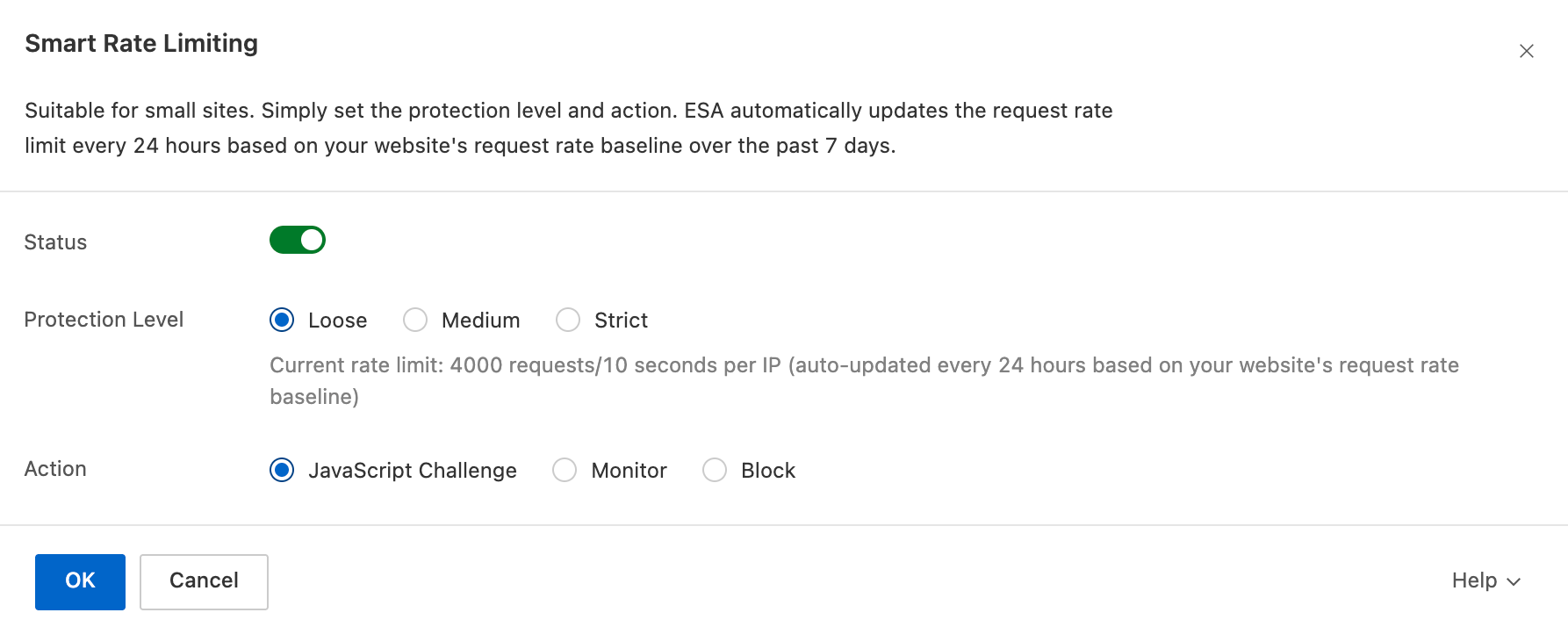
On the Overview tab, in the Smart Rate Limiting section, click Configure. Turn on the Status switch, and then select a Protection Level and an Action.
 Note
Note
Protection levels
-
Loose: Use when false positives occur. You can enable loose mode or disable intelligent rate limiting entirely. Initial limit: 4,000 requests per 10 seconds per IP. Auto-adjusts every 24 hours based on historical data.
-
Medium: Recommended for daily operations. Initial limit: 200 requests per 10 seconds per IP. Auto-adjusts every 24 hours based on historical data.
-
Strict: Recommended during active abuse or malicious traffic. Initial limit: 40 requests per 10 seconds per IP. Auto-adjusts every 24 hours based on historical data.
Actions
-
JavaScript Challenge: ESA returns a JavaScript snippet to the client. If the browser executes the script successfully,ESA allows all subsequent requests from that client for a default period of 30 minutes without another challenge. Otherwise, the request is blocked.
-
Monitor: Allows matching requests to pass but logs the event. Use monitor mode to test new rules and check WAF logs for false positives. After confirming no false positives, change the action to Block.
NoteYou must enable Log Service to use the log query feature.
-
Block: Blocks matching requests and returns a block page to the client.