Install and use DeepNCCL
DeepNCCL is an AI communication acceleration library developed by Alibaba Cloud to optimize multi-GPU interconnection. It seamlessly accelerates tasks that use the NVIDIA Collective Communications Library (NCCL) for communication operator calls, such as distributed training and multi-GPU inference. You can install the DeepNCCL communication library on Elastic GPU Service instances to accelerate distributed training or inference performance. This topic describes how to install and use DeepNCCL on GPU-accelerated instances that run the Ubuntu or CentOS operating system.
For more information, see What is the DeepNCCL AI communication acceleration library?.
Limits
You must have an Alibaba Cloud GPU-accelerated instance that meets the following requirements:
The operating system is Ubuntu 18.04 or later, or CentOS 7.x or later.
A GPU driver and CUDA 11.4 or later are installed.
When you create a GPU-accelerated instance, select an image and then select the Install GPU Driver option. You can then select the required CUDA, driver, and cuDNN versions. For more information, see Create a GPU-accelerated instance.
Only some GPU-accelerated instances support DeepNCCL.
The following table lists the NCCL communication algorithms that DeepNCCL supports. This topic uses the common allreduce (global reduction) communication algorithm as an example to demonstrate the optimization effects of DeepNCCL.
NCCL communication algorithm
Supported GPU-accelerated instances
Description
allgather (full collection)
Multi-node optimization
V100: ecs.gn6v-c10g1.20xlarge, ecs.gn6e-c12g1.24xlarge, ecs.ebmgn6e.24xlarge, ecs.ebmgn6v.24xlarge
ecs.ebmgn7e.32xlarge, ecs.ebmgn7ex.32xlarge, ecs.sccgn7ex.32xlarge, ecs.gn7e-c16g1.32xlarge
Improves performance by 60% for training on two instances.
Supports scaling up to a maximum of 20 instances.
reduce-scatter (scatter reduction)
Multi-node optimization
V100: ecs.gn6v-c10g1.20xlarge, ecs.gn6e-c12g1.24xlarge, ecs.ebmgn6e.24xlarge, ecs.ebmgn6v.24xlarge
ecs.ebmgn7e.32xlarge, ecs.ebmgn7ex.32xlarge, ecs.sccgn7ex.32xlarge, ecs.gn7e-c16g1.32xlarge
Improves performance by 60% for training on two instances.
Supports scaling up to a maximum of 8 instances.
allreduce (global reduction)
Multi-node optimization:
V100: ecs.gn6v-c10g1.20xlarge, ecs.gn6e-c12g1.24xlarge, ecs.ebmgn6e.24xlarge, ecs.ebmgn6v.24xlarge
ecs.ebmgn7e.32xlarge, ecs.ebmgn7ex.32xlarge, ecs.sccgn7ex.32xlarge, ecs.gn7e-c16g1.32xlarge
ecs.ebmgn8v.48xlarge
Improves performance by 40% for training on two instances.
Supports scaling up to a maximum of 8 instances.
Single-node optimization:
A10: ecs.ebmgn7ix.32xlarge
Improves training efficiency by 10% to 100% on a single ebmgn7ix instance for data sizes from 512 B to 2 MB.
Install DeepNCCL
Install DeepNCCL based on the operating system of your GPU-accelerated instance.
Ubuntu operating system
(Recommended) Install using PyPI
Run the following command to install the latest version of DeepNCCL, 2.1.0, from the Alibaba Cloud Pip source.
pip install deepncclInstall using a
.debpackageRun the following command to download the DeepNCCL
.debpackage from OSS.This step uses DeepNCCL 2.1.0 as an example.
wget http://aiacc.oss-cn-beijing.aliyuncs.com/deepnccl/release/2.1.0/deb/deep-nccl-2.1.0.debRun the following command to install DeepNCCL.
dpkg -i deep-nccl-2.1.0.deb
CentOS operating system
(Recommended) Installation using PyPI
Run the following command to install the latest version of DeepNCCL (2.1.0) from the Alibaba Cloud Pip source.
pip install deepncclInstall using an
.rpmpackageRun the following command to download the DeepNCCL
.rpmpackage from OSS.This step uses DeepNCCL 2.1.0 as an example.
wget http://aiacc.oss-cn-beijing.aliyuncs.com/deepnccl/release/2.1.0/rpm/deep-nccl-2.1.0.rpmRun the following command to install DeepNCCL.
rpm -i deep-nccl-2.1.0.rpm
Run the following command to verify the installation.
ldconfig -p | grep ncclThe command output is shown in the following figure. If the output contains
libnccl.so.2, DeepNCCL is installed.
Use DeepNCCL
After you install DeepNCCL (including aiacc-nccl-plugin), you can use its communication optimization features without additional configuration. The following example uses nccl-tests to demonstrate the acceleration effect of DeepNCCL with the allreduce communication algorithm on a setup that consists of two V100 instances and 16 GPUs.
Sample script
Download the nccl-tests package from NVIDIA nccl-tests. Follow the instructions in the README.md file and copy the following sample script to load the optimization algorithm.
mpirun --allow-run-as-root \
  --np 16 -npernode 8  \
  --hostfile hostfile \
  -mca btl_tcp_if_include eth0 \
  -x NCCL_DEBUG=info \
  -x NCCL_ALGO=Ring \
  ./build/${op}_perf -b 256K -e 1G -d $datatype -f 2 -g 1 -w 10 -n 100
The algorithm loading process depends on the current instance topology. The following figure shows that the optimization algorithm is successfully loaded.

Performance improvement
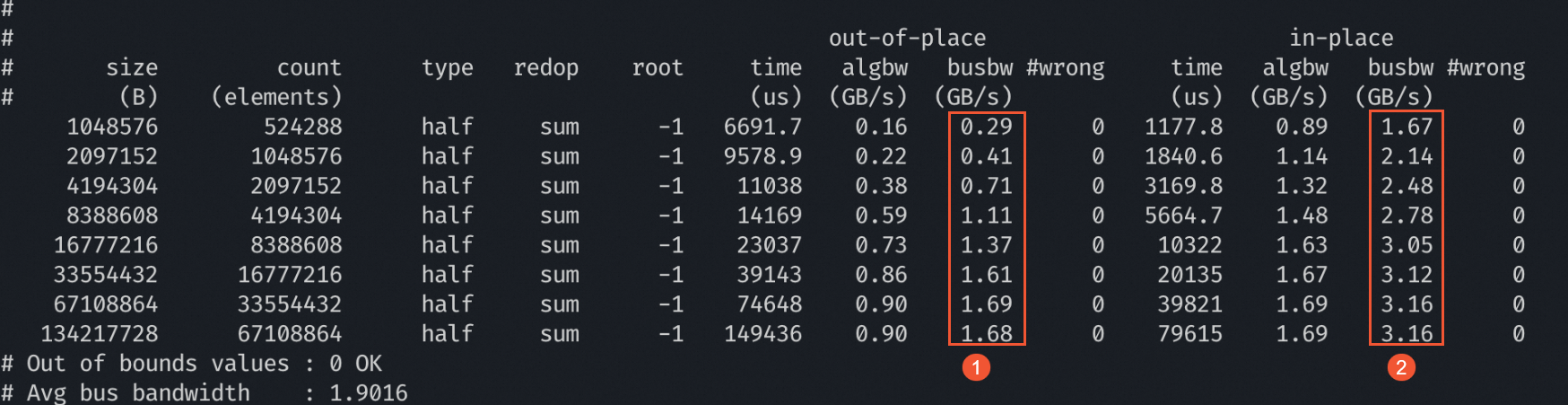
Compared with the baseline performance of NCCL, DeepNCCL significantly improves distributed optimization performance when you use the allreduce communication algorithm on a setup that consists of two V100 instances and 16 GPUs. The busbw values are shown in the following figure:
①: The busbw value for distributed optimization using NCCL (Baseline).
②: The busbw value for distributed optimization using DeepNCCL.
Uninstall DeepNCCL
If you no longer need the optimization capabilities of DeepNCCL, you can uninstall it.
Ubuntu operating system
If you installed DeepNCCL using PyPI, run the following command to uninstall it.
pip uninstall deepncclIf you installed DeepNCCL using a
.debpackage, run the following command to uninstall it.dpkg -r deep-nccl
CentOS operating system
If you installed DeepNCCL using PyPI, run the following command to uninstall it.
pip uninstall deepncclIf you installed DeepNCCL using an
.rpmpackage, run the following command to uninstall it.rpm -e deep-nccl