Internet connectivity FAQ
This topic describes common issues with EIP internet connectivity.
Cannot access an EIP
Possible cause | Troubleshooting |
The EIP instance is not associated with a cloud resource. | Verify that the EIP instance is associated with the target cloud resource.
|
The EIP instance has expired or has overdue payments. | Check if the EIP instance has overdue payments. Alibaba Cloud sends you notifications before and after a payment becomes overdue. To prevent service interruptions, promptly renew your instance or add funds to your account. |
Blocked by cloud security policies. | Check if the following cloud security policies are blocking traffic:
|
Blocked by security policies of the associated resource. | Check the security policies of the associated resource. For example, if the EIP is associated with an ECS instance, check the instance's iptables rules, system firewall policies, and third-party security software. Also, verify that the network interface driver is installed correctly. You can run network connectivity diagnostics on the ECS instance to help troubleshoot the issue. If the EIP is associated with other cloud resources, refer to the security policy documentation for that product. |
Blocked by an internet service provider (ISP). | You can use Problem Diagnosis to identify the region where access is abnormal. If traffic is blocked by an ISP, consider the following recommendations:
|
Website access triggers TCP reset (RST)
Symptoms
Error messages:
When accessing a website hosted on Alibaba Cloud, the browser displays "This site can't be reached" or "The connection was reset" (error code:
ERR_CONNECTION_RESET).In a Linux environment, the error is typically
TCP connection reset by peer.
Cause: The client receives an RST packet from the web server during connection establishment, which forcibly terminates the TCP connection.
Troubleshooting approach
Use a public network testing tool to identify which ISPs are affected:
If only specific provinces or cities are affected, the ISP is likely restricting access due to its policies. This issue is not caused by the Alibaba Cloud server.
If the server is located in the Chinese mainland and major domestic ISPs cannot access it, further investigate whether the server's services are running correctly.
Identify the public egress IP address of the affected client:
Use a third-party website, such as https://www.lddgo.net/network/getmyip or https://tool.hiofd.com/ip/#google_vignette.
Reproduce the issue on the client and capture packets. To reproduce the issue in a mobile network environment, you can create a Wi-Fi hotspot with your phone and connect your computer to it for testing.
Use a packet capture tool on the web server to capture network packets.
Common causes
By analyzing the captured packets, you can identify the source of the RST packets.
ISP interception
The ISP blocks the website domain name or IP address due to specific policies.
Solution: The domain owner must submit a support request with proof of ownership to the local ISP. Based on the ISP's findings, they can then file an appeal to lift the block.
Indicators:
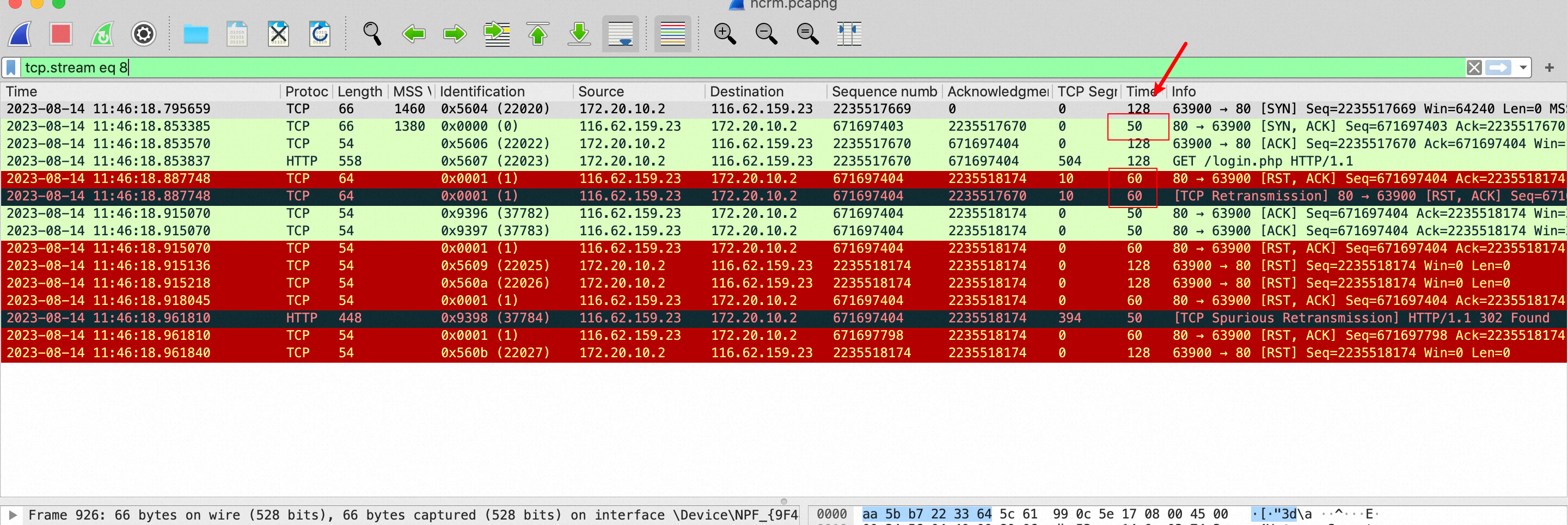
The TTL value of the SYN-ACK packet sent by the web server during the TCP three-way handshake does not match the TTL value of the RST packet.
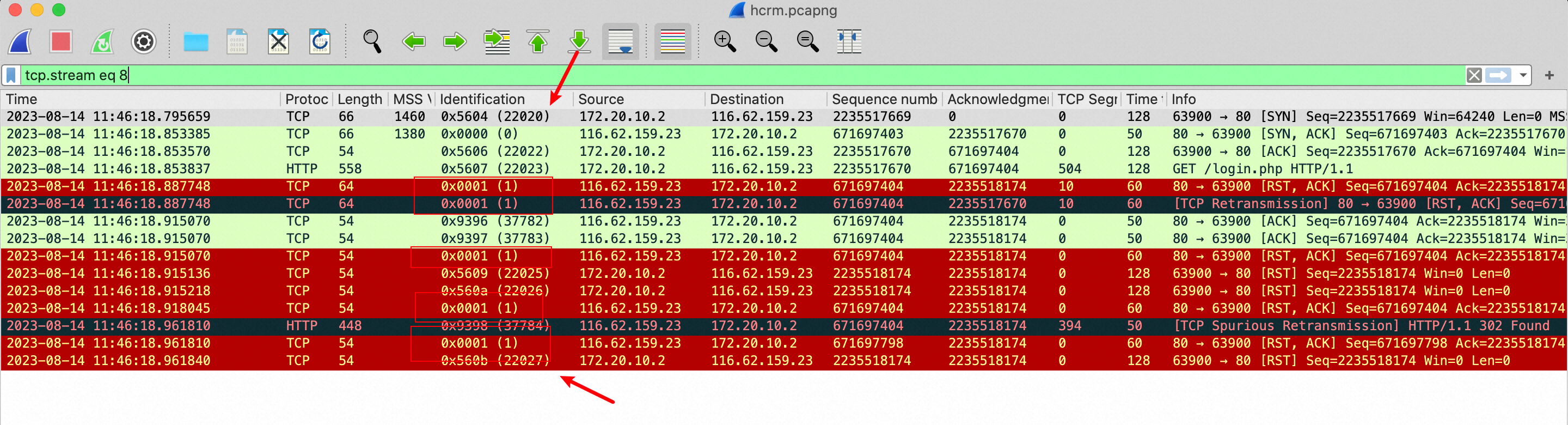
Client-side packet capture: The Identification field values in the IP headers of packets from the web server's IP address are not sequential.
The RST packets sent by some ISP interception devices may contain a specific payload, such as
0x01020304050607080900.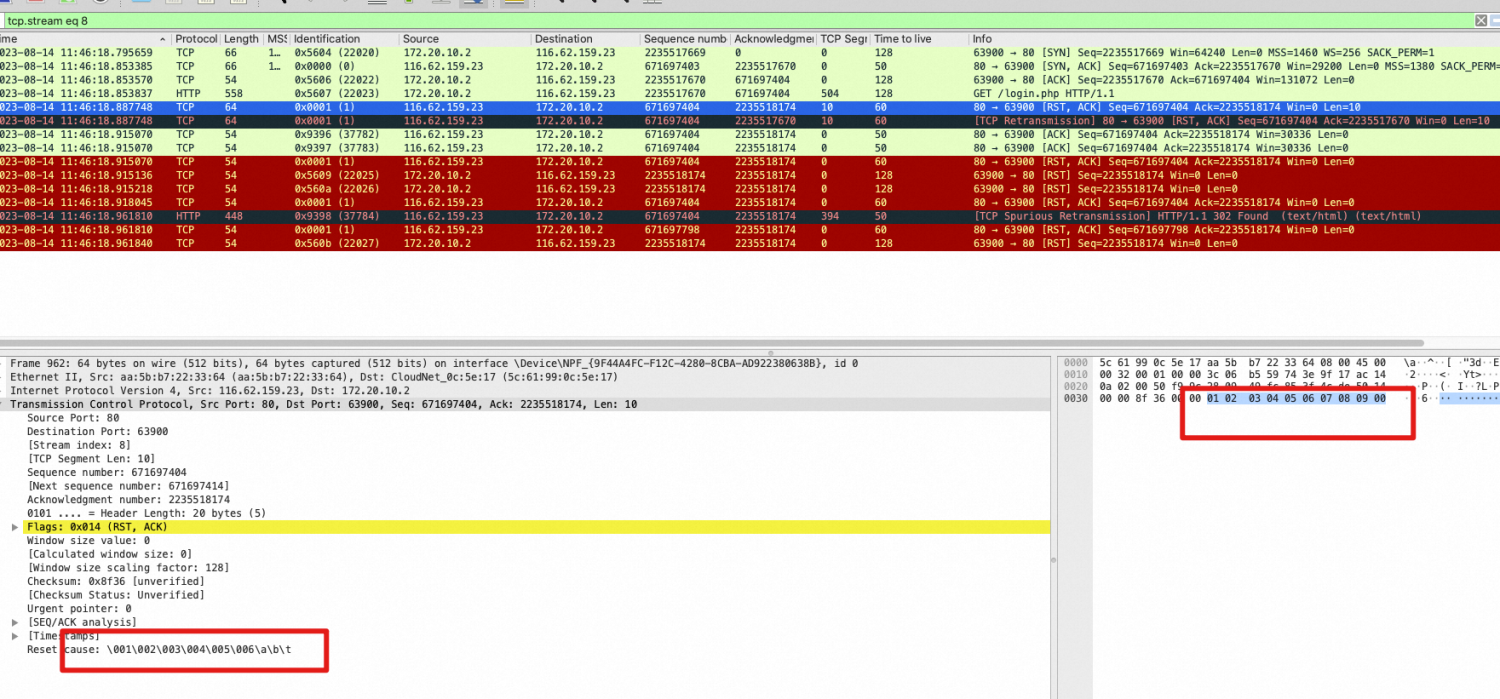
RST sent by SLB
An SLB instance sends an RST packet to the client due to its processing logic.
Analysis method: RST packets actively sent by Alibaba Cloud SLB have a specific signature: the Identification field in the IP header is 31415, and the initial TTL value is 102. RST packets without this signature are not generated by the SLB instance.

Solution: Analyze the root cause and adjust the SLB instance configuration. Common causes include:
TCP session timeout: The TCP listener is configured with a connection timeout. When a TCP connection is idle for longer than this threshold, the SLB instance actively sends an RST packet to terminate the connection.

Health check failure: All backend servers in the server group of the TCP listener fail their health checks, leaving no backend servers available. The SLB instance directly rejects new TCP requests by sending RST packets.

No backend servers added to the listener: No servers have been added to the backend server group of the TCP listener. The SLB instance directly rejects new TCP requests by sending RST packets.


Interception by cloud security products
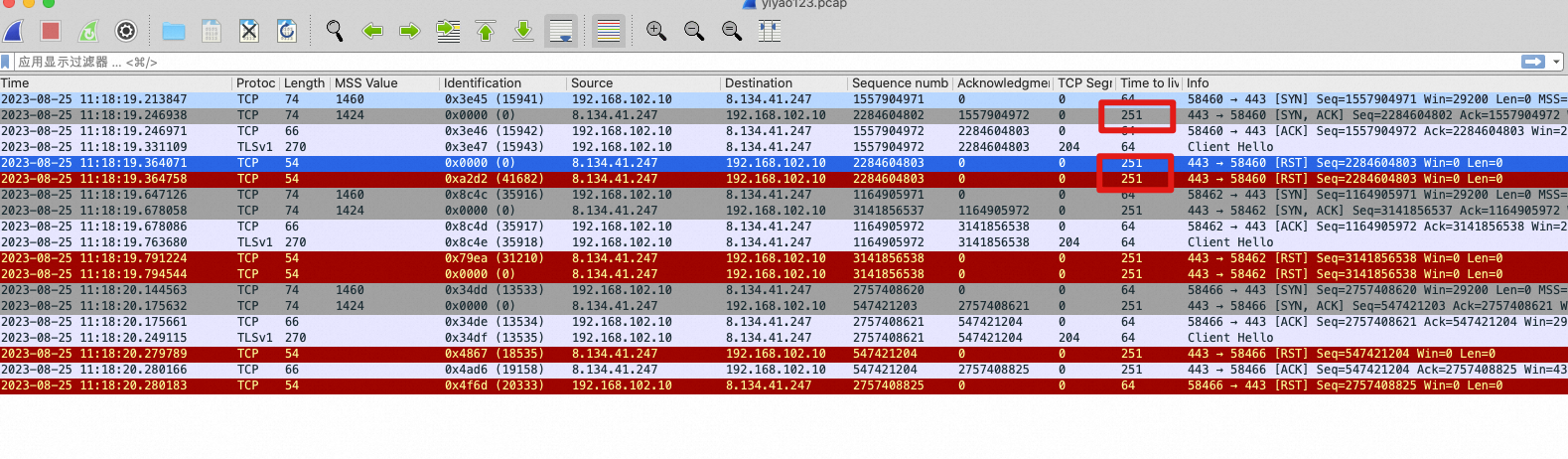
Cloud security products, such as Cloud Firewall, often operate in bypass mode. When they detect a risk, they forge RST packets to both the client and the server to terminate the connection, without affecting normal packet transmission. These RST packets usually have no fixed signature, and their TTL values may match the TTL values of normal server responses, which makes troubleshooting more difficult.
The domain name has not completed ICP filing with Alibaba Cloud.
According to relevant regulations, domain names that resolve to servers in the Chinese mainland must complete an ICP filing with Alibaba Cloud. Access to domains without an ICP filing is blocked.
Protection by the intrusion prevention module of Cloud Firewall
If the intrusion prevention feature of Cloud Firewall is enabled for the public IP, Cloud Firewall sends an RST packet to block traffic when it detects an attack at the application layer.
Packet characteristics: When Cloud Firewall blocks traffic, it may drop the original payload and force the TCP flag to RST, while keeping fields such as IP ID, TCP SEQ, and TTL unchanged.
Analysis method: Use the request timestamp and client IP address to query the intrusion prevention logs in the Cloud Firewall console.

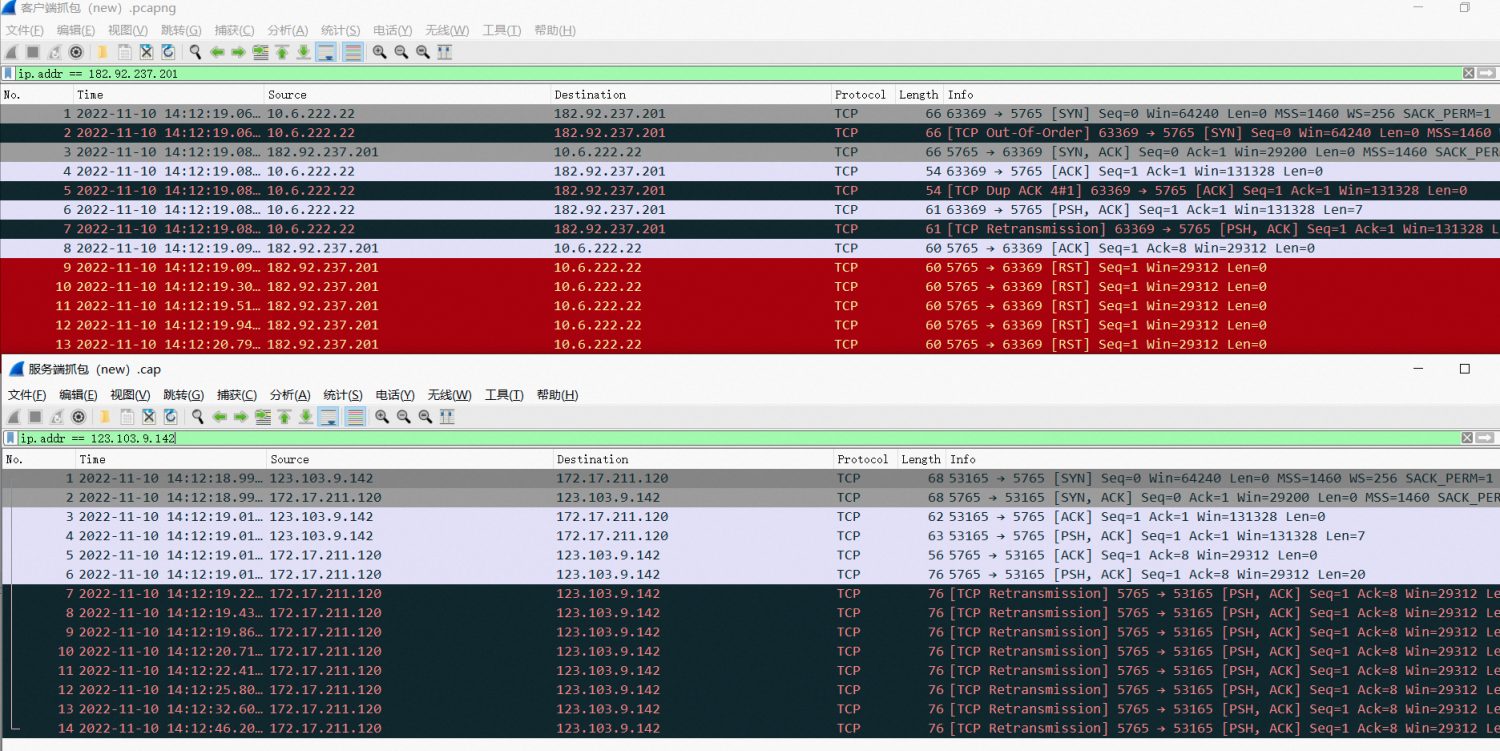
Server application or system configuration issues
Analysis method: Capture packets within the ECS instance. If you confirm that the RST packet originates from the instance, investigate the application logs and system configurations.
Common issues:
The web application is not running, or the port is not being listened on.
The server has already closed the socket and sent a FIN packet, but the client continues to send data without a timely response. In this case, the server's protocol stack replies with an RST packet to forcibly close the connection.
When an application calls the
close()function to close a socket while data remains in its send buffer, the protocol stack sends an RST packet instead of a FIN packet to terminate the connection.
Why is my service inaccessible through its domain name after I change the public IP address or EIP of my ECS instance?
If the domain's A record points directly to the original public IPv4 address or EIP of your ECS instance, changing the IP address without updating the record may make your service inaccessible. Even after you update the record, some clients may continue to access the old IP address until their DNS caches refresh.
Solution
Sign in to the console of the DNS provider that hosts your domain's DNS records. Update the relevant A record to point to the new public IPv4 address or EIP.
Wait for DNS caches to refresh. The time required depends primarily on the record's TTL before the change and the cache refresh behavior of recursive DNS servers and clients.
Verify that the domain's A record resolves to the new IP address:
Replace
example.comwith the domain name used to access your service. If the domain resolves to the new IP address but the service remains inaccessible, check the EIP association, security group rules, operating system firewall settings, and whether the service is running.Linux/macOS: Run
dig example.com Aand check the IP address in the A record underANSWER SECTION.Windows: Run
nslookup -type=A example.comand check the IP address returned for the queried domain. Do not confuse it with the DNS server address displayed at the beginning of the output.