Trino, formerly PrestoSQL, is an open source, distributed SQL query engine for interactive analytics. Starting with E-MapReduce (EMR) versions 3.44.0 and 5.10.0, EMR adopted the official community name Trino. Earlier versions displayed the name Presto in the console, but the underlying engine was already Trino.
Basic features
Trino is developed in Java and designed for high-performance, interactive analytics. It supports:
Full ANSI SQL compliance.
-
A wide range of data sources through connectors, including:
Hive
Cassandra
Kafka
MongoDB
MySQL
PostgreSQL
SQL Server
Redis
Redshift
Local files
-
Advanced data structures, including:
Arrays and maps
JSON data
GIS data
Color data
-
Extensibility through multiple mechanisms, including:
Extension data connectors
Custom data types
Custom SQL functions
Pipeline processing that streams query results to clients in real time.
-
Monitoring through multiple interfaces:
A web UI that visualizes query execution progress.
The JMX protocol.
System components
The following figure shows the system components of Trino.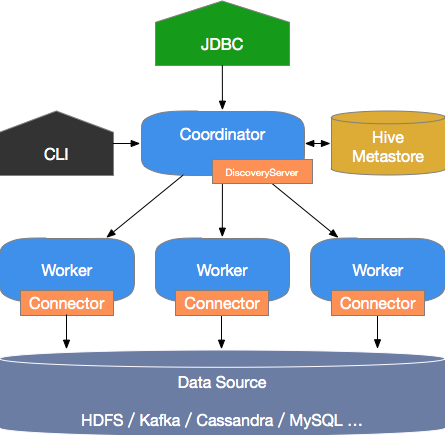
A Trino cluster uses a coordinator/worker architecture. The coordinator accepts SQL queries from clients, parses and plans them, and distributes the resulting tasks to worker nodes. The coordinator handles:
Accepting user queries, parsing them, generating execution plans, and distributing tasks to worker nodes.
Monitoring worker node status. Each worker node maintains a heartbeat connection with the coordinator to report its status.
Maintaining metastore data.
Worker nodes execute the distributed tasks. They use connectors to read data from external storage systems, process the data, and return results to the coordinator.
Use cases
Trino is built for Online Analytical Processing (OLAP) workloads — data analysis, large-scale aggregations, and reporting. It is suitable for:
Extract, transform, and load (ETL)
Ad hoc queries
Analysis of large-scale structured or semi-structured data
Aggregation and report analysis of large-scale multidimensional data
Trino is not a general-purpose relational database and does not replace systems like MySQL or PostgreSQL. Its transaction support is limited, so it is not suitable for Online Transaction Processing (OLTP) or other transactional workloads.
Benefits
Trino on E-MapReduce (EMR) offers the following advantages over open source Trino:
Ready-to-use clusters. Spin up a Trino cluster with hundreds of nodes in minutes, with no setup required.
Simple elastic scaling.
Seamless integration with the EMR software stack and support for data stored in Object Storage Service (OSS).
Fully managed operations with no O&M required.
Terms
Data model
Trino organizes data in a three-layer hierarchy: catalogs, schemas, and tables.
-
Catalog
A catalog maps to an external data source through a connector and contains one or more schemas. A single query can span multiple catalogs.
-
Schema
A schema is equivalent to a database instance and contains multiple tables.
-
Table
A table functions the same as in a standard relational database.
Connector
A connector adapts Trino to a specific data source, similar to a database driver. Each catalog is bound to one connector type, configured in the catalog's properties file.
Trino provides a standard Service Provider Interface (SPI) that you can implement to build custom connectors for any data source. Trino also ships with several built-in connectors grouped by data source type:
Data lakes and lakehouses: Hive and other Hadoop-compatible sources
Relational databases: MySQL, PostgreSQL, SQL Server
Other systems: Cassandra, Kafka, MongoDB, Redis, Redshift, and local files
More information
To view the open source Trino documentation, replace the version number in the URL http://trino.io/docs/3XX/ with your Trino component version, then open the link in a browser.
For example, if your Trino version is 331, use https://trino.io/docs/331/. For more information, see Trino 331 Documentation.