Slowly changing dimension
Business data changes over time. To analyze this data, you need a strategy for storing and managing its history. A dimension that manages historical data is known as a slowly changing dimension (SCD). E-MapReduce provides a specific implementation called Granularity-based slowly changing dimension (G-SCD) for data warehouse scenarios. This topic describes the G-SCD solution and shows how to use it to process dimension data.
Background
SCDs
A slowly changing dimension (SCD) is a dimension that changes over time. In a data warehouse, managing both current and historical data requires handling SCDs. This makes SCD processing a key part of any extract, transform, and load (ETL) task for tracking dimensional changes.
| Type | Description |
| Type 1: Direct overwrite | Overwrites the original value and does not retain the history. This method prevents the analysis of historical changes. |
| Type 2: Add dimension row | Retains a full history of values. When an attribute value changes, a new row is added to capture the change. The new row becomes the current record, and the previous record is marked as inactive. Typically, start and end dates are used to mark the effective period of each record. |
| Type 3: Add attribute column | Saves the previous attribute value in a new column and updates the original attribute with the new value. This method retains only the most recent historical value. |
G-SCD concept and solution
The three standard SCD methods do not cover all business scenarios. Therefore, E-MapReduce introduces the Granularity-based slowly changing dimension (G-SCD), which is designed for data warehouse scenarios that require business snapshots. G-SCD generates a business snapshot at a fixed time granularity, such as daily, hourly, or by the minute. It also supports querying data from a specific time period based on that granularity.
| Solution | Problem |
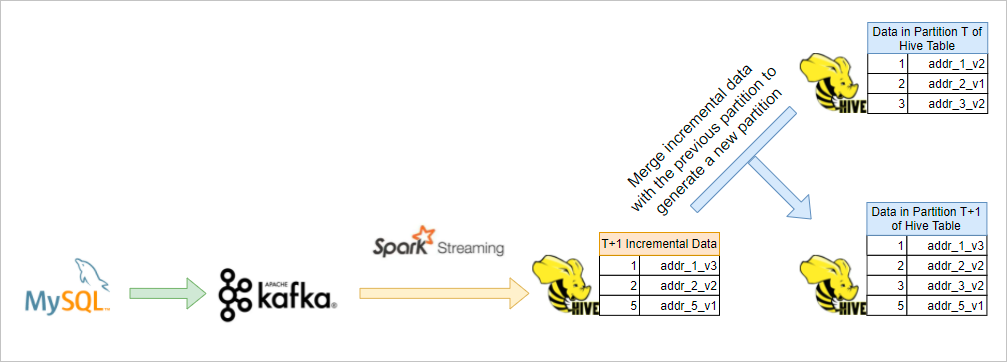
| Build an incremental table for time T+1 in streaming mode, merge it with the time T partition of an offline table, and generate the T+1 partition of the offline table. | Wastes storage resources. |
| Maintain a base table and store incremental data for each business time point separately. Merge the base table and incremental tables at query time. | Poor query performance. |
| Solution | Similarity | Difference |
| Type 2 SCD solution | Retains all historical information. | A new record is added each time an attribute value changes. |
| G-SCD on Delta Lake solution | Instead of adding new records, G-SCD on Delta Lake uses the native versioning feature of Delta Lake. It uses the Time Travel capability to access specific business snapshots. |
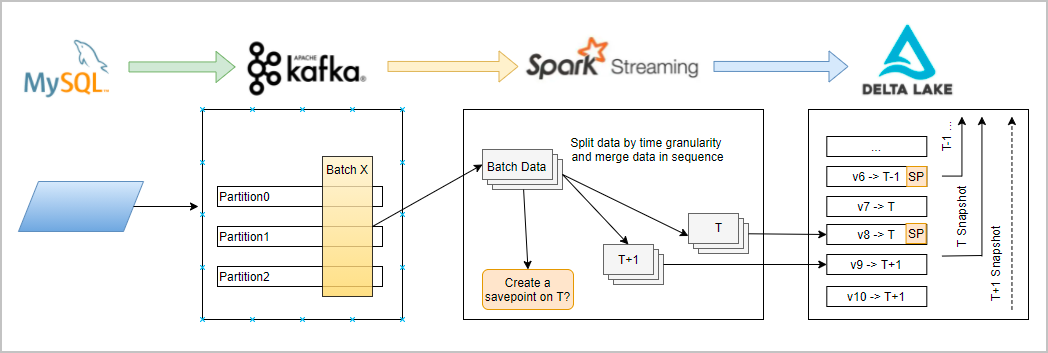
- Unified stream and batch processing: Eliminates the need for separate incremental and base tables.
- Storage savings: You do not need to store the full historical dataset for each time granularity.
- High query performance: Improves query performance by using the Optimize, Z-ordering, and Data Skipping features of Delta Lake.
- High SQL compatibility: You can reuse your existing SQL statements. You can query business snapshot data for a specific time period by using a partition-like field, similar to how you would query a partitioned table.
Prerequisites
An E-MapReduce cluster is required. For more information, see Create a cluster.
Limitations
- Data within the same Kafka partition must be strictly ordered.
- Data must be partitioned by key to ensure that data with the same key is written to the same Kafka partition.
Procedure
- Step 1: Create a G-SCD table
Create a G-SCD table and configure the required parameters.
- Step 2: Process data
You can process data by using either a streaming write or a batch write based on your business requirements. This example uses two batch writes to simulate data processing in G-SCD on Delta Lake.
- Step 3: Verify the written data
Verify that the data was written successfully by running query statements.
Step 1: Create a G-SCD table
CREATE TABLE target (id Int, body String, dt string)
USING delta
TBLPROPERTIES (
  "delta.gscdTypeTable" = "true",
  "delta.gscdGranularity" = "1 day",
  "delta.gscdColumnFormat" = "yyyy-MM-dd",
  "delta.gscdColumn" = "dt"
);| Parameter | Description |
| delta.gscdTypeTable | Specifies whether the current table is a G-SCD Delta Lake table. Set to true to enable the features. If set to false, the table is a regular table and cannot use G-SCD features. |
| delta.gscdGranularity | The granularity of the business snapshot. Examples: 1 day, 1 hour, and 30 minutes. |
| delta.gscdColumnFormat | The format of the string value in the delta.gscdColumn. The following formats are supported:
|
| delta.gscdColumn | Defines the column that represents the business snapshot version at query time. This column must also be defined in the table schema and have a String data type. |
Step 2: Process data
- Streaming write
CREATE TABLE IF NOT EXISTS gscd_kafka_table
USING kafka
OPTIONS(
  kafka.bootstrap.servers = 'localhost:9092',
  subscribe = 'xxxxxx'
);
CREATE SCAN gscd_stream ON gscd_kafka_table USING STREAM
OPTIONS (
  `watermark.time` = 'floor(ts/1000)'  --- Define the watermark time expression for the source. Unit: seconds.
);
CREATE STREAM delta_job
OPTIONS (
  triggerType = 'ProcessingTime',
  checkpointLocation = '/path/to/checkpoint'
)
MERGE INTO gscd_target_table AS target
USING (
  SELECT *, from_unixtime(ts/1000, 'yyyy-MM-dd') AS dt FROM gscd_stream
) AS source
ON source.id = target.id AND target.dt = source.dt
WHEN MATCHED THEN update set *
WHEN NOT MATCHED THEN insert *;
Important Note the following principles and usage considerations for watermarks in the preceding SQL statement:- To automatically trigger a savepoint in a streaming job, you must specify a watermark time expression in the
CREATE SCANstatement. - The watermark represents the time value of the streaming job source, in seconds.
- The watermark time is generated as the value of the column. When the watermark time reaches the boundary ( in this example), a savepoint is triggered automatically.delta.gscdGranularity
- The watermark time must be monotonically increasing within the same partition.
- To automatically trigger a savepoint in a streaming job, you must specify a watermark time expression in the
- Batch write
In most cases, a streaming write is sufficient. If data becomes inconsistent, G-SCD on Delta Lake also provides a rollback capability. You can then use an offline batch write to repair data. After the repair, create a savepoint to permanently retain the current version.
MERGE INTO GSCD("2021-01-01") gscd_target_table
USING gscd_source_table
ON source.id = target.id
WHEN MATCHED THEN UPDATE SET body = source.body
WHEN NOT MATCHED THEN INSERT(id, body) VALUES(source.id, source.body);
The syntax
GSCD ("2021-01-01")specifies the business granularity value to which the data belongs.Important A single batch write job does not support writing data to multiple business granularities. To do so, you must split the data and use separate jobs.
The following example demonstrates how to use G-SCD to process dimension data with batch writes.
- Simulate the source data.
CREATE TABLE s1 (id Int, body String) USING delta; CREATE TABLE s2 (id Int, body String) USING delta; INSERT INTO s1 VALUES (1, "addr_1_v1"), (2, "addr_2_v1"), (3, "addr_3_v1"); INSERT INTO s2 VALUES (2, "addr_2_v2"), (4, "addr_1_v1"); - Use two batch writes to simulate the G-SCD on Delta Lake processing flow instead of a streaming write.
- Perform the first batch write, and then create a savepoint for the corresponding time granularity.
-- First batch write. MERGE INTO GSCD ("2021-01-01") target as target USING s1 as source ON source.id = target.id WHEN MATCHED THEN UPDATE SET body = source.body WHEN NOT MATCHED THEN INSERT(id, body) VALUES(source.id, source.body); -- Create a savepoint for 2021-01-01. CREATE SAVEPOINT target GSCD('2021-01-01'); - Perform the second batch write, and then create a savepoint for the corresponding time granularity.
-- Second batch write.
MERGE INTO GSCD ("2021-01-02") target as target
USING s2 as source
ON source.id = target.id
WHEN MATCHED THEN UPDATE SET body = source.body
WHEN NOT MATCHED THEN INSERT(id, body) VALUES(source.id, source.body);
-- Create a savepoint for 2021-01-02.
CREATE SAVEPOINT target GSCD('2021-01-02');
- Perform the first batch write, and then create a savepoint for the corresponding time granularity.
Step 3: Verify the written data
Verify that the data is written successfully by running a query statement. The following steps describe how to query the data that was batch written twice in the example in Step 2: Process data.
- Run the following command to query the data written by the first batch write.
select id, body from target where dt = '2021-01-01';Important- You can use standard SQL syntax to query data.
- When you query data, you must specify the
gscdColumncolumn as a filter condition. The condition must use the=operator, for example,dt = '2021-01-01'.
- Run the following command to query the data written by the second batch write.
select id, body from target where dt = '2021-01-02';The queries return the following results:spark-sql> select id, body from target where dt='2021-01-01'; 1 addr_1_v1 2 addr_2_v1 3 addr_3_v1 Time taken: 4.282 seconds, Fetched 3 row(s) spark-sql> select id, body from target where dt='2021-01-02'; 1 addr_1_v1 2 addr_2_v2 3 addr_3_v1 4 addr_1_v1 Time taken: 1.1 seconds, Fetched 4 row(s)