StarRocks 2.3 and later support the catalog feature that you can use to maintain both internal and external data in one system, allowing you to access and query data stored in various external sources with ease.
Terms
-
Internal data: the data that is stored in StarRocks.
-
External data: the data that is stored in external data sources, such as Apache Hive, Apache Iceberg, Apache Hudi, Delta Lake, and Java Database Connectivity (JDBC).
Catalog overview
StarRocks supports two types of catalogs: internal catalog and external catalog.

-
Internal catalog: manages all internal data in a StarRocks cluster. For example, databases and tables created by the CREATE DATABASE and CREATE TABLE statements belong to the internal catalog. Each StarRocks cluster has only one internal catalog named default_catalog.
-
External catalog: connects to an external metastore, allowing you to query external data directly without importing or migrating it. You can create the following types of external catalogs:
-
Hive catalog: used to query Hive data.
-
Iceberg catalog: used to query Iceberg data.
-
Hudi catalog: used to query Hudi data.
-
Delta Lake catalog: used to query Delta Lake data.
-
JDBC catalog: used to query data in a JDBC data source.
-
Paimon catalog: used to query Paimon data. This type of catalog is supported in StarRocks 3.1 or later.
-
Unified catalog: used to query data in a data source that integrates Hive, Iceberg, Hudi, and Delta Lake. This type of catalog is supported in StarRocks 3.2 or later.
When you query external data through an external catalog, StarRocks relies on two components of the external data source:
-
Metadata service: exposes metadata to the frontend node (FE) of a StarRocks cluster for query plan generation.
-
Storage system: stores data files in various formats within a distributed file system or object storage system. After the FE distributes the query plan to each backend node (BE) or compute node (CN), the BE or CN scans the target data in the Hive storage system in parallel, performs computation, and returns the results.
-
Use catalogs
-
Method 1: Execute the
SET CATALOG <catalog_name>statement in SQL Editor. -
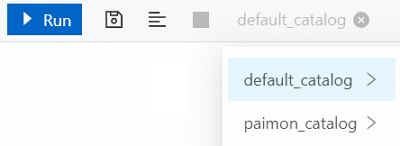
Method 2: Select the desired catalog from the catalog drop-down list to switch the active catalog for the current session, and then query data.
Query data
Query internal data
For more information about how to query data that is stored in StarRocks, see Default catalog.
Query external data
For more information about how to query data that is stored in external data sources, see Query external data.
Query data across catalogs
To query data across catalogs, reference the target data in the format of catalog_name.db_name or catalog_name.db_name.table_name.
-
In the
default_catalogcatalog, execute the following statement to query data from thehive_tabletable in thehive_catalogcatalog:SELECT * FROM hive_catalog.hive_db.hive_table; -
In the
hive_catalogcatalog, execute the following statement to query data from theolap_tabletable in thedefault_catalogcatalog:SELECT * FROM default_catalog.olap_db.olap_table; -
In the
hive_catalogcatalog, execute the following statement to perform a federated query on thehive_tabletable and theolap_tabletable in thedefault_catalogcatalog:SELECT * FROM hive_table h JOIN default_catalog.olap_db.olap_table o WHERE h.id = o.id; -
In other catalogs, execute the following statement to perform a federated query on the
hive_tabletable in thehive_catalogcatalog and theolap_tabletable in thedefault_catalogcatalog:SELECT * FROM hive_catalog.hive_db.hive_table h JOIN default_catalog.olap_db.olap_table o WHERE h.id = o.id;