FalconSeek vector index user guide

更新时间:
复制 MD 格式

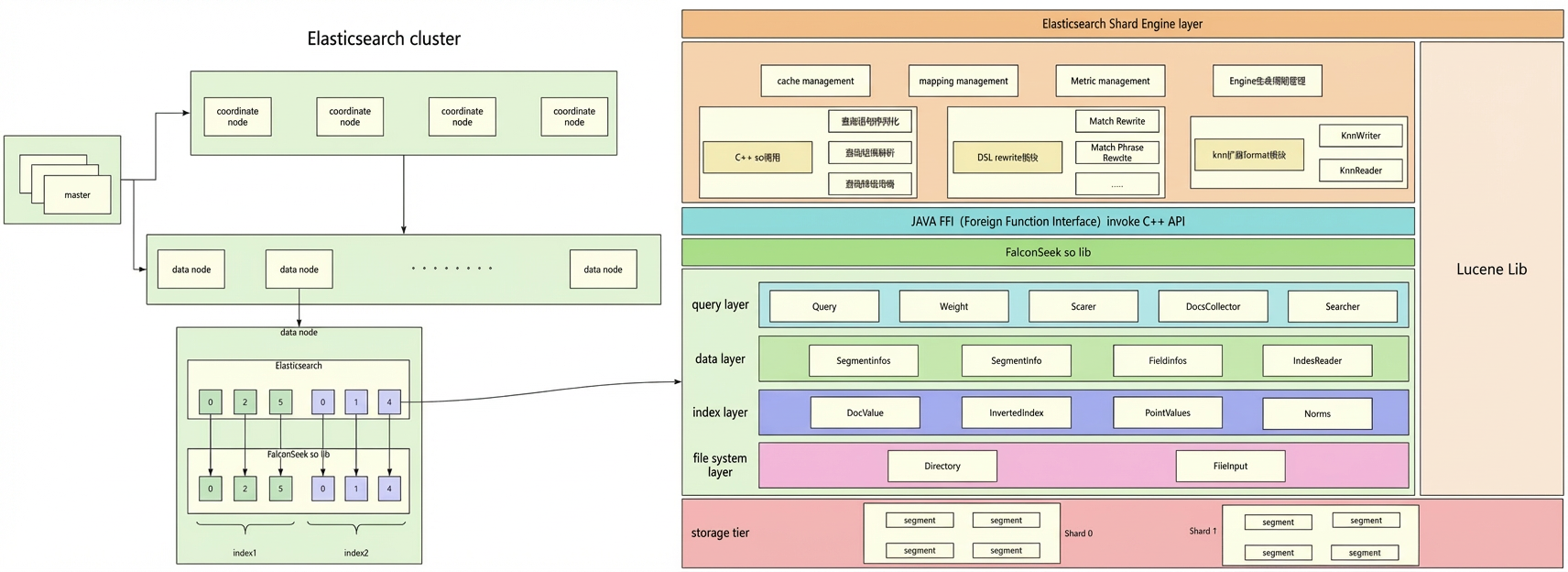
FalconSeek is Alibaba Cloud's C++-based vector engine integrated into Elasticsearch (ES). It powers image search, semantic search, and recommendation systems at the scale of Taobao, Tmall, and Pailitao. By setting index_options.type to havenask_native, you can use FalconSeek's high-performance vector index in any Alibaba Cloud ES index while staying fully compatible with the open-source k-nearest neighbors (k-NN) search API.

This guide covers algorithm selection, index configuration, filtering strategies, and runtime tuning.

Use cases

  • Semantic search: Match documents by meaning rather than exact keywords.

  • Image search: Find visually similar images or products based on embedding vectors.

  • Recommendation systems: Surface related items based on vector similarity of user or item embeddings.

Prerequisites

Before you begin, ensure that you have:

  • An Alibaba Cloud Elasticsearch cluster with FalconSeek enabled

  • Pre-generated vector embeddings for your documents (the embedding model determines the dims value)

  • Query vectors generated by the same model as the document vectors

Choose an algorithm

Choosing the right knn_type is the most impactful configuration decision. The table below compares all five algorithms across the dimensions most relevant to production use.

Algorithm Recall Speed Memory Recommended data scale
HNSW High Fast Medium 100K–10M documents
RabitQGraph High Fastest Lowest >10M documents
QGraph High Fast Low >5M documents
QC Medium Medium Low >1M documents
Linear 100% Slow Low <1,000 documents (auto-selected)

Limitations:

  • RabitQGraph: Only supports l2_norm similarity. Vector dimensions must be a positive integer multiple of 64.

  • Linear: Query time grows linearly with data volume. Suitable only for small datasets.

  • QC: Longer build time than graph-based algorithms.

Decision guide:

  • Start here: Use HNSW. It delivers the best balance of recall, speed, and memory for datasets from 100K to 10M documents.

  • Growing dataset, memory-sensitive: Migrate from HNSW to QGraph and set a quantizer to reduce memory usage.

  • Growing dataset, latency-sensitive: Migrate from HNSW to RabitQGraph if your dimensions are a multiple of 64 and you only need l2_norm similarity.

  • Very large datasets (>10M documents): Choose RabitQGraph for minimum latency, or QGraph for cost-effective storage.

  • Small dataset (<1,000 documents): Linear (brute-force) search is used automatically. No algorithm selection needed.

Quick start

The following example creates an index named my_falcon_seek_index with a 128-dimension vector field using the HNSW algorithm, writes two documents, and runs a k-NN search.

Step 1: Create an index

PUT /my_falcon_seek_index
{
  "settings": {
    "number_of_shards": 1,
    "number_of_replicas": 0
  },
  "mappings": {
    "properties": {
      "product_vector": {
        "type": "dense_vector",
        "dims": 128,
        "index": true,
        "similarity": "l2_norm",
        "index_options": {
          "type": "havenask_native",
          "knn_type": "HNSW",
          "m": 32,
          "ef_construction": 400
        }
      },
      "category": {
        "type": "keyword"
      }
    }
  }
}

Key `dense_vector` field properties:

Property Description
dims Vector dimension. Must match the dimension of your embedding model.
similarity Distance function for computing vector similarity. See Similarity functions.
index_options Algorithm and build parameters for the vector index.

Step 2: Write documents

The product_vector array must have exactly 128 elements, matching dims.

POST /my_falcon_seek_index/_doc/1
{
  "product_vector": [0.12, -0.05, 0.08, 0.24, -0.17, 0.31, 0.02, -0.19, 0.11, 0.28,
    -0.03, 0.15, 0.22, -0.11, 0.09, 0.33, -0.07, 0.14, 0.26, -0.21,
    0.18, 0.29, -0.13, 0.06, 0.35, -0.08, 0.16, 0.23, -0.15, 0.12,
    0.27, -0.22, 0.19, 0.32, -0.14, 0.07, 0.25, -0.18, 0.13, 0.30,
    -0.09, 0.17, 0.24, -0.16, 0.10, 0.34, -0.10, 0.20, 0.31, -0.23,
    0.15, 0.28, -0.12, 0.11, 0.26, -0.19, 0.14, 0.29, -0.17, 0.08,
    0.22, -0.20, 0.16, 0.27, -0.15, 0.09, 0.25, -0.21, 0.18, 0.30,
    -0.13, 0.07, 0.24, -0.22, 0.19, 0.32, -0.16, 0.10, 0.26, -0.18,
    0.12, 0.28, -0.14, 0.06, 0.23, -0.19, 0.15, 0.29, -0.11, 0.05,
    0.21, -0.17, 0.13, 0.27, -0.10, 0.04, 0.20, -0.15, 0.11, 0.25,
    -0.09, 0.03, 0.19, -0.13, 0.10, 0.24, -0.08, 0.02, 0.18, -0.12,
    0.09, 0.23, -0.07, 0.01, 0.17, -0.11, 0.08, 0.22, 0.05, -0.06,
    0.09, 0.23, -0.07, 0.01, 0.17, -0.11, 0.08, 0.22],
  "category": "clothes"
}

Step 3: Run a k-NN search

The following query returns the 5 most similar documents to the given query vector. num_candidates controls the size of the candidate set searched on each shard—a larger value increases recall at the cost of higher latency.

GET /my_falcon_seek_index/_search
{
  "knn": {
    "field": "product_vector",
    "query_vector": [0.12, -0.05, 0.01, 0.24, -0.17, 0.31, 0.02, -0.19, 0.11, 0.28,
      -0.03, 0.15, 0.22, -0.11, 0.09, 0.23, -0.07, 0.14, 0.26, -0.21,
      0.18, 0.29, -0.13, 0.06, 0.35, -0.18, 0.16, 0.23, -0.15, 0.12,
      0.27, -0.22, 0.19, 0.32, -0.14, 0.87, 0.25, -0.18, 0.13, 0.30,
      -0.09, 0.17, 0.24, -0.16, 0.10, 0.64, -0.10, 0.20, 0.31, -0.23,
      0.15, 0.28, -0.12, 0.11, 0.26, -0.19, 0.14, 0.29, -0.17, 0.08,
      0.22, -0.20, 0.16, 0.27, -0.15, 0.09, 0.25, -0.21, 0.18, 0.30,
      -0.13, 0.07, 0.24, -0.22, 0.19, 0.52, -0.16, 0.10, 0.26, -0.18,
      0.12, 0.28, -0.14, 0.06, 0.23, -0.19, 0.14, 0.29, -0.11, 0.05,
      0.21, -0.17, 0.13, 0.27, -0.10, 0.04, 0.20, -0.15, 0.11, 0.25,
      -0.09, 0.03, 0.19, -0.13, 0.10, 0.24, -0.08, 0.02, 0.18, -0.12,
      0.09, 0.23, -0.07, 0.01, 0.17, -0.11, 0.08, 0.22, 0.05, -0.06,
      0.09, 0.23, -0.07, 0.01, 0.17, -0.11, 0.08, 0.12],
    "k": 5,
    "num_candidates": 100
  }
}

Step 4: Add a filter

To narrow results to a specific category, add a filter clause. This applies pre-filtering during the approximate k-NN search, so the response always returns up to k matching results.

GET /my_falcon_seek_index/_search
{
  "knn": {
    "field": "product_vector",
    "query_vector": [
      0.12, -0.05, 0.01, 0.24, -0.17, 0.31, 0.02, -0.19, 0.11, 0.28,
      -0.03, 0.15, 0.22, -0.11, 0.09, 0.23, -0.07, 0.14, 0.26, -0.21,
      0.18, 0.29, -0.13, 0.06, 0.35, -0.18, 0.16, 0.23, -0.15, 0.12,
      0.27, -0.22, 0.19, 0.32, -0.14, 0.87, 0.25, -0.18, 0.13, 0.30,
      -0.09, 0.17, 0.24, -0.16, 0.10, 0.64, -0.10, 0.20, 0.31, -0.23,
      0.15, 0.28, -0.12, 0.11, 0.26, -0.19, 0.14, 0.29, -0.17, 0.08,
      0.22, -0.20, 0.16, 0.27, -0.15, 0.09, 0.25, -0.21, 0.18, 0.30,
      -0.13, 0.07, 0.24, -0.22, 0.19, 0.52, -0.16, 0.10, 0.26, -0.18,
      0.12, 0.28, -0.14, 0.06, 0.23, -0.19, 0.14, 0.29, -0.11, 0.05,
      0.21, -0.17, 0.13, 0.27, -0.10, 0.04, 0.20, -0.15, 0.11, 0.25,
      -0.09, 0.03, 0.19, -0.13, 0.10, 0.24, -0.08, 0.02, 0.18, -0.12,
      0.09, 0.23, -0.07, 0.01, 0.17, -0.11, 0.08, 0.22, 0.05, -0.06,
      0.09, 0.23, -0.07, 0.01, 0.17, -0.11, 0.08, 0.12
    ],
    "k": 5,
    "num_candidates": 100,
    "filter": {
      "term": {
        "category": "shoes"
      }
    }
  }
}

Similarity functions

The similarity function determines how the engine measures closeness between two vectors. Choose based on how your embedding model represents similarity.

Function How it works Best for
l2_norm Euclidean distance—smaller values indicate greater similarity General use: image recognition, facial recognition
cosine Cosine similarity—values closer to 1 indicate greater similarity; not affected by vector length Text semantic similarity
dot_product Dot product—larger values indicate greater similarity Recommendation systems where vector magnitude matters
max_inner_product Same as dot_product, but does not require normalized vectors Recommendation systems without vector normalization
RabitQGraph only supports l2_norm. Configuring any other similarity function with RabitQGraph results in an error.

Index configuration

All vector index settings go inside the index_options block of the field mapping.

PUT /<your_index_name>
{
  "mappings": {
    "properties": {
      "<your_vector_field>": {
        "type": "dense_vector",
        "dims": 768,
        "similarity": "l2_norm",
        "index_options": {
          "type": "havenask_native",
          "knn_type": "HNSW",
          "m": 32,
          "ef_construction": 400,
          "thread_count": 8
        }
      }
    }
  }
}

General parameters

Parameter Type Required Default Description
type String Yes Must be "havenask_native" to activate FalconSeek.
knn_type String No "HNSW" Vector index algorithm. Options: HNSW, RabitQGraph, QGraph, QC, Linear.

Build parameters

These parameters take effect during index construction and determine index structure and quality. They cannot be changed without reindexing.

HNSW and QGraph

Parameter Type Default Impact and recommendations
m Integer 16 Maximum neighbors per node in the graph. Range: 4–128. A larger value increases recall and memory usage. Use 16 for low memory, 32 for balanced, 64128 for high recall.
ef_construction Integer 200 Width of the candidate search during graph construction. Range: 10–2000. A larger value improves index quality and recall but increases build time. Use 200 for fast builds, 400500 for balanced, 800+ for high-quality builds.

QGraph only

Parameter Type Default Options
quantizer String None "int8" (recommended, 8x compression), "int4" (higher compression), "fp16" (high precision, 2x compression), "2bit" (extreme compression)

Advanced parameters

Parameter Type Default Description
thread_count Integer 1 Threads used during index construction. Set to 0 to use all available CPU cores, or specify a value from 1 to 32.
tags Array [] Low-cardinality keyword fields to enable tags_filter pre-filtering. Example: ["category", "brand_id"].
linear_build_threshold Integer 0 If the document count falls below this value, the engine uses Linear (brute-force) search instead of building the configured index. Set to 1000 or 5000 for indexes that may start small.
index_params Object {} Direct access to underlying engine parameters for advanced tuning. Parameters here override top-level parameters with the same name.
Important

index_params parameters override top-level parameters. For example, if you set "m": 32 at the top level and "proxima.hnsw.builder.max_neighbor_count": 48 inside index_params, the effective value is 48. Use index_params only when you need to tune parameters not exposed at the top level.

"index_options": {
  "knn_type": "HNSW",
  "m": 32,
  "index_params": {
    "proxima.hnsw.builder.max_neighbor_count": 48
  }
}

knn query parameters

Parameter Type Required Description
field String Yes The dense_vector field to search.
query_vector Array Yes The query vector. Dimension must match the field's dims.
k Integer Yes Number of nearest neighbors to return.
num_candidates Integer Recommended Candidate set size per shard. Must be greater than k. A larger value increases recall but raises query latency.
tags_filter String No High-performance pre-filter for HNSW and QGraph. See tags_filter pre-filtering.
search_params Object No Runtime search parameter overrides. See Tuning search parameters at query time.

tags_filter pre-filtering

tags_filter is a pre-filtering mechanism optimized for HNSW and QGraph. Unlike the standard filter clause, tags_filter excludes non-matching nodes early during graph traversal, before distance computations. This makes it significantly faster for fields with a limited number of distinct values, such as category or brand ID.

When to use `tags_filter`:

  • The filter field has low cardinality (a small number of unique values).

  • Query performance is critical and the filter field is known at index creation time.

When to use standard `filter`:

  • The filter condition involves high-cardinality fields or complex expressions.

  • The algorithm is not HNSW or QGraph (that is, tags_filter is optimized for HNSW and QGraph).

Enable tags_filter

Step 1: Declare the filter fields in index_options using the tags parameter.

PUT /my_vector_index_with_tags
{
  "mappings": {
    "properties": {
      "product_vector": {
        "type": "dense_vector",
        "dims": 128,
        "index_options": {
          "type": "havenask_native",
          "knn_type": "HNSW",
          "tags": ["category"]
        }
      },
      "category": {
        "type": "keyword"
      }
    }
  }
}

Step 2: Use tags_filter in the knn query. The syntax is "field_name = value". Use | for OR and & for AND.

GET /my_vector_index_with_tags/_search
{
  "knn": {
    "field": "product_vector",
    "query_vector": [...],
    "k": 5,
    "tags_filter": "category = shoes | category = socks"
  }
}

Tuning search parameters at query time

Without rebuilding the index, temporarily adjust search parameters per query using search_params. This is useful when different workloads need different precision-latency trade-offs—for example, using a lower ef for real-time queries and a higher ef for batch analytics.

HNSW and QGraph

GET vector_index/_search
{
  "knn": {
    "field": "vector",
    "query_vector": [0.1, 0.2, 0.3],
    "k": 10,
    "num_candidates": 100,
    "search_params": {
      "proxima.hnsw.searcher.ef": "500",
      "proxima.hnsw.searcher.max_scan_ratio": "0.2"
    }
  }
}

QC

GET vector_index/_search
{
  "knn": {
    "field": "vector",
    "query_vector": [0.1, 0.2, 0.3],
    "k": 10,
    "num_candidates": 100,
    "search_params": {
      "proxima.qc.searcher.scan_ratio": "0.05"
    }
  }
}

RabitQGraph

GET vector_index/_search
{
  "knn": {
    "field": "vector",
    "query_vector": [0.1, 0.2, 0.3],
    "k": 10,
    "num_candidates": 100,
    "search_params": {
      "param.rabitQGraph.searcher.ef": "400",
      "param.rabitQGraph.searcher.max_scan_ratio": "0.1"
    }
  }
}

Parameter reference

HNSW

HNSW parameters use the proxima.hnsw. namespace. Set them via index_params.

Builder parameters

Parameter Type Default Description
proxima.hnsw.builder.max_neighbor_count uint32 100 Neighbors per node in the graph. A larger value improves accuracy but increases computation and storage. Maximum: 65535. Generally should not exceed the vector dimension.
proxima.hnsw.builder.efconstruction uint32 500 Graph construction precision. A larger value produces a more accurate graph but takes longer.
proxima.hnsw.builder.thread_count uint32 0 Construction threads. 0 uses all CPU cores.
proxima.hnsw.builder.memory_quota uint64 0 Maximum memory for construction in bytes. The build fails if this limit is exceeded. Disk-based construction is not supported.
proxima.hnsw.builder.scaling_factor uint32 50 Node ratio between graph layers. Range: [5, 1000]. Rarely needs adjustment.
proxima.hnsw.builder.neighbor_prune_ratio float 0.5 Controls when edge pruning begins in the neighbor table. Rarely needs adjustment.
proxima.hnsw.builder.upper_neighbor_ratio float 0.5 Upper-layer neighbor count relative to layer 0. Rarely needs adjustment.
proxima.hnsw.builder.enable_adsampling bool false Accelerated distance sampling. Supports only Euclidean distance on fp32 data. Not recommended for dimensions below 256.
proxima.hnsw.builder.slack_pruning_factor float 1.0 Controls pruning aggressiveness. Recommended range: [1.1, 1.2]. Use 1.1 for gist960 and sift128 datasets.

Searcher parameters

Parameter Type Default Description
proxima.hnsw.searcher.ef uint32 500 Candidate set size during search. A larger value increases recall but raises latency.
proxima.hnsw.searcher.max_scan_ratio float 0.1 Maximum fraction of documents to scan. The search may stop before this ratio if the ef candidate set converges early.
proxima.hnsw.searcher.neighbors_in_memory_enable bool false Keeps the neighbor table in memory for faster search. Increases memory usage.
proxima.hnsw.searcher.check_crc_enable bool false Runs a cyclic redundancy check (CRC) on the index at load time. Increases load time when enabled.
proxima.hnsw.searcher.visit_bloomfilter_enable bool false Uses a bloom filter to deduplicate visited graph nodes. Reduces memory but slightly degrades performance.
proxima.hnsw.searcher.visit_bloomfilter_negative_prob float 0.001 Bloom filter false-positive rate. A smaller value is more accurate but uses more memory.
proxima.hnsw.searcher.brute_force_threshold int 1000 If the total document count is below this value, the engine uses linear search instead of HNSW graph traversal.

Configuration examples

PUT /hnsw_basic
{
  "mappings": {
    "properties": {
      "vector": {
        "type": "dense_vector",
        "dims": 768,
        "index": true,
        "similarity": "cosine",
        "index_options": {
          "type": "havenask_native",
          "knn_type": "HNSW"
        }
      }
    }
  }
}
PUT /hnsw_performance
{
  "mappings": {
    "properties": {
      "vector": {
        "type": "dense_vector",
        "dims": 1024,
        "index": true,
        "similarity": "dot_product",
        "index_options": {
          "type": "havenask_native",
          "knn_type": "HNSW",
          "m": 48,
          "ef_construction": 500,
          "thread_count": 8,
          "linear_build_threshold": 1000,
          "is_embedding_saved": true,
          "embedding_load_strategy": "ANN_INDEX_FILE",
          "index_load_strategy": "MEM"
        }
      }
    }
  }
}

RabitQGraph

Important

RabitQGraph only supports l2_norm similarity. Vector dimensions must be a positive integer multiple of 64.

RabitQGraph parameters use the param.rabitQGraph. namespace.

Builder parameters

Parameter Type Default Description
param.rabitQGraph.builder.neighbor_cnt uint32 128 Neighbors per node. Affects graph connectivity and search precision.
param.rabitQGraph.builder.ef_construction uint32 512 Candidate node count during construction.
param.rabitQGraph.builder.prune_ratio float 0.5 Neighbor pruning ratio for graph optimization.
param.rabitQGraph.builder.cluster_count uint32 64 Number of cluster centroids for vector quantization.
param.rabitQGraph.builder.quantized_bit_count uint32 1 Quantization bit depth. Allowed values: 1, 4, 5, 8, or 9.
param.rabitQGraph.builder.slack_prune_factor float 1.0 Pruning policy factor.
param.rabitQGraph.builder.repair_connectivity bool true Repairs graph connectivity after construction.
param.rabitQGraph.builder.thread_count uint32 0 Construction threads. 0 uses all CPU cores.
param.rabitQGraph.builder.ckpt_count uint32 0 Number of checkpoints for incremental builds.
param.rabitQGraph.builder.ckpt_threshold uint32 2000000 Document count threshold that triggers a checkpoint.

Searcher parameters

Parameter Type Default Description
param.rabitQGraph.searcher.ef uint32 250 Candidate set size during search. A larger value increases recall but raises latency.
param.rabitQGraph.searcher.max_scan_ratio double 0.05 Maximum fraction of nodes to scan.
param.rabitQGraph.searcher.check_crc_enable bool false Enables CRC check at load time.
param.rabitQGraph.searcher.thread_count uint32 1 Search threads.
param.rabitQGraph.searcher.thread_safe_filter bool false Enables thread-safe filtering.

Configuration examples

{
  "index_params": {
    "param.rabitQGraph.builder.neighbor_cnt": 256,
    "param.rabitQGraph.builder.ef_construction": 512,
    "param.rabitQGraph.builder.quantized_bit_count": 8,
    "param.rabitQGraph.builder.cluster_count": 128,
    "param.rabitQGraph.builder.thread_count": 8,
    "param.rabitQGraph.searcher.ef": 300,
    "param.rabitQGraph.searcher.max_scan_ratio": 0.1
  }
}
{
  "index_params": {
    "param.rabitQGraph.builder.neighbor_cnt": 64,
    "param.rabitQGraph.builder.ef_construction": 200,
    "param.rabitQGraph.builder.quantized_bit_count": 1,
    "param.rabitQGraph.builder.cluster_count": 32,
    "param.rabitQGraph.searcher.ef": 150,
    "param.rabitQGraph.searcher.max_scan_ratio": 0.03
  }
}
{
  "index_params": {
    "param.rabitQGraph.builder.neighbor_cnt": 128,
    "param.rabitQGraph.builder.ef_construction": 400,
    "param.rabitQGraph.builder.quantized_bit_count": 4,
    "param.rabitQGraph.builder.cluster_count": 64,
    "param.rabitQGraph.searcher.ef": 250
  }
}

QGraph

QGraph (Quantized Graph) inherits all HNSW builder and searcher parameters and adds the following quantization parameters. Use quantizer at the top level for simple configuration, or use index_params for fine-grained control.

Additional builder parameters

Parameter Type Default Options
proxima.qgraph.builder.quantizer_class String Int8QuantizerConverter, Int4QuantizerConverter, HalfFloatConverter, DoubleBitConverter
proxima.qgraph.builder.quantizer_params Object Quantizer-specific configuration.

Configuration examples

{
  "index_params": {
    "proxima.hnsw.builder.max_neighbor_count": 32,
    "proxima.hnsw.builder.efconstruction": 400,
    "proxima.hnsw.builder.thread_count": 4,
    "proxima.qgraph.builder.quantizer_class": "Int8QuantizerConverter",
    "proxima.qgraph.builder.quantizer_params": {},
    "proxima.hnsw.searcher.ef": 300
  }
}
{
  "index_params": {
    "proxima.hnsw.builder.max_neighbor_count": 48,
    "proxima.hnsw.builder.efconstruction": 500,
    "proxima.hnsw.builder.thread_count": 6,
    "proxima.qgraph.builder.quantizer_class": "Int4QuantizerConverter",
    "proxima.qgraph.builder.quantizer_params": {},
    "proxima.hnsw.searcher.ef": 400,
    "proxima.hnsw.searcher.max_scan_ratio": 0.1
  }
}
{
  "index_params": {
    "proxima.hnsw.builder.max_neighbor_count": 64,
    "proxima.hnsw.builder.efconstruction": 600,
    "proxima.hnsw.builder.thread_count": 8,
    "proxima.qgraph.builder.quantizer_class": "HalfFloatConverter",
    "proxima.qgraph.builder.quantizer_params": {},
    "proxima.hnsw.searcher.ef": 500
  }
}

QC

QC (Quantization Clustering) uses a clustering-based index. Parameters use the proxima.qc. namespace. Build time is longer than graph-based algorithms, but runtime memory usage is lower.

Builder parameters

Parameter Type Default Description
proxima.qc.builder.train_sample_count uint32 0 Training data size. 0 uses all documents.
proxima.qc.builder.thread_count uint32 0 Construction threads. 0 uses all CPU cores.
proxima.qc.builder.centroid_count String Number of cluster centroids. Supports hierarchical clustering using * as a separator, for example "100*100".
proxima.qc.builder.cluster_class String OptKmeansCluster Clustering method.
proxima.qc.builder.cluster_auto_tuning bool false Automatically tunes the centroid count.
proxima.qc.builder.optimizer_class String HcBuilder Centroid optimizer for improving classification precision.
proxima.qc.builder.optimizer_params IndexParams Build and retrieval parameters for the optimizer.
proxima.qc.builder.converter_class String Automatically applies MIPS transformation when the similarity metric is inner product.
proxima.qc.builder.converter_params IndexParams Initialization parameters for converter_class.
proxima.qc.builder.quantizer_class String Quantizer type. Options: Int8QuantizerConverter, Int4QuantizerConverter, and others.
proxima.qc.builder.quantizer_params IndexParams Quantizer configuration.
proxima.qc.builder.quantize_by_centroid bool false Quantizes vectors by centroid when using quantizer_class.
proxima.qc.builder.store_original_features bool false Stores original (unquantized) vectors alongside the index.

Searcher parameters

Parameter Type Default Description
proxima.qc.searcher.scan_ratio float 0.01 Used to calculate max_scan_num: total doc count × scan_ratio.
proxima.qc.searcher.optimizer_params IndexParams Runtime retrieval parameters for the optimizer used during the build.
proxima.qc.searcher.brute_force_threshold int 1000 If the total document count is below this value, the engine uses linear search.

Configuration examples

{
  "index_params": {
    "proxima.qc.builder.thread_count": 4,
    "proxima.qc.builder.centroid_count": "1000",
    "proxima.qc.builder.cluster_class": "OptKmeansCluster",
    "proxima.qc.searcher.scan_ratio": 0.02
  }
}
{
  "index_params": {
    "proxima.qc.builder.thread_count": 8,
    "proxima.qc.builder.centroid_count": "100*100",
    "proxima.qc.builder.optimizer_class": "HnswBuilder",
    "proxima.qc.builder.quantizer_class": "Int8QuantizerConverter",
    "proxima.qc.searcher.scan_ratio": 0.01
  }
}
{
  "index_params": {
    "proxima.qc.builder.thread_count": 12,
    "proxima.qc.builder.centroid_count": "2000",
    "proxima.qc.builder.train_sample_count": 100000,
    "proxima.qc.builder.store_original_features": true,
    "proxima.qc.searcher.scan_ratio": 0.05
  }
}

Linear

Linear performs a brute-force search across all vectors. It delivers 100% recall but query time grows linearly with document count. The engine selects Linear automatically when the document count is below brute_force_threshold (default 1,000) or linear_build_threshold.

Parameters use the proxima.linear. namespace.

Builder and searcher parameters

Parameter Type Default Description
proxima.linear.builder.column_major_order String "false" Storage order for vectors. "false" = row-major, "true" = column-major.
proxima.linear.searcher.read_block_size uint32 1048576 Block size (in bytes) read into memory per search iteration. The recommended value is 1 MB (1048576).

Configuration examples

{
  "index_params": {
    "proxima.linear.builder.column_major_order": "false",
    "proxima.linear.searcher.read_block_size": 1048576
  }
}
{
  "index_params": {
    "proxima.linear.builder.column_major_order": "true",
    "proxima.linear.searcher.read_block_size": 2097152
  }
}

Appendix: Complete index configuration examples

HNSW

PUT /hnsw_basic
{
  "mappings": {
    "properties": {
      "vector": {
        "type": "dense_vector",
        "dims": 768,
        "index": true,
        "similarity": "cosine",
        "index_options": {
          "type": "havenask_native",
          "knn_type": "HNSW"
        }
      }
    }
  }
}
PUT /hnsw_performance
{
  "mappings": {
    "properties": {
      "vector": {
        "type": "dense_vector",
        "dims": 1024,
        "index": true,
        "similarity": "dot_product",
        "index_options": {
          "type": "havenask_native",
          "knn_type": "HNSW",
          "m": 48,
          "ef_construction": 500,
          "thread_count": 8,
          "linear_build_threshold": 1000,
          "is_embedding_saved": true,
          "embedding_load_strategy": "ANN_INDEX_FILE",
          "index_load_strategy": "MEM"
        }
      }
    }
  }
}

Linear

PUT /linear_basic
{
  "mappings": {
    "properties": {
      "vector": {
        "type": "dense_vector",
        "dims": 384,
        "index": true,
        "similarity": "l2_norm",
        "index_options": {
          "type": "havenask_native",
          "knn_type": "Linear"
        }
      }
    }
  }
}

QC

PUT /qc_basic
{
  "mappings": {
    "properties": {
      "vector": {
        "type": "dense_vector",
        "dims": 768,
        "index": true,
        "similarity": "cosine",
        "index_options": {
          "type": "havenask_native",
          "knn_type": "QC"
        }
      }
    }
  }
}
PUT /qc_custom
{
  "mappings": {
    "properties": {
      "vector": {
        "type": "dense_vector",
        "dims": 1024,
        "index": true,
        "similarity": "dot_product",
        "index_options": {
          "type": "havenask_native",
          "knn_type": "QC",
          "thread_count": 8,
          "linear_build_threshold": 5000,
          "index_params": "{\"proxima.qc.builder.thread_count\": 8, \"proxima.qc.builder.centroid_count\": \"2000\"}"
        }
      }
    }
  }
}

QGraph

PUT /qgraph_basic
{
  "mappings": {
    "properties": {
      "vector": {
        "type": "dense_vector",
        "dims": 768,
        "index": true,
        "similarity": "cosine",
        "index_options": {
          "type": "havenask_native",
          "knn_type": "QGraph",
          "quantizer": "int8"
        }
      }
    }
  }
}
PUT /qgraph_high_precision
{
  "mappings": {
    "properties": {
      "vector": {
        "type": "dense_vector",
        "dims": 1536,
        "index": true,
        "similarity": "cosine",
        "index_options": {
          "type": "havenask_native",
          "knn_type": "QGraph",
          "m": 40,
          "ef_construction": 600,
          "thread_count": 8,
          "quantizer": "fp16",
          "is_embedding_saved": true,
          "index_load_strategy": "MEM"
        }
      }
    }
  }
}
PUT /qgraph_memory_optimized
{
  "mappings": {
    "properties": {
      "vector": {
        "type": "dense_vector",
        "dims": 1024,
        "index": true,
        "similarity": "l2_norm",
        "index_options": {
          "type": "havenask_native",
          "knn_type": "QGraph",
          "m": 24,
          "ef_construction": 300,
          "thread_count": 6,
          "quantizer": "int4",
          "is_embedding_saved": false,
          "index_load_strategy": "BUFFER"
        }
      }
    }
  }
}

RabitQGraph

PUT /rabitqgraph_basic
{
  "mappings": {
    "properties": {
      "vector": {
        "type": "dense_vector",
        "dims": 64,
        "index": true,
        "similarity": "l2_norm",
        "index_options": {
          "type": "havenask_native",
          "knn_type": "RabitQGraph"
        }
      }
    }
  }
}
PUT /rabitqgraph_performance
{
  "mappings": {
    "properties": {
      "vector": {
        "type": "dense_vector",
        "dims": 128,
        "index": true,
        "similarity": "l2_norm",
        "index_options": {
          "type": "havenask_native",
          "knn_type": "RabitQGraph",
          "thread_count": 8,
          "index_params": {
            "param.rabitQGraph.builder.neighbor_cnt": 256,
            "param.rabitQGraph.builder.ef_construction": 512,
            "param.rabitQGraph.builder.quantized_bit_count": 4,
            "param.rabitQGraph.builder.cluster_count": 128,
            "param.rabitQGraph.searcher.ef": 300
          }
        }
      }
    }
  }
}
PUT /rabitqgraph_memory_optimized
{
  "mappings": {
    "properties": {
      "vector": {
        "type": "dense_vector",
        "dims": 192,
        "index": true,
        "similarity": "l2_norm",
        "index_options": {
          "type": "havenask_native",
          "knn_type": "RabitQGraph",
          "thread_count": 4,
          "linear_build_threshold": 1000,
          "index_params": {
            "param.rabitQGraph.builder.neighbor_cnt": 64,
            "param.rabitQGraph.builder.ef_construction": 200,
            "param.rabitQGraph.builder.quantized_bit_count": 1,
            "param.rabitQGraph.builder.cluster_count": 32,
            "param.rabitQGraph.searcher.ef": 150,
            "param.rabitQGraph.searcher.max_scan_ratio": 0.05
          }
        }
      }
    }
  }
}
PUT /rabitqgraph_with_tags
{
  "mappings": {
    "properties": {
      "vector": {
        "type": "dense_vector",
        "dims": 256,
        "index": true,
        "similarity": "l2_norm",
        "index_options": {
          "type": "havenask_native",
          "knn_type": "RabitQGraph",
          "tags": ["category", "region"],
          "index_params": {
            "param.rabitQGraph.builder.neighbor_cnt": 128,
            "param.rabitQGraph.builder.ef_construction": 400,
            "param.rabitQGraph.builder.quantized_bit_count": 8,
            "param.rabitQGraph.searcher.ef": 250
          }
        }
      },
      "category": {
        "type": "keyword"
      },
      "region": {
        "type": "keyword"
      }
    }
  }
}