Connect to a VPC
After you connect your data center to an Alibaba Cloud access point through an Express Connect circuit, add the associated virtual border router (VBR) to the Cloud Enterprise Network (CEN) instance that contains your Virtual Private Cloud. This establishes private communication between Alibaba Cloud and your data center.
Background information
Cloud Enterprise Network (CEN) helps you build a global network for hybrid cloud and distributed business systems. CEN automatically distributes and learns routes to accelerate network convergence and improve cross-region communication quality and security.
When network instances, such as VPCs, VBRs, and Cloud Connect Network (CCN) instances, are attached to the same CEN instance in the same region, they can communicate over private connections at no charge. If the network instances are in different regions, such as a VBR in the China (Hangzhou) region and a VPC in the US (Silicon Valley) region, you must purchase a bandwidth plan and allocate bandwidth for cross-region communication.
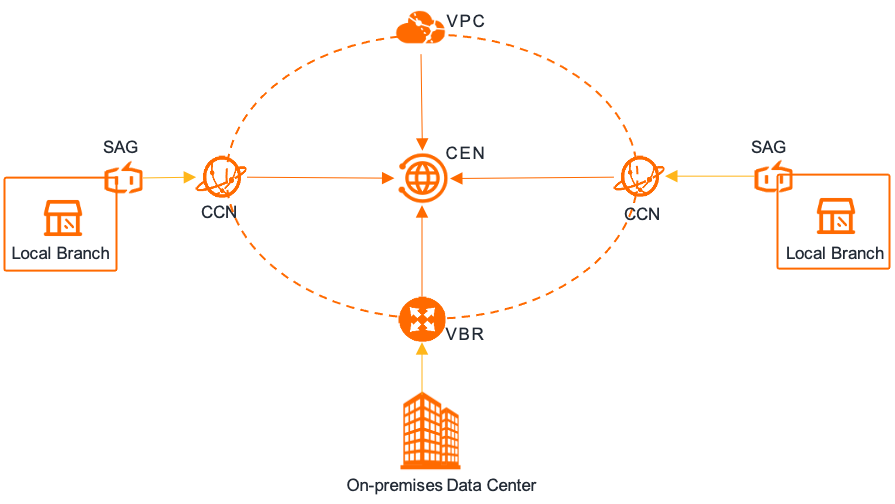
Prerequisites
You have set up an Express Connect circuit to connect to an Alibaba Cloud access point and created a VBR. For more information, see Create and manage VBRs.
You have created a VPC. For more information, see Create a VPC and a vSwitch.
You have created a CEN instance and attached the VPC to the CEN instance. For more information, see Create a CEN instance and Create a VPC connection.
Join a CEN instance
Log on to the Express Connect console.
In the top menu bar, select the target region, and then in the left-side navigation pane, click Virtual Border Routers (VBRs).
On the Virtual Border Routers (VBRs) page, click the target VBR instance ID.
In the Basic Information section, click Join CEN.
NoteBefore attaching the VBR to a CEN instance, make sure its Status is Active. You can find its status in the Basic Information section.
In the Join CEN panel, select the CEN instance and click OK.
Unbind from a CEN instance
Log on to the Express Connect console.
In the top menu bar, select the target region, and then in the left-side navigation pane, click Virtual Border Routers (VBRs).
On the Virtual Border Routers (VBRs) page, click the target VBR instance ID.
In the Basic Information section, click Unbind to the right of Associated CEN.
If the VBR is attached to an Enterprise Edition transit router:
On the Intra-Region Connections tab, find the target network instance connection and click Disassociate in the Actions column.
In the dialog box, verify the connection resources of the transit router instance. At the bottom of the dialog box, select Make sure that your services will not be affected if you delete the preceding x configurations at a time. and click OK.
In the Confirm dialog box, confirm the instance information and click Confirm.
If the VBR is attached to a Basic Edition transit router:
On the Intra-Region Connections tab, find the target network instance connection and click Disassociate in the Actions column.
In the Unload Instance dialog box, click Confirm.
References
Express Connect API operations
CreateVirtualBorderRouter: Creates a VBR instance.
DescribeVirtualBorderRouters: Queries a list of existing VBR instances.
CEN API operations
CreateTransitRouterVpcAttachment: Creates a VPC connection on an Enterprise Edition transit router.
CreateTransitRouterVbrAttachment: Creates a VBR connection on an Enterprise Edition transit router.
AttachCenChildInstance: Attaches a network instance to a CEN instance.
DetachCenChildInstance: Detaches a network instance from a CEN instance.
DeleteTransitRouterVpcAttachment: Deletes a VPC connection from an Enterprise Edition transit router.
DeleteTransitRouterVbrAttachment: Deletes a VBR connection from an Enterprise Edition transit router.