CREATE TABLE AS (CTAS) statement (Retiring)
The CREATE TABLE AS (CTAS) statement synchronizes data and schema changes from a source table to a sink table in real time. This simplifies the creation and maintenance of the sink table as the source schema evolves. This topic describes how to use the CTAS statement and provides practical examples.
We recommend using YAML-based data ingestion jobs to synchronize data from a source to a sink. Existing CTAS/CDAS SQL jobs can be converted to YAML jobs with a single click using the CTAS/CDAS job generation feature.
-
YAML feature advantages: YAML jobs cover all capabilities of CTAS/CDAS, including full database synchronization, single-table synchronization, synchronization of sharded tables and databases, new table synchronization, schema changes, and computed column synchronization. They also provide additional features such as immediate schema change synchronization, raw binlog synchronization, WHERE clause filtering, column pruning, and user-defined functions (UDFs).
-
YAML performance advantages: Compared to SQL jobs, YAML jobs use a single source operator to read from multiple tables and a single sink operator to write to multiple tables by default. This approach reduces resource overhead.
For more examples, see Flink CDC data ingestion best practices.
Key features
Data synchronization
|
Feature |
Description |
|
Single-table synchronization |
Synchronizes full and incremental data from a source table to a sink table in real time. (See Example: Single-table synchronization.) |
|
Merge and synchronize sharded tables and databases |
Matches multiple sharded tables and databases by using a regular expression to define their names. The matched data is then merged and synchronized into a single sink table. (See Example: Merge and synchronize sharded tables and databases.) Note
The caret character ( |
|
Synchronize computed columns |
Defines computed columns to perform transformations on source table data. Computed columns can use built-in or custom functions, and their positions can be specified. These new columns are created as physical columns in the sink table, and their results are synchronized in real time. (See Example: Synchronize computed columns.) |
|
Multiple CTAS statements |
|
Schema change synchronization
While synchronizing data in real time, the CTAS statement also replicates schema changes from the source table to the sink table. Schema changes include the initial table creation and any subsequent table alterations.
-
Supported schema changes
Schema change
Description
Add a nullable column
The corresponding column is automatically added to the end of the sink table's schema, and its data is synchronized. The new column defaults to nullable, and its value for pre-existing rows is set to NULL.
Add a non-null column
The corresponding column is automatically added to the end of the sink table's schema, and its data is synchronized.
Delete a nullable column
The column is not removed from the sink table. Instead, its data is automatically set to NULL.
Rename a column
This is treated as adding a new column and deleting the old one. The renamed column is added to the end of the sink table's schema, and the data in the original column is automatically set to NULL.
NoteFor example, if
col_ais renamed tocol_b,col_bis added to the end of the sink table, and the data forcol_ais set to NULL.Change a column's data type
-
If the sink system supports data type changes: Currently, only Paimon supports handling data type changes. CTAS supports type changes for standard columns, such as from INT to BIGINT.
The supported type changes depend on the rules of the sink. Refer to the documentation for the specific sink connector for details.
-
If the sink system does not support data type changes: Currently, only Hologres supports the type normalization mode to handle data type changes. In this mode, a CTAS job creates a downstream table with wider data types. This approach leverages the sink's compatibility with data type changes. For more details, see Example: Synchronize data in type normalization mode.
ImportantYou must enable type normalization mode when the CTAS job is first started. Otherwise, you must drop the sink table and perform a stateless restart for this mode to take effect.
ImportantCTAS detects schema changes by comparing the schemas of consecutive records rather than by identifying the specific DDL operation.
-
If a column is deleted and then re-added without any data changes in between, CTAS does not detect a schema change.
-
CTAS detects a schema change only after a new column is added and data changes occur. It then synchronizes the schema change to the sink table.
-
-
Unsupported schema changes
-
Changes to constraints, such as a primary key or index.
-
Deletion of non-null columns.
-
Changing a column from NOT NULL to NULLABLE.
ImportantIf an unsupported schema change occurs, you must manually drop the sink table and restart the CTAS job. This recreates the sink table and resynchronizes the historical data.
-
Startup process
The following example shows the process of synchronizing data from MySQL to Hologres using CTAS.
|
Flowchart |
Startup process |
 |
Running a CTAS statement triggers the following process:
|
Prerequisites
Before running a CTAS statement, ensure that a destination catalog has been registered in your workspace. For more information, see Data Management.
Limitations
Syntax limitations
-
The debug feature is not supported.
-
You cannot use
INSERT INTOstatements in the same job. -
Synchronization to StarRocks partitioned tables is not supported.
-
MiniBatch configurations are not supported.
Important-
Before creating an SQL job: On the Configurations page, ensure that any MiniBatch settings are removed from the Other Configuration section on the Deployment Defaults tab.
-
After creating an SQL job: For a solution, see Error: Currently does not support merge StreamExecMiniBatchAssigner type ExecNode in CTAS/CDAS syntax.
-
Source and sink compatibility
The following table lists the supported source and sink connectors for CTAS.
|
Connector |
Source table |
Sink table |
Notes |
|
√ |
× |
|
|
|
√ |
× |
None. |
|
|
√ |
× |
|
|
|
× |
√ |
None. |
|
|
× |
√ |
Only StarRocks on EMR is supported. |
|
|
× |
√ |
If the sink is Hologres, CTAS creates a number of connections for each table based on the Note
When synchronizing data to Hologres, if your source table contains data types not supported by Fixed Plan, we recommend using an INSERT INTO statement to perform type conversion within Flink before synchronizing the data. Do not use CTAS to create the sink table, as this method cannot use Fixed Plan and results in poor write performance. |
|
|
× |
√ |
Only VVR 11.1 or later of the Realtime Compute for Apache Flink engine supports synchronizing data to a Paimon DLF 2.5 sink table. |
Syntax
CREATE TABLE IF NOT EXISTS <sink_table>
(
  [ <table_constraint> ]
)
[COMMENT table_comment]
[PARTITIONED BY (partition_column_name1, partition_column_name2, ...)]
WITH (
  key1=val1,
  key2=val2,
  ...
 )
AS TABLE <source_table> [/*+ OPTIONS(key1=val1, key2=val2, ... ) */]
[ADD COLUMN { <column_component> | (<column_component> [, ...])}];

<sink_table>:
  [catalog_name.][db_name.]table_name

<table_constraint>:
  [CONSTRAINT constraint_name] PRIMARY KEY (column_name, ...) NOT ENFORCED

<source_table>:
  [catalog_name.][db_name.]table_name

<column_component>:
  column_name AS computed_column_expression [COMMENT column_comment] [FIRST | AFTER column_name]
The CTAS syntax is based on the CREATE TABLE statement. The following table describes its parameters.
|
Parameter |
Description |
|
|
The name of the sink table for data synchronization. You can specify the catalog and database names. |
|
|
The description for the sink table. By default, the description of the |
|
|
Creates a partitioned table based on one or more columns. Important
Synchronization to StarRocks partitioned tables is not supported. |
|
|
Defines the primary key constraint for the table, which ensures data uniqueness. |
|
|
Sink table options. You can enter any Note
Both the key and value must be strings. For example, |
|
|
The name of the source table for data synchronization. You can specify the catalog and database names. |
|
|
Source table options. You can enter any Note
Both the key and value must be of the string type, for example, 'server-id' = '65500'. |
|
|
Defines new or renamed columns for the sink table relative to the source table. Supports column aliases and computed columns. Important
A pure field mapping, such as |
|
|
The definition of a new column. |
|
|
The expression used to compute a column. |
|
|
Places the new column as the first field in the table's logical schema. If this parameter is not specified, the new column is appended to the end of the logical schema by default. |
|
|
Places the new column after a specified existing column. |
-
The
IF NOT EXISTSkeyword is required. If the sink table does not exist in the destination storage, it will be created first. Otherwise, the creation step is skipped. -
The sink table schema inherits the source table's schema, including the primary key and the names and types of physical columns. It does not include computed columns, metadata columns, or watermarks.
-
Column data types are converted through type mapping from the source table to the sink table. For more information, see the type mapping section in the documentation for the corresponding connector.
Code examples
Single-table synchronization
Scenario: Synchronize the web_sales table from MySQL to Hologres.
Prerequisites: You have registered the following catalogs in your workspace.
-
A Hologres catalog named holo.
-
A MySQL catalog named mysql.
Code sample:
CTAS is typically used with catalogs for both the data source and the destination. A source catalog automatically parses the source table's schema and options, eliminating the need for manual DDL, enabling full and incremental data synchronization from the source table to the sink table.
USE CATALOG holo;

CREATE TABLE IF NOT EXISTS web_sales   -- If no database is specified, the table is synchronized to the web_sales table in the default database.
WITH ('jdbcWriteBatchSize' = '1024')   -- Optional: Specifies parameters for the sink table.
AS TABLE mysql.tpcds.web_sales
/*+ OPTIONS('server-id'='8001-8004') */;  -- Specifies additional parameters for the mysql-cdc source table.
Merge sharded tables and databases
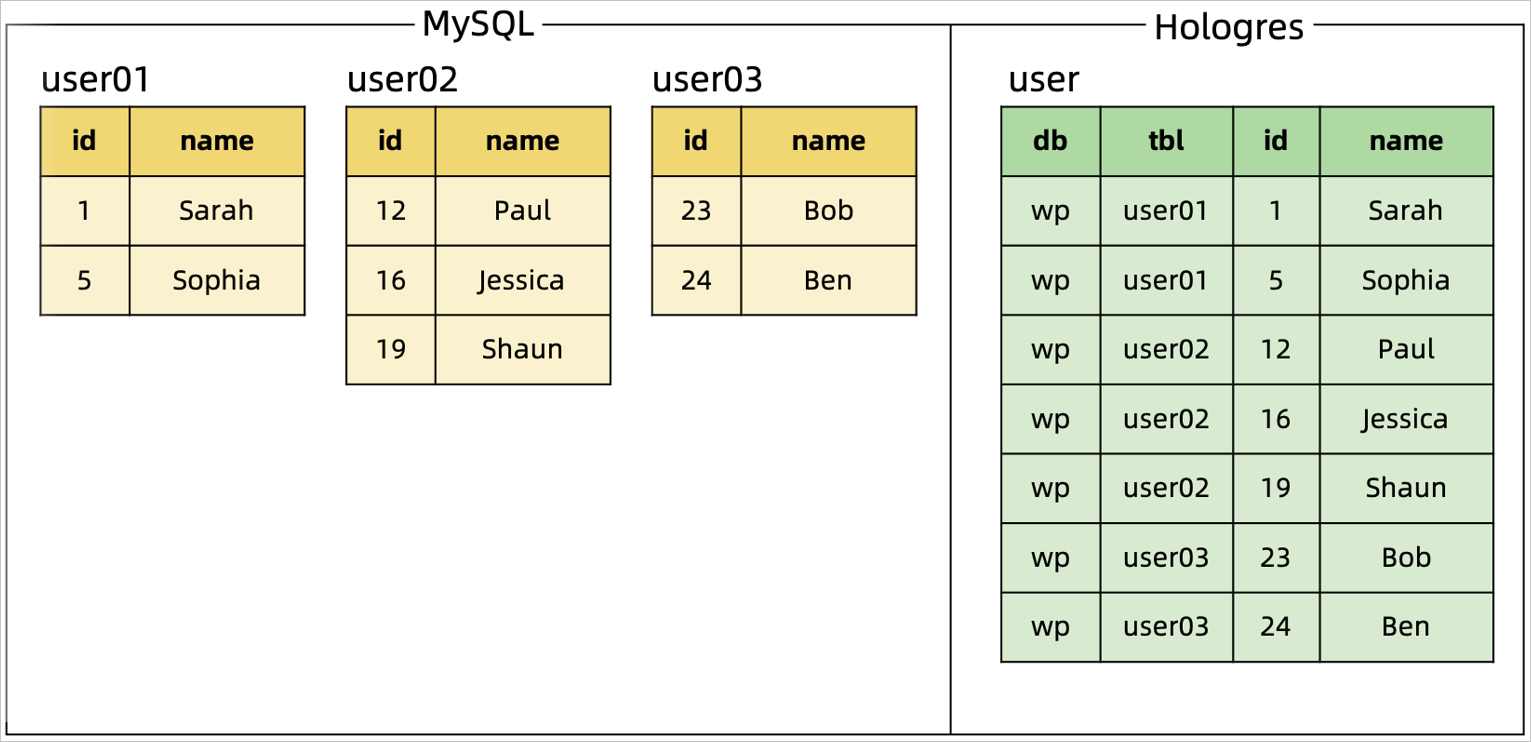
Scenario: Use CTAS to merge multiple sharded MySQL tables into a single Hologres table.
Solution: In combination with a MySQL catalog, use a regular expression to match the database and table names of the tables you want to synchronize. The database and table names are written as two additional columns in the sink table. To ensure primary key uniqueness, the database name, table name, and original primary key are combined to form a new composite primary key for the Hologres table.
Code sample and merge result:
|
Code sample |
Merge result |
|
Merge and synchronize sharded tables scenario: |
|
|
Source table schema change scenario: A column age is added to the user02 table and a record is inserted. Although the schemas of the sharded tables are inconsistent, subsequent data and schema changes in the user02 table are automatically synchronized to the downstream table in real time. |
|

Synchronize computed columns
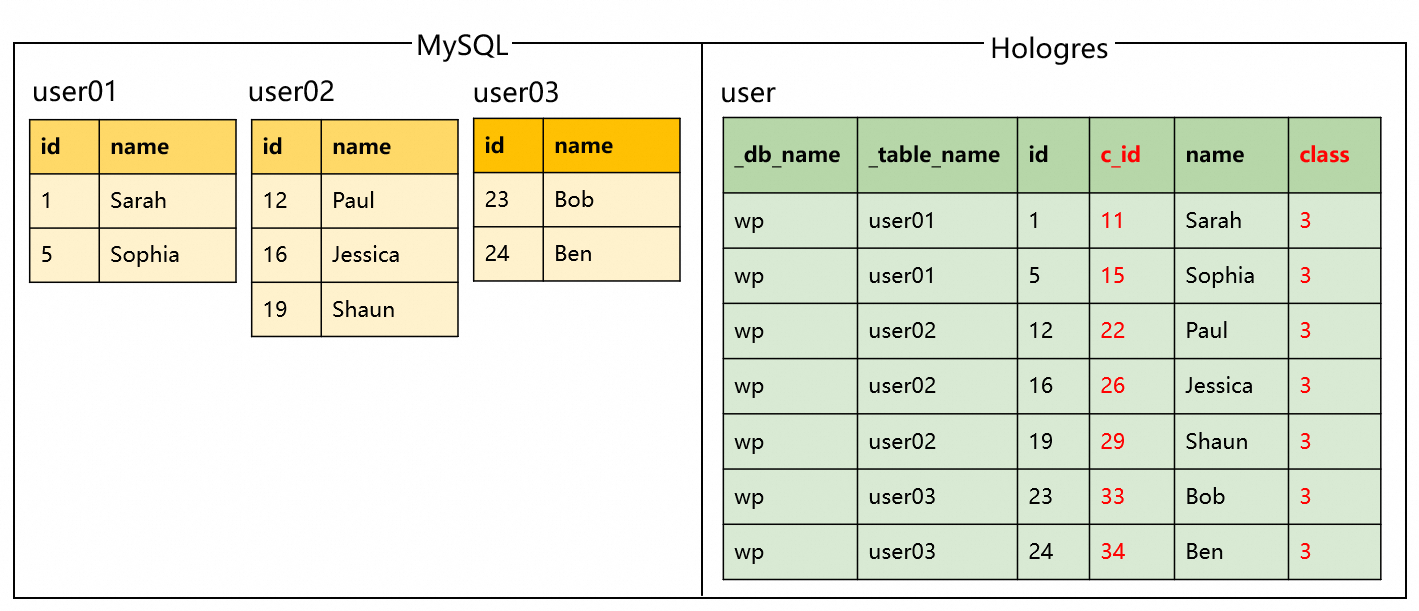
Scenario: Add custom computed columns to a Hologres table during the process of merging and synchronizing sharded MySQL tables.
Code sample and merge result:
|
Code sample |
Merge result |
|
|
Multiple CTAS statements as a single job
Scenario: Synchronize the MySQL web_sales table and the sharded user tables to Hologres as a single job.
Solution: Use the STATEMENT SET syntax to commit multiple CTAS statements as a single job. This approach allows a single source node to be reused for reading data from multiple business tables, which reduces the number of server IDs, database connections, and read load on the MySQL CDC source.
-
The source can be reused only if the
OPTIONSfor the source tables are identical. -
For information about setting the server ID in the MySQL connector, see Set the server ID to avoid binlog consumption conflicts.
Code sample:
USE CATALOG holo;

BEGIN STATEMENT SET;

-- Synchronize the web_sales table.
CREATE TABLE IF NOT EXISTS web_sales
AS TABLE mysql.tpcds.web_sales
/*+ OPTIONS('server-id'='8001-8004') */;

-- Synchronize the sharded user tables.
CREATE TABLE IF NOT EXISTS user
AS TABLE mysql.`wp.*`.`user[0-9]+`
/*+ OPTIONS('server-id'='8001-8004') */;

END;
Synchronize one source to multiple sink tables
-
If sink tables do not require computed columns
USE CATALOG `holo`; BEGIN STATEMENT SET; -- Use a CTAS statement to synchronize the MySQL user table to the user table in the database1 of the Hologres data warehouse. CREATE TABLE IF NOT EXISTS `database1`.`user` AS TABLE `mysql`.`tpcds`.`user` /*+ OPTIONS('server-id'='8001-8004') */; -- Use a CTAS statement to synchronize the MySQL user table to the user table in the database2 of the Hologres data warehouse. CREATE TABLE IF NOT EXISTS `database2`.`user` AS TABLE `mysql`.`tpcds`.`user` /*+ OPTIONS('server-id'='8001-8004') */; END; -
If sink tables require computed columns
-- Create a temporary table user_with_changed_id based on the source table user. It supports defining computed columns, such as computed_id, which is calculated based on the id from the source table.
CREATE TEMPORARY TABLE `user_with_changed_id` (
  `computed_id` AS `id` + 1000
) LIKE `mysql`.`tpcds`.`user`;

-- Create a temporary table user_with_changed_age based on the source table user. It supports defining computed columns, such as computed_age, which is calculated based on the age from the source table.
CREATE TEMPORARY TABLE `user_with_changed_age` (
  `computed_age` AS `age` + 1
) LIKE `mysql`.`tpcds`.`user`;

BEGIN STATEMENT SET;

-- Use a CTAS statement to synchronize the MySQL user table to the user_with_changed_id table in the Hologres data warehouse. The table will contain the computed ID in the computed_id column.
CREATE TABLE IF NOT EXISTS `holo`.`tpcds`.`user_with_changed_id`
AS TABLE `user_with_changed_id`
/*+ OPTIONS('server-id'='8001-8004') */;

-- Use a CTAS statement to synchronize the MySQL user table to the user_with_changed_age table in the Hologres data warehouse. The table will contain the computed age in the computed_age column.
CREATE TABLE IF NOT EXISTS `holo`.`tpcds`.`user_with_changed_age`
AS TABLE `user_with_changed_age`
/*+ OPTIONS('server-id'='8001-8004') */;

END;
Synchronize a new table
Scenario: After a job with multiple CTAS statements is started, you need to add a new CTAS statement to synchronize data from a newly added table.
Solution: Enable the new table detection feature in the SQL job, add the new CTAS statement, and then restart the job from a savepoint. Once the new table is captured, its data will be synchronized.
Limitations:
-
The new table detection feature is supported in VVR 8.0.1 and later.
-
When synchronizing from a CDC source table, the new table detection feature is only supported for jobs with the source table startup mode set to initial.
-
The configuration of the new source table in the added CTAS statement must be identical to the existing source table configurations to ensure that the source can be reused.
-
The job configuration parameters, such as the startup mode, cannot be changed before and after adding the new CTAS statement.
Procedure:
-
When you need to add a new CTAS statement, go to the Deployments page, stop the job, and select Stop With Savepoint.
-
In the SQL job, enable new table detection, add the new CTAS statement, and then Deploy the job again.
-
Add the following statement to the SQL job to enable new table detection.
SET 'table.cdas.scan.newly-added-table.enabled' = 'true'; -
Add the new CTAS statement to the SQL job. The final complete code is as follows.
-- Enable new table detection. SET 'table.cdas.scan.newly-added-table.enabled' = 'true'; USE CATALOG holo; BEGIN STATEMENT SET; -- Synchronize the web_sales table. CREATE TABLE IF NOT EXISTS web_sales AS TABLE mysql.tpcds.web_sales /*+ OPTIONS('server-id'='8001-8004') */; -- Synchronize the sharded user tables. CREATE TABLE IF NOT EXISTS user AS TABLE mysql.`wp.*`.`user[0-9]+` /*+ OPTIONS('server-id'='8001-8004') */; -- Synchronize the product table. (New table) CREATE TABLE IF NOT EXISTS product AS TABLE mysql.tpcds.product /*+ OPTIONS('server-id'='8001-8004') */; END; -
Click Deploy.
-
-
Restore the job from the savepoint.
-
On the Deployments page, click the name of the target job, go to the State tab, and click History.
-
In the Savepoints list, find the savepoint created when the job was stopped.
-
In the Actions column for the target savepoint, select to start the job. For more information, see Start a job.
-
Synchronize to a Hologres partitioned table
Scenario: Use a CTAS statement to synchronize a MySQL source table to a Hologres partitioned table.
Hologres partition rule: In Hologres, if a primary key is defined for the sink table, the partition columns must be included in the primary key.
Code sample:
The DDL statement for the MySQL source table is as follows:
CREATE TABLE orders (
    order_id INTEGER NOT NULL,
    product_id INTEGER NOT NULL,
    city VARCHAR(100) NOT NULL
    order_date DATE,
    purchaser INTEGER,
    PRIMARY KEY(order_id, product_id)
);
The approach differs depending on whether the source table's primary key includes the partition key.
-
If the source primary key includes the partition column, you can synchronize directly with a CTAS statement.
Hologres automatically verifies that the partition column is part of the primary key.
CREATE TABLE IF NOT EXISTS `holo`.`tpcds`.`orders` PARTITIONED BY (product_id) AS TABLE `mysql`.`tpcds`.`orders`; -
If the source primary key does not include the partition column, redeclare the sink table's primary key in the CTAS statement.
If a partition column (for example,
city) is not part of the source table's primary key, the job fails. You must redeclare the sink table's primary key in the CTAS statement to ensure the partition column is part of the primary key.-- You can use the following SQL to specify the primary key of the Hologres partitioned table as order_id, product_id, and city. CREATE TABLE IF NOT EXISTS `holo`.`tpcds`.`orders`( CONSTRAINT `PK_order_id_city` PRIMARY KEY (`order_id`,`product_id`,`city`) NOT ENFORCED ) PARTITIONED BY (city) AS TABLE `mysql`.`tpcds`.`orders`;
Synchronize data in type normalization mode
Scenario: When using a CTAS statement to synchronize data to a Hologres table, you need to support scenarios that require adjusting the precision of existing data types (for example, from VARCHAR(10) to VARCHAR(20)) or changing the data type (for example, from SMALLINT to INT).
Solution: Use the Hologres type normalization mode to synchronize data. The type normalization mode should be enabled when the CTAS job is first started. If it is not enabled at startup, you must drop the downstream table and perform a stateless restart of the job for it to take effect.
Type normalization rules:
After an upstream data type is changed, if the new and original types normalize to the same target type, the job runs normally. Otherwise, the change is considered incompatible, and the CTAS job throws an exception. The specific rules are as follows:
-
TINYINT,SMALLINT,INT, andBIGINTare normalized toBIGINT. -
CHAR,VARCHAR, andSTRINGare normalized toSTRING. -
FLOATandDOUBLEare normalized toDOUBLE. -
Other data types are created according to the original type mapping rules. For more information, see Type mapping.
Code sample:
CREATE TABLE IF NOT EXISTS `holo`.`tpcds`.`orders`
WITH (
'connector' = 'hologres',
'enableTypeNormalization' = 'true' -- Enable type normalization mode.
) AS TABLE `mysql`.`tpcds`.`orders`;
Synchronize MongoDB to Hologres
Limitations:
-
Requires Realtime Compute for Apache Flink VVR 8.0.6 or later and MongoDB 6.0 or later.
-
In SQL Hints, set scan.incremental.snapshot.enabled and scan.full-changelog to true.
-
The pre- and post-images feature must be enabled in the MongoDB database. For information on how to enable it, see Document Preimages.
-
Synchronizing multiple MongoDB collections in a single job has the following requirements:
-
The MongoDB configuration must be identical for each table, including
hosts,scheme,username,password, andconnectionOptions. -
The
scan.startup.modeconfiguration must be identical for each table.
-
Code sample:
BEGIN STATEMENT SET;

CREATE TABLE IF NOT EXISTS `holo`.`database`.`table1`
AS TABLE `mongodb`.`database`.`collection1`
/*+ OPTIONS('scan.incremental.snapshot.enabled'='true','scan.full-changelog'='true') */;

CREATE TABLE IF NOT EXISTS `holo`.`database`.`table2`
AS TABLE `mongodb`.`database`.`collection2`
/*+ OPTIONS('scan.incremental.snapshot.enabled'='true','scan.full-changelog'='true') */;

END;
FAQ
Job operation
-
Timeout issue: Error: akka.pattern.AskTimeoutException
Job performance
-
How can I resolve low efficiency and backpressure during the full table read phase?
-
How do I investigate unstable data consumption from an upstream source?
Data synchronization
Related documents
-
CTAS uses catalogs to manage persistent table metadata, overcoming limitations such as the inability to persist schema and access tables across jobs. For common catalog usage, see:
-
Use cases and practical scenarios for CTAS and CDAS:
-
Synchronizing a full database, merging databases, or synchronizing newly added tables in a source database: CREATE DATABASE AS (CDAS) statement.
-
Synchronizing an entire MySQL database to Kafka to reduce database load from multiple jobs: Synchronize a MySQL database to Kafka with Flink CDC.
-
Tutorials on implementing data synchronization using CTAS and CDAS: Real-time database ingestion, Build a Hologres real-time data warehouse, or Paimon and StarRocks streaming lakehouse.
-
-
Implementing data synchronization through YAML jobs:
-
Quick start: Flink CDC data ingestion jobs.
-
Converting a CTAS job to a YAML job: Create Flink CDC data ingestion jobs.
-