MCP service access
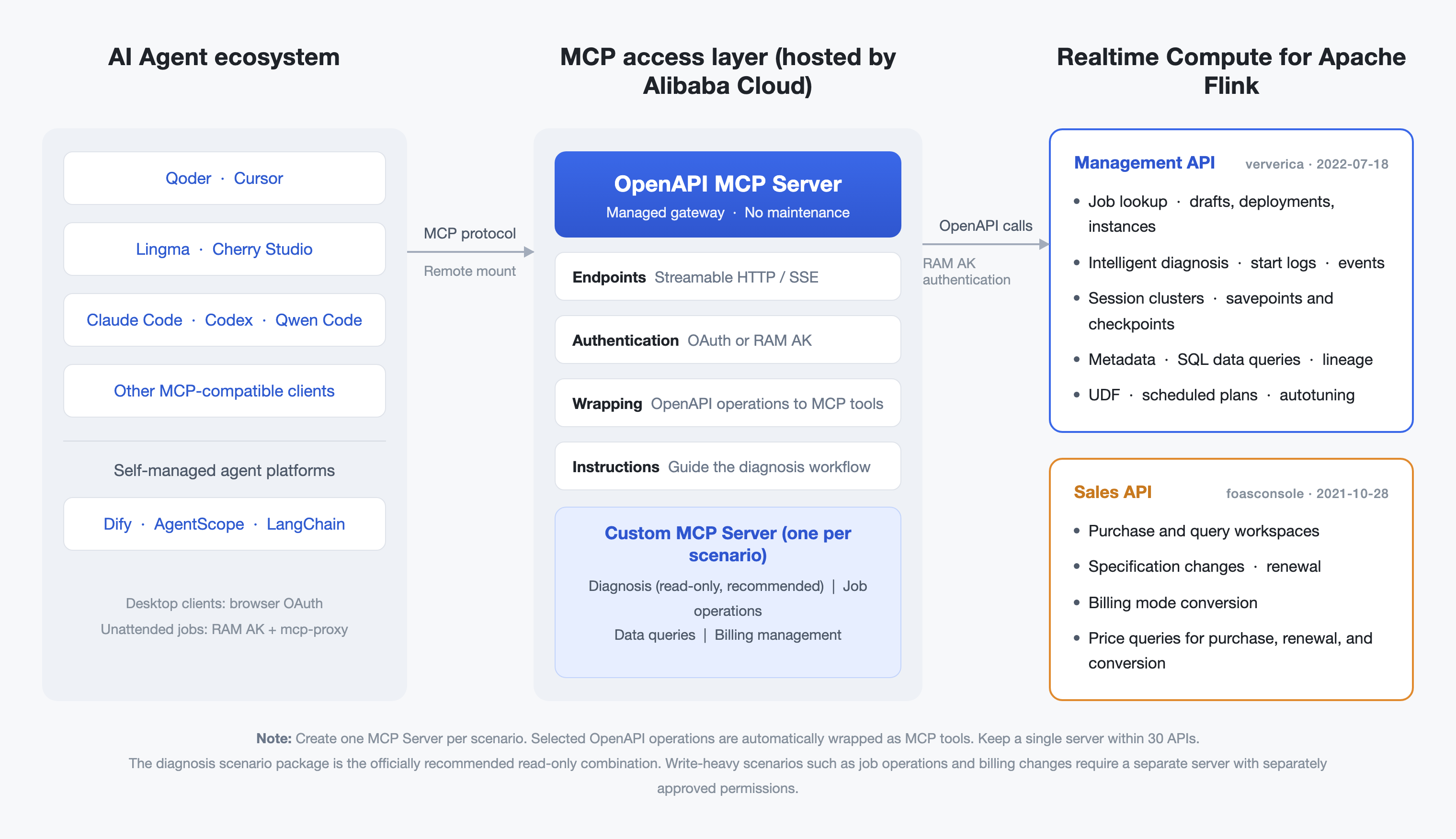
Realtime Compute for Apache Flink exposes its OpenAPI operations as Model Context Protocol (MCP) tools, hosted by Alibaba Cloud OpenAPI MCP Server. AI agents can call these tools directly.
Overview
Flink provides two sets of OpenAPI operations. Both can be exposed as MCP tools.
-
Sales-side operations: product code
foasconsole, API version2021-10-28. Covers workspace purchase, specification change, renewal, and billing queries. -
Management-side operations: product code
ververica, API version2022-07-18. Covers job development, operations, diagnosis, cluster management, and metadata and data queries.
You can connect AI clients such as Qoder, Cursor, Lingma, and Claude Code, and self-managed agent platforms such as Dify and AgentScope.
Architecture
Capabilities
The following capability domains are covered. Select the corresponding API operations to expose them as MCP tools.
|
Capability domain |
Description |
Representative operations |
|
Sales and cost management |
Workspace purchase, specification change, renewal, billing mode conversion, and price queries (sales-side |
|
|
Job lookup |
Browse and search deployments, and check instance status |
|
|
Job development and deployment |
Create and edit deployment drafts, validate SQL, and deploy jobs |
|
|
Job operations |
Start and stop instances, and update parameters and resources at runtime |
|
|
Intelligent diagnosis |
Return diagnosis items such as back pressure, insufficient resources, and code exceptions |
|
|
Savepoints and checkpoints |
Create, query, and delete savepoints for failure recovery |
|
|
Session cluster management |
Manage the session cluster lifecycle |
|
|
Metadata and data queries |
Browse catalogs, databases, and tables, and run and retrieve query results |
|
|
Data lineage |
Query job and data lineage |
|
|
UDFs and connectors |
Register UDFs and custom connectors |
|
|
Scheduling and Autopilot |
Manage scheduled plans and Autopilot policies |
|
-
The job diagnosis package recommended by Alibaba Cloud is used throughout this topic. It combines the diagnosis-related operations listed above. See Recommended APIs. For other packages such as job operations and data queries, select the corresponding operations in the same way. See API selection.
-
Operations for AI Intelligent Assistant conversations (
ChatAiAgent), intelligent inspection (ListPatrolReports,TriggerPatrol, and four more), and AI service management (GetFlinkAiServiceand others, sales-sidefoasconsole) are also available. See AI intelligent O&M.
Typical scenarios
Job diagnosis
Use case: locate the root cause of job failures, frequent failovers and restarts, startup failures, and performance degradation.
Example prompt: "One of my Flink jobs has been restarting frequently since this morning. Help me find out why."
The diagnosis chain is as follows.
|
Step |
Tool called |
Information obtained |
|
1 |
|
Locate the target job |
|
2 |
|
Instance status and time of failure |
|
3 |
|
Diagnosis items such as back pressure, insufficient resources, and code exceptions |
|
4 |
|
Exception stack traces in the startup log |
|
5 |
|
Failover event timeline |
The diagnosis result contains the following parts.
-
Root cause category: back pressure, insufficient resources, code exception, or external dependency, taken from the diagnosis items returned by
GetJobDiagnosis. -
Evidence: diagnosis item descriptions, key lines in the startup log, or the event timeline. Each item must be traceable to a tool response.
-
Recommended action: use the fix suggestion returned with each diagnosis item, and check the recovery point and checkpoint health with
ListSavepoints.
If the evidence is insufficient, ask the model to call ListSavepoints or ListAutopilotTuningHistories to restore the full context.
AI intelligent O&M
The AI Intelligent Assistant and intelligent inspection capabilities of Flink are available through OpenAPI. You can expose them as MCP tools in the same way and integrate them into your own agents and workflows. Both capabilities are also available in the console without any integration.
|
Capability |
Description |
Typical usage |
|
AI Intelligent Assistant |
Handles the full job lifecycle in natural language: generate and deploy Flink SQL in one sentence, diagnose job exceptions through multi-step reasoning including external dependencies, and answer questions about product knowledge and connector usage |
Use |
|
Intelligent inspection |
Runs unattended inspections on a schedule or on demand, for all jobs, jobs by tag, or specified jobs. Reports are generated and delivered automatically, and abnormal health score trends raise early warnings |
Configure "inspect all jobs every day at 06:00" in one sentence, and review archived reports at any time |
The management-side ververica operations cover both AI Intelligent Assistant conversations and intelligent inspection.
|
API operation |
Description |
Read or write |
|
Starts an AI Intelligent Assistant conversation (streaming): natural language input, multi-turn sessions ( |
Conversation/execution |
|
|
Queries inspection reports by time, status, scope, and trigger type |
Read-only |
|
|
Queries the details of an inspection report |
Read-only |
|
|
Queries the inspection configuration, including the schedule, time zone, and scope |
Read-only |
|
|
Triggers one inspection for all jobs ( |
Write |
|
|
Updates the inspection configuration, including the schedule, time zone, and scope |
Write |
Flink AI service is the prerequisite for both capabilities. Its status, deletion protection, and free quota are exposed through the sales-side foasconsole operations.
|
API operation |
Description |
Read or write |
|
Queries the status of the Flink AI service |
Read-only |
|
|
Queries the usage of the free quota |
Read-only |
|
|
Enables the Flink AI service |
Write |
|
|
Disables the Flink AI service |
Write |
|
|
Modifies the deletion protection setting of the Flink AI service |
Write |
The two paths are complementary: MCP exposure fits AI O&M capabilities into your own agents and observability stack, while the console entry ships with expert knowledge and built-in skills and works out of the box.
The AI Intelligent Assistant and intelligent inspection are billed by token usage, with a free trial quota before commercial launch. Quotas and billing details are shown on the AI Service page in the console.
Prerequisites
-
You have an Alibaba Cloud account and a Flink workspace.
-
You have the workspace ID and namespace name of the target workspace, which are required in most calls.
-
The RAM user that performs the authorization has permissions on the selected API operations. Read-only permissions are recommended.
-
For static credential access, Python 3.13 or later and
uvare installed, and the system policyAliyunOpenAPIMCPServerStaticCredentialAccessis attached to the RAM user. -
Do not use the AccessKey pair of your Alibaba Cloud account.
Limits
-
Select no more than 30 API operations for a single MCP server.
-
Whether a call succeeds depends on the permissions of the RAM user that performs the authorization.
-
The full set of operations includes write operations such as start, stop, deploy, and delete. The job diagnosis package recommended in this topic is read-only and performs no changes.
-
Diagnosis results are generated by AI from diagnosis items, logs, and event timelines. Confirm critical changes manually.
Access methods
|
Scenario |
Method |
Description |
|
Desktop AI client with browser OAuth, such as Qoder, Cherry Studio, Cursor, or Lingma |
OAuth |
No AccessKey configuration is required. Authorize in the browser and start using the server. Recommended. |
|
Enterprise agent platform, CI/CD, or unattended integration |
Static credentials and mcp-proxy |
Uses the AccessKey pair of a RAM user. Follow the principle of least privilege. |
|
Self-managed platform with its own OAuth system, such as Dify or AgentScope |
Custom OAuth |
Configure custom OAuth credentials when you create the MCP server. |
API selection
The API operations you select determine which tools the agent can call. Create one server per scenario to keep permissions isolated and tool lists focused. The job diagnosis package used in this topic is described in Create an MCP server.
|
Package |
Operations to select |
Read or write |
Description |
|
Job diagnosis (used in this topic) |
See Create an MCP server |
Read-only |
Safe default for first-time access and demos |
|
Job operations |
|
Includes write operations |
Require user confirmation before the agent makes changes |
|
Data queries and analysis |
|
Query and execution |
For data retrieval and analytical Q&A |
|
Cluster and resource observation |
|
Read-only |
For resource usage and tuning analysis |
Important For packages that contain write operations, create a separate MCP server and approve its permissions separately in RAM. Do not mix them with read-only diagnosis capabilities.
Create an MCP server
The following example creates a server for the job diagnosis package. Decide which API operations and which instructions to use, and then create the server in the console.
Recommended APIs
The job diagnosis package recommended by Alibaba Cloud contains nine read-only operations. Together they cover the full chain of locating the job, checking instance status, diagnosing the root cause, and restoring the event timeline.
|
API operation |
Description |
Role in the diagnosis flow |
|
|
Lists deployments |
Browse and filter target jobs |
|
|
Searches for a deployment by name |
Locate the exact job |
|
|
Lists job instances |
Confirm instance status, start time, and failure time |
|
|
Queries the details of a job instance |
Check the current status and exception information |
|
|
Queries diagnosis details |
Core tool: intelligent diagnosis that returns diagnosis items |
|
|
Queries the startup log of the latest instance |
Troubleshoot startup failures |
|
|
Queries runtime events |
Restore the failover event timeline |
|
|
Queries Autopilot tuning history |
Check whether instance changes were caused by scaling |
|
|
Lists savepoints and system checkpoints |
Assess the recovery point and checkpoint health |
Note Selected operations are exposed as tools named <product code>-<API version without hyphens>-<operation name>. This package returns nine tools such as ververica-20220718-ListDeployments and ververica-20220718-GetJobDiagnosis. The tool list in the client uses these names.
MCP instructions
MCP instructions guide the model to call tools in a defined workflow. The client must support the Instructions field of the MCP standard. Paste the following template into the MCP instructions field when you create the server.
You are a job diagnosis assistant for Realtime Compute for Apache Flink. When diagnosing a job issue, follow this workflow:
1) Locate the target job with ListDeployments or GetDeploymentsByName.
2) List job instances with ListJobs to identify the failed instance and the time of failure.
3) Call GetJobDiagnosis on the failed instance and read the diagnosis items, such as back pressure, insufficient resources, code exceptions, and network issues.
4) If the job failed to start, call GetLatestJobStartLog to read the exception stack traces in the startup log.
5) Restore the failover process with the event timeline from GetEvents. Refer to ListAutopilotTuningHistories when needed to determine whether Autopilot scaling is involved.
6) Output the conclusion: root cause category, evidence (quoting diagnosis items or key log lines), and recommended action.
This MCP server provides read-only capabilities only. It does not perform changes such as start and stop operations.
Procedure
-
Log on to the OpenAPI MCP Server console. In the left-side navigation pane, choose .
-
Configure the parameters as described in the following table.
|
Parameter |
Recommended value |
Description |
|
Name |
|
3 to 16 characters. Lower-case letters, digits, |
|
Document language |
English |
Determines the language of the tool descriptions |
|
OAuth |
Alibaba Cloud OAuth |
Select Custom OAuth to connect a self-managed platform |
|
Cloud product and API list |
Select Realtime Compute for Apache Flink and select the nine operations listed in Recommended APIs |
Each selected operation is exposed as one MCP tool |
|
MCP instructions |
Paste the template in MCP instructions |
Guides the model to call tools in the diagnosis workflow |
-
Click Create and confirm the risk notice.
-
After the server is created, the page shows the Streamable HTTP Endpoint and the SSE Endpoint. Copy and store them. The endpoint uses the following format.
https://openapi-mcp.cn-hangzhou.aliyuncs.com/accounts/<account-id>/custom/<server-name>/id/<service-id>/mcpNote In a VPC environment, use the VPC endpoint shown on the page. Its domain name is in the format openapi-mcp-cn.vpc-proxy.aliyuncs.com and its path follows the same rules as the public endpoint. Public access is enabled by default. After you disable it, the server is accessible only from VPCs in the whitelist.
Configure the MCP client
The endpoint page in the console provides one-click configuration templates for common clients, including Cherry Studio, Lingma, Cursor, Windsurf, VS Code, Claude Code, and Codex. The following sections describe manual configuration.
OAuth
If your client supports remote MCP servers, add the server in the MCP settings of the client and set the URL to the Streamable HTTP Endpoint. Clients that require an explicit transport type accept streamable-http or sse. Qoder detects the transport type from the URL, so you do not need to specify it.
{
  "mcpServers": {
    "flink_diagnosis": {
      "type": "streamable-http",
      "url": "<your Streamable HTTP Endpoint>"
    }
  }
}
If your client supports only STDIO, such as Cursor or Lingma, bridge the connection with mcp-remote-alibaba-cloud.
{
  "mcpServers": {
    "flink_diagnosis": {
      "command": "npx",
      "args": [
        "mcp-remote-alibaba-cloud",
        "<your Streamable HTTP Endpoint>"
      ]
    }
  }
}
For Cursor, paste the configuration into ~/.cursor/mcp.json or .cursor/mcp.json in the project root. For Lingma, add the server on the MCP Tools page of the plug-in and select the STDIO type.
On the first connection, a browser window opens for authorization. Log on as a RAM user that belongs to the same Alibaba Cloud account as the MCP server and confirm the authorization. The client can then list and call the tools.
Important On a shared device, make sure that you log on as the intended RAM user. Authorization from an unrelated account results in incorrect permissions.
Static credentials
Use the local proxy alibabacloud.mcp-proxy with the AccessKey pair of a RAM user. Run the pre-check first to confirm that the proxy and the permissions are ready.
uvx alibabacloud.mcp-proxy@latest --server-url <MCP endpoint> pre-checkAdd the MCP server in your client as an STDIO server with the following settings.
|
Setting |
Value |
|
Type |
|
|
Command |
|
|
Arguments |
|
|
Environment variables |
|
If you have signed in by running aliyun configure, the proxy reuses the credentials of the Alibaba Cloud CLI and you can omit the environment variables.
Warning Do not hard-code AccessKey pairs in configuration files that are under version control. Use environment variables or a secret management service instead.
Verify the connection
After the connection is established, ask your client: "List my jobs in Realtime Compute for Apache Flink and check why the most recent failed job stopped."
Expected behavior: the model calls the job list, instance query, and diagnosis tools in sequence, and returns the root cause and a recommended action for the failed instance.
Every tool requires the workspace (workspace ID) and namespace parameters. Provide them in your prompt. The job diagnosis package does not include an operation that discovers workspaces. If you want the agent to locate them on its own, also select the sales-side operations DescribeInstances and DescribeNamespaces.
Security considerations
-
Least privilege: create a dedicated RAM user for MCP access and grant only the permissions required by the selected read-only operations. Static credential access also requires
AliyunOpenAPIMCPServerStaticCredentialAccess. -
No account-level AccessKey pair: static credential access must use the AccessKey pair of a RAM user, granted with the minimum permissions required.
-
Read-only boundary: the job diagnosis package recommended in this topic contains read-only operations only. It cannot perform changes such as start, stop, or scaling.
-
Isolate write operations: for O&M scenarios such as start, stop, and scaling, create a separate MCP server and approve its permissions separately in RAM.
-
Multi-tenant isolation: MCP can query job information in all workspaces within the authorized scope. In multi-tenant scenarios, isolate access with RAM policies.
FAQ
The connection fails with 401 Authorization header is missing.
The remote endpoint requires authentication. This is expected protection. For OAuth, start the connection again and complete the browser authorization. For static credentials, make sure that the AccessKey pair is injected into the environment variables of mcp-proxy and that the pre-check command has been run.
The query results do not match the expected region.
The MCP endpoint is located in cn-hangzhou. If no region is specified, the resources in China (Hangzhou) are accessed. To query jobs in another region, instruct the model to set x_mcp_region_id in your prompt, for example "List the jobs whose regionId is cn-shenzhen and set x_mcp_region_id".
A model call returns a permission error.
Whether a call succeeds depends on the permissions of the RAM user that performed the authorization. Grant the corresponding read-only policies on Flink API operations to that RAM user.
Realtime Compute for Apache Flink is not in the product list.
Make sure that you select Realtime Compute for Apache Flink (OpenAPI product code ververica, API version 2022-07-18).
My agent platform does not support browser OAuth pop-ups.
Use one of the following methods: select Custom OAuth when you create the MCP server and register credentials for your platform, or connect through the local proxy alibabacloud.mcp-proxy with a static AccessKey pair.