Content moderation in the decision engine
The Fraud Detection decision engine integrates Alibaba Cloud's Text Moderation 2.0
Background information
The decision engine integrates two common text moderation services from Content Moderation, with each service provided through four variables that correspond to the following return parameters: labels (labels), riskTips (subcategory labels), adNums (hit advertising numbers), and riskWords (hit risk words)(For more information, see Text Moderation 2.0 General Service API).
Service | Business scenarios | Description | Parameter |
nickname_detection | User nicknames, official account names, and live stream titles. | Focuses on identifying baseline violations, brand impersonation, and prohibited marketing activities. It helps you manage fraudulent accounts. | Text Moderation_2.0_Nickname_Label |
Text Moderation_2.0_Nickname_Subcategory Label | |||
Text Moderation_2.0_Nickname_Hit Advertising Number | |||
Text Moderation_2.0_Nickname_Hit Risk Words | |||
comment_detection | Comments, live chat messages, public posts, and reposts. | This scenario often involves a high risk rate and diverse, evolving risk types. This service detects baseline violations, advertisements, traffic diversion, and other restricted content. | Text Moderation_2.0_Public Chat Comment_Label |
Text Moderation_2.0_Public Chat Comment_Subcategory Label | |||
Text Moderation_2.0_Public Chat Comment_Hit Advertising Number | |||
Text Moderation_2.0_Public Chat Comment_Hit Risk Words |
Use cases
You can configure Content Moderation variables in the decision engine to adjust the scope and details of risk detection to meet your business requirements. You can also convert the labels returned by the service into entity-level risk features (for entities such as accounts, devices, or IP addresses) to improve the accuracy and efficiency of your risk management.
Use case | Description |
If you are already integrated with the decision engine, you can perform content moderation directly without a separate integration with the Content Moderation API. | |
You can aggregate text-level risks into features associated with an entity, such as an account, device, or IP address. This allows for more accurate and efficient risk handling. For example, you can set a threshold for the number of ad-related messages sent by an account and apply a penalty when the threshold is exceeded. |
Passthrough moderation results
If you have an active Fraud Detection subscription, you can call the two Content Moderation services through the API without any additional configuration.
In the common parameters, set the
serviceparameter to eithernickname_detectionorcomment_detection.In the
serviceParameterobject, add thecontentfield and pass the text that you want to moderate.The following code shows a sample request to moderate public chat comments:
https://saf.cn-shanghai.aliyuncs.com/
    ?Format=JSON
    &Version=2020-07-06
    &Signature=vpEEL0zFHfxXYzSFV0n7%2FZiFL9o%3D
    &SignatureMethod=Hmac-SHA1
    &SignatureNonce=15215528852396
    &SignatureVersion=1.0
    &Action=ExecuteRequest
    &AccessKeyId=123****saf
    &Timestamp=2018-06-01T12:00:00Z
    &Service=comment_detection
    &ServiceParameters={"content":"add me for great deals"}
The moderation results are returned in the
extendfield of the response. The structure of this field is identical to the response from the Content Moderation API.Label:
labels.Subcategory label:
riskTips.Hit advertising number:
adNums.Hit risk words:
riskWords.
The following code shows a sample response:
{
  "Message": "OK",
  "RequestId": "62383C45-5DC3-5A25-AD6C-3F7AB61FDE59",
  "Data": {
    "extend": "{\"riskTips\":\"ad_wechat_variant,ad_traffic_diversion\",\"adNums\":\"\",\"riskWords\":\"add contact,Add contact\",\"labels\":\"ad\"}"
  },
  "Code": 200
}
Convert text-level risks to entity-level features
This example shows how to count the number of ad-related messages sent from the same account within a specific period. If the count reaches a threshold, such as 3, the system returns a high-risk tag.
Log on to the Fraud Detection console.
In the left-side navigation pane, click and then click New Event. Create a content moderation event and add a field for the content. In this example, the field is named
content.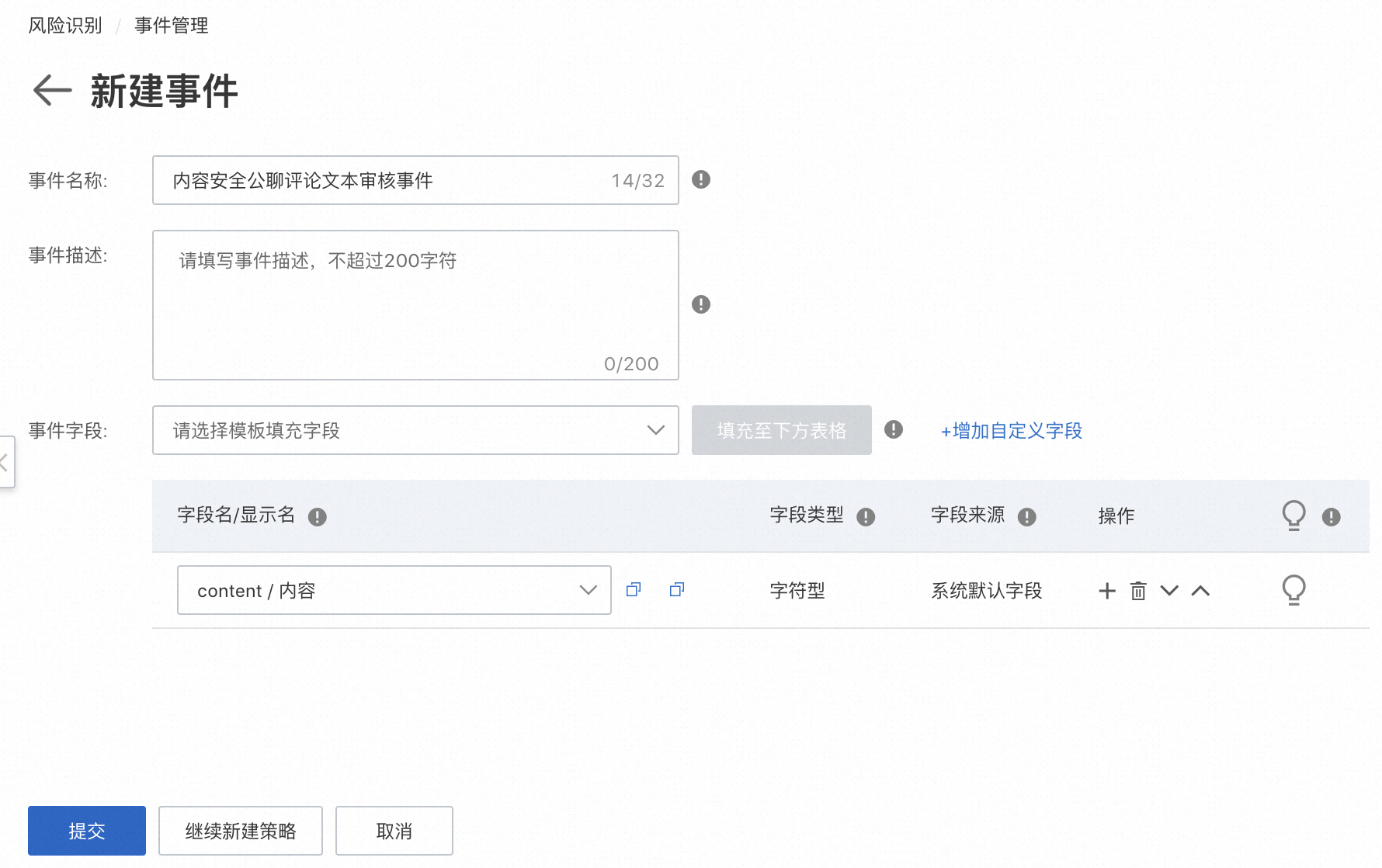
Configure the Content Moderation variable. Navigate to and click Add Associated Variable. Select the Content Moderation service. The system automatically adds the four variables associated with the selected service.
Select variable: To use the public chat moderation service (
comment_detection), select .Select event: Choose the event for this variable.
Associate variable field: Map the field from your event to the variable's input field. In this example, map the
contentfield.Click OK.
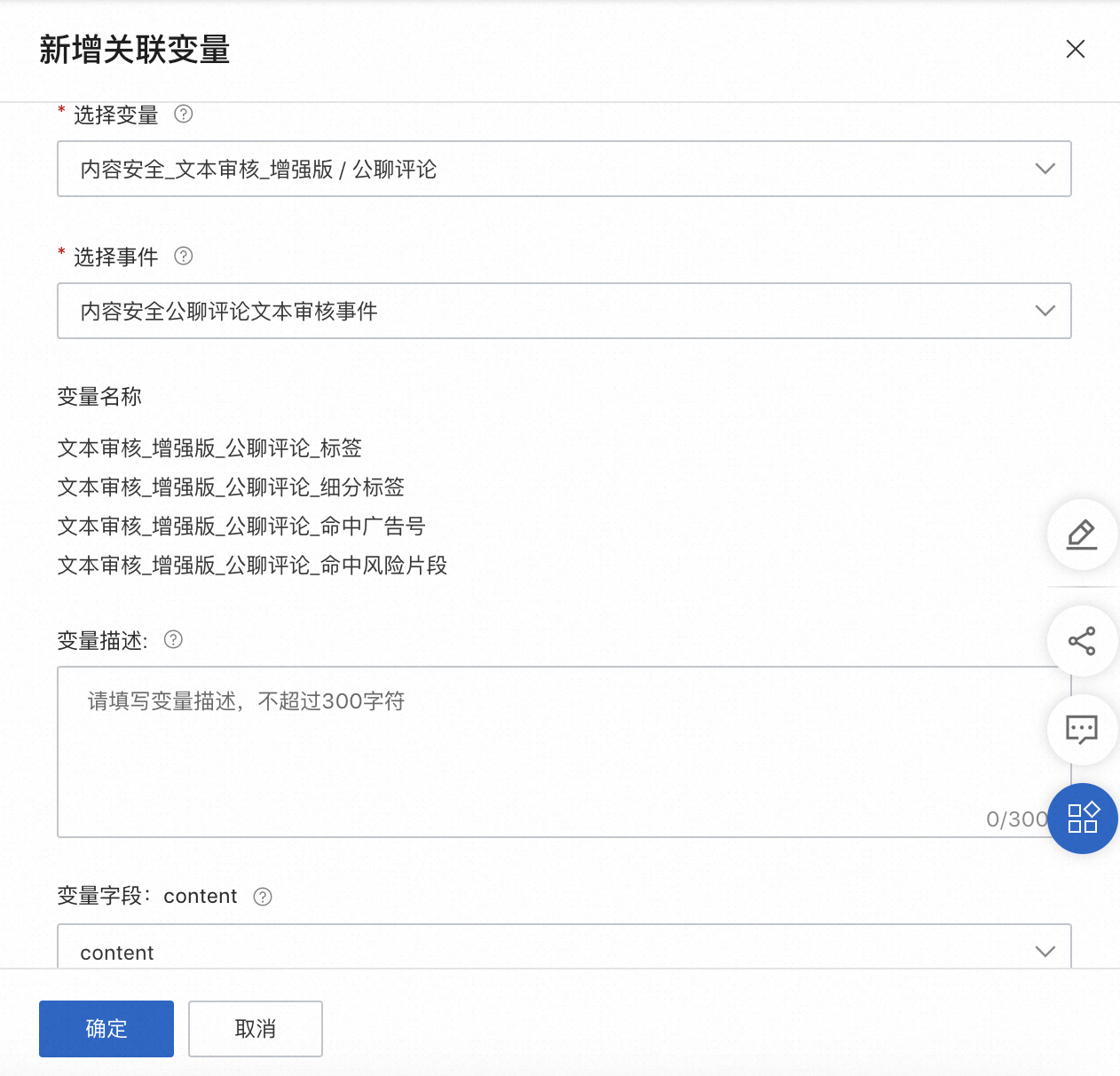
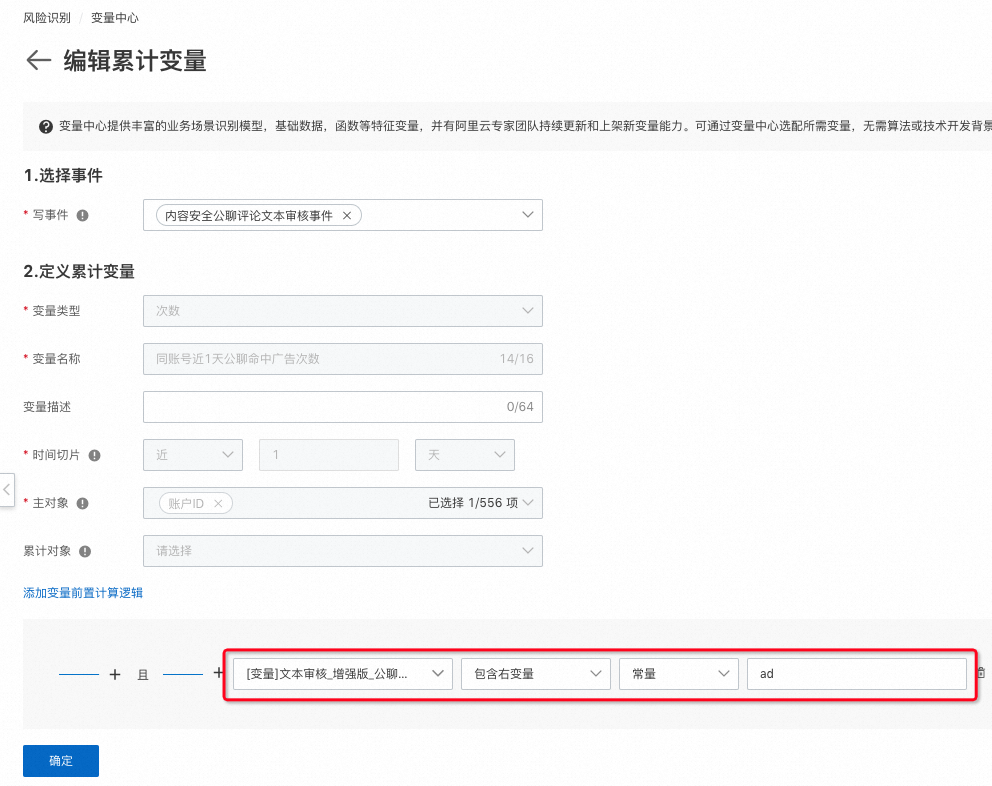
Navigate to , and then click New Velocity Variable.
Configure the Velocity Variable.
Write event: Select the target event.
Variable Type: Select Count.
Variable Name: Enter a descriptive name. For this example, use
Number of ad-related messages from account in last 1 day.Time Window: Select Last 1 day.
Main object: Select Account ID.
Cumulative object: Empty.
Add Trigger Condition.
Left variable: Select .
Operator: Select Contains.
Right variable: Enter the label value to count. In this example, enter
ad.
In the left-side navigation pane, click to create a policy. This example policy states: If the
Number of ad-related messages from account in last 1 dayis greater than or equal to 3, then output the high-risk taghighRisk_ad.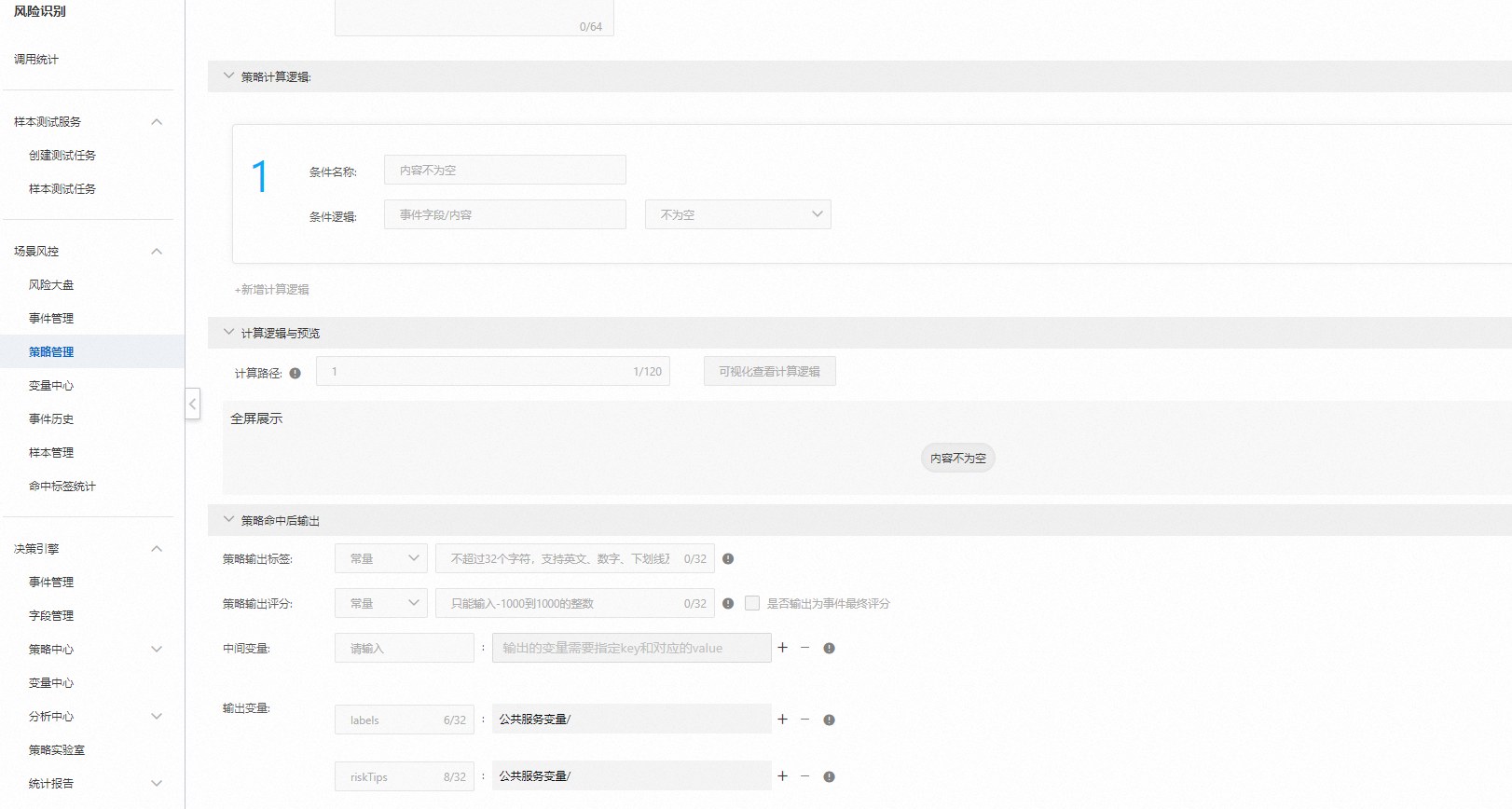
Left variable: In the custom variables section, select the
Number of ad-related messages from account in last 1 dayVelocity Variable that you created.Operator: Select Greater than or equal to.
Right variable: Enter
3.Rules Expression: Enter
1.Tags: Enter
highRisk_ad.Click Save, and then publish the policy to complete the configuration.
Verify the policy.
You can test the policy in OpenAPI Explorer.
Sample request parameters:
{ "eventCode": "de_example", "accountId": "jack", "content": "add me for great deals" }NoteReplace
eventCodewith the code of your configured event.Sample response:
After you call the API three times with content that triggers the
adlabel, the policy is triggered and thetagsfield returnshighRisk_ad.{ "Message": "OK", "RequestId": "9AF58AD8-6816-59D8-AFC9-6602B52A242D", "Data": { "extend": "", "tags": "highRisk_ad" }, "Code": 200 }