Create a policy (DSL)
This topic describes how to create a Domain-Specific Language (DSL) policy. You can use DSL policies to implement custom fraud detection rules.
Precautions
When you configure policy conditions, ensure that variable types are compatible with operators to prevent logic errors.
After you create a policy, test it to verify that the execution results meet your expectations before you publish it.
Review and update policies regularly to adapt to changing business requirements and new risk scenarios.
Procedure
Step 1: Go to the Policy Management page
Log on to the Fraud Detection console. In the navigation pane on the left, choose .
On the Policy Management page, click Create Policy.
Configure the basic parameters for the new policy.
Step 2: Configure Basic Information
Parameter | Procedure |
Policy Mode | Switch to |
Associated Event | From the drop-down list, select the risk control event to attach, such as a transaction event or a log on event. |
Policy Name | Enter a policy identifier. It can contain English letters, digits, and underscores (_). The maximum length is 32 characters. Policy names must be unique for the same event. |
Policy Description | Optional. Briefly describe the purpose of the policy. The maximum length is 64 characters. |
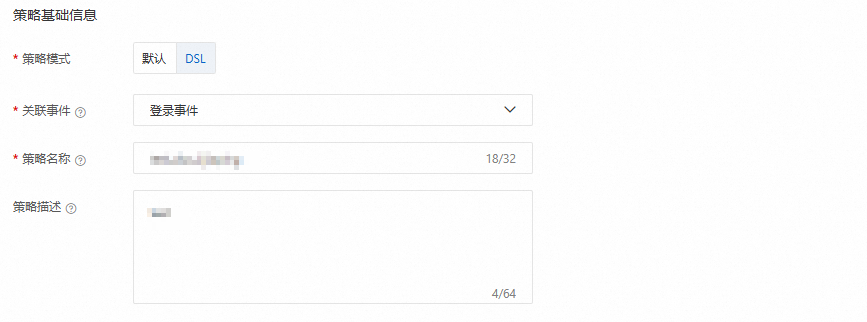
Step 3: Configure the Policy Rules
In the
Ifcondition section, click+Add Conditionto build the decision logic. You can combine multiple levels of conditions using AND/OR operators. For each condition, configure the following:Left-hand variable: Select a device variable, event field, custom variable, or system variable.
Operator: Select an operator to evaluate the left-hand variable. The system provides compatible operators based on the variable type.
Right-hand variable: After you select the left-hand variable and operator, enter a constant or a variable.
 To configure multiple logic conditions, click Add Condition. To quickly create multiple conditions, click Add Group.
In the
Thenaction section, define the output. The output is what the decision engine returns when the policy conditions are met. When a policy is hit, it can produce several types of output, such as labels, scores, intermediate variables, and output variables.Output label: Use descriptive labels, such as
highRiskorpass. Separate multiple labels with commas (,). If multiple policies for the same event are configured with the same label, the system removes duplicates from the final output.Output score: The score must be an integer from -1000 to 1000. When a policy is hit, its score is used to calculate the event score. The event score is the sum of the scores of all hit policies for that event.
Intermediate variable: An intermediate variable is a variable used during the policy calculation process. When a policy with an intermediate variable is hit, the variable is calculated or output according to the configured logic. You can use intermediate variables in other policies for the same event.
Output variable: In addition to scores and labels, you can also define custom output variables, such as event input parameters or intermediate variables. When a policy is hit, the custom output variables are included in the returned message.

Multi-branch logic.
Else if condition (Optional): You can add extra conditional branches, similar to the If condition.
Else action (Optional): You can define the action to take when none of the preceding conditions are met.
Save and enable the policy.
After you configure the policy, click the Submit button at the bottom of the page.
In the policy list, find the policy you created. The policy has a
DSLidentifier before its name. In the Actions column, click the icon, and then click Publish. The policy then takes effect.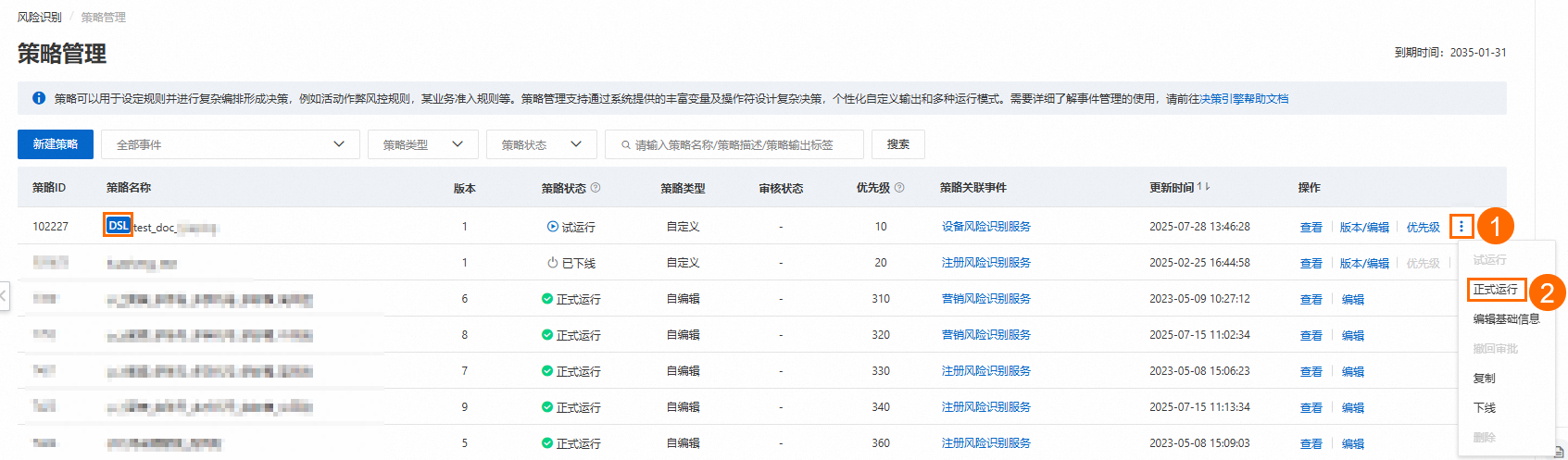
After you configure a policy, you must publish it. To reduce the risk of configuration errors, first set the policy to Trial Run. Monitor its status, and then switch it to Published.
You can now create and manage DSL policies in Alibaba Cloud Fraud Detection to customize fraud detection and prevention.