Configure a ZIP decompression trigger
Object Storage Service (OSS) provides automatic ZIP file decompression. After you configure a decompression rule by specifying a file prefix and a destination directory, the system automatically decompresses matching ZIP files that you upload to an OSS bucket and writes the extracted files to the destination directory. This feature is built on the integration of Function Compute (FC) and OSS. It is essentially a native OSS trigger created in FC, implementing this event-driven workflow without writing code.
How it works
The ZIP decompression feature uses FC to decompress ZIP files. The process is shown in the following figure.
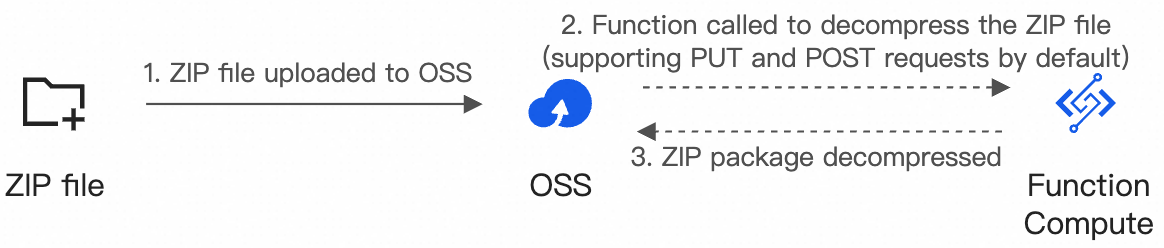
A ZIP file that matches the decompression rule is uploaded to a directory matching the configured prefix.
An FC function is automatically triggered.
FC decompresses the ZIP file and stores the extracted files in the specified destination directory in OSS.
Use cases
Batch uploads
When you need to upload a large number of small files, uploading them individually is time-consuming. You can use the ZIP decompression feature to package the files and upload them as a single archive.
Complete file uploads
To ensure resource integrity, you can group multiple files into a single resource. Uploading them separately can be unreliable. The ZIP decompression feature ensures all files are uploaded together, improving the success rate.
Uploads with a specific directory structure
A website may reference many static resources with a complex directory structure. Creating each directory and uploading files one by one in OSS is inefficient. You can define the directory structure within a ZIP file on your local machine, upload the compressed file to OSS, and use the ZIP decompression feature to extract it.
Resource distribution
When you need to distribute a large number of files to users or servers, you can package them into a ZIP file. Using the OSS ZIP decompression feature, you can extract the files to a specified directory, which reduces data transfer time and bandwidth consumption.
Billing
The ZIP decompression feature incurs costs for both OSS storage and FC function calls and resource usage. The details are as follows:
OSS fees
You are charged a request fee for accessing resources and a storage fee for storing files in an OSS bucket.
FC fees
You are charged for function invocation fees and the usage of vCPU, memory, and disk resources that function invocations consume. The preceding metering items are converted to CU usage by using fixed conversion factors for billing. For more information, see Billing overview.
Data transfer over an internal endpoint is free of charge.
Limitations
Storage class limitations
You must restore objects in the Cold Archive or Deep Cold Archive storage class before they can be decompressed. For objects of the Archive storage class, if Archive Direct Read is not enabled for the bucket, the objects must be restored before they can be decompressed.
File and folder naming limitations
We recommend that you use UTF-8 or GB 2312 encoding for the names of your files and folders. Otherwise, the names of the decompressed files or folders may be garbled, or the decompression process may be interrupted.
Package limitations
The size of a ZIP package cannot exceed 10 GB, and the size of a single file in the package cannot exceed 10 GB. The default maximum execution time for decompressing a single package is 2 hours. If decompression takes longer than 2 hours, you can adjust the function's execution timeout. For more information, see Decompression task timeout.
Configure a ZIP decompression trigger
Log on to the OSS console. In the left-side navigation pane, click Buckets.
On the Buckets page, click the name of the target bucket.
In the left-side navigation pane of the target bucket page, choose . Then, click ZIP package decompression. On the ZIP package decompression panel, configure the decompression rule.
Parameter
Description
Example
Service authorization
Create a service-linked role for FC so it can access other cloud services. If you have not logged on to the FC console before, click Authorize to create the AliyunServiceRoleForFC service-linked role.
Not applicable
Function authorization
Grant FC the permissions to read from and write to OSS.
Click Authorize and follow the on-screen instructions to grant the permissions.
Not applicable
Trigger authorization
Grant OSS the permissions to access FC.
Click Authorize and follow the on-screen instructions to grant the permissions. If you have granted the permissions, this parameter is displayed as Trigger role.
Not applicable
Prefix
Specify a file prefix for the trigger. If you upload a ZIP file with the specified prefix or upload a ZIP file to a directory with the specified prefix, the FC function is triggered. If you leave this parameter empty, the trigger matches all uploaded ZIP files.
ImportantIf you leave this parameter empty, circular triggers can occur. Specify a file prefix to prevent this issue. For more information, see How do I prevent circular triggers?
zipfolder/
Destination directory
Specify the destination directory for the extracted files. If you leave this parameter empty, FC extracts the files to the root directory of the current bucket. For information about the file structure after decompression when different destination directories are configured, see the configuration examples in this topic.
WarningTo prevent impacts on the regular use of the OSS-HDFS service or to avoid risks of data contamination and data loss, do not set the destination directory to
.dlsdata/when you configure a ZIP decompression rule for a bucket for which the OSS-HDFS service is enabled.The destination directory is
destfolder, and Decompress directly to destination directory is selected.bucket ├─── zipfolder/ │ ├─── a.zip │ └─── b.zip └─── destfolder/ ├─── a.txt ├─── b.txt └─── ...The destination directory is empty, and Keep compressed file name as a directory is selected.
bucket/
├── zipfolder/
│   ├── a.zip
│   └── b.zip
├── a/
│   ├── a.txt
│   └── ...
└── b/
    ├── b.txt
    └── ...
The destination directory is
destfolder, and Keep compressed file name as a directory is selected.bucket/ ├── zipfolder/ │ ├── a.zip │ └── b.zip └── destfolder/ ├── a/ │ ├── a.txt │ └── ... └── b/ ├── b.txt └── ...
After completing the configuration, you can modify the trigger's file prefix and related FC function settings. For more information, see Configure a native OSS trigger and Function instance specifications and auto scaling rules.
Related documents
To automatically decompress other types of compressed files, such as
.taror.gz, see decompress-oss.To use FC to package and download OSS files, see Package multiple files into a ZIP package for download.