A custom runtime is an HTTP server you implement inside a Function Compute execution environment. Function Compute communicates with it through a defined HTTP protocol: it sends requests with specific headers, expects specific response codes and headers, and collects logs in a specific format.
This page defines that contract.
A compliant custom runtime must:
Read the
x-fc-control-pathheader to determine whether the request is an event invocation, an HTTP invocation, or an initialization callReturn
StatusCodeandx-fc-statusin every HTTP responseWrite
FC Invoke Start RequestId:andFC Invoke End RequestId:to stdout for every invocation
Request headers
Function Compute automatically injects the following headers into every request it sends to your custom runtime. Both event functions and HTTP functions receive these headers.
The temporary AccessKey headers (x-fc-access-key-id,x-fc-access-key-secret,x-fc-security-token) are included so your runtime can call other Alibaba Cloud services. If you are migrating an existing application, you can ignore these headers.
| Header | Description |
|---|---|
x-fc-request-id | The request ID. Include this in your logs to correlate log entries with invocations. |
x-fc-access-key-id | Temporary AccessKey ID for calling other Alibaba Cloud services. |
x-fc-access-key-secret | Temporary AccessKey secret. |
x-fc-security-token | Temporary security token. |
x-fc-function-handler | The function handler. For custom runtimes and custom containers, where the runtime itself is the function, this value is not meaningful—set it to any string. |
x-fc-function-memory | The maximum memory the function can use. |
x-fc-function-initializer | The Initializer function handler. For custom runtimes and custom containers, this value is not meaningful—set it to any string. |
x-fc-initialization-timeout | The timeout period for the Initializer function. |
x-fc-instance-lifecycle-pre-stop-handler | The PreStop lifecycle hook handler. For custom runtimes and custom containers, this value is not meaningful—set it to any string. |
x-fc-instance-lifecycle-pre-freeze-handler | The PreFreeze lifecycle hook handler. For custom runtimes and custom containers, this value is not meaningful—set it to any string. |
x-fc-region | The region where the function runs. |
x-fc-account-id | The UID of the function owner. |
x-fc-qualifier | The service version or alias used when invoking the function. For more information, see Use versions and aliases to implement phased releases. |
x-fc-version-id | The service version used when invoking the function. |
x-fc-function-name | The function name. |
x-fc-service-name | The name of the service the function belongs to. |
x-fc-service-logproject | The Simple Log Service log project configured for the service. |
x-fc-service-logstore | The Logstore configured for the service. |
x-fc-control-path | The request type. Use this header to determine how to handle the incoming request. |
x-fc-control-path values
| Value | Request type | Description |
|---|---|---|
/invoke | Event function invocation | An Invoke call. Handle the event payload and return a result. |
/http-invoke | HTTP function invocation | An HTTP Invoke call. Function Compute forwards the original request—path, body, and headers—along with the common headers. Return the response headers and body directly to the client. |
/initialize | Initialization | Function Compute sends this request once when the execution environment is first created, similar to a class constructor. Only one successful initialization call occurs per container lifecycle. |
Response codes and response headers
Every function invocation is an HTTP request to your runtime. Each response must include both a StatusCode and an x-fc-status header.
Set both StatusCode and x-fc-status in every HTTP response.
| Field | Required | Values | Description |
|---|---|---|---|
StatusCode | Yes | 200 (success), 404 (failure) | The standard HTTP response code. |
x-fc-status | Yes | 200 (success), 404 (failure) | Reports execution status to Function Compute. |
Why `x-fc-status` matters
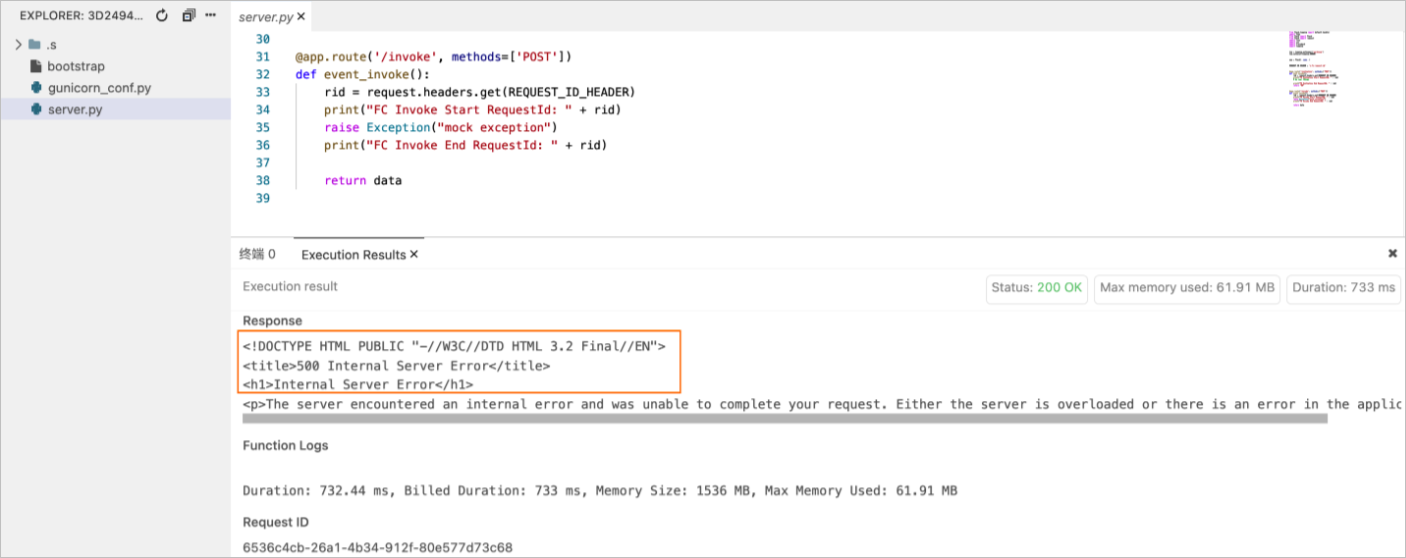
If x-fc-status is not set, Function Compute assumes the invocation succeeded, even if your function threw an exception. This does not affect your business logic, but it prevents Function Compute from recording the failure in monitoring and observability data.
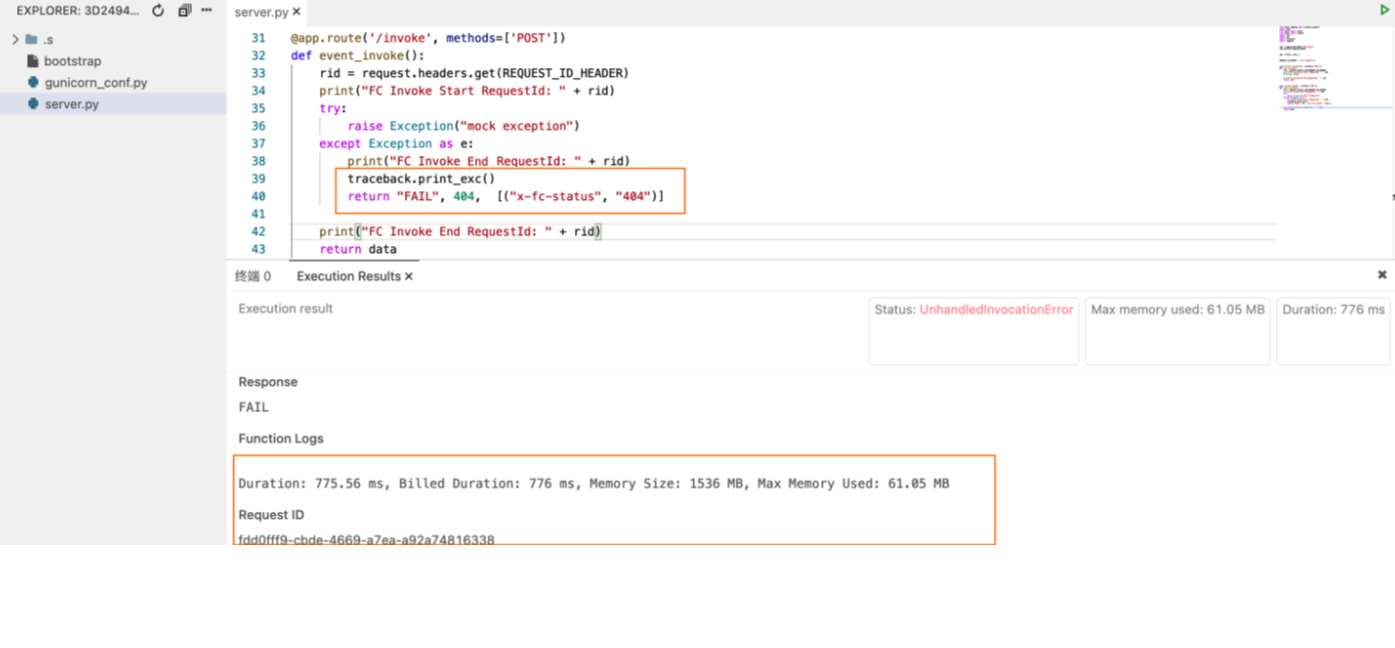
When x-fc-status is set, Function Compute correctly records failures. Print the error stack to stdout alongside the response.
Log format
Enable logging when creating a service. All output written to stdout in a custom runtime is automatically collected in the Simple Log Service you specify. For more information, see Configure logs.
If you invoke a function anonymously through an HTTP trigger, including x-fc-log-type: Tail in the request header may expose sensitive information. Enable authentication to prevent this. For more information, see Authentication.
For runtime environments other than custom runtime and custom container: when the request header includes x-fc-log-type: Tail, the x-fc-log-result response header contains up to 4 KB of execution logs, viewable in the Function Compute console.
For custom runtimes, write the start and end log entries below to stdout. Function Compute uses these entries to display logs in the console execution results.
Required log entries
| Log content | Required | Log string |
|---|---|---|
| Runtime start | No — flags a cold start | FunctionCompute ${runtime} runtime inited. Use a custom name for ${runtime}; avoid official Function Compute language names such as Node.js, Python, or PHP. |
| Invoke start | Yes | FC Invoke Start RequestId: ${RequestId} |
| Invoke end | Yes | FC Invoke End RequestId: ${RequestId} |
| Initialize start | No — required if using the Initializer function | FC Initialize Start RequestId: ${RequestId} |
| Initialize end | No — required if using the Initializer function | FC Initialize End RequestId: ${RequestId} |
Recommended log format
Include the request ID in all log entries to make issue diagnosis straightforward. The recommended format is:
$utcdatetime(yyyy-MM-ddTHH:mm:ss.fff) $requestId [$Level] $messageLog level interfaces vary by language. Set the log level based on your runtime environment. For more information, see Basic information.