Instance lifecycle hook methods
Lifecycle hooks let you run custom logic at two points in a function instance's lifetime: after the instance starts (Initializer hook) and before it is destroyed (PreStop hook). This page explains how to implement and configure both hooks for Java functions.
Use lifecycle hooks to amortize expensive setup costs across multiple invocations:
Initializer hook: Get database credentials from environment variables and open a connection pool once. All subsequent invocations on the same instance reuse the connection, reducing latency and cost.
PreStop hook: Close database connections or flush in-memory state before the instance is recycled, preventing resource leaks.
For PHP functions, see Configure instance lifecycles.
How it works
Function Compute runs each instance through three stages:
| Stage | When | What runs |
|---|---|---|
| Init | Instance starts, before any invocation | Initializer hook (once) |
| Invoke | Each request | Your handler |
| Shutdown | Instance is about to be destroyed | PreStop hook |
Initializer hook behavior:
Runs exactly once per instance lifetime, after the instance starts and before the first handler invocation.
If the Initializer hook fails, Function Compute retries it until it succeeds, then runs your handler.
Make the hook idempotent to handle retries safely. For example, check whether a connection pool already exists before creating one — if the pool is non-null, skip initialization. This prevents duplicate connections if the hook is retried.
PreStop hook behavior:
Runs before the instance is destroyed.
Instances are cached for a period before destruction, so PreStop does not run immediately after the last invocation.
Billing
Lifecycle hook executions are billed the same as regular invocations. Hook execution logs appear in Function Logs, Real-time Logs, and Advanced Logs, but not in the invocation request list.
Implement the hooks
Initializer hook
Implement the FunctionInitializer interface and its initialize(Context context) method.
Interface definition:
package com.aliyun.fc.runtime;

import java.io.IOException;

/**
 * This is the interface for the initialization operation
 */
public interface FunctionInitializer {

    /**
     * The interface to handle a function compute initialize request
     *
     * @param context The function compute initialize environment context object.
     * @throws IOException IOException during I/O handling
     */
    void initialize(Context context) throws IOException;
}
PreStop hook
Implement the PreStopHandler interface and its preStop(Context context) method.
Interface definition:
package com.aliyun.fc.runtime;

import java.io.IOException;

/**
 * This is the interface for the preStop operation
 */
public interface PreStopHandler {

    /**
     * The interface to handle a function compute preStop request
     *
     * @param context The function compute preStop environment context object.
     * @throws IOException IOException during I/O handling
     */
    void preStop(Context context) throws IOException;
}
Full example: StreamRequestHandler with both hooks
package example;

import java.io.IOException;
import java.io.InputStream;
import java.io.OutputStream;

import com.aliyun.fc.runtime.Context;
import com.aliyun.fc.runtime.StreamRequestHandler;
import com.aliyun.fc.runtime.FunctionInitializer;
import com.aliyun.fc.runtime.PreStopHandler;

public class App implements StreamRequestHandler, FunctionInitializer, PreStopHandler {
    @Override
    public void initialize(Context context) throws IOException {
        context.getLogger().info("initialize start ...");
    }

    @Override
    public void handleRequest(
            InputStream inputStream, OutputStream outputStream, Context context) throws IOException {
        context.getLogger().info("handlerRequest ...");
        outputStream.write(new String("hello world\n").getBytes());
    }

    @Override
    public void preStop(Context context) throws IOException {
        context.getLogger().info("preStop start ...");
    }
}Note:InputStreamreturns data in chunks.OutputStreamdoes not.
Configure lifecycle hooks
Use the Function Compute console
On the function details page in the Function Compute console, set the hook fields using the format [Package name].[Class name]::[Method name].
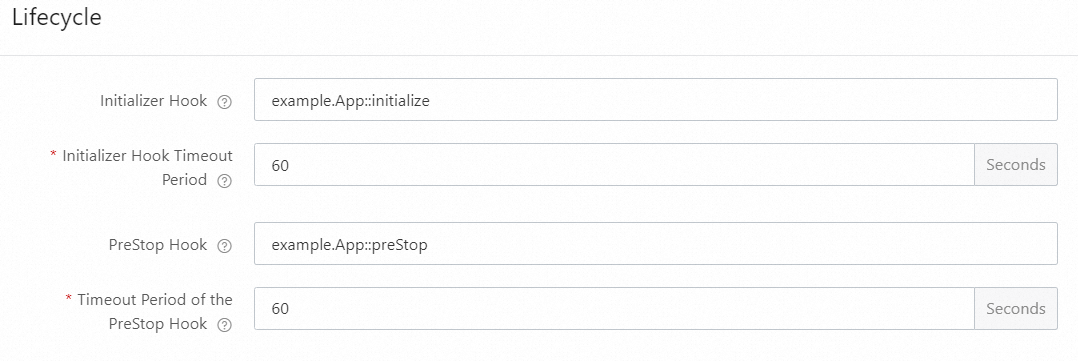
For the example class above:
Initializer Hook:
example.App::initializePreStop Hook:
example.App::preStop
Use Serverless Devs
Add instanceLifecycleConfig under function in s.yaml, with initializer and preStop sub-keys. Each sub-key takes a handler and a timeout (in seconds).
# ------------------------------------
#   Official manual: https://manual.serverless-devs.com/user-guide/aliyun/#fc3
#   Tips: https://manual.serverless-devs.com/user-guide/tips/
# If you have any questions, join the DingTalk group 33947367 for technical support.
# ------------------------------------
edition: 3.0.0
name: hello-world-app
access: "default"

vars: # The global variables
  region: "cn-hangzhou"

resources:
  hello_world:
    component: fc3
    actions:
      pre-${regex('deploy|local')}:
        - run: mvn package -DskipTests
          path: ./
    props:
      region: ${vars.region}
      functionName: "start-java-1xqf"
      description: 'hello world by serverless devs'
      runtime: "java8"
      code: ./target/HelloFCJava-1.0-SNAPSHOT-jar-with-dependencies.jar
      handler: example.App::handleRequest
      memorySize: 128
      timeout: 10
      instanceLifecycleConfig:      # The extension function
        initializer:                # The Initializer hook
          handler: example.App::initialize
          timeout: 60
        preStop:                    # The PreStop hook
          handler: example.App::preStop  # The function handler
          timeout: 60               # The timeout period.
For the full YAML syntax reference, see Common commands of Serverless Devs.
View lifecycle hook logs
Hook logs appear alongside invocation logs in Function Logs but are not listed in the invocation request list.
Log on to the Function Compute console. In the left-side navigation pane, click Functions.
In the top navigation bar, select a region. On the Functions page, click the function you want to manage.
On the function details page, click the Test Function tab, click Test Function, and then choose Logs > Function Logs.
Initializer logs:
2024-03-04 17:57:28 FC Initialize Start RequestId: 1-65e59b07-1520da26-bf73bbb91b69
2024-03-04 17:57:28 2024-03-04 09:57:28.192 1-65e59b07-1520da26-bf73bbb91b69 [info] initializer
2024-03-04 17:57:28 FC Initialize End RequestId: 1-65e59b07-1520da26-bf73bbb91b69
2024-03-04 17:57:28 FC Invoke Start RequestId: 1-65e59b07-1520da26-bf73bbb91b69
2024-03-04 17:57:28 FC Invoke End RequestId: 1-65e59b07-1520da26-bf73bbb91b69
PreStop logs — triggering the hook:
Function instances are cached for a period before destruction, so PreStop logs do not appear immediately. To trigger PreStop right away, update the function configuration or code. After the update, PreStop logs appear in Function Logs:
2024-03-04 18:33:26 FC PreStop Start RequestId: 93c93603-9fbe-4576-9458-193c8b213031
2024-03-04 18:33:26 2024-03-04 10:33:26.077 93c93603-9fbe-4576-9458-193c8b213031 [info] preStop
2024-03-04 18:33:26 FC PreStop End RequestId: 93c93603-9fbe-4576-9458-193c8b213031
What's next
java11-mysql: A sample program that uses an Initializer hook to get database configurations from environment variables and open a MySQL connection, and a PreStop hook to close it.