Lifecycle hooks for function instances
Function instances spend time on initialization and cleanup that your handler code cannot control. Lifecycle hooks let you attach custom logic to those moments — running setup code before the first invocation and cleanup code before the instance is destroyed. This topic covers lifecycle hooks for the Go runtime.
How it works
Every function instance passes through three phases:
| Phase | What happens |
|---|---|
| Init | The instance starts. If an Initializer hook is configured, it runs before the first handler invocation. |
| Invoke | The instance handles requests. |
| Shutdown | The instance is destroyed. If a PreStop hook is configured, it runs before destruction. |
Billing for lifecycle hooks follows the same rules as regular invocations.
Initializer hook
Runs exactly once per instance lifetime, after the instance starts and before the first handler invocation.
If the hook fails, Function Compute retries it until it succeeds. The handler does not run until the Initializer completes successfully.
Design your Initializer to be idempotent so it can be safely retried.
Common use cases: loading configuration from environment variables, creating database connection pools, warming up caches.
PreStop hook
Runs before the instance is destroyed.
To use the PreStop hook, update fc-runtime-go-sdk to v0.1.0 or later.
Prerequisites
Before you begin, ensure that you have:
A Function Compute function using the Go runtime
fc-runtime-go-sdk v0.1.0 or later (required for the PreStop hook)
Implement lifecycle hooks
Both hooks share the same signature — a single ctx context.Context parameter with no return value:
func(ctx context.Context)Register hooks in main() before calling fc.Start() or fc.StartHttp(). Registrations after fc.Start() are ignored.
package main

import (
    "context"
    "log"

    "github.com/aliyun/fc-runtime-go-sdk/fc"
    "github.com/aliyun/fc-runtime-go-sdk/fccontext"
)

func HandleRequest(ctx context.Context) (string, error) {
    return "hello world!", nil
}

func initialize(ctx context.Context) {
    log.Print("this is initialize handler")
    fctx, _ := fccontext.FromContext(ctx)
    fctx.GetLogger().Infof("context: %#v\n", fctx)
}

func preStop(ctx context.Context) {
    log.Print("this is preStop handler")
    fctx, _ := fccontext.FromContext(ctx)
    fctx.GetLogger().Infof("context: %#v\n", fctx)
}

func main() {
    fc.RegisterInitializerFunction(initialize) // Register the Initializer hook
    fc.RegisterPreStopFunction(preStop)        // Register the PreStop hook
    fc.Start(HandleRequest)
}
Key functions:
| Function | Description |
|---|---|
initialize(ctx context.Context) | The Initializer hook. The ctx parameter carries invocation context. See Context. |
preStop(ctx context.Context) | The PreStop hook. The ctx parameter carries invocation context. See Context. |
main() | The entry point for Go functions. Call fc.RegisterInitializerFunction and fc.RegisterPreStopFunction here before passing your handler to fc.Start. |
Register all hooks before calling fc.Start(HandleRequest) or fc.StartHttp(HandleRequest). Hooks registered after this call are not recognized.
Configure lifecycle hooks
Use the Function Compute console
In the Function Compute console, open your function's configuration and set the Initializer hook and PreStop hook fields.
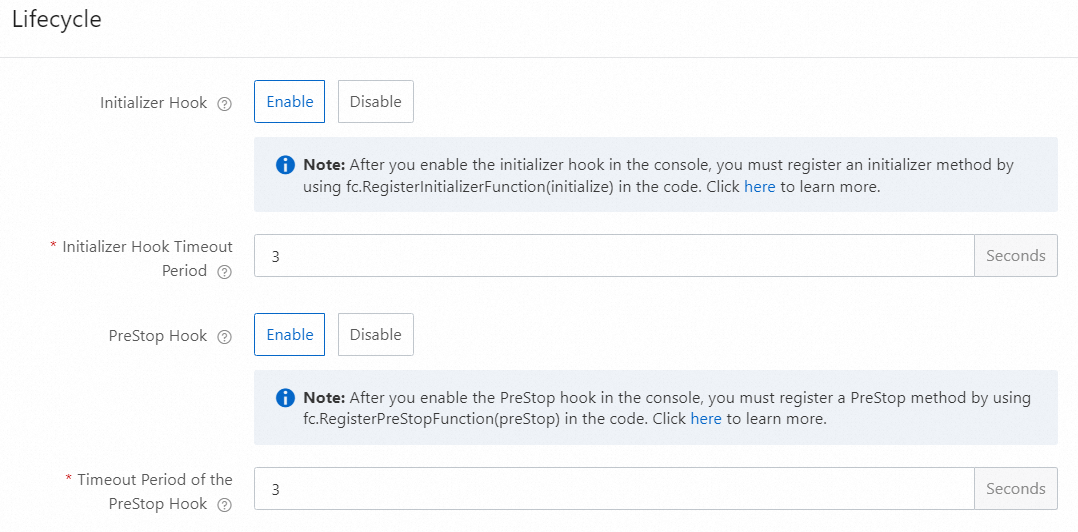
For the full configuration reference, see Configure instance lifecycles.
Use Serverless Devs
Add the initializer and instanceLifecycleConfig.preStop fields to the props section of your s.yaml file.
The handler field must be a non-empty string. When using the default value "true", enclose it in double quotation marks in s.yaml.
edition: 3.0.0
name: hello-world  # Project name
access: default    # Key alias

vars: # Global variables
  region: cn-hangzhou

resources:
  helloworld: # Service or module name
    component: fc3
    props:
      region: ${vars.region}
      functionName: "golang-lifecycle-hook-demo"
      description: 'this is golang lifecycle'
      runtime: "go1"
      code: ./
      handler: main
      memorySize: 128
      timeout: 60
      instanceLifecycleConfig:
        initializer:
          handler: initialize
          timeout: 60
        preStop:
          handler: preStop  # Function handler
          timeout: 60       # Timeout in seconds
For the full Serverless Devs YAML reference, see Common commands of Serverless Devs.
View lifecycle hook logs
Lifecycle hook logs appear in Function Logs, Real-time Logs, and Advanced Logs. They are not shown in the invocation request list.
Log on to the Function Compute console. In the left-side navigation pane, click Functions.
In the top navigation bar, select a region. On the Functions page, click the function you want to manage.
Click the Test Function tab, click Test Function, and then choose Logs > Function Logs.
The Logs tab shows both invocation logs and Initializer logs together. Example:
2024-03-04 17:57:28 FC Initialize Start RequestId: 1-65e59b07-1520da26-bf73bbb91b69
2024-03-04 17:57:28 2024-03-04 09:57:28.192 1-65e59b07-1520da26-bf73bbb91b69 [info] initializer
2024-03-04 17:57:28 FC Initialize End RequestId: 1-65e59b07-1520da26-bf73bbb91b69
2024-03-04 17:57:28 FC Invoke Start RequestId: 1-65e59b07-1520da26-bf73bbb91b69
2024-03-04 17:57:28 FC Invoke End RequestId: 1-65e59b07-1520da26-bf73bbb91b69
Function instances are cached and not destroyed immediately, so PreStop logs won't appear right away. To trigger a PreStop hook immediately, update the function's code or configuration — this forces the existing instance to shut down. After the update, PreStop logs appear in Function Logs:
2024-03-04 18:33:26 FC PreStop Start RequestId: 93c93603-9fbe-4576-9458-193c8b213031
2024-03-04 18:33:26 2024-03-04 10:33:26.077 93c93603-9fbe-4576-9458-193c8b213031 [info] preStop
2024-03-04 18:33:26 FC PreStop End RequestId: 93c93603-9fbe-4576-9458-193c8b213031
Sample program
The go-initializer-mysql sample shows how to use the Initializer hook to set up a MySQL connection pool in Go:
Read MySQL connection settings from function environment variables (defined in
s.yaml).Create a connection pool in the Initializer hook.
Test connectivity before the handler runs.
This pattern keeps connection setup out of the hot path, so each invocation reuses an already-established pool.
What's next
Configure instance lifecycles — full reference for lifecycle configuration options
Context — details on the
ctxparameter available in hooks and handlers