Calling Alibaba Cloud Model Studio APIs from regions other than China (Beijing), Singapore, or US (Virginia) over the public internet can cause high latency, jitter, and packet loss. Global Accelerator (GA) accelerates these connections and improves the API call experience.
Regions and service deployment scope supported by Alibaba Cloud Model Studio.
Effects
Calling Qwen API without GA | Calling Qwen API with GA |
| |
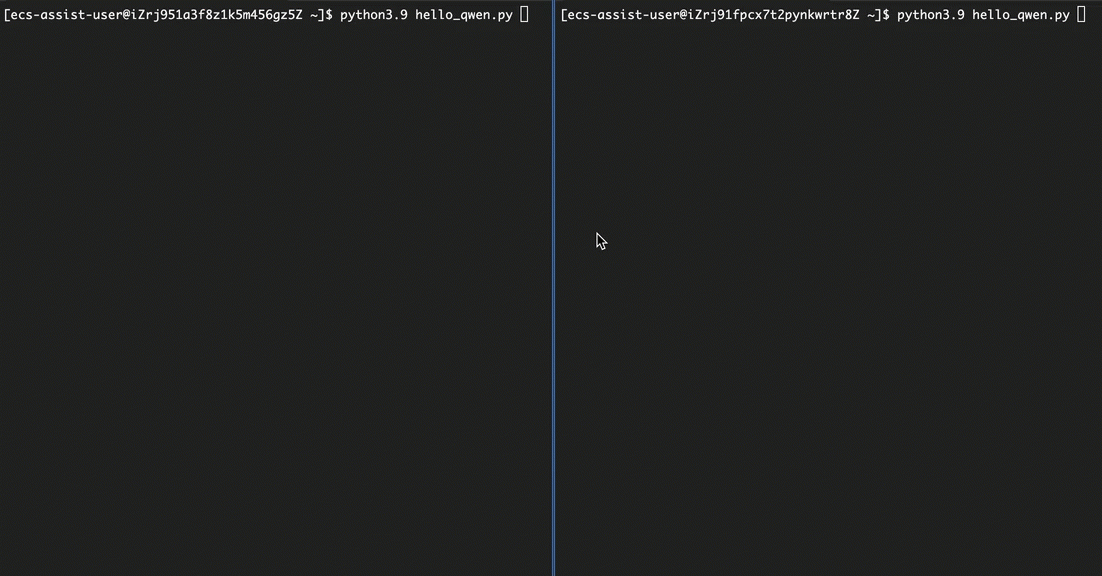
The results shown are for reference only. Actual acceleration performance may vary depending on your service configuration.
Solution architecture
Accelerate API calls to large models on Model Studio with GA in three steps:
Create and configure a GA instance:
Instance type: Select a standard pay-as-you-go GA instance.
Acceleration region: The region where your clients are located. Client requests enter the Alibaba Cloud global network via an accelerated IP address in the nearest acceleration region.
Listener: A listener monitors a specific protocol and port for client requests and forwards them to the backend service in an endpoint group.
Endpoint group: The service to be accelerated. The backend service can be configured as the public domain name of Model Studio in the corresponding region:
dashscope.aliyuncs.com (Beijing),dashscope-intl.aliyuncs.com (Singapore), ordashscope-us.aliyuncs.com (US (Virginia)).Forwarding rule: Rewrites the
Hostrequest header to the Model Studio domain name to meet the API call requirements of the Model Studio platform.
Configure DNS resolution: The CNAME of a new standard GA instance cannot be accessed directly over HTTP or HTTPS. Instead, you must point your custom domain name to the GA instance's CNAME by adding a record in your DNS settings.
Call the large model API: Finally, use your custom domain name to call the large model API. For example, if your custom domain name is
www.example.com, thebase_urlfield is configured ashttps://www.example.com/compatible-mode/v1.
The following figure shows the solution architecture.

Before you begin
You are familiar with the basic operations for calling large model APIs on Model Studio, including account and identity verification, getting and configuring an API key, configuring the development environment, and calling large model APIs.
You have a registered custom domain name. If the acceleration region is in the Chinese mainland, or if you use the Model Studio service in the China (Beijing) region, your custom domain name must have an ICP filing.
To call the large model API over HTTPS, you must use an HTTPS listener and select a server certificate when you configure the GA listener. Therefore, you must have a server certificate that matches your custom domain name. If your certificate was not purchased from Alibaba Cloud, you must upload it to Certificate Management Service before you can select it.
Procedure
1. Create and configure a GA instance
Go to the Standard Instance page of the Global Accelerator console, and click Create Standard Pay-as-you-go Instance.
Configure the basic instance settings. Then, click Next.
Use a standard pay-as-you-go GA instance.
For Accelerated IP Address Type, keep the default value EIP.
Configure the acceleration region. Then, click Next.
Set Acceleration Region to China (Shenzhen).
(Optional) Adjust the Maximum Bandwidth if you have higher bandwidth requirements. The maximum bandwidth serves as a reference and an upper limit. It is not a service level commitment.
ImportantIf the maximum bandwidth is set too low, speed limiting may cause traffic to be dropped. Plan your bandwidth to ensure it meets your business requirements.
(Optional) The default IP Protocol for client access in the acceleration region is IPv4. For IPv6-only access, set it to IPv6. For both IPv4 and IPv6 access, set it to Dual Stack.
(Optional) In the China (Hong Kong) and Japan (Tokyo) regions, you can set ISP Line Type to BGP Pro to improve access quality.
Configure the listener and click Next.
For Routing Type, keep the default value Intelligent Routing (formerly Standard Listener).
Set Protocol to HTTPS, the maximum version to HTTP/1.1, and Port to 443.
For Server Certificate, select the certificate that corresponds to your custom domain name.
Keep the default values for other parameters.
Configure the endpoint group. Then, click Next.
Set Region to China (Beijing). If you use models in the Singapore region, set this parameter to Singapore. If you use models in the US (Virginia) region, set this parameter to US (Virginia).
In the Endpoint Configuration section, set Backend Service Type to Custom Domain Name, and for Backend Services, enter the public domain name of Model Studio for the corresponding region:
dashscope.aliyuncs.com (Beijing),dashscope-intl.aliyuncs.com (Singapore), ordashscope-us.aliyuncs.com (US (Virginia)).Set Backend IP Version to HTTPS, which means traffic from GA is forwarded to Model Studio over HTTPS. Set IP Version to HTTP/1.1.
If the configuration involves cross-border data transfer, select Compliance Commitments Regarding Cross-border Data Transfers.
Keep the default values for other parameters.
Review the configuration and click Submit to create the GA instance.
Configure a forwarding rule. Because large model application platforms such as Model Studio require the
Hostrequest header for API requests to be the platform's domain name, you must also configure a forwarding rule in GA to rewrite the domain name.Go to the Standard Instance page in the Global Accelerator console and click the ID of the target instance.
On the instance details page, click the Listener tab and then click the ID of the target listener.
On the listener details page, click the Forwarding Rule tab, and then click Add Forwarding Rule.
Forwarding condition: One rule that exactly matches a custom domain name (for example,
www.example.com).Forwarding action: Configure two rules: rewrite the domain name to the Model Studio domain name (for example,
dashscope.aliyuncs.com), and forward to the default endpoint group (backend service: the Model Studio domain name).
After you configure the rule, click OK.
2. Configure DNS resolution
If your domain name is not registered with Alibaba Cloud, you must first add the domain name to Alibaba Cloud DNS - Public Zone before you can configure DNS records in Alibaba Cloud. For more information, see the Domain Management documentation.
If you use a DNS service from another provider, follow the instructions provided by that platform.
On the Alibaba Cloud DNS page, find the target domain name and click Configure in the Actions column.
Click Add Record. Add a CNAME record with the following information and then click OK.
Set Record Type to CNAME.
For Hostname, enter the prefix of the accelerated domain name.
For Record Value, enter the CNAME that is assigned to the GA instance. You can find the CNAME on the Standard Instance page in the Global Accelerator console.
Keep the default values for other parameters.
3. Call the large model API
Refer to the Model Studio documentation to call the large model API. If your custom domain name is www.example.com, the base_url field is set to https://www.example.com/compatible-mode/v1.
Billing
Global Accelerator fees: For a standard pay-as-you-go GA instance, you are charged instance fees, capacity unit (CU) fees, and data transfer fees. For more information, see the billing rules.
Domain name and DNS fees: In addition to the fees charged by your domain name provider, you are charged Public Zone fees for configuring DNS resolution in Alibaba Cloud.
Certificate fees: If you purchase a certificate from or upload one to Alibaba Cloud, you are charged server certificate fees.
Model Studio model fees: Calling Model Studio APIs incurs model fees.
Production considerations
Optimize the billing method: Pay-as-you-go is recommended for workloads with fluctuating traffic or low usage. For stable, long-term workloads, consider subscription to reduce costs.
Use a static public accelerated IP address:
Problem: A pay-as-you-go GA instance assigns two EIPs per acceleration region for high availability. When multiple regions are used, each has different EIPs, making this unsuitable for applications that require a single, static public IP address.
Solution: When you create an instance, consider using an Anycast Elastic IP Address (Anycast EIP) as the accelerated IP address type. GA provides two static public IP addresses across multiple regions worldwide. However, note that the access points for Anycast EIPs are different from those for EIPs. Anycast EIPs primarily support network acceleration for regions outside the Chinese mainland. Clients in the Chinese mainland connect through the access point in the China (Hong Kong) region.
The Anycast Elastic IP Address type is in beta release. If you cannot select this option, contact your account manager to apply for a trial.
Optimize cross-border routes (Optional): To improve cross-border acceleration, you can upgrade from the default BGP (Multi-ISP) bandwidth to a dedicated line. You can find this option in the Transmission Network Type section on the instance details page in the GA console. Follow the on-screen instructions to apply for and switch to the dedicated line.
ImportantIf the current GA instance configuration involves a cross-border network, this switchover causes a traffic interruption of about one minute. Proceed with caution.
Use GA to accelerate multiple services: If you need to use a single GA instance to accelerate multiple services, such as Model Studio and an Application Load Balancer (ALB), you can configure forwarding rules for the GA instance to perform different actions based on different requests.
FAQ
Connection error with a custom domain
This issue usually occurs because client requests are not reaching the Model Studio service.
Use the following checklist to troubleshoot:
API call: Check if base_url is configured correctly in the code. The correct format is
https://www.example.com/compatible-mode/v1.ICP filing: If the acceleration region is in the Chinese mainland, or if you use the Model Studio service in the China (Beijing) region, check whether your domain name has an ICP filing.
DNS resolution: Check your DNS records to ensure that the CNAME record for your custom domain name correctly points to the domain name provided by the GA instance, and that the record has taken effect in the acceleration region.
GA configuration:
Check whether the maximum bandwidth for the acceleration region covers your peak traffic and whether packet loss is occurring on the accelerated IP address.
Check whether the IP protocol version for the acceleration region matches the client request. For example, an error can occur if you configure only IPv4 but the client sends an IPv6 request.
Check whether the listener protocol and version meet the requirements. We recommend using the HTTPS protocol and the HTTP/1.1 version.
Check whether the server certificate domain of the HTTPS listener matches your custom domain name. Also, verify that the certificate is valid and has not expired.
Check that the region of the endpoint group matches the region of the Model Studio service, the backend service is correctly configured with the Model Studio domain name, and the backend protocol is HTTPS. The recommended protocol version is HTTP/1.1. Note that the region and the Model Studio domain name must match. For example, do not set the region to Beijing and use the Singapore domain name
dashscope-intl.aliyuncs.comor the US (Virginia) domain namedashscope-us.aliyuncs.com.Check whether a forwarding rule is configured and whether the rewrite of the Model Studio domain name is configured correctly.
References
API reference: